
Diese Seite ist keine offizielle Seite der App oder ihres Entwicklers, sondern eine unabhängige redaktionelle Veröffentlichung, die zu Informations- und Kommentarzwecken erstellt wurde. Sofern nicht ausdrücklich anders angegeben, sind weder die App noch ihr Entwickler mit MWM, Apple, Google Play, dem App-Herausgeber oder dem Entwickler der App verbunden, von ihnen unterstützt, gesponsert, autorisiert oder anderweitig offiziell verbunden, und nichts auf dieser Seite impliziert, dass die App unter Verwendung der Dienste von MWM entwickelt wurde. Alle Marken, Logos, Screenshots und andere Inhalte bleiben Eigentum ihrer jeweiligen Inhaber.


PlayScore 2
Noten scannen, Sound abrufen: MWMs App verwandelt Papier in Performance. Einfach, direkt, gnadenlos effizient.
Downloads
1M+Bewertung
Bewertungen gesamt
8.2KHerausgeber
Kategorie
MusicSprachen
8Neueste Version
3.66Größe
93.1 MBErstveröffentlichung
23. Jan. 2019Eine detaillierte Analyse der Kernfunktionen von PlayScore 2 für Musiker und Lehrende.
Funktionsanalyse: PlayScore 2
Optische Notenerkennung und Wiedergabe
Die App bietet die Möglichkeit, Notenblätter von Fotos, Bildern und PDF-Dateien direkt einzulesen und abzuspielen. Dies wandelt physische Partituren in interaktive, hörbare Versionen um, was für das Lernen und Üben unerlässlich ist.
Professioneller Export (MusicXML & MIDI)
Dieses Tool ermöglicht den Export von Noten als MusicXML und MIDI, einschließlich vollständiger Notation, Texten, Dynamik und Artikulation. Dies ist entscheidend für die Weiterbearbeitung in professionellen Notensatzprogrammen und den Austausch mit anderen Musikern oder Studierenden.
Individuelle Anpassung der Stimmen
Die App bietet die Möglichkeit, Lautstärke, Instrument und Transposition für jede einzelne Notenlinie anzupassen. Dies ist besonders wertvoll für Ensemblemitglieder, um ihren eigenen Part zu isolieren oder sich auf bestimmte Instrumentierungen zu konzentrieren.
Intelligente Begleitfunktion
Es ermöglicht Nutzern, sich selbst beim Singen oder Spielen eines Instruments zu begleiten, inklusive eines Einzählers und eines intelligenten Metronoms, das Taktarten versteht. Dies fördert das Timing und das rhythmische Verständnis beim Üben.
Erstellung und Teilen spielbarer Partituren
Nutzer können spielbare Partitur-Dokumente erstellen, die von anderen heruntergeladen und abgespielt werden können. Dies erleichtert die Zusammenarbeit in Ensembles und den Austausch von Übungsmaterialien mit Schülern oder Bandmitgliedern.
Interaktive Wiedergabe und Schleifenfunktion
Die App scrollt Takt für Takt durch die Musik während der Wiedergabe und erlaubt es, auf beliebige Stellen zu tippen, um dort zu beginnen, oder mit dem Finger eine Schleife für das Üben schwieriger Passagen zu erstellen.
Vielfältige Instrumentenbibliothek
Pro Notenlinie stehen 19 hochwertige Instrumente zur Auswahl. Dies bietet eine realistische Klangwiedergabe und hilft Musikern, sich ein besseres Bild des Arrangements und der Klangfarben zu machen.
Flexible Wiedergabesteuerung
Dieses Tool verfügt über Funktionen zur Tempoänderung (auch während der Wiedergabe), anpassbaren Dynamikbereich und Swing-Wiedergabe. Dies ermöglicht eine detaillierte musikalische Interpretation und Anpassung an individuelle Übungsbedürfnisse.
Häufig gestellte Fragen
Alles, was Sie über wissen müssen PlayScore 2
What is PlayScore 2?
PlayScore 2 is an application that plays music directly from photos, images, and PDF scores. Users can capture sheet music with their camera, import files, and hear compositions played back with interactive features.
How can I input music into the PlayScore 2 app?
PlayScore 2 accepts music input by snapping photos with your device's camera. You can also import existing image files or PDF scores directly into the application for playback and interaction.
Can PlayScore 2 export music scores to other formats?
Yes, PlayScore 2 can export music scores. It supports exporting as MusicXML for full notation, which is compatible with score editors. MIDI file export is also available, particularly with a Professional subscription.
Does PlayScore 2 allow tempo and instrument adjustments?
Yes, PlayScore 2 allows extensive customization. You can adjust the volume, instrument, and transposition for each individual staff. The application also permits changing the tempo while the music is playing.
What are Playable Score Documents in PlayScore 2?
Playable Score Documents are a unique feature of PlayScore 2. They are shareable files that anyone with the app can open and interact with, enabling individual part practice for choirs or ensembles.
What features are available in PlayScore 2 without a paid subscription?
Without a subscription, PlayScore 2 users can play and interact with any existing Playable Score. They can also play pages of music with unlimited staves from a photo, and create or share single-page playable documents.
What features does the PlayScore 2 Productivity subscription unlock?
The Productivity subscription enables creating and playing multi-staff, multi-page scores from camera captures or imported images. It also allows exporting documents for others, score interaction, auto-transposition, and MIDI file exports.
What specific capabilities does a PlayScore 2 Professional subscription provide?
The Professional subscription allows creating Playable Score documents directly from PDF scores. It also provides the advanced capability to export any score as MIDI and MusicXML, including full notation details and text.
How do PlayScore 2 subscriptions handle renewal and billing?
PlayScore 2 subscriptions are auto-renewing, available monthly or annually. Payment is charged to your iTunes Account upon purchase. Subscriptions automatically renew unless cancelled at least 24 hours before the current period ends.
Can I use PlayScore 2 to capture and play copyrighted music?
PlayScore 2 explicitly states that capturing copyrighted music without proper permission from the copyright holder is illegal. Users are responsible for adhering to copyright laws.
Die folgenden Screenshots und die Beschreibung stammen direkt aus dem offiziellen Store-Eintrag der App und sind Eigentum des Entwicklers.
App Store
Screenshots

Nutzer können Notenblätter direkt mit der Smartphone-Kamera erfassen, wobei eine Live-Vorschau auf dem Bildschirm die präzise Ausrichtung des Notenblatts erleichtert.
Noten spielbereit erfassen
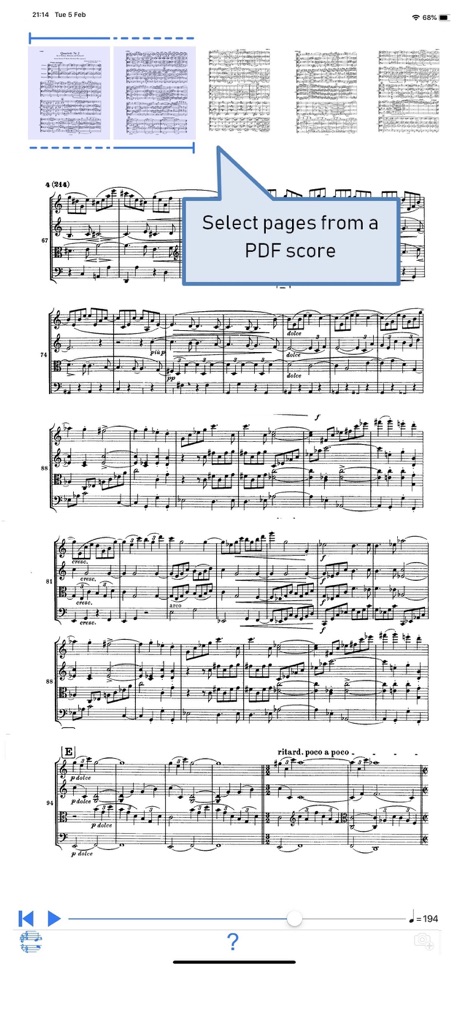
Die App ermöglicht das einfache Importieren von PDF-Partituren, wobei Nutzer über die Seitenminiaturen mühelos bestimmte Abschnitte auswählen können, wie die hervorgehobene Funktion deutlich zeigt.
PDF-Partituren verwalten
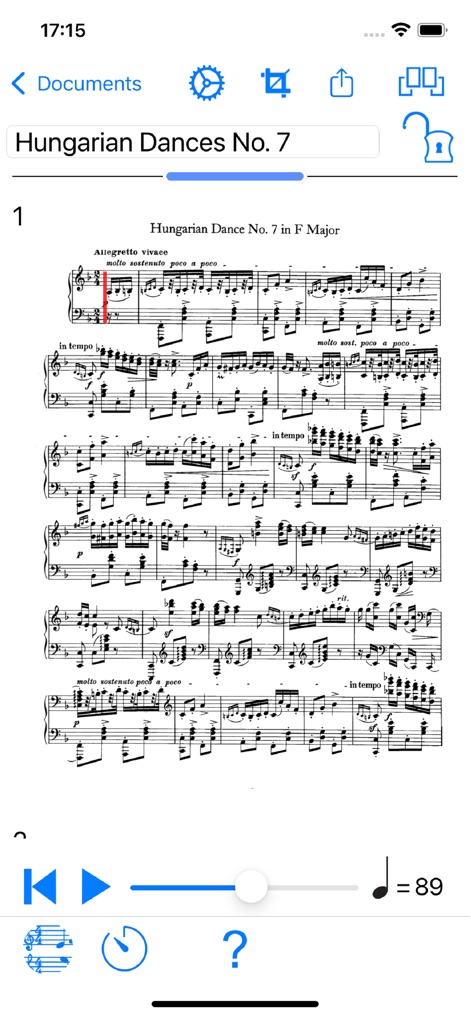
Dieses Tool bietet eine präzise Notenwiedergabe, die durch einen roten vertikalen Cursor auf der Partitur den aktuellen Spielstand anzeigt und über die integrierte Tempo-Steuerung am unteren Rand individuell angepasst werden kann.
Interaktive Wiedergabe
Beschreibung
Download
Ähnliche Apps
Apps mit ähnlichen Funktionen und Nutzererfahrung

Cifra Club
Studio Sol Comunicacao Digital LTDA

Musicnotes: Sheet Music Reader
Musicnotes

Spark: Chords, Backing Tracks
Positive Grid Inc

iReal Pro
Technimo LLC

懂音律-钢琴吉他谱共享学习平台
梦莹 张

Jamzone - Sing & Play Along
Recisio

MuseScore: sheet music
MuseScore Limited

Songsterr Tabs & Chords
Guitar Tabs LLC

弹琴吧-钢琴吉他学习平台
Beijing Qule Technology Co., Ltd.
Diese Seite ist keine offizielle Seite der App oder ihres Entwicklers, sondern eine unabhängige redaktionelle Veröffentlichung, die zu Informations- und Kommentarzwecken erstellt wurde. Sofern nicht ausdrücklich anders angegeben, sind weder die App noch ihr Entwickler mit MWM, Apple, Google Play, dem App-Herausgeber oder dem Entwickler der App verbunden, von ihnen unterstützt, gesponsert, autorisiert oder anderweitig offiziell verbunden, und nichts auf dieser Seite impliziert, dass die App unter Verwendung der Dienste von MWM entwickelt wurde. Alle Marken, Logos, Screenshots und andere Inhalte bleiben Eigentum ihrer jeweiligen Inhaber.