
Diese Seite ist keine offizielle Seite der App oder ihres Entwicklers, sondern eine unabhängige redaktionelle Veröffentlichung, die zu Informations- und Kommentarzwecken erstellt wurde. Sofern nicht ausdrücklich anders angegeben, sind weder die App noch ihr Entwickler mit MWM, Apple, Google Play, dem App-Herausgeber oder dem Entwickler der App verbunden, von ihnen unterstützt, gesponsert, autorisiert oder anderweitig offiziell verbunden, und nichts auf dieser Seite impliziert, dass die App unter Verwendung der Dienste von MWM entwickelt wurde. Alle Marken, Logos, Screenshots und andere Inhalte bleiben Eigentum ihrer jeweiligen Inhaber.


Polycam 3D Scans & Floor Plans
Millimetergenaue 3D-Daten? Dein Smartphone liefert sie jetzt. Schluss mit Schätzungen und ungenauen Plänen.
Downloads
12.5M+Bewertung
Bewertungen gesamt
114.6KHerausgeber
Kategorie
Photo & VideoSprachen
27Neueste Version
5.2.12Größe
490.8 MBErstveröffentlichung
28. Sept. 2020Analyse der Schlüsselfunktionen von Polycam 3D Scans & Floor Plans
Eine detaillierte Analyse der Kernfunktionen für präzise 3D-Modellierung und professionelle Integration.
Präzise Grundrisse und Baupläne
Es ermöglicht die sofortige Erstellung von 2D-Grundrissen und maßstabsgetreuen Bauplänen aus 3D-Raumscans, die nahtlos in Architektur- und Design-Workflows integriert werden können und den Export in Formate wie AutoCAD, SketchUp und Adobe Illustrator unterstützen.
Raum-Modus für Innenräume
Dieses Feature revolutioniert die Erfassung von Innenräumen, indem es mithilfe von LiDAR detaillierte und hochpräzise 3D-Modelle von Räumen generiert. Dies ist ideal für Architekten, Designer und Immobilienfachleute und ermöglicht eine erweiterte Visualisierung und Dokumentation.
Nahtlose Exportoptionen
Die App bietet umfangreiche Exportoptionen für detaillierte 3D-Modelle (OBJ, DAE, FBX, STL) und Farbpunktwolken (DXF, PLY), die direkt in professionelle 3D-Software wie Blender und SketchUp überführt werden können, um den Design- und Visualisierungsprozess zu optimieren.
Hochpräzises LiDAR 3D-Scannen
Dieses Tool nutzt LiDAR-Technologie für schnelle und präzise Erfassungen von Räumen. Es ermöglicht die Erstellung detaillierter 3D-Scans, die direkt bearbeitet oder in andere Designsoftware importiert werden können, was für professionelle Anwender essenziell ist.
Web-Zugriff und erweiterte Desktop-Bearbeitung
Es bietet Zugang zur Polycam-Webplattform für die Bearbeitung, Verbesserung und Freigabe von Modellen vom Computer aus. Dies umfasst erweiterte Bearbeitungswerkzeuge, KI-Texturgenerierung und Cloud-Synchronisierung, was den professionellen Workflow erheblich erweitert.
Photogrammetrie und Gaussian Splats
Die App ermöglicht die mühelose Erstellung hochwertiger 3D-Modelle aus Fotos mittels Photogrammetrie und Gaussian Splats, ideal für die Erfassung komplexer Objekte und Szenen. Diese Modelle sind für verschiedene Computer-Grafik-Anwendungen exportierbar.
Unbegrenzte Photogrammetrie und Gaussian Splats
Es bietet professionellen Anwendern die Freiheit, beliebig viele hochqualitative 3D-Modelle mittels Photogrammetrie und Gaussian Splats zu erfassen und zu verarbeiten, ohne Einschränkungen. Dies ist entscheidend für umfangreiche Projekte.
Präzise Bearbeitungs- und Messwerkzeuge
Dieses Tool verfügt über leistungsstarke On-Device-Werkzeuge, mit denen Nutzer ihre 3D-Modelle präzise zuschneiden, drehen, skalieren, vermessen und verfeinern können, was die Genauigkeit und Details vor dem Export verbessert.
Kollaborations- und Freigabefunktionen
Es ermöglicht die schnelle Freigabe von 3D-Erfassungen über einfache Links für professionelles Feedback und Zusammenarbeit. Zudem fördern gemeinsame Bibliotheken eine effiziente Teamarbeit an Projekten.
Immersive 360°-Erlebnisse
Die App verwandelt ein iPhone in eine 360°-Kamera, um immersive Panoramabilder zu erstellen. Diese können über Links geteilt oder als equirektangulare Bilder exportiert werden, wobei KI ungesehene Bereiche für vollständige virtuelle Umgebungen ausfüllt.
Häufig gestellte Fragen
Alles, was Sie über wissen müssen Polycam 3D Scans & Floor Plans
What is Polycam used for?
Polycam is a 3D scanning platform for iPhone and iPad. It creates high-quality 3D models from photos, generates LiDAR scans, and captures 360° images for editing and export to industry-standard software.
Can Polycam generate 3D models from photos?
Yes, Polycam generates high-quality 3D models from photos using photogrammetry and Gaussian splats. This feature functions across all iPhones and iPads.
Does Polycam support LiDAR scanning?
Yes, Polycam offers top-rated LiDAR scanning for rapid, accurate captures of space. This feature requires an iPhone or iPad equipped with LiDAR technology.
What devices are compatible with Polycam's 360° camera feature?
Polycam's 360° camera feature is compatible with iPhone 11 and later models. It transforms the device into a full-fledged 360° camera for immersive panoramic experiences.
Can Polycam create floor plans from 3D scans?
Yes, Polycam generates detailed 3D models of rooms using LiDAR in Room Mode, and instantly creates 2D floor plans and scale-accurate blueprints from these scans.
What file formats can Polycam export 3D models in?
Polycam exports detailed 3D models in .obj, .dae, .fbx, and .stl formats, and color point clouds as .dxf and .ply. Floor plans are exported for AutoCAD, SketchUp, and Adobe Illustrator.
Does Polycam offer on-device editing tools?
Yes, Polycam provides powerful on-device tools for precise editing and measuring. Users can crop, rotate, rescale, and measure their 3D models directly on their iPhone or iPad.
How does Polycam facilitate collaboration on projects?
Polycam facilitates collaboration through easy sharing via simple links and streamlined teamwork using shared libraries. Users can also connect with a community of creators on Polycam Explore.
Is Polycam Web Access included with the app?
Yes, Polycam Web Access is included free. It allows users to edit, enhance, and share models from their computer, featuring advanced editing, AI texture generation, and cloud syncing.
Does Polycam Pro offer unlimited 3D model creation?
Yes, Polycam Pro offers unlimited photogrammetry and Gaussian splats. This allows users to capture and process any number of high-quality 3D models for their projects without restrictions.
Can Polycam be used for measuring distances in 3D scans?
Yes, Polycam allows precise measurement within 3D scans. The app provides tools to measure distances in seconds directly on the device, as shown with dimensions displayed on screen.
How can I view the Privacy Policy for Polycam?
The Privacy Policy for Polycam is accessible via the link: https://poly.cam/privacy_policy.pdf. This document details how Polycam handles user data and privacy practices.
Die folgenden Screenshots und die Beschreibung stammen direkt aus dem offiziellen Store-Eintrag der App und sind Eigentum des Entwicklers.
App Store
Screenshots
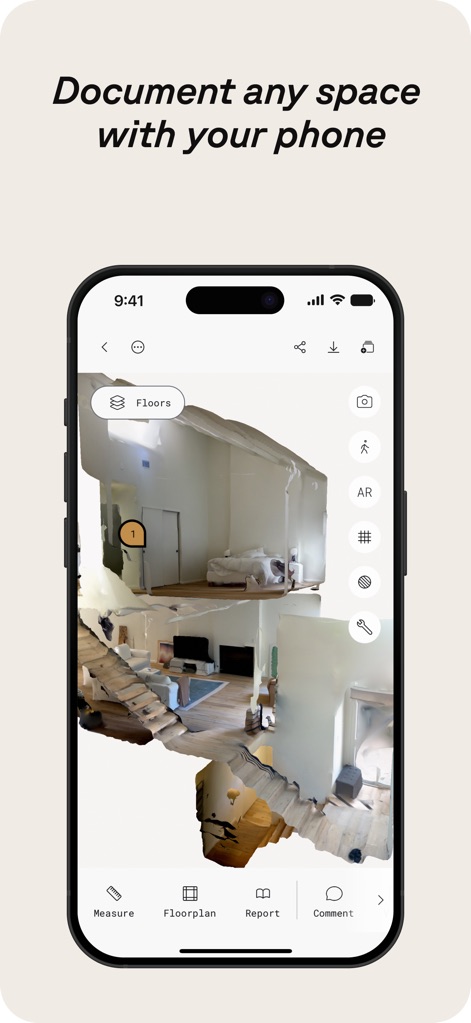
Raum scannen leicht gemacht
Die App ermöglicht Nutzern, 3D-Scans von Innenräumen zu erstellen, wobei ein detailliertes Modell des Raumes mit navigierbaren Ebenen und einer intuitiven Benutzeroberfläche sichtbar ist.
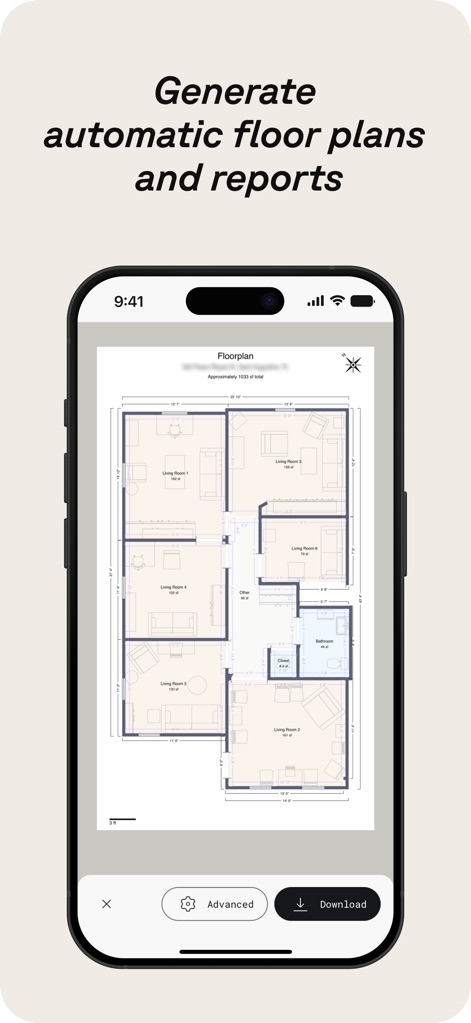
Präzise Grundrisse generieren
Dieses Tool erstellt automatisch maßstabsgetreue 2D-Grundrisse aus 3D-Scans, die klare Raumaufteilungen und detaillierte Maßangaben aufweisen.
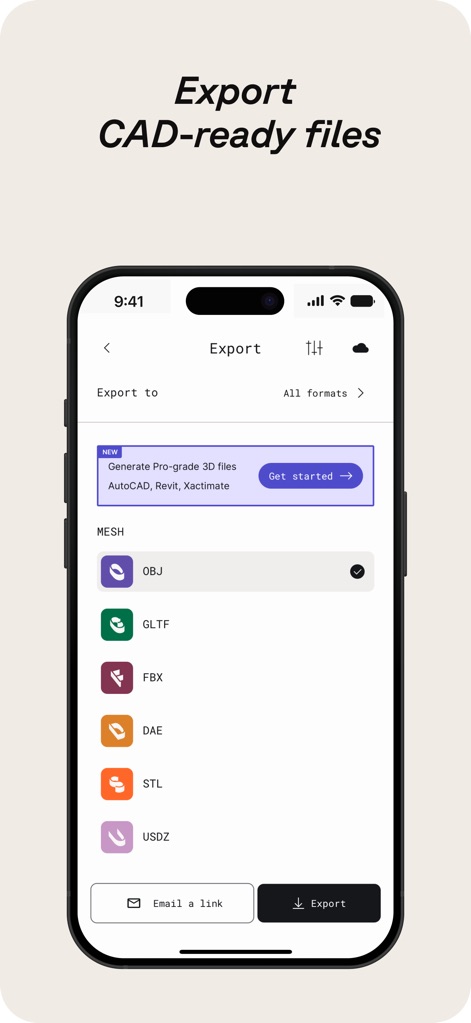
Flexible Exportoptionen
Polycam unterstützt den Export in branchenübliche Formate wie OBJ und GLTF, was die nahtlose Integration in professionelle CAD-Software ermöglicht und eine Vielzahl von Exportformaten anzeigt.
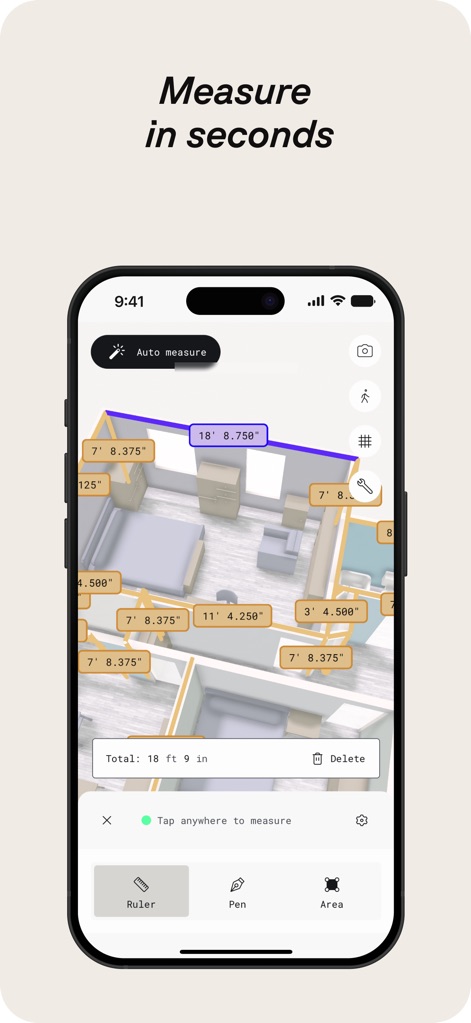
Schnelles präzises Messen
Nutzer können präzise Messungen direkt im 3D-Modell durchführen, was sich an den angezeigten Abständen und der interaktiven Messleiste zeigt.
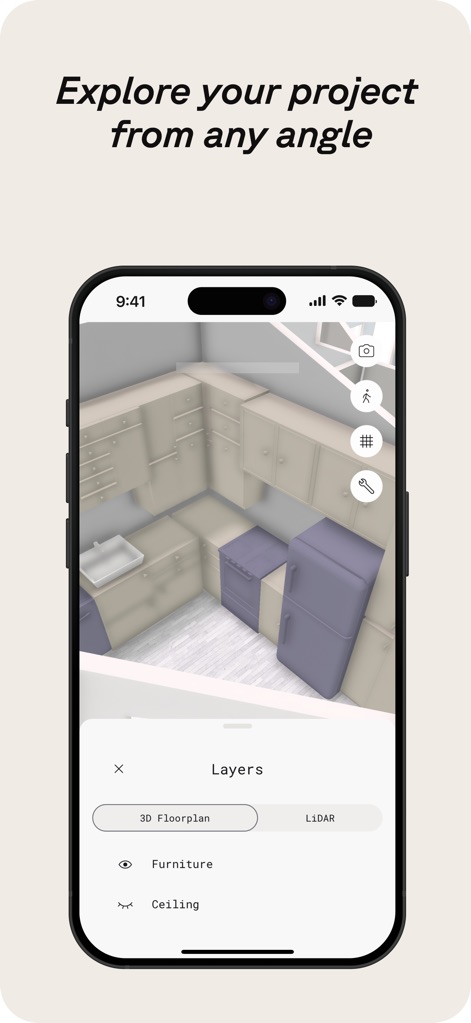
Projekte vielseitig erkunden
Die Anwendung erlaubt die Erkundung von Projekten aus jedem Winkel, wobei verschiedene Ebenen und 3D-Grundrisse zur besseren Visualisierung ein- und ausgeblendet werden können.
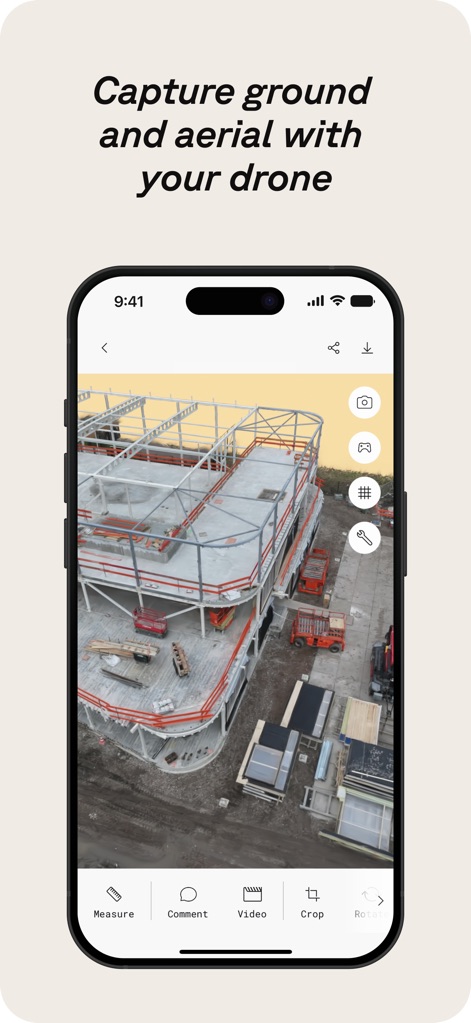
Drohnen-Aufnahmen integrieren
Polycam ermöglicht die Integration von Boden- und Drohnenaufnahmen zur Erfassung großer Areale, was am visuellen Beispiel einer Baustelle mit detaillierten Strukturen und einer spezifischen Crop-Option erkennbar ist.
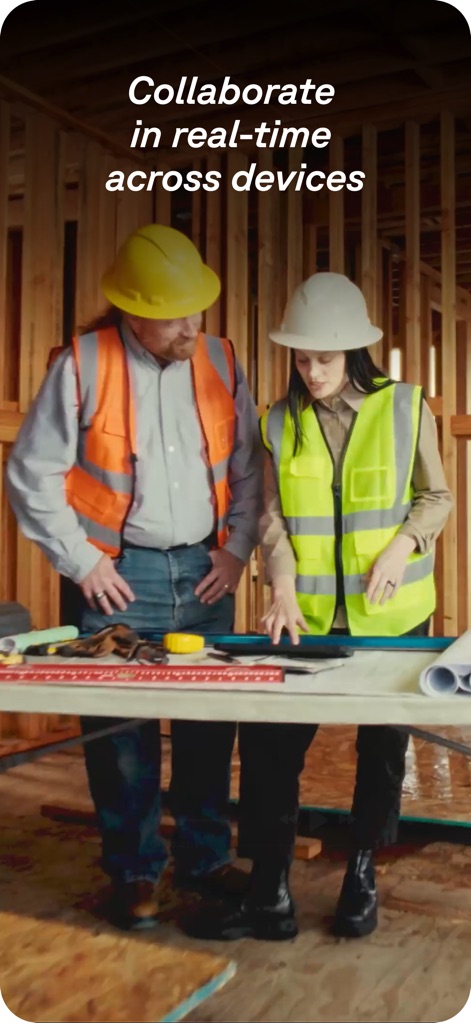
Teamarbeit in Echtzeit
Die App fördert die Zusammenarbeit in Echtzeit über verschiedene Geräte hinweg, was durch zwei Fachkräfte, die gemeinsam ein Projekt auf einem Tablet sichten und Pläne überprüfen, anschaulich dargestellt wird.
Beschreibung
Download
Ähnliche Apps
Apps mit ähnlichen Funktionen und Nutzererfahrung

Pocket Bubble Level XXL
ExaMobile S.A.

Measuring Tape +ㅤ
Rocket Apps GmbH

CamToPlan - 3D Scanner & LiDAR
Tasmanic Editions

Tape Measure: AR Ruler
Veysel OTI

Home Planner - AI Room Design
Room Planner Ltd

Measuring Tape+ Measure AR app
MEASURE TECH SOCIEDAD LIMITADA

Tape Measure®
AI Photo Editor Lab SRL

Bubble Level for iPhone
Lemondo Apps LLC
CamToPlan - AR tape measure
Tasmanic Editions
Diese Seite ist keine offizielle Seite der App oder ihres Entwicklers, sondern eine unabhängige redaktionelle Veröffentlichung, die zu Informations- und Kommentarzwecken erstellt wurde. Sofern nicht ausdrücklich anders angegeben, sind weder die App noch ihr Entwickler mit MWM, Apple, Google Play, dem App-Herausgeber oder dem Entwickler der App verbunden, von ihnen unterstützt, gesponsert, autorisiert oder anderweitig offiziell verbunden, und nichts auf dieser Seite impliziert, dass die App unter Verwendung der Dienste von MWM entwickelt wurde. Alle Marken, Logos, Screenshots und andere Inhalte bleiben Eigentum ihrer jeweiligen Inhaber.