PrintHand Mobile Print Premium
Herunterladen auf App Store

Diese Seite ist keine offizielle Seite der App oder ihres Entwicklers, sondern eine unabhängige redaktionelle Veröffentlichung, die zu Informations- und Kommentarzwecken erstellt wurde. Sofern nicht ausdrücklich anders angegeben, sind weder die App noch ihr Entwickler mit MWM, Apple, Google Play, dem App-Herausgeber oder dem Entwickler der App verbunden, von ihnen unterstützt, gesponsert, autorisiert oder anderweitig offiziell verbunden, und nichts auf dieser Seite impliziert, dass die App unter Verwendung der Dienste von MWM entwickelt wurde. Alle Marken, Logos, Screenshots und andere Inhalte bleiben Eigentum ihrer jeweiligen Inhaber.

Logo von PrintHand Mobile Print Premium
Herunterladen auf App Store

PrintHand Mobile Print Premium

Die professionelle Wahl für nahtloses mobiles Drucken. Verbinden Sie Ihr iPhone oder iPad mit nahezu jedem Drucker – einschließlich älterer Modelle und Nicht-AirPrint-Modelle –, um Dokumente, Cloud-Dateien und Fotos in Sekundenschnelle zu drucken.

Kennzahlen

Downloads

57K+

Bewertung

2.3/5

Bewertungen gesamt

0

Herausgeber

Dynamix Software

Kategorie

Productivity

Sprachen

9

Neueste Version

3.18

Größe

29.6 MB

Erstveröffentlichung

20. Juni 2013
Funktionen

Entfesseln Sie die volle Leistung Ihres Druckers

Hören Sie auf, mit Kompatibilitätsproblemen zu kämpfen. PrintHand Premium schließt die Lücke zwischen Ihrem Mobilgerät und jedem Drucker und bietet Ihnen einen professionellen Büro-Workflow, wo immer Sie sind.

Universelle Druckerunterstützung

Schließen Sie die Lücke zu älterer Hardware. Drucken Sie auf nahezu jeden Wi-Fi-, Bluetooth- oder USB-Drucker, selbst auf solche, die AirPrint nicht nativ unterstützen.

Direkte Cloud-Integration

Optimieren Sie Ihren Workflow, indem Sie Dokumente direkt aus Google Drive, Dropbox, OneDrive und Box drucken, ohne sie vorher herunterladen zu müssen.

Die folgenden Screenshots und die Beschreibung stammen direkt aus dem offiziellen Store-Eintrag der App und sind Eigentum des Entwicklers.

App Store

Screenshots
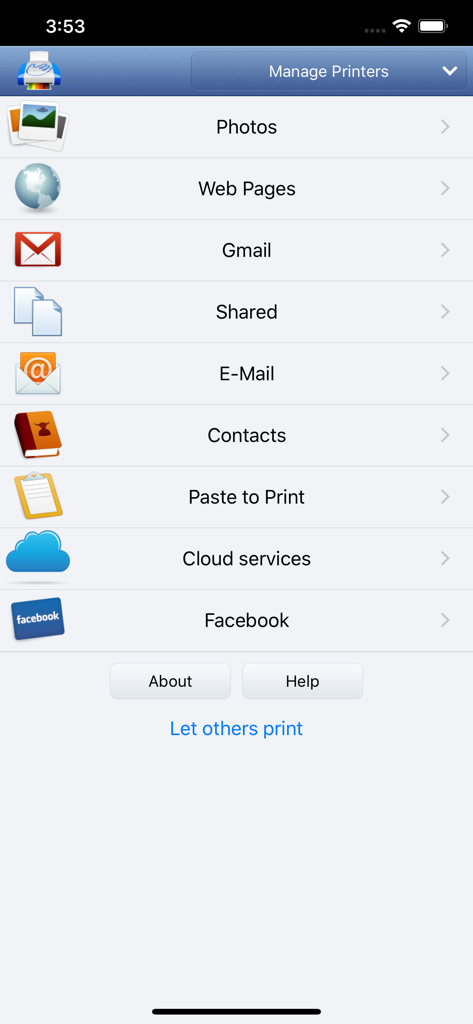
PrintHand Mobile Print Premium - Hauptmenü der PrintHand Mobile Print Premium App mit Druckoptionen für Fotos, Webseiten, E-Mails und Cloud-Dienste
Hauptmenü der PrintHand Mobile Print Premium App mit Druckoptionen für Fotos, Webseiten, E-Mails und Cloud-Dienste

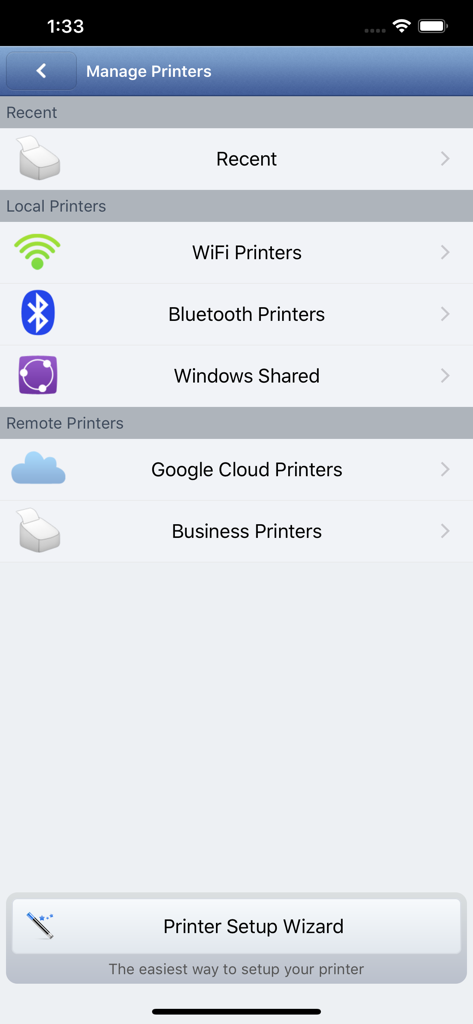
PrintHand Mobile Print Premium - Oberfläche zur Verwaltung lokaler und entfernter Drucker, einschließlich Wi-Fi- und Bluetooth-Optionen
Oberfläche zur Verwaltung lokaler und entfernter Drucker, einschließlich Wi-Fi- und Bluetooth-Optionen

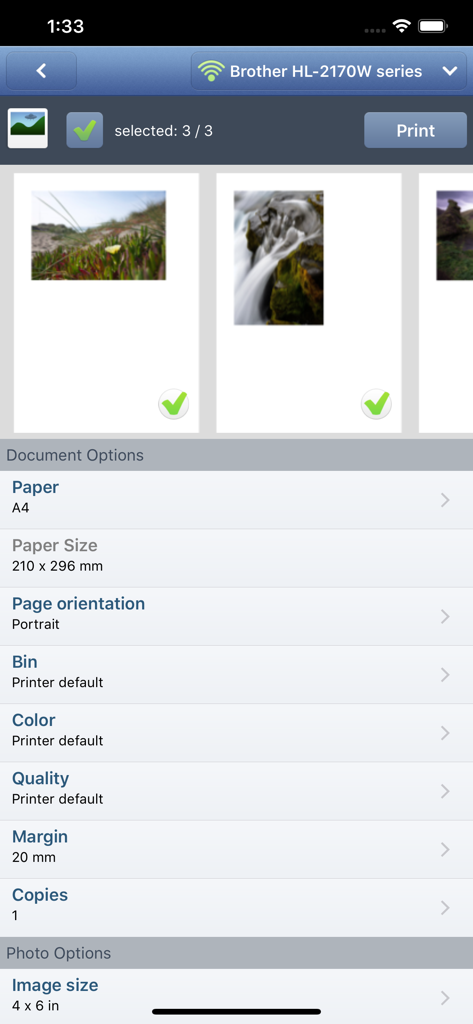
PrintHand Mobile Print Premium - Oberfläche der mobilen App, die Fotoauswahl und Druckeinstellungen für einen Brother-Drucker zeigt

Oberfläche der mobilen App, die Fotoauswahl und Druckeinstellungen für einen Brother-Drucker zeigt

Beschreibung

With PrintHand Mobile Print Premium you can print photos, web pages, emails, attachments, contacts and files saved to various cloud services. Many other apps, including Mail, Safari and Notes, allow you to copy something and paste it to PrintHand for printing or even share content to the printing app using the Action button. One can print on Wi-Fi, Bluetooth, AirPrint, Windows Shared and Google Cloud Print printers. IMPORTANT Prior to purchasing the app we do recommend referring to the list of supported printers and printing a test page from the free PrintHand Mobile Print app. Here is the list of printers supported by PrintHand app: http://printhand.com/list_of_supported_printers.php Please make sure that your printer is supported. In case your printer is not supported, direct printing from your mobile device might be impossible. However, printing from PrintHand Mobile Print Premium using PrintHand Remote desktop software installed on your computer is an option if you can print from your computer on the same printer. Please visit http://www.printhand.com/shared_printers.php to download the PrintHand Remote desktop software. FEATURES Using PrintHand you can print the following content: - Office documents, including MS Word, Excel, PowerPoint, PDF shared from web browser or stored in Cloud services; - Text files shared from web browser or stored in Cloud services; - Photos and images; - Web pages; - Emails and attachments; - Google Drive content; - Contacts; - Facebook albums; - Files from Dropbox; - Files from Box; - Files from OneDrive; - Content copied to clipboard (using Paste to Print); - Content shared from other apps using the Action button. You can print via: - Wi-Fi (using a Wi-Fi Direct printer or using a Wi-Fi router as a middleman); - Bluetooth (only on supported Apple MFi certified printers); - PC or Mac (if your printer is shared using PrintHand Remote desktop client or standard tools of your computer's OS); - Google Cloud Print; - AirPrint. USING PRINTERS Printing on Nearby wireless printers Most of the Wi-Fi printers are detected automatically. PrintHand can print on such printers directly in case they are supported by the app. As long as your printer is available from a Windows or Mac computer, you can print via the PrintHand Remote. To use it, please visit http://www.printhand.com/shared_printers.php to download the PrintHand Remote desktop software. Print Hammermill app installed on your mobile device will find printers shared via the PrintHand Remote desktop app automatically. However, please note that your printer should be connected to the same Wi-Fi network to which your mobile device is connected. Remote printing via the Internet Also, you can print on printers located anywhere in the world via the Internet. This will require the same PrintHand Remote software installed on the computer at the receiving end, and a PrintHand Remote account registered. Complimentary 100 pages for Remote Printing under the same account.

Download

Herunterladen auf App Store

Diese Seite ist keine offizielle Seite der App oder ihres Entwicklers, sondern eine unabhängige redaktionelle Veröffentlichung, die zu Informations- und Kommentarzwecken erstellt wurde. Sofern nicht ausdrücklich anders angegeben, sind weder die App noch ihr Entwickler mit MWM, Apple, Google Play, dem App-Herausgeber oder dem Entwickler der App verbunden, von ihnen unterstützt, gesponsert, autorisiert oder anderweitig offiziell verbunden, und nichts auf dieser Seite impliziert, dass die App unter Verwendung der Dienste von MWM entwickelt wurde. Alle Marken, Logos, Screenshots und andere Inhalte bleiben Eigentum ihrer jeweiligen Inhaber.








