
Diese Seite ist keine offizielle Seite der App oder ihres Entwicklers, sondern eine unabhängige redaktionelle Veröffentlichung, die zu Informations- und Kommentarzwecken erstellt wurde. Sofern nicht ausdrücklich anders angegeben, sind weder die App noch ihr Entwickler mit MWM, Apple, Google Play, dem App-Herausgeber oder dem Entwickler der App verbunden, von ihnen unterstützt, gesponsert, autorisiert oder anderweitig offiziell verbunden, und nichts auf dieser Seite impliziert, dass die App unter Verwendung der Dienste von MWM entwickelt wurde. Alle Marken, Logos, Screenshots und andere Inhalte bleiben Eigentum ihrer jeweiligen Inhaber.


Quiver - 3D Coloring App
Aus Buntstiftstrichen wird verblüffende Realität. MWMs Kreation verwandelt einfache Kritzeleien in interaktive, dreidimensionale Erlebnisse. Sie gibt der Fantasie junger Nutzer eine Bühne, auf der sie digital tanzen kann.
Downloads
2.5M+Bewertung
Bewertungen gesamt
426Herausgeber
Kategorie
EntertainmentSprachen
1Neueste Version
6.32Größe
265.2 MBErstveröffentlichung
30. Mai 2013Eine detaillierte Untersuchung der Kernfunktionalitäten zur Förderung kreativen Lernens und spielerischer Interaktion durch Augmented Reality.
Analyse der Quiver - 3D Mal-App
Magische AR-Animationen
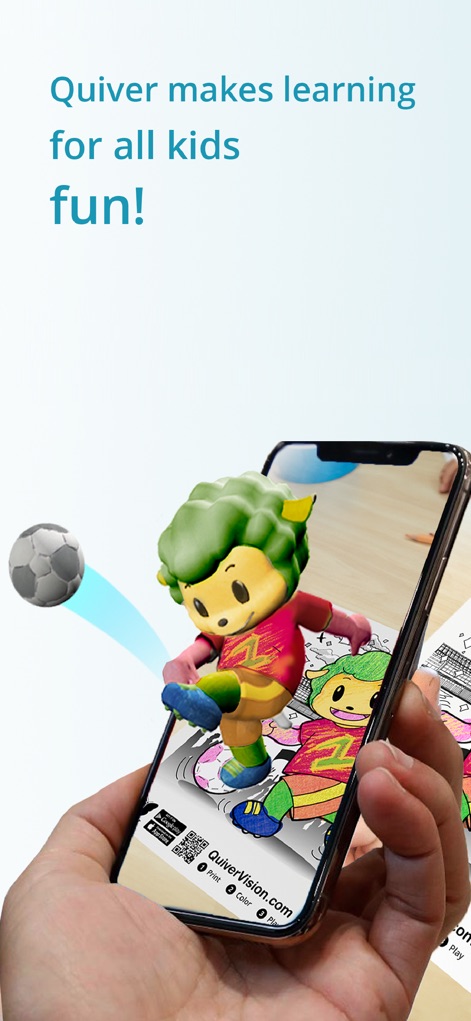
Die App erweckt physisch ausgemalte Bilder in Echtzeit zu farbenfrohen, personalisierten 3D-Animationen auf Smart-Geräten zum Leben, was ein magisches und einzigartiges Erlebnis schafft.
Bildung durch AR-Interaktion
Es integriert Lerninhalte wie Quizze und interaktive Elemente in die AR-Erfahrung, um spielerisch Wissen in verschiedenen Fächern zu vermitteln und das Verständnis zu fördern.
Breites Spektrum an Malvorlagen
Dieses Tool bietet eine breite Auswahl an Malvorlagen, die sowohl lehrreiche Themen (z.B. ABC, Weltraum) als auch reine Unterhaltung abdecken, um vielfältige Interessen anzusprechen und langfristige Motivation zu gewährleisten.
Dynamische Spielinteraktionen
Es ermöglicht Nutzern, direkt mit ihren zum Leben erweckten AR-Kreationen zu interagieren und sogar kleine Spiele zu spielen, was die Beschäftigung vertieft und den Spielspaß erhöht.
Teilen von Kreationen
Die App ermöglicht das einfache Aufnehmen und Teilen von Fotos und Videos der zum Leben erweckten Kunstwerke, wodurch Kinder ihre Erfolge präsentieren und andere inspirieren können.
Kostenlose Bildungsmaterialien
Die zugehörige Website stellt eine Reihe von kostenlosen, von Lehrern erstellten Unterrichts- und Aktivitätsplänen zur Verfügung, die speziell für den Einsatz mit den AR-Malvorlagen im Klassenzimmer konzipiert sind.
Schul-Dashboard für Geräte
Das Bildungs-Dashboard vereinfacht die Lizenzverwaltung und Bereitstellung der App auf mehreren Geräten in schulischen Umgebungen mit nur einem Abonnement, was den Einsatz im Unterricht erleichtert.
Begleitende Soundeffekte
Jede AR-Seite wird durch passende Soundeffekte untermalt, die das Eintauchen in die animierte Welt verstärken und das gesamte sensorische Erlebnis bereichern.
Häufig gestellte Fragen
Alles, was Sie über wissen müssen Quiver - 3D Coloring App
What is the Quiver - 3D Coloring App?
The Quiver app combines physical coloring with augmented reality technology. It creates an engaging, educational, and magical experience by bringing colored pages to life as 3D animations on smart devices.
How does the Quiver app work?
Users download the Quiver app, print pages from the website, color them, then scan the QR code and the colored page with their device's camera. The Quiver app then makes the creation leap from the page with augmented reality.
Does the Quiver - 3D Coloring App offer free content?
Yes, the Quiver app offers free pages available for download from its website. These free pages allow users to test the augmented reality coloring experience before considering a subscription.
What kind of educational content does Quiver provide?
Quiver provides a wide range of educational content including subjects like ABCs, space, math, science, and geography. It also offers lesson and activity plans created by educators to help students visualize and understand various topics.
Do I need a subscription for the Quiver app?
A subscription for the Quiver app unlocks all paid premium augmented reality content and lesson plans. While free pages are available, in-app purchases and subscriptions give access to additional content.
Can multiple devices use one Quiver app subscription in a classroom?
Yes, the Quiver Education dashboard allows deployment of the Quiver app across multiple classroom devices using a single subscription. All these devices can then access and use the available Quiver app content during the subscription term.
Does the Quiver - 3D Coloring App collect personal data?
No, the Quiver app does not collect any personally identifiable data. It collects only anonymous, aggregated analytics data to improve the app experience, adhering to its privacy policy.
What are the technical requirements for using the Quiver app?
The Quiver app requires physically printed coloring pages to enjoy the full experience, an Internet connection to download new content, and it only works with QuiverVision pages, identifiable by the Quiver Butterfly logo.
Where can I find Quiver coloring pages to print?
Users can find and download Quiver coloring pages from the Quiver app's website, specifically at quivervision.com/coloring-packs. These pages are then printed to be colored and used with the app.
Die folgenden Screenshots und die Beschreibung stammen direkt aus dem offiziellen Store-Eintrag der App und sind Eigentum des Entwicklers.
App Store
Screenshots



Beschreibung
Download
Ähnliche Apps
Apps mit ähnlichen Funktionen und Nutzererfahrung
Project Aqua: Adobe for Kids
Adobe Labs, Inc.

The Magical Mix-Up AR
King Studio, LLC

Plugo by PlayShifu
MOBILIZAR TECHNOLOGIES PRIVATE LIMITED

Animopus: kids drawing 2+
Animopus Inc.

My Very Hungry Caterpillar AR
StoryToys Limited

Discover Dairy
Center for Dairy Excellence

Elf Studio
North Pole Command Centre Limited

Orboot Earth AR by PlayShifu
MOBILIZAR TECHNOLOGIES PRIVATE LIMITED

Kids Drawing, Doodle Painting
Hue Hoang Thi
Diese Seite ist keine offizielle Seite der App oder ihres Entwicklers, sondern eine unabhängige redaktionelle Veröffentlichung, die zu Informations- und Kommentarzwecken erstellt wurde. Sofern nicht ausdrücklich anders angegeben, sind weder die App noch ihr Entwickler mit MWM, Apple, Google Play, dem App-Herausgeber oder dem Entwickler der App verbunden, von ihnen unterstützt, gesponsert, autorisiert oder anderweitig offiziell verbunden, und nichts auf dieser Seite impliziert, dass die App unter Verwendung der Dienste von MWM entwickelt wurde. Alle Marken, Logos, Screenshots und andere Inhalte bleiben Eigentum ihrer jeweiligen Inhaber.