
Diese Seite ist keine offizielle Seite der App oder ihres Entwicklers, sondern eine unabhängige redaktionelle Veröffentlichung, die zu Informations- und Kommentarzwecken erstellt wurde. Sofern nicht ausdrücklich anders angegeben, sind weder die App noch ihr Entwickler mit MWM, Apple, Google Play, dem App-Herausgeber oder dem Entwickler der App verbunden, von ihnen unterstützt, gesponsert, autorisiert oder anderweitig offiziell verbunden, und nichts auf dieser Seite impliziert, dass die App unter Verwendung der Dienste von MWM entwickelt wurde. Alle Marken, Logos, Screenshots und andere Inhalte bleiben Eigentum ihrer jeweiligen Inhaber.


Radio Code for Renault Stereo
Der verlorene Radiocode? Eine bloße Erinnerung an unnötigen Ärger. MWMs Kreation schaltet die Stille im Renault ab.
Downloads
10k+Bewertung
Bewertungen gesamt
1.6KHerausgeber
Kategorie
UtilitiesSprachen
2Neueste Version
2.1Größe
38.3 MBErstveröffentlichung
9. Juni 2016Eine kritische Analyse der Funktionalitäten zur Radiocode-Wiederherstellung für Renault-Fahrzeuge
App-Bewertung: Radio Code for Renault Stereo
Schnelle und einfache Radiocode-Wiederherstellung
Die App ermöglicht die schnelle und einfache Wiederherstellung verlorener 4-stelliger Radiocodes für Renault-Fahrzeuge, was nach einem Batterieaustausch oder -trennung erforderlich ist. Dies bietet eine eigenständige und schnelle Lösung ohne Werkstattbesuch.
Detaillierte Anleitung zur Precode-Ermittlung
Das Tool bietet klare Anweisungen, wie der benötigte 'Precode' vom Autoradio abgelesen oder über eine Tastenkombination (1+6) ermittelt werden kann, inklusive dem wichtigen Hinweis zur möglichen Demontage des Radios, um den Precode zu finden.
Umfassende Code-Eingabeanleitungen
Die App stellt detaillierte Schritt-für-Schritt-Anleitungen bereit, wie der wiederhergestellte 4-stellige Code in das Renault-Autoradio eingegeben werden kann, und unterstützt dabei verschiedene Methoden wie Preset-Tasten, Lenkradfernbedienung und andere Fernbedienungsoptionen.
Benutzerfreundliche Precode-Eingabe
Es ermöglicht Nutzern, den ermittelten Precode einfach in die App einzugeben, um den verlorenen Radiocode zu generieren, was den Prozess unkompliziert und benutzerfreundlich gestaltet.
Transparentes Token-basiertes Nutzungssystem
Die App verwendet ein Token-basiertes System, bei dem der Kauf der App 5 Token beinhaltet und weitere Token bei Bedarf über In-App-Käufe erworben werden können. Dies ermöglicht eine flexible und bedarfsgerechte Nutzung und eine potenziell kostengünstigere Lösung für einmalige Anforderungen.
Direkte Kundenunterstützung
Das Tool bietet eine direkte Kontaktmöglichkeit für Nutzer, die Schwierigkeiten mit der App haben, um schnelle Hilfe und Problemlösungen zu erhalten, was die Benutzerfreundlichkeit und das Vertrauen in die App erhöht.
Die folgenden Screenshots und die Beschreibung stammen direkt aus dem offiziellen Store-Eintrag der App und sind Eigentum des Entwicklers.
App Store
Screenshots
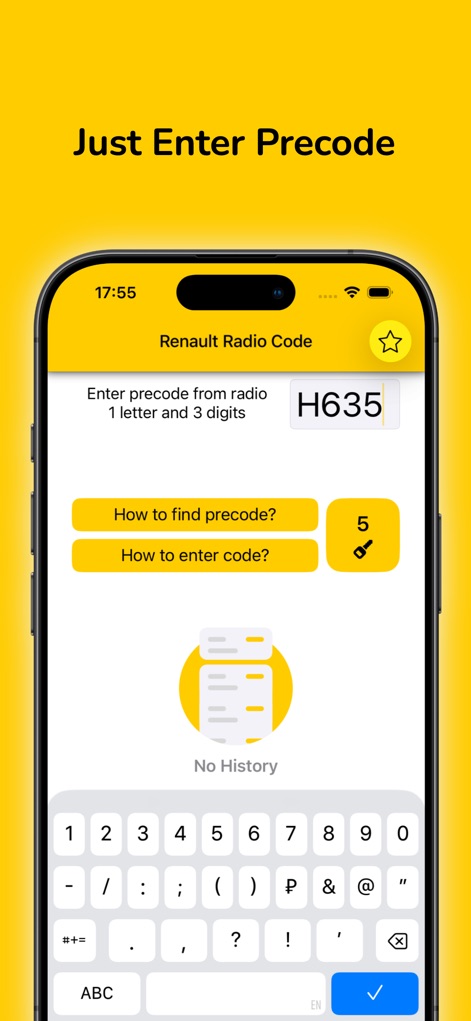
Nutzer können den Precode direkt in das klar gekennzeichnete Eingabefeld eingeben und dabei die übersichtliche numerische Tastatur verwenden.
Precode Eingabe
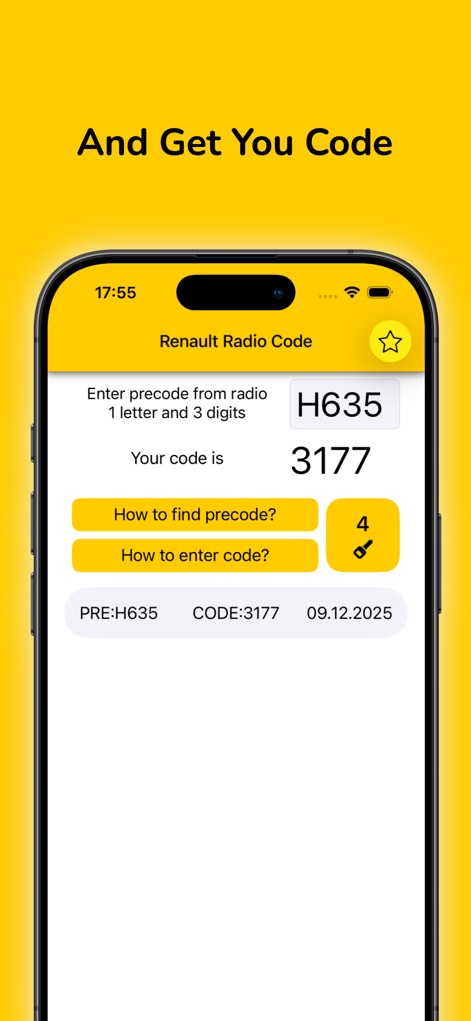
Die App zeigt den generierten vierstelligen Code deutlich an und führt eine praktische Historie mit Precode und dem zugehörigen Code.
Code Generierung
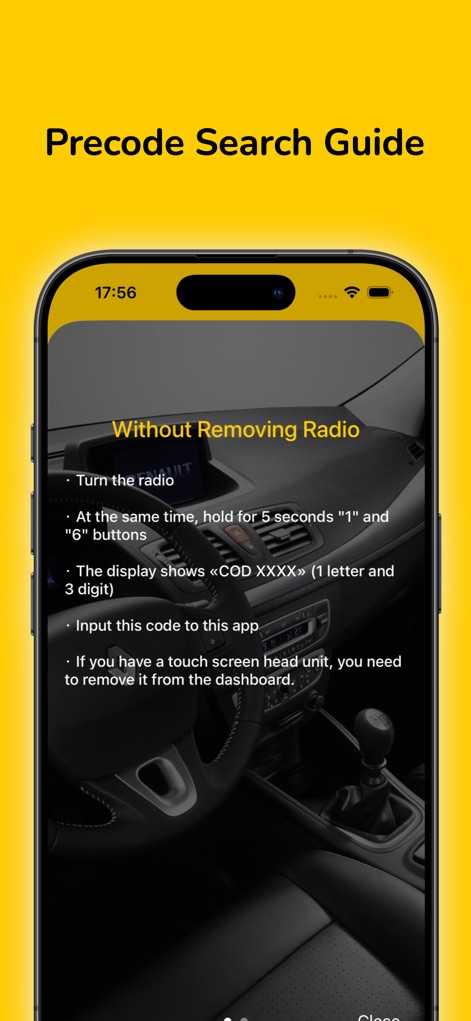
Eine detaillierte Anleitung erklärt, wie der Precode "Ohne Entfernen des Radios" ermittelt wird, mit klaren Anweisungen zum Drücken der Tasten "1" und "6".
Precode finden
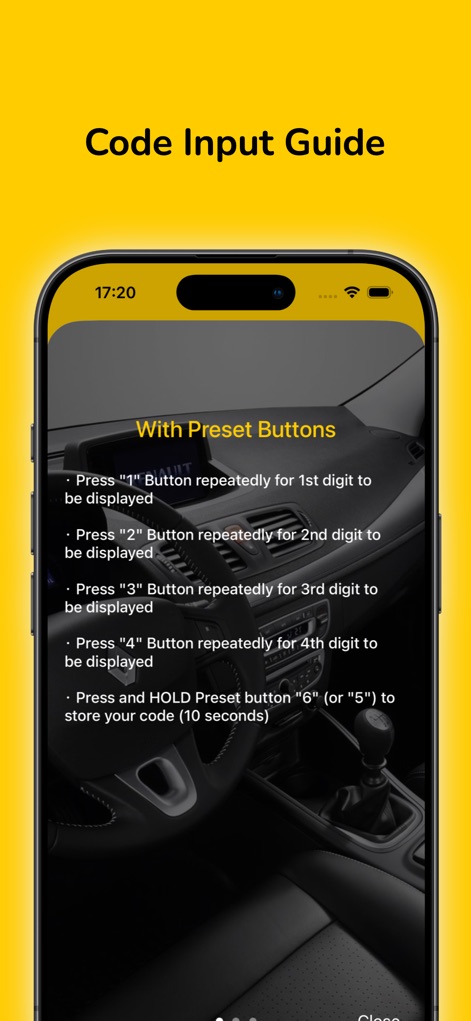
Diese Anleitung demonstriert die Code-Eingabe "Mit Voreinstellungstasten" und beschreibt das schrittweise Drücken der Tasten "1" bis "4" für jede Ziffer.
Code eingeben
Beschreibung
Download
Ähnliche Apps
Top-gerankte Apps in derselben Kategorie

Google LLC

Google Chrome
Google LLC

中国移动(手机营业厅)
China Mobile Online Services Co., Ltd.

Google Authenticator
Google LLC

CNH do Brasil
Servicos e Informacoes do Brasil

Cleanup: Phone Storage Cleaner
DEEP FLOW SOFTWARE SERVICES - FZCO

gov.br
Servicos e Informacoes do Brasil

中国电信-全国统一官方服务平台
CHINA TELECOM Corporation Ltd.

Microsoft Edge: AI Browser
Microsoft Corporation
Diese Seite ist keine offizielle Seite der App oder ihres Entwicklers, sondern eine unabhängige redaktionelle Veröffentlichung, die zu Informations- und Kommentarzwecken erstellt wurde. Sofern nicht ausdrücklich anders angegeben, sind weder die App noch ihr Entwickler mit MWM, Apple, Google Play, dem App-Herausgeber oder dem Entwickler der App verbunden, von ihnen unterstützt, gesponsert, autorisiert oder anderweitig offiziell verbunden, und nichts auf dieser Seite impliziert, dass die App unter Verwendung der Dienste von MWM entwickelt wurde. Alle Marken, Logos, Screenshots und andere Inhalte bleiben Eigentum ihrer jeweiligen Inhaber.