
Diese Seite ist keine offizielle Seite der App oder ihres Entwicklers, sondern eine unabhängige redaktionelle Veröffentlichung, die zu Informations- und Kommentarzwecken erstellt wurde. Sofern nicht ausdrücklich anders angegeben, sind weder die App noch ihr Entwickler mit MWM, Apple, Google Play, dem App-Herausgeber oder dem Entwickler der App verbunden, von ihnen unterstützt, gesponsert, autorisiert oder anderweitig offiziell verbunden, und nichts auf dieser Seite impliziert, dass die App unter Verwendung der Dienste von MWM entwickelt wurde. Alle Marken, Logos, Screenshots und andere Inhalte bleiben Eigentum ihrer jeweiligen Inhaber.


Remote Control - All TV
Fernbedienungen sind ein Relikt. Diese App befreit dich vom Plastikmüll auf deinem Couchtisch. Dein Smartphone ist jetzt die Kommandozentrale.
Downloads
250k+Bewertung
Bewertungen gesamt
8Herausgeber
Kategorie
EntertainmentSprachen
1Neueste Version
3.3Größe
92.8 MBErstveröffentlichung
20. Mai 2024Eine tiefgehende Analyse der Kernfunktionen und ihres Nutzens für technikaffine Smart-TV-Besitzer.
Analytische Bewertung der App 'Remote Control - All TV'
Smartphone als universelle TV-Fernbedienung
Es ermöglicht Nutzern, ihr Smartphone als umfassende Fernbedienung für den Fernseher zu nutzen, wodurch die Notwendigkeit mehrerer physischer Remotes entfällt und eine nahtlose Interaktion mit Menüs und Einstellungen gewährleistet wird.
Universelle Gerätekompatibilität
Die App bietet eine nahtlose Verbindung mit einer breiten Palette von TV-Marken wie Samsung, Roku und LG, was eine flexible und markenunabhängige Steuerung ermöglicht.
Intelligente Suchfunktion
Dieses Tool verfügt über eine intuitive Suchfunktion, die es Nutzern erleichtert, ihre Lieblingssendungen, Filme und Sportereignisse schnell zu finden und Inhalte effizient über verschiedene Kanäle hinweg zu entdecken.
Ein-Tipp-Ein-/Ausschaltfunktion
Es ermöglicht Nutzern, ihren Fernseher mit nur einem einfachen Tippen ein- oder auszuschalten, was das umständliche Suchen nach physischen Fernbedienungen eliminiert und sofortige Kontrolle bietet.
Präzise Lautstärkeregelung
Die App bietet die Möglichkeit, die Lautstärke des Fernsehers direkt vom Smartphone aus anzupassen, wodurch eine mühelose und genaue Feinabstimmung des Sounds möglich ist.
Einfache Kanalwechsel
Dieses Tool ermöglicht das bequeme Wechseln von Kanälen, oft durch intuitive Wischgesten, ohne die physische Fernbedienung verwenden zu müssen.
Häufig gestellte Fragen
Alles, was Sie über wissen müssen Remote Control - All TV
What is the Remote Control - All TV app?
The "Remote Control - All TV" app transforms your phone into a smart TV controller. It offers seamless navigation and enhances your entertainment experience, putting you in charge of your TV.
How do I connect the Remote Control - All TV app to my television?
To connect "Remote Control - All TV", ensure your phone and TV are on the same Wi-Fi network. Open the app, tap the icon, and follow on-screen instructions to pair with your television.
Is the Remote Control - All TV app compatible with major TV brands?
Yes, "Remote Control - All TV" offers universal compatibility. It seamlessly connects with a wide range of major TV brands, including Samsung, Roku, LG, Sony, TCL, Aqua WebOS, and Sharp.
Can I customize themes in the Remote Control - All TV app?
Yes, you can customize themes within the "Remote Control - All TV" app. It provides a variety of themes to personalize your remote interface, matching your preferred style.
Does Remote Control - All TV allow changing TV channels?
Yes, the "Remote Control - All TV" app makes channel surfing easy. You can change channels directly from your phone, eliminating the need for a physical remote.
Can the Remote Control - All TV app mirror photos and videos?
Yes, "Remote Control - All TV" supports mirroring. The app enables quick mirroring of photos and videos from your phone to your TV, enhancing your viewing experience.
How can I power my TV on or off with Remote Control - All TV?
Yes, "Remote Control - All TV" offers a One-Touch Power feature. You can turn your TV on or off with a simple tap directly from the app on your phone.
Does Remote Control - All TV provide quick access to streaming services?
Yes, "Remote Control - All TV" provides quick access to streaming services. You can directly launch apps like Netflix, YouTube, Disney+, and Prime Video from the app interface.
Die folgenden Screenshots und die Beschreibung stammen direkt aus dem offiziellen Store-Eintrag der App und sind Eigentum des Entwicklers.
App Store
Screenshots
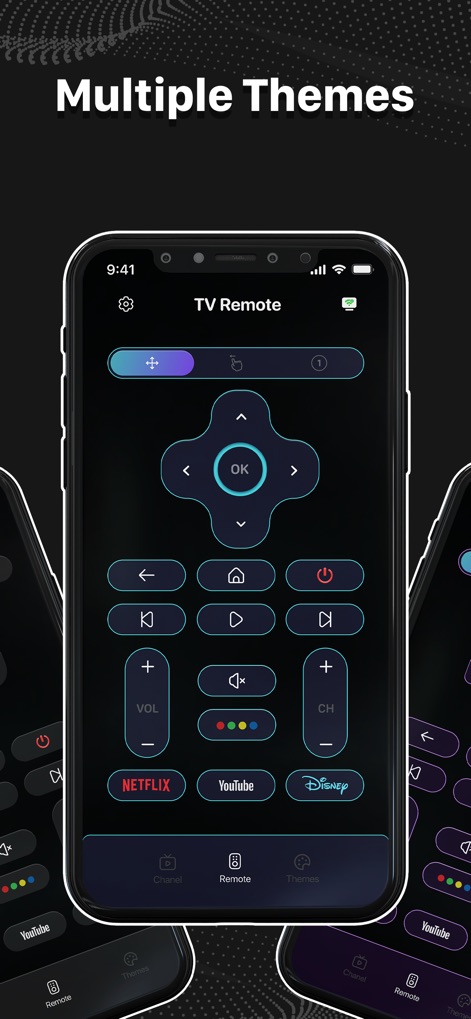
Nutzer können aus verschiedenen Designs wählen, wie dem eleganten Dunkel-Modus, und erhalten Direktzugriff auf Streaming-Dienste wie Netflix und YouTube.
Personalisierte Oberflächen

Die App bietet ein klassisches Fernbedienungs-Layout mit Navigationstasten und ermöglicht eine präzise Lautstärkeregelung sowie Kanalwechsel.
Intuitive Steuerung
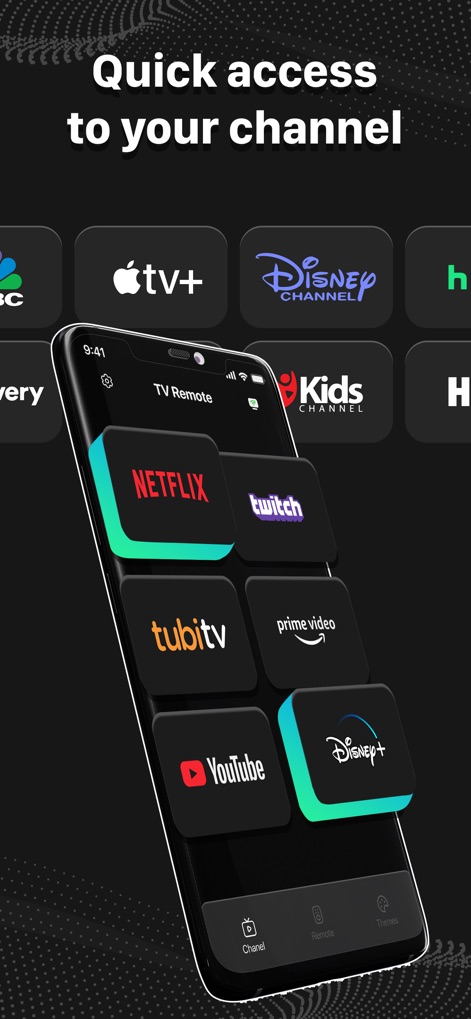
Mit der App erhalten Nutzer schnellen Zugriff auf beliebte Streaming-Dienste, übersichtlich dargestellt als großes Grid mit Logos wie Netflix und YouTube.
Direkter Kanalzugriff

Dieses Tool ermöglicht die einfache Auswahl und Verbindung mit verschiedenen Smart-TV-Geräten und zeigt bekannte Markenlogos wie Samsung und Roku.
Breite Kompatibilität

Die App unterstützt schnelles Screen-Mirroring, sodass Medieninhalte wie das Rennspiel auf dem TV-Bildschirm in hoher Qualität wiedergegeben werden können.
Inhalte spiegeln
Beschreibung
Download
Ähnliche Apps
Apps mit ähnlichen Funktionen und Nutzererfahrung

The Roku App (Official)
ROKU INC

TV Remote & Smart TV Control
To Ngoc Mai

Universal TV Remote Control .
Apps Venture Inc.

TV Remote, Universal Remote
Hangzhou Yingshitong Technology Co., Ltd.

TV Remote Control “Universo”
Nemo Apps LLC

TV Remote・Universal Control #1
Mihai Turlea

Remote Smart Tv Universal
clement gasner

Remote TV Control TCL Onn App
CEMAL CAGLAR KIRICI

TV Remote Control Universal AI
Anh Ngo
Diese Seite ist keine offizielle Seite der App oder ihres Entwicklers, sondern eine unabhängige redaktionelle Veröffentlichung, die zu Informations- und Kommentarzwecken erstellt wurde. Sofern nicht ausdrücklich anders angegeben, sind weder die App noch ihr Entwickler mit MWM, Apple, Google Play, dem App-Herausgeber oder dem Entwickler der App verbunden, von ihnen unterstützt, gesponsert, autorisiert oder anderweitig offiziell verbunden, und nichts auf dieser Seite impliziert, dass die App unter Verwendung der Dienste von MWM entwickelt wurde. Alle Marken, Logos, Screenshots und andere Inhalte bleiben Eigentum ihrer jeweiligen Inhaber.