Route Planner - GPS MGRS UTM
Herunterladen auf App Store

Diese Seite ist keine offizielle Seite der App oder ihres Entwicklers, sondern eine unabhängige redaktionelle Veröffentlichung, die zu Informations- und Kommentarzwecken erstellt wurde. Sofern nicht ausdrücklich anders angegeben, sind weder die App noch ihr Entwickler mit MWM, Apple, Google Play, dem App-Herausgeber oder dem Entwickler der App verbunden, von ihnen unterstützt, gesponsert, autorisiert oder anderweitig offiziell verbunden, und nichts auf dieser Seite impliziert, dass die App unter Verwendung der Dienste von MWM entwickelt wurde. Alle Marken, Logos, Screenshots und andere Inhalte bleiben Eigentum ihrer jeweiligen Inhaber.


Logo von Route Planner - GPS MGRS UTM
Herunterladen auf App Store

Route Planner - GPS MGRS UTM

Beherrschen Sie das Gelände mit militärischen MGRS-Gittern, fortschrittlicher Koordinatenprojektion und Offline-Topografiekarten, die für taktische Experten und Outdoor-Profis entwickelt wurden.

Kennzahlen

Downloads

5K+

Bewertung

1.0/5

Bewertungen gesamt

0

Herausgeber

Ivan Blajic

Kategorie

Navigation

Sprachen

4

Neueste Version

2.0.2

Größe

83.1 MB

Erstveröffentlichung

14. Apr. 2025
Funktionen

Präzisionswerkzeuge für taktische und Feldeinsätze

Schließen Sie die Lücke zwischen Verbrauchernavigation und professionellem GIS. Unsere Suite hochpräziser Werkzeuge ist für Militärpersonal, Feldforscher und Backcountry-Profis konzipiert, die Zuverlässigkeit in den abgelegensten Umgebungen benötigen.

Militärische Koordinatenpräzision

Wechseln Sie sofort zwischen MGRS, UTM und Längen-/Breitengraden. Führen Sie taktische Koordinatenprojektionen basierend auf Peilung und Entfernung für punktgenaue Genauigkeit im Feld durch.

Nahtlose GIS-Datenintegration

Standardisieren Sie Ihren Workflow durch Import und Export von KML-, GPX- und GeoJSON-Dateien. Verwalten Sie komplexe räumliche Daten mit benutzerdefinierten Ebenen, Polygonen und professionellen Kartenannotationen.

Die folgenden Screenshots und die Beschreibung stammen direkt aus dem offiziellen Store-Eintrag der App und sind Eigentum des Entwicklers.

App Store

Screenshots

Route Planner - GPS MGRS UTM - Ein Wanderer in taktischer Ausrüstung in der Wildnis mit Text, der die App als All-in-One-Planer, Navigator und Tracker beschreibt
Ein Wanderer in taktischer Ausrüstung in der Wildnis mit Text, der die App als All-in-One-Planer, Navigator und Tracker beschreibt

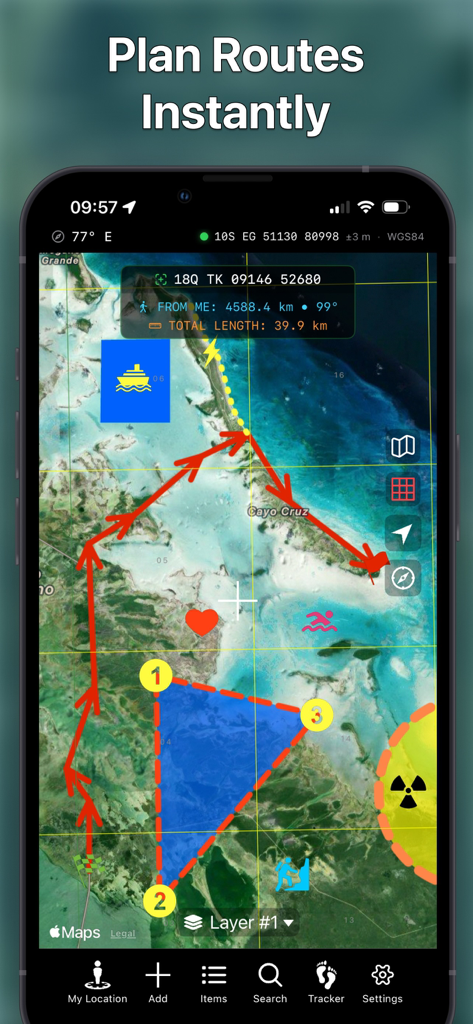
Route Planner - GPS MGRS UTM - Smartphone zeigt die Routenplaner-App mit taktischer Kartenroutenzeichnung und MGRS-Koordinaten an

Smartphone zeigt die Routenplaner-App mit taktischer Kartenroutenzeichnung und MGRS-Koordinaten an
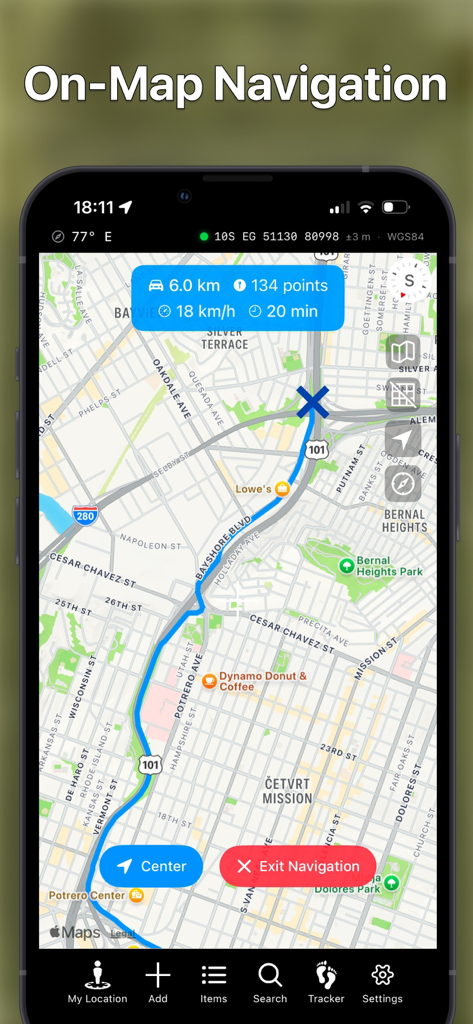
Route Planner - GPS MGRS UTM - Screenshot der mobilen App, der die Navigation auf der Karte mit einer blauen Route und MGRS-Koordinaten zeigt
Screenshot der mobilen App, der die Navigation auf der Karte mit einer blauen Route und MGRS-Koordinaten zeigt

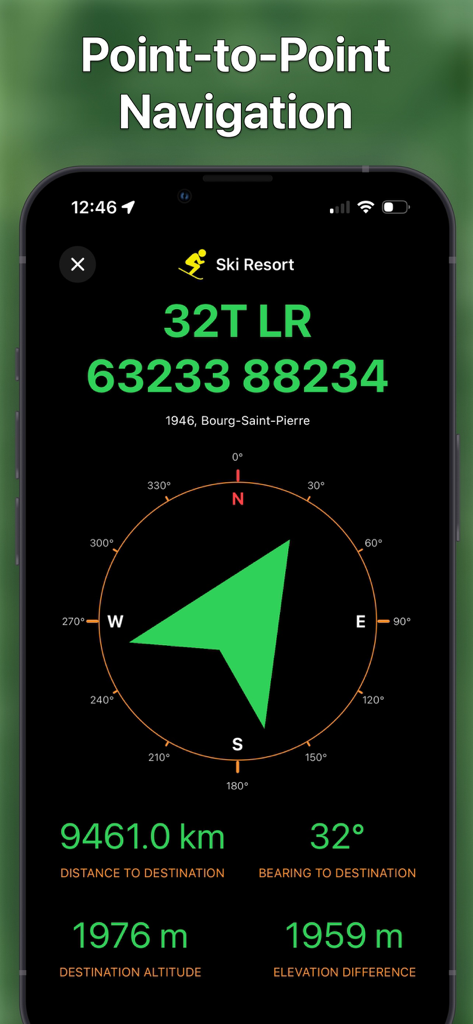
Route Planner - GPS MGRS UTM - Taktische Punkt-zu-Punkt-Navigationsschnittstelle mit MGRS-Koordinaten und Kompasspeilung
Taktische Punkt-zu-Punkt-Navigationsschnittstelle mit MGRS-Koordinaten und Kompasspeilung

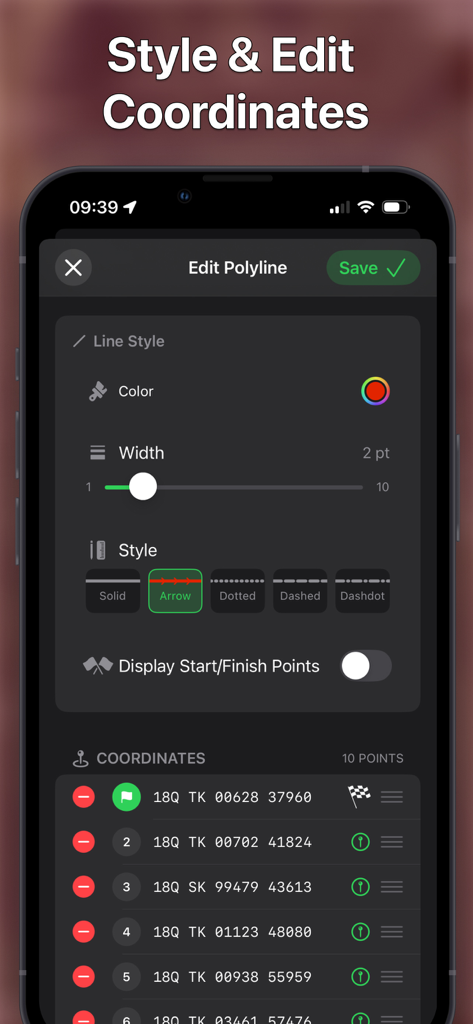
Route Planner - GPS MGRS UTM - Schnittstelle zum Stylen von Kartenrouten und Verwalten von MGRS-Koordinatenpunkten
Schnittstelle zum Stylen von Kartenrouten und Verwalten von MGRS-Koordinatenpunkten

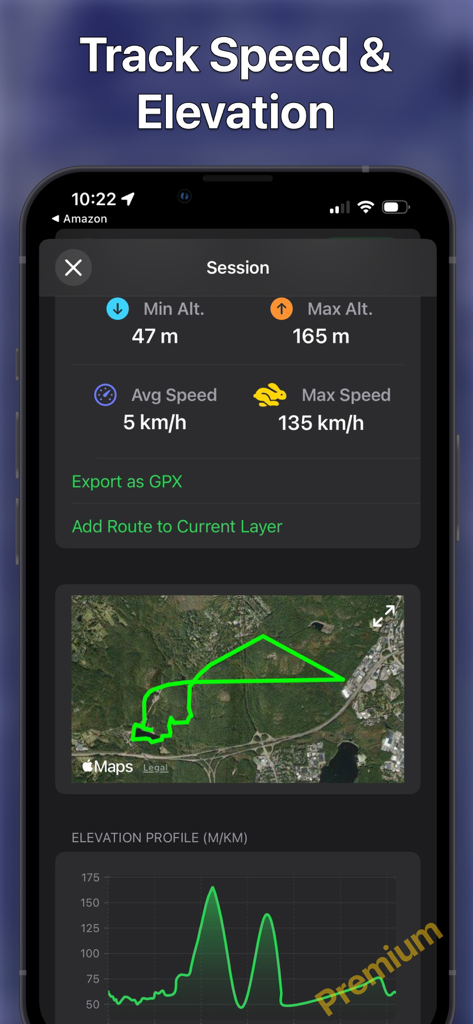
Route Planner - GPS MGRS UTM - App-Oberfläche zeigt Geschwindigkeits- und Höhenverfolgungsstatistiken mit einer Routenkarte und einem Höhenprofil an

App-Oberfläche zeigt Geschwindigkeits- und Höhenverfolgungsstatistiken mit einer Routenkarte und einem Höhenprofil an

Beschreibung

Route Planner delivers a powerful, intuitive mapping experience designed for professionals, outdoor adventurers, and map enthusiasts. View maps in multiple styles, overlay MGRS grids, and explore with precision - all in a sleek, native app experience. Whether you're navigating the backcountry, planning a mission, or analyzing spatial data, Route Planner gives you the tools you need right at your fingertips. CORE FEATURES (Free): - Live Location Data: See your coordinates, address, heading, speed, altitude, and more, clearly displayed in real time. - Multiple Map Types: Choose the map that fits your mission. - MGRS Grid Overlay: Toggle the Military Grid Reference System (MGRS) grid on or off with ease. - Custom Pins & Navigation: Drop different types of pins and navigate directly to them. - Altitude: Set pin altitude automatically or manually. - Draw & Design: Add polylines (routes), polygons, and shapes. - Add/Edit Items via Form: Easily create or modify pins, shapes, and routes using a structured input form. - Custom Pin and Overlay Styling: Customize colors, stroke widths, and dash patterns for pins, lines, shapes, and areas on your map. - Layer Items List: View your layers in a clear, organized list. - Search: Search by MGRS, UTM, Latitude/Longitude. - Coordinate Projection: Move the map cursor based on a bearing and distance from your location or the map center. - Flexible Data Formats: Customize your units for coordinates, distance, angles, altitude, and speed. - File Import Support: Import map data from KML, GeoJSON, and GPX files with ease. Note: free app version supports only limited number of pins and overlays. PREMIUM FEATURES (Available via in-app purchase): - Unlimited pins and polylines (routes). - Car & Walking Directions: Get turn-by-turn navigation for both driving and walking routes. - Hiking, Cycling & Ski Trails: Discover and explore nearby hiking, cycling and ski trails with detailed route and elevation data. - Weather Forecast: View a 10-day forecast for any pinned location. - Route Elevation Profile: View detailed elevation changes along your route, including ascents and descents. - Peak Names and Altitudes: Identify surrounding peaks with their names and elevation clearly labeled. - Route Navigation: Navigate along your custom-drawn paths with real-time turn-by-turn guidance. - Search by Address/Location: Quickly find places using standard addresses or points of interest. - Tracker: Record your route, view it on the map along with its elevation profile (graph), and export it as a GPX file. - Multiple Layers: Organize your data by adding multiple map layers for better structure and visibility. - Layer Export & Import: Export or import your annotations, drawings, and overlays — or share them with others. - Offline Map Caching: Save OpenStreetMap map locally to use them without an internet connection — perfect for remote areas. - Additional Maps (OpenStreetMap & OpenTopoMap): Access detailed terrain and topographic map sources with full offline support for exploration anywhere. Whether you're using it for tactical operations, field research, or hiking adventures, Route Planner is your go-to navigation companion. More features coming soon – stay tuned! If you have any questions, suggestions, or bug reports, do not hesitate to contact me at blayasoft@gmail.com.

Download

Herunterladen auf App Store

Diese Seite ist keine offizielle Seite der App oder ihres Entwicklers, sondern eine unabhängige redaktionelle Veröffentlichung, die zu Informations- und Kommentarzwecken erstellt wurde. Sofern nicht ausdrücklich anders angegeben, sind weder die App noch ihr Entwickler mit MWM, Apple, Google Play, dem App-Herausgeber oder dem Entwickler der App verbunden, von ihnen unterstützt, gesponsert, autorisiert oder anderweitig offiziell verbunden, und nichts auf dieser Seite impliziert, dass die App unter Verwendung der Dienste von MWM entwickelt wurde. Alle Marken, Logos, Screenshots und andere Inhalte bleiben Eigentum ihrer jeweiligen Inhaber.








