Say it Mail it Plus
Say it Mail it Plus
Herunterladen auf App Store

Diese Seite ist keine offizielle Seite der App oder ihres Entwicklers, sondern eine unabhängige redaktionelle Veröffentlichung, die zu Informations- und Kommentarzwecken erstellt wurde. Sofern nicht ausdrücklich anders angegeben, sind weder die App noch ihr Entwickler mit MWM, Apple, Google Play, dem App-Herausgeber oder dem Entwickler der App verbunden, von ihnen unterstützt, gesponsert, autorisiert oder anderweitig offiziell verbunden, und nichts auf dieser Seite impliziert, dass die App unter Verwendung der Dienste von MWM entwickelt wurde. Alle Marken, Logos, Screenshots und andere Inhalte bleiben Eigentum ihrer jeweiligen Inhaber.


Logo von Say it Mail it Plus
Herunterladen auf App Store

Say it Mail it Plus

Hören Sie auf zu tippen und fangen Sie an zu sprechen. Erfassen Sie Ideen, Fotos und GPS-Standorte freihändig und senden Sie sie automatisch direkt an Ihr Postfach. Perfekt für vielbeschäftigte Profis, die unterwegs produktiv bleiben müssen.

Kennzahlen

Downloads

26K+

Bewertung

1.0/5

Bewertungen gesamt

0

Herausgeber

Carnation Software

Kategorie

Business

Sprachen

1

Neueste Version

1.0.4

Größe

2.8 MB

Erstveröffentlichung

16. Okt. 2021
Funktionen

Ideen mit Denkgeschwindigkeit erfassen

Say it & Mail it Plus ist das ultimative Produktivitätstool für vielbeschäftigte Profis, die Sprachnotizen in Aufgaben umwandeln müssen, ohne jemals eine Tastatur berühren zu müssen.

Reibungslose Spracherfassung

Nehmen Sie freihändig auf, indem Sie das Telefon einfach ans Ohr halten oder es kurz schütteln – kein Fummeln mehr mit Tastaturen, während Sie fahren oder vor Ort sind.

Automatisierte Zustellung im Posteingang

Überspringen Sie die Schaltfläche 'Senden' komplett. Ihre Notizen werden automatisch als universelle Audiodateien per E-Mail versendet, sodass Ihre Aufgaben in Ihrem Posteingang auf Sie warten.

Die folgenden Screenshots und die Beschreibung stammen direkt aus dem offiziellen Store-Eintrag der App und sind Eigentum des Entwicklers.

App Store

Screenshots
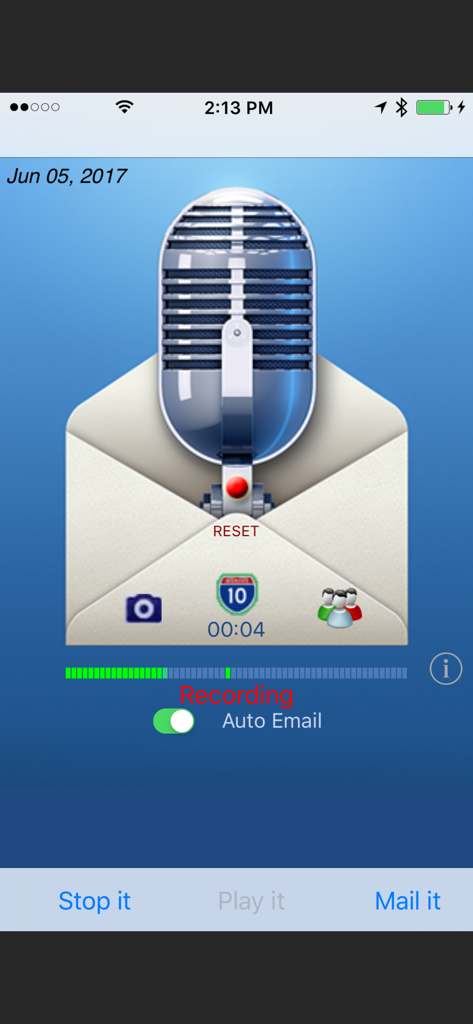
Say it Mail it Plus - Say it Mail it Plus App-Oberfläche, die die Aufnahme einer Sprachnotiz mit einem automatischen E-Mail-Schalter zeigt
Say it Mail it Plus App-Oberfläche, die die Aufnahme einer Sprachnotiz mit einem automatischen E-Mail-Schalter zeigt

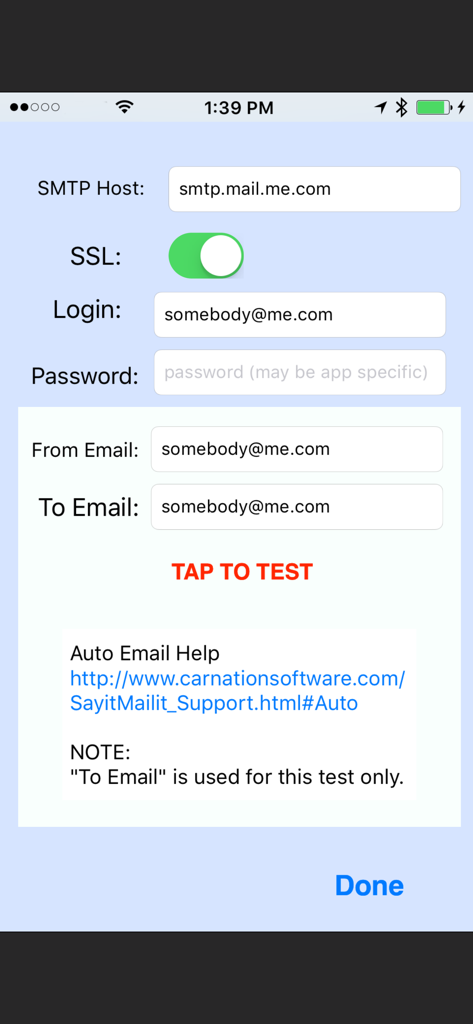
Say it Mail it Plus - SMTP-Konfigurationsbildschirm in der App mit Feldern für die E-Mail-Host-Anmeldung und Servertests

SMTP-Konfigurationsbildschirm in der App mit Feldern für die E-Mail-Host-Anmeldung und Servertests

Beschreibung

Don't type it! Just Say it & Mail it. The fastest way to email a voice memo to yourself or to someone else and optionally include a photo, movie and map location. You can optionally turn on Auto Email. (Then you can Say it and Mail it with no need to tap the Send button) No In-App purchases. "Say it & Mail it" has been designed with simplicity and speed in mind. It remembers your name and an email address, which makes it very fast and easy to send yourself an email memo. Four methods of recording to fit your style: * Method 1: Tap 'Say it' then tap 'Mail it' * Method 2: Hold the iPhone to your ear and speak. When you move the iPhone away, recording stops and the email window opens * Method 3: Shake it to start recording and shake it to stop * Method 4: Tap on the microphone to start recording and tap it again to stop BUT WAIT, THERE'S MORE :-) EMAIL TO GROUPS Uses the groups you already have set up in your Contacts INCLUDE A PICTURE OR MOVIE IN YOUR EMAIL Take a photo or movie or select from the album. Pictures are full resolution compressed jpg format and the picture size can be adjusted. INCLUDE YOUR MAP LOCATION IN YOUR EMAIL When someone receives your email with an iPhone, they will be able to click on the link to launch the map application, see your location and get directions. When someone receives your email with a Mac or PC, they will be able to click on the link to launch their browser to see your location and get directions. So, what else can you do with 'Say it & Mail it'? Lots of things! •Recommend a good restaurant, including location map and photo •Email a reminder to yourself, a friend or preset groups •Document when, why and where you took a great photo •Update your blog via email •Track a real estate tour with info about each home (agent or buyer) •Send a customer the location and details of a house for sale •Record scientific notes with map location and photo of findings •Add content to your podcast •Communicate with elderly relatives who have difficulty typing •Send product information or newsflashes to clients •Email great vacation photos, footage, maps and commentary •Let people know where you are when you need help •Email your messages in any language (no QWERTY keyboard limits) •Document where you park your car so you can easily find it again •And a whole lot more! Emailed voice memos are compatible with Mac, PC and any other computer O/S (uses compressed wave format). No file maintenance on your iPhone/iPod Touch, since audio files are not stored there. NO ADVERTISING in your emails. Just a 'Say it Mail it' signature, which you can optionally remove in the 'Info' setup. Send yourself reminders when you are away from your computer. No typing required. Your email address and subject are autofilled. If you are using an iPhone, your message is sent off immediately, thanks to cell towers. iPod Touch devices store the email and send as soon as they are able to make a Wi-Fi connection. Great way to send anyone a detailed email without using the keyboard. Send an MMS Instant Message So many uses, we can't imagine them all. You will think of many more NOTES: iPod Touch requires headphones with microphone and a Wi-Fi connection. The iPhone has a microphone built-in. Camera may only be available on iPhone. Not all devices can take movies.

Download

Herunterladen auf App Store

Diese Seite ist keine offizielle Seite der App oder ihres Entwicklers, sondern eine unabhängige redaktionelle Veröffentlichung, die zu Informations- und Kommentarzwecken erstellt wurde. Sofern nicht ausdrücklich anders angegeben, sind weder die App noch ihr Entwickler mit MWM, Apple, Google Play, dem App-Herausgeber oder dem Entwickler der App verbunden, von ihnen unterstützt, gesponsert, autorisiert oder anderweitig offiziell verbunden, und nichts auf dieser Seite impliziert, dass die App unter Verwendung der Dienste von MWM entwickelt wurde. Alle Marken, Logos, Screenshots und andere Inhalte bleiben Eigentum ihrer jeweiligen Inhaber.








