ScanPlus PRO - OCR&PDF Scanner

ScanPlus PRO - OCR&PDF Scanner

Herunterladen auf App Store
Logo von ScanPlus PRO - OCR&PDF Scanner

ScanPlus PRO: Ihr professioneller mobiler Scanner, E-Signierer & OCR-Tool

Verwandeln Sie Ihr iPhone in ein leistungsstarkes tragbares Büro. Scannen Sie mühelos Dokumente, unterzeichnen Sie Verträge unterwegs und extrahieren Sie Text mit 61-sprachiger OCR – und bewahren Sie dabei Ihre Daten sicher lokal auf.

Herunterladen auf App Store

Herausgeber

Mihail Salari

Kategorie

Business

Downloads

8K+

Bewertung

1.0/5

Bewertungen gesamt

0

Sprachen

1

Ihr mobiles Büro

Entdecken Sie die Oberfläche, die von 8K+ Nutzern verwendet wird.
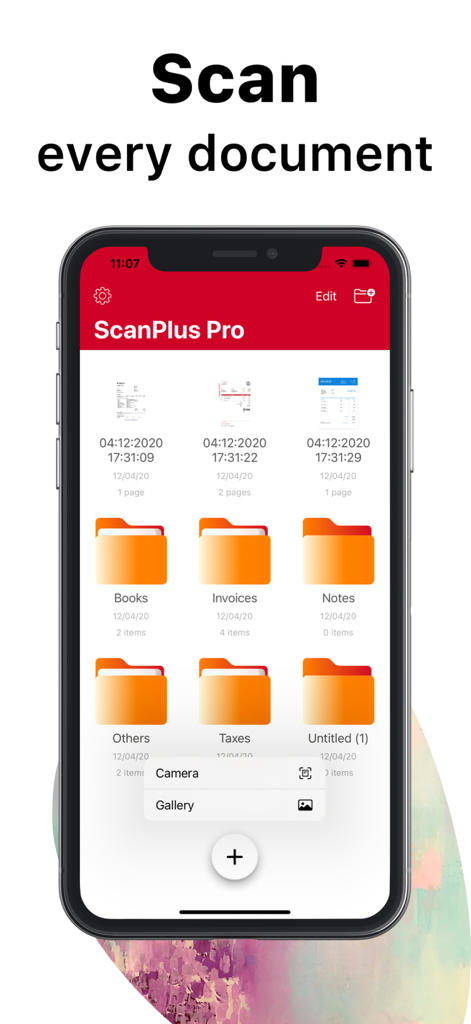
Mobile Benutzeroberfläche von ScanPlus PRO, die organisierte Dokumentenordner für Geschäfts- und Steuerdateien zeigt

Mobile Benutzeroberfläche von ScanPlus PRO, die organisierte Dokumentenordner für Geschäfts- und Steuerdateien zeigt

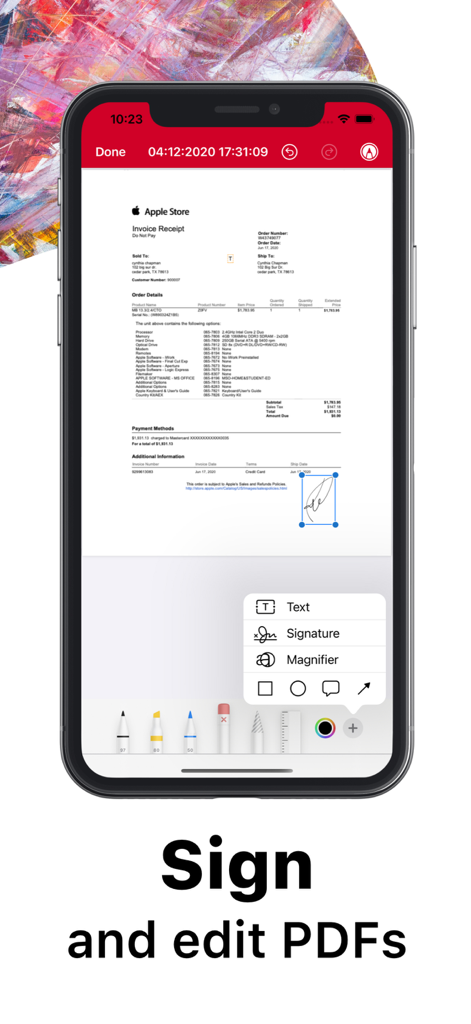
iPhone-Bildschirm mit ScanPlus PRO App-Funktion zum Signieren und Bearbeiten von PDF-Dokumenten

iPhone-Bildschirm mit ScanPlus PRO App-Funktion zum Signieren und Bearbeiten von PDF-Dokumenten

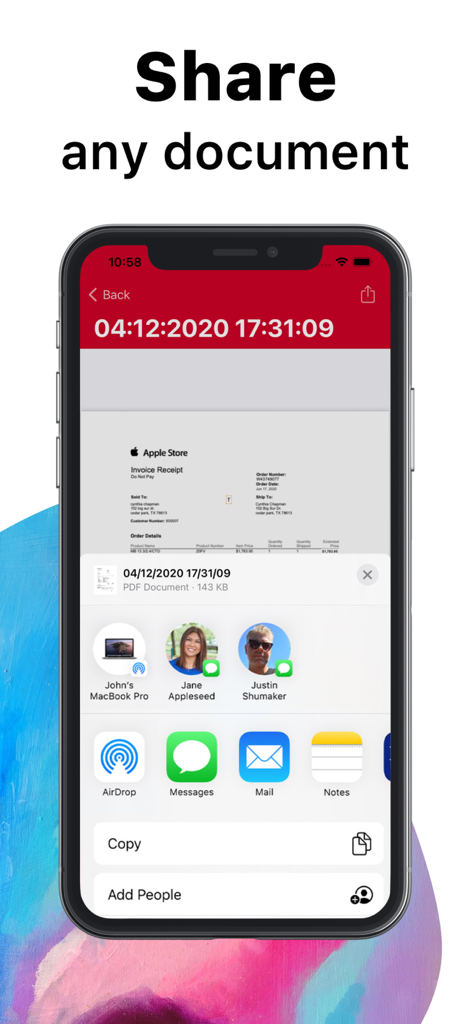
ScanPlus PRO App-Benutzeroberfläche mit Optionen zum Teilen einer gescannten Rechnung als PDF.

ScanPlus PRO App-Benutzeroberfläche mit Optionen zum Teilen einer gescannten Rechnung als PDF.

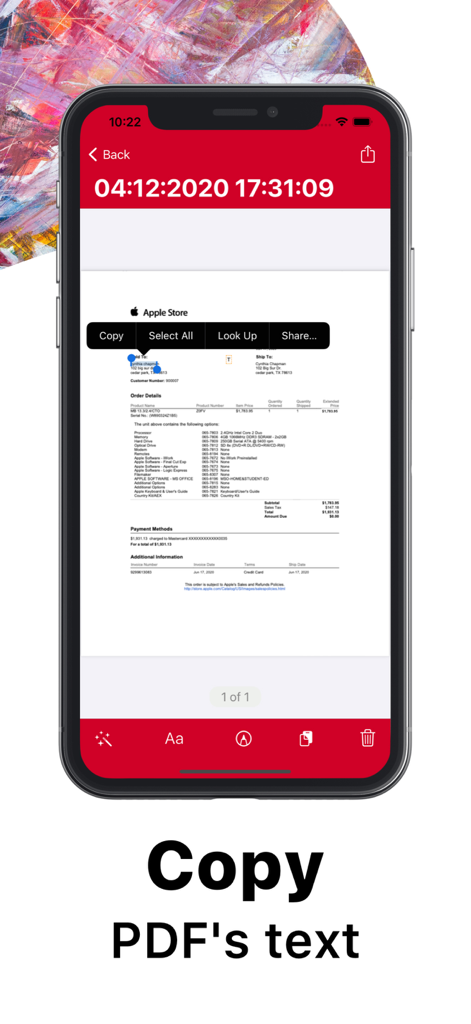
ScanPlus PRO App, die die OCR-Funktion zum Kopieren von Text aus einem gescannten Dokument zeigt

ScanPlus PRO App, die die OCR-Funktion zum Kopieren von Text aus einem gescannten Dokument zeigt

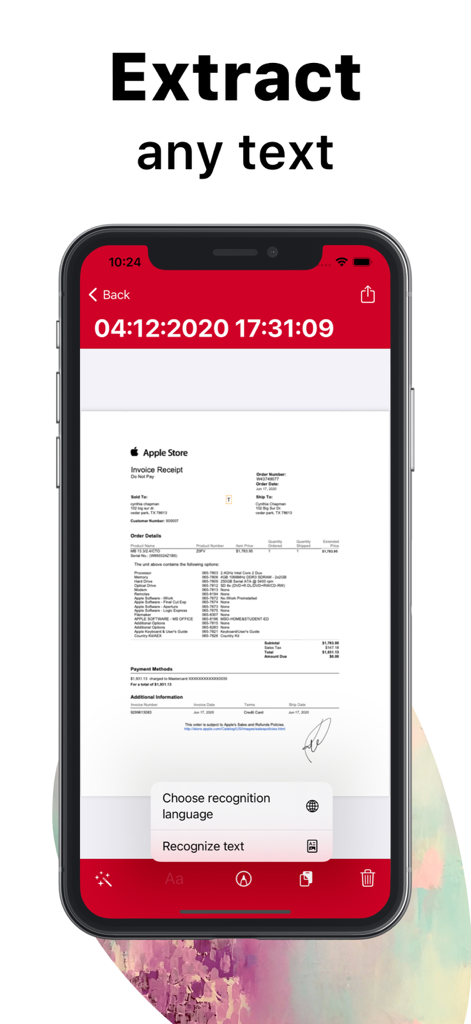
iPhone zeigt die ScanPlus PRO App beim Extrahieren von Text aus einer gescannten Apple Store Rechnung mittels OCR-Technologie

iPhone zeigt die ScanPlus PRO App beim Extrahieren von Text aus einer gescannten Apple Store Rechnung mittels OCR-Technologie

Ihre komplette mobile Bürosuite

Die Tools, die diese App auszeichnen, gewählt von 8K+ Nutzern.

📄

Professionelles Dokumentenscannen

Erfassen Sie kristallklare PDFs mit automatischer Randerkennung und fortschrittlicher Bildverbesserung. Perfekt für Verträge, Quittungen und wichtige Geschäftsunterlagen.

✍️

OCR & Sofortige E-Signaturen

Extrahieren Sie Text aus Scans in 61 Sprachen und signieren Sie Dokumente digital in Sekunden. Eliminieren Sie manuelles Tippen und halten Sie Ihren Workflow unterwegs in Bewegung.

🔒

Datenschutzorientierter sicherer Speicher

Bewahren Sie Ihre sensiblen Daten sicher auf mit lokalem Speicher und passwortgeschützten Ordnern. Ihre Dokumente bleiben auf Ihrem Gerät, was Ihnen die vollständige Kontrolle über Ihre Privatsphäre gibt.

Über die App

Alles, was Sie über wissen müssen ScanPlus PRO - OCR&PDF Scanner.

Beschreibung

ScanPlus - PDF Scanner, E-Signature & OCR ScanPlus is a handy scanner app that turns your iPhone or iPad into a powerful mobile scanner. Easily scan, save, and share any document in high-quality PDF format. Our scanner app will become an indispensable tool in your day-to-day life. Scan receipts, documents, paper notes, fax papers, books, and store your scans as multipage PDF files. Save even more time with new features like OCR to recognize text from scans and e-sign to add a signature to your documents with just a few taps. Take this portable document scanner anywhere you go for your daily business needs. No internet connection is required, as all scans are stored locally on your device. If you need to protect your valuable scans, you can set up a password for the entire app or lock particular folders or documents. Say goodbye to bulky office scanners and get this ultra-fast PDF scanner app now — the one and only ScanPlus! *** ScanPlus Main Features: *** -- Advanced PDF Scanner APP-- * Scan to high-quality PDF * Save scans in grayscale, black & white, magic, noir, threshold, or color * Automatic shutter and border detection for any scannable object * Advanced image processing with enhancement, color correction, noise removal, automatic perspective correction, and more * Choose between low, medium, and HD scan quality * Extract any text from scans or images using OCR * Multipage scanning – scan as many pages as you need -- Document Editor -- * Annotate or sign any document * Recognize and copy any text from your scans -- Text Recognition (OCR) -- * Convert any scan into selectable and copyable text. ScanPlus supports 61 languages: Afrikaans, Albanian, Arabic, Basque, Bengali, Bulgarian, Catalan, Chinese (Traditional), Croatian, Czech, Danish, Dutch, English, Estonian, French, Georgian, German, Greek, Gujarati, Hebrew, Hindi, Hungarian, Icelandic, Indonesian, Irish, Italian, Japanese, Javanese, Korean, Latin, Latvian, Lithuanian, Macedonian, Malay, Malayalam, Maltese, Marathi, Nepali, Norwegian, Persian, Polish, Portuguese, Punjabi, Romanian, Russian, Serbian, Slovak, Slovenian, Spanish, Swahili, Swedish, Tamil, Telugu, Thai, Tibetan, Turkish, Ukrainian, Urdu, Uzbek, Vietnamese -- File Manager -- * Full-featured file manager with folders and document editing * Long press on a file to open a context menu (share, rename, select, delete) * Select multiple PDF files and merge them into one * Select multiple files and move them to any folder -- Document Sharing Tool -- * Share your scans via email * Print your scans with any Wi-Fi printer * Share and upload scanned documents to cloud services like Dropbox, iCloud, or Google Drive -- Share Your Scans -- * Just scan any document and tap the "Share" button. You can send scanned documents via email, export to Photos, or open them in any 3rd-party application. With ScanPlus, you can also print your documents. -- Privacy -- * Add a passcode to make sure only those you want to can open your app ScanPlus - PDF Scanner, E-Signature & OCR, the Original Mobile Scanner for your everyday scanning needs!

Neueste Version

3.0.3

Größe

70.9 MB

Erstveröffentlichung

25. Aug. 2017

Vereinfachen Sie Ihren Workflow – Werden Sie noch heute papierlos

Schließen Sie sich Tausenden mobiler Profis an, die ScanPlus PRO für hochwertige Scans, sofortige E-Signaturen und sicheres Dokumentenmanagement unterwegs vertrauen.

Herunterladen auf App Store

App information, icons, screenshots, and descriptions displayed on this page are sourced from the Apple App Store and are the property of their respective developers. Download estimates and rankings are based on MWM's proprietary models and may not reflect actual figures. This page is provided for informational and analytical purposes only.

Believe this page infringes your intellectual property? File a dispute