Smarter Inventory
Smarter Inventory
Herunterladen auf App Store

Diese Seite ist keine offizielle Seite der App oder ihres Entwicklers, sondern eine unabhängige redaktionelle Veröffentlichung, die zu Informations- und Kommentarzwecken erstellt wurde. Sofern nicht ausdrücklich anders angegeben, sind weder die App noch ihr Entwickler mit MWM, Apple, Google Play, dem App-Herausgeber oder dem Entwickler der App verbunden, von ihnen unterstützt, gesponsert, autorisiert oder anderweitig offiziell verbunden, und nichts auf dieser Seite impliziert, dass die App unter Verwendung der Dienste von MWM entwickelt wurde. Alle Marken, Logos, Screenshots und andere Inhalte bleiben Eigentum ihrer jeweiligen Inhaber.


Logo von Smarter Inventory
Herunterladen auf App Store

Smarter Inventory

Der leistungsstarke, mobile Bestandsmanager für kleine Unternehmen und Wiederverkäufer. Organisieren Sie Produkte, scannen Sie Barcodes und verfolgen Sie Gewinne sofort – ohne Registrierung oder Werbung.

Kennzahlen

Downloads

7K+

Bewertung

3.7/5

Bewertungen gesamt

0

Herausgeber

HELIOBYTE LLC

Kategorie

Productivity

Sprachen

1

Neueste Version

3.05

Größe

13.6 MB

Erstveröffentlichung

19. Okt. 2016
Funktionen

Alles, was Sie brauchen, um Ihr Unternehmen zu skalieren

Smarter Inventory ersetzt Tabellenkalkulationen und Papierkram durch ein leistungsstarkes, mobiles System, das für kleine Unternehmen und E-Commerce-Wiederverkäufer entwickelt wurde.

Intelligentes Barcode-Scanning

Identifizieren Sie Produkte sofort mit Ihrer Kamera. Die Unterstützung von QR-Codes und über 15 Barcode-Typen macht die Bestandsaufnahme schneller als je zuvor.

Geschäftstaugliche Berichte

Exportieren Sie professionelle PDF- und CSV-Berichte für die Steuererklärung. Verfolgen Sie den Lagerumschlag und die Gewinnmargen mit höchster Präzision.

Die folgenden Screenshots und die Beschreibung stammen direkt aus dem offiziellen Store-Eintrag der App und sind Eigentum des Entwicklers.

App Store

Screenshots
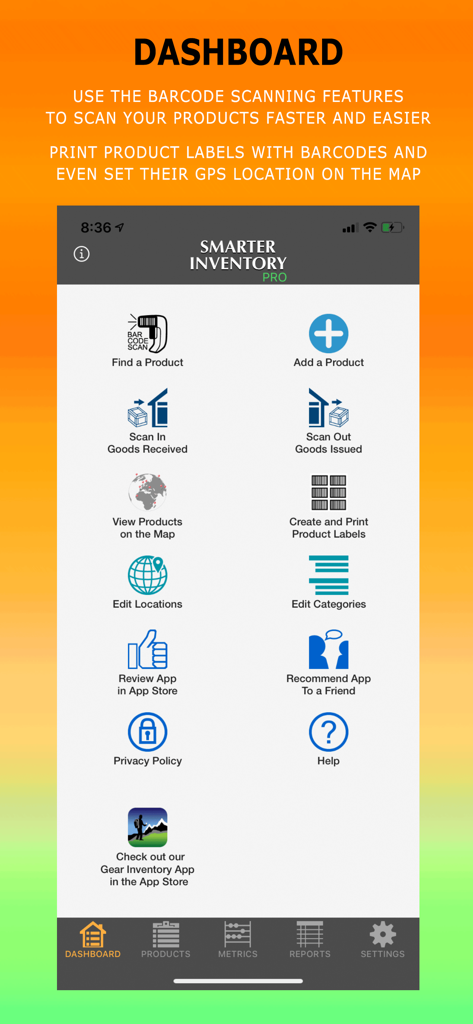
Smarter Inventory - Haupt-Dashboard der Smarter Inventory App mit Menü-Icons für Barcode-Scanning, Produktmanagement und Berichte
Haupt-Dashboard der Smarter Inventory App mit Menü-Icons für Barcode-Scanning, Produktmanagement und Berichte

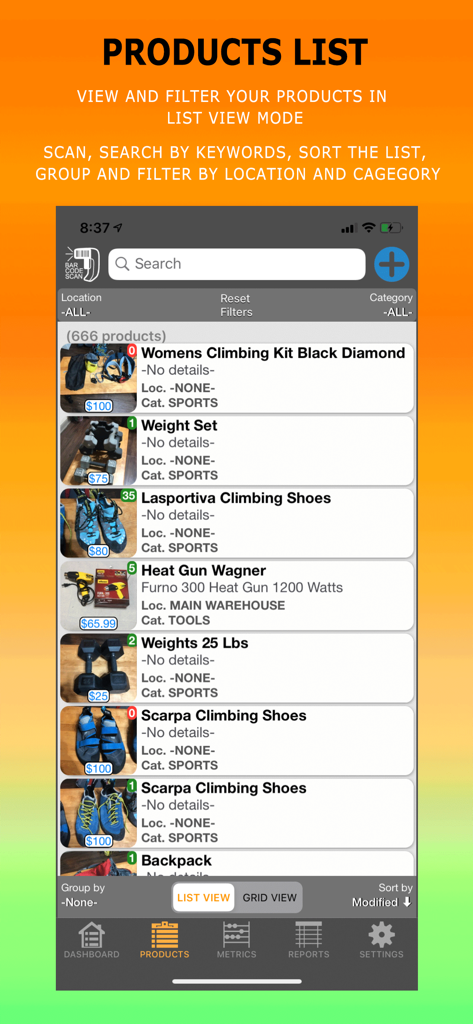
Smarter Inventory - Smarter Inventory App mit einer Liste verfolgter Produkte mit Fotos und Preisen
Smarter Inventory App mit einer Liste verfolgter Produkte mit Fotos und Preisen

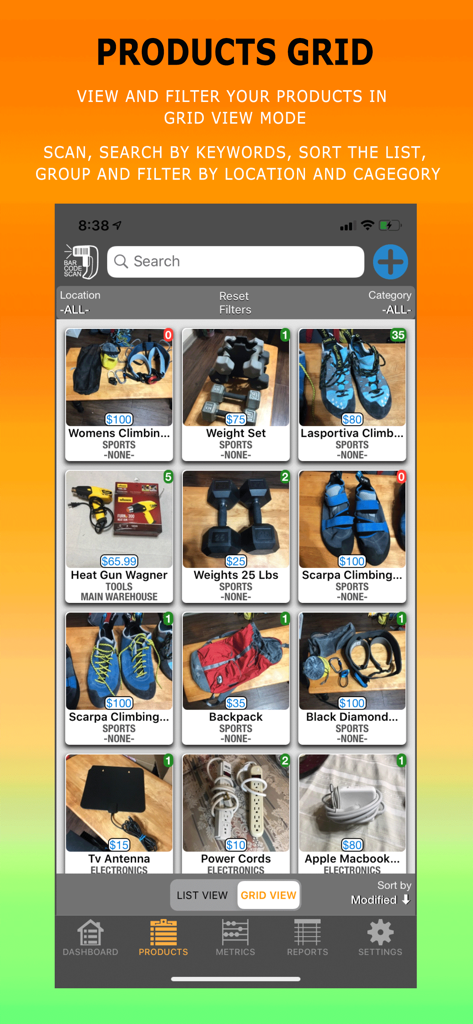
Smarter Inventory - Smarter Inventory App Produktraster mit organisierten Artikeln mit Fotos und Preisen

Smarter Inventory App Produktraster mit organisierten Artikeln mit Fotos und Preisen
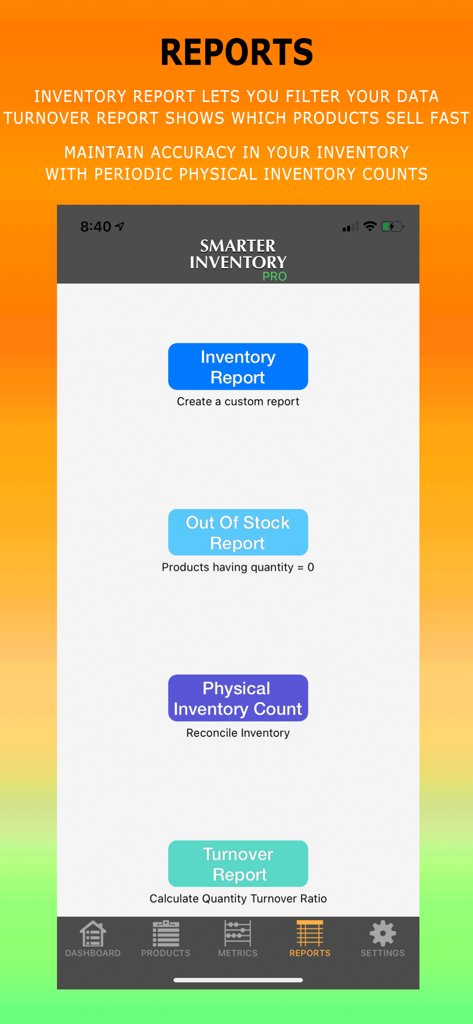
Smarter Inventory - Smarter Inventory Pro Berichtsmenü mit Optionen für Inventar, nicht vorrätige Artikel, physische Inventur und Umschlagberichte
Smarter Inventory Pro Berichtsmenü mit Optionen für Inventar, nicht vorrätige Artikel, physische Inventur und Umschlagberichte

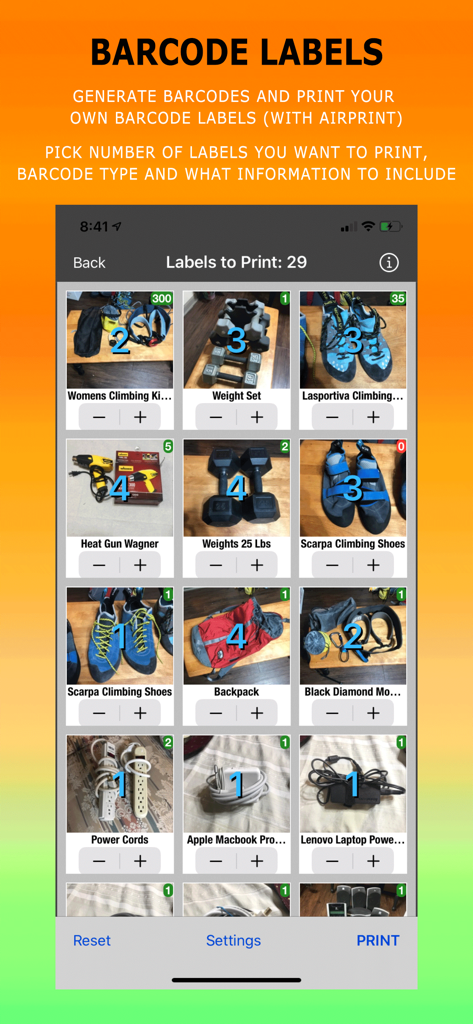
Smarter Inventory - Ein mobiler Bildschirm, der ein Inventarraster mit Optionen zur Auswahl von Mengen und zum Drucken von Barcode-Etiketten zeigt.
Ein mobiler Bildschirm, der ein Inventarraster mit Optionen zur Auswahl von Mengen und zum Drucken von Barcode-Etiketten zeigt.

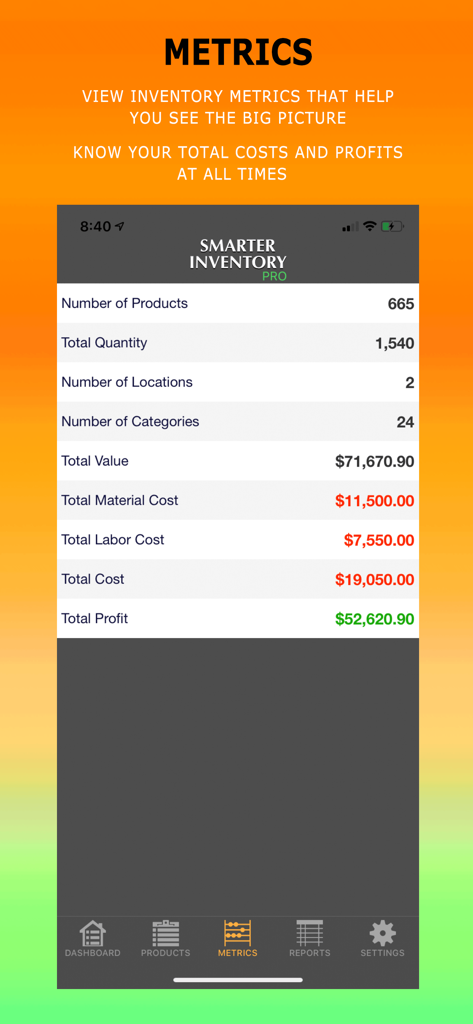
Smarter Inventory - Eine Dashboard-Ansicht der Smarter Inventory App mit Geschäftskennzahlen einschließlich Gesamtgewinn und Arbeitskosten
Eine Dashboard-Ansicht der Smarter Inventory App mit Geschäftskennzahlen einschließlich Gesamtgewinn und Arbeitskosten

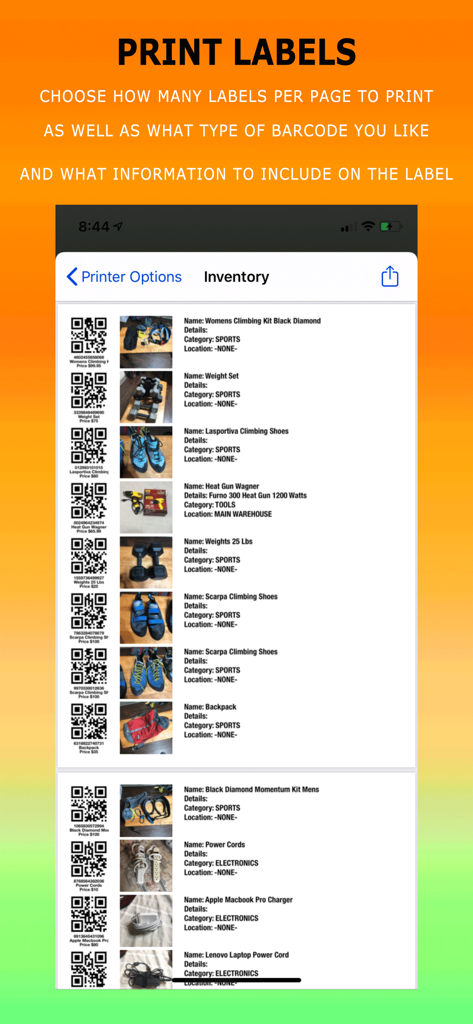
Smarter Inventory - Smarter Inventory App Bildschirm zum Drucken benutzerdefinierter Barcode-Etiketten mit Produktbildern
Smarter Inventory App Bildschirm zum Drucken benutzerdefinierter Barcode-Etiketten mit Produktbildern

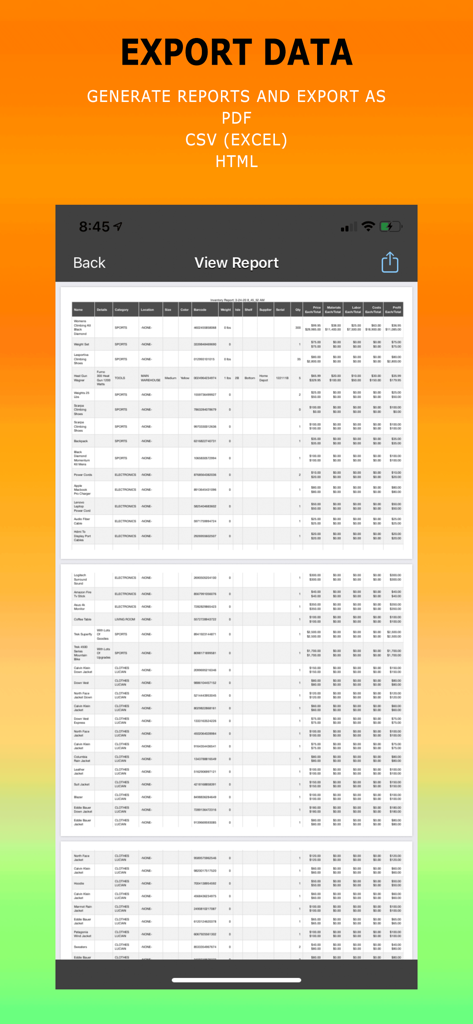
Smarter Inventory - Oberfläche zum Erstellen und Exportieren detaillierter Inventarberichte als PDF oder CSV-Dateien

Oberfläche zum Erstellen und Exportieren detaillierter Inventarberichte als PDF oder CSV-Dateien
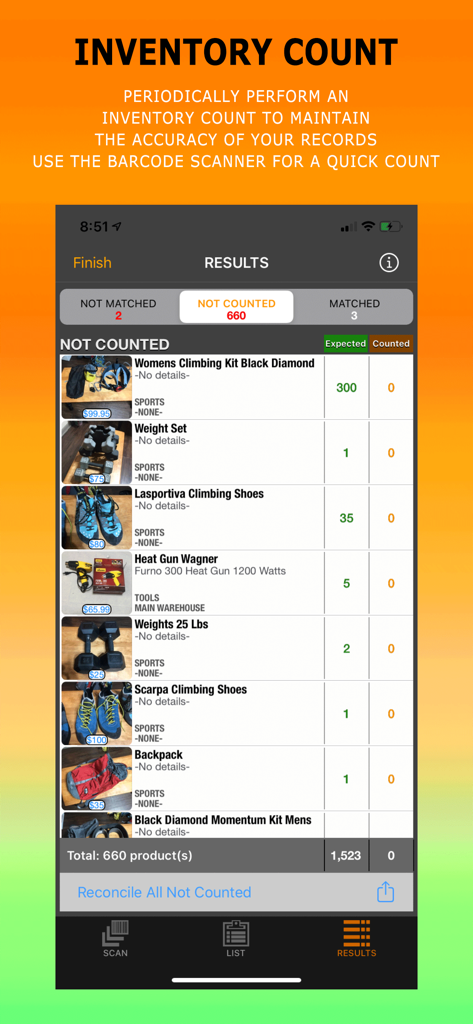
Smarter Inventory - Smarter Inventory App Bildschirm mit Ergebnissen der Inventurzählung mit erwarteten und gezählten Bestandsmengen für verschiedene Geschäftsartikel.
Smarter Inventory App Bildschirm mit Ergebnissen der Inventurzählung mit erwarteten und gezählten Bestandsmengen für verschiedene Geschäftsartikel.

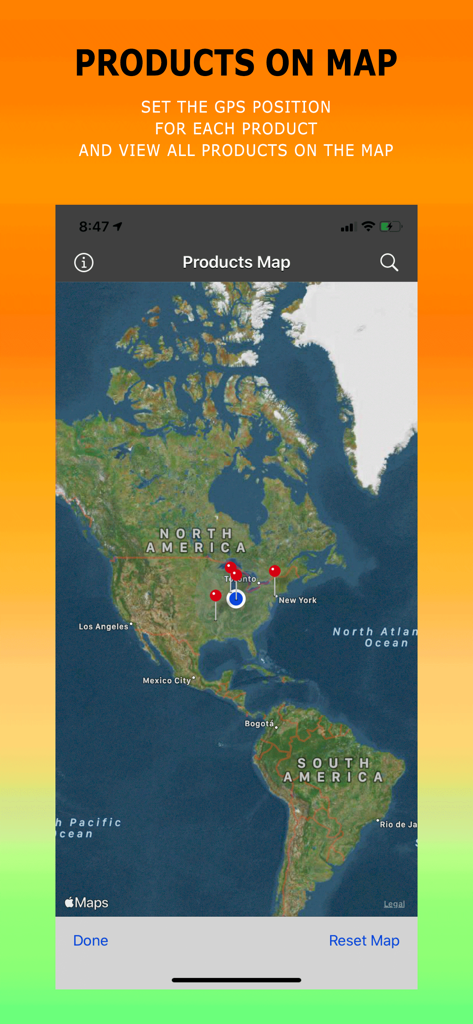
Smarter Inventory - Die Benutzeroberfläche der Smarter Inventory App mit einer Weltkarte und roten Pins, die die GPS-Positionen verschiedener Produkte anzeigen

Die Benutzeroberfläche der Smarter Inventory App mit einer Weltkarte und roten Pins, die die GPS-Positionen verschiedener Produkte anzeigen

Beschreibung

Smarter Inventory is the smarter way to organize and track your products right on your mobile device. Whether you have a small business, a large warehouse full of products, or just want to track your personal assets and belongings, Smarter Inventory provides an extensive list of features with an intuitive layout that meets your inventory needs. How Smarter Inventory can benefit you: 1. Saves you a lot of time in organizing your products 2. Reduces the need for computers and paperwork with the convenience of having access to your inventory system on your mobile device 3. Search, filter and group functions help you quickly find the products in your inventory 4. Effective barcode scanning features 5. Create custom reports for your inventory, and know when products are out of stock 6. Perform an Inventory Count periodically to maintain the accuracy of your records 7. Reduces backorders and overstocking 8. Add unlimited number of products, no restrictions 9. No advertisements that waste your time 10. Use app right away, without the need to register or create any accounts. App Features included in the Standard Version: 1. Classify products by location and category 2. Keep track of Product Name, Details, Quantity, Price, Photo, Barcode, Color, Weight & Units, Size, Notes 3. Find a product using the barcode scan feature, or search by keywords 4. Scan barcodes, QR codes and over 15 other common barcode types to quickly identify and update your inventory 5. Know when you are out of stock by running the Out of Stock Report 6. View products in a list or in a grid 7. Filter and also Group products list by location and category 8. Sort Products by: Name, Price, Quantity, Location, Category, Created and Modified Dates, etc 9. View Inventory metrics 10. Pick a currency symbol for your country and enter default weight units 11. Allows you to duplicate products which saves you a lot of time when adding similar products 12. Create a customizable Inventory Report 13. Generate random barcodes with the tap of a button 14. Filter report by one or more categories and locations and sort data. 15. Share products with your contacts via e-mail, text message, social media, etc… App Features included in the Pro Version: 1. Use a Bluetooth Scanner to scan your products 2. Perform an Inventory Count periodically and reconcile any differences found in your inventory. 3. Customizable Inventory Report with additional Filters and Export type options CSV and PDF (with AirPrint option) 4. Turnover Report that calculates the inventory turnover ratio which shows which products sell fast 5. Generate, Export & Print your own Barcode Labels 6. Track Material and Labor Costs, as well as Isle, Shelf, GPS Position, Supplier Name and Serial Number. It automatically calculates Total Cost & Profit 7. View your products on the global map in relation to each other 8. View historical data of all changes in quantity and price 9. Scan In & Out Goods 10. Additional App Security using FaceID/TouchID or Password 11. Restore and Backup There are 3 subscription options if you choose to upgrade to the Pro Version. All come with a Free Trial, so you can try it before you buy it. Prices vary by location and are subject to change. - Monthly Auto-Renewable subscription for $2.99 per month - 6 Month Auto-Renewable subscription for $14.99 per 6 months - 1 Year Auto-Renewable subscription for $29.99 per year If you choose to purchase the Pro Subscription, payment will be charged to your iTunes Account only at the end of the free trial period. Subscription automatically renews unless auto-renew is turned off at least 24-hours before the end of the current period. Subscriptions can be managed and auto-renewal may be turned off by going to the user's Account Settings after purchase. No cancellation of the current subscription is allowed during an active subscription period. Privacy Policy and Terms Of Use: https://heliobyte.files.wordpress.com/2020/03/privacypolicy.pdf

Download

Herunterladen auf App Store

Diese Seite ist keine offizielle Seite der App oder ihres Entwicklers, sondern eine unabhängige redaktionelle Veröffentlichung, die zu Informations- und Kommentarzwecken erstellt wurde. Sofern nicht ausdrücklich anders angegeben, sind weder die App noch ihr Entwickler mit MWM, Apple, Google Play, dem App-Herausgeber oder dem Entwickler der App verbunden, von ihnen unterstützt, gesponsert, autorisiert oder anderweitig offiziell verbunden, und nichts auf dieser Seite impliziert, dass die App unter Verwendung der Dienste von MWM entwickelt wurde. Alle Marken, Logos, Screenshots und andere Inhalte bleiben Eigentum ihrer jeweiligen Inhaber.








