
Diese Seite ist keine offizielle Seite der App oder ihres Entwicklers, sondern eine unabhängige redaktionelle Veröffentlichung, die zu Informations- und Kommentarzwecken erstellt wurde. Sofern nicht ausdrücklich anders angegeben, sind weder die App noch ihr Entwickler mit MWM, Apple, Google Play, dem App-Herausgeber oder dem Entwickler der App verbunden, von ihnen unterstützt, gesponsert, autorisiert oder anderweitig offiziell verbunden, und nichts auf dieser Seite impliziert, dass die App unter Verwendung der Dienste von MWM entwickelt wurde. Alle Marken, Logos, Screenshots und andere Inhalte bleiben Eigentum ihrer jeweiligen Inhaber.


Smartify - LG TV Remote
Fernbedienungen sind Relikte. Smartify verwandelt Ihr iPhone in die Kommandozentrale für den LG-Fernseher.
Downloads
10M+Bewertung
Bewertungen gesamt
212.3KHerausgeber
Kategorie
UtilitiesSprachen
23Neueste Version
1.38Größe
46.3 MBErstveröffentlichung
27. Mai 2015Eine Bewertung der App-Funktionalitäten aus Sicht eines Software-Analysten zur Zielgruppenansprache.
Analyse der Schlüsselmerkmale von Smartify - LG TV Remote
Erweiterte Texteingabe und Navigation
Dieses Tool ermöglicht Nutzern eine effizientere Texteingabe mittels einer mobilen Tastatur und eine präzisere Navigation durch die Smart-TV-Oberfläche über ein integriertes Touchpad, was die Bedienung erheblich vereinfacht.
Breite Kompatibilität
Die App bietet Unterstützung für eine Vielzahl von LG Smart TVs, einschließlich aller WebOS-Modelle sowie Netcast-Modelle ab dem Baujahr 2012, wodurch eine breite Nutzerbasis abgedeckt wird.
Werbefreies Premium-Erlebnis
Für Premium-Nutzer entfällt die Werbung vollständig, was ein ungestörtes und flüssigeres Nutzungserlebnis der erweiterten Funktionen gewährleistet.
Umfassende Fernbedienungsfunktionen
Es verfügt über eine intuitive Benutzeroberfläche zur Steuerung grundlegender TV-Funktionen sowie erweiterter Bedienelemente wie farbige Tasten und Wiedergabesteuerung.
Einfache Verbindung und Kopplung
Die App ermöglicht eine unkomplizierte Verbindung zwischen dem iPhone und dem LG Smart TV über dasselbe Wi-Fi-Netzwerk, gefolgt von einem einfachen Kopplungsprozess.
Direkter Zugang zu TV-Apps
Dieses Tool bietet direkten Zugriff auf die installierten TV-Anwendungen, was das schnelle Starten von Diensten wie Netflix oder YouTube erleichtert (mit Einschränkungen bei der Tastaturunterstützung).
Häufig gestellte Fragen
Alles, was Sie über wissen müssen Smartify - LG TV Remote
How do I connect Smartify to my LG TV?
Connect your iPhone and LG Smart TV to the same Wi-Fi network. Then, perform a simple pairing routine within the Smartify app to establish control.
Is Smartify compatible with all LG Smart TVs?
No, Smartify supports all WebOS models of LG Smart TV. It also supports Netcast models from 2012 and later for compatibility.
Does Smartify provide a keyboard for text entry?
Yes, Smartify offers a keyboard for text input. The keyboard appears automatically on your mobile device when you activate an input field on your TV screen.
Can I use Smartify's keyboard in Netflix or YouTube?
No, Smartify's keyboard is not supported for services like Netflix and YouTube. These applications have their own integrated keyboards.
What features are included with a Smartify Premium Subscription?
A Smartify Premium Subscription includes unlimited use of the Touchpad, Keyboard, Colored buttons, Playback controls, and TV Apps without advertisements.
How much does a Smartify Premium Subscription cost?
A 1-year Smartify Premium Subscription costs $19.99. This price includes a 7-day free trial period before the subscription begins.
Is Smartify an official LG Electronics application?
No, Smartify is not an official product of LG Electronics. Kraftwerk 9, Inc., the developer, is not an affiliated entity of LG Electronics.
Does Smartify offer a free trial period?
Yes, Smartify offers a 7-day free trial period with its 1-year subscription. Any unused portion of the free trial is forfeited upon subscription purchase.
How can I manage my Smartify subscription?
Users can manage their Smartify subscriptions and turn off auto-renewal by going to their Account Settings after purchase through iTunes.
What happens when my Smartify subscription expires?
If a Smartify subscription expires, the user becomes unsubscribed. The Interaction tab functionality will no longer be available.
Die folgenden Screenshots und die Beschreibung stammen direkt aus dem offiziellen Store-Eintrag der App und sind Eigentum des Entwicklers.
App Store
Screenshots
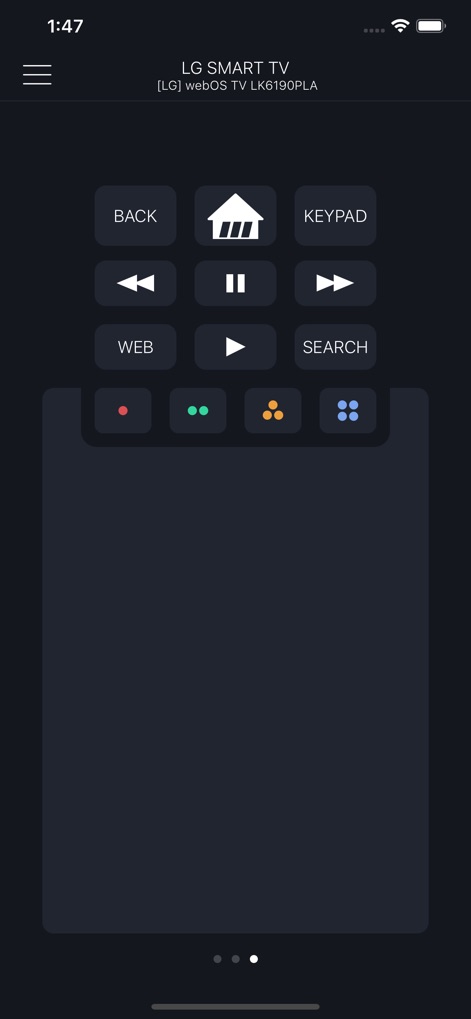
Die App bietet intuitive Mediensteuerung mit Tasten für Wiedergabe und Pause sowie farbige App-Buttons für schnellen Zugriff auf Ihre Lieblingsdienste.
Mediensteuerung und Apps
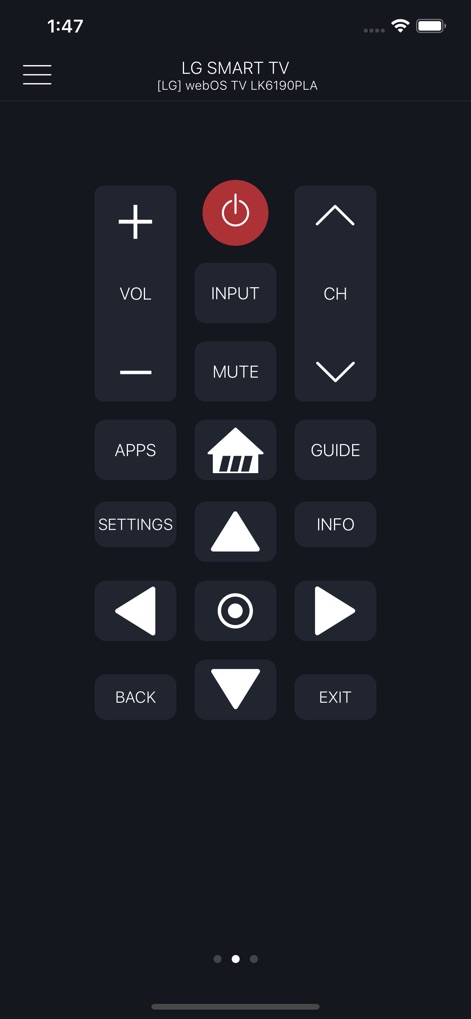
Diese Ansicht präsentiert eine vollständige Sammlung an Steuerelementen, von Standard-Fernbedienungstasten für Lautstärke und Kanal bis hin zu Navigationselementen wie dem Richtungspad und Info-Buttons.
Komplette Fernbedienung
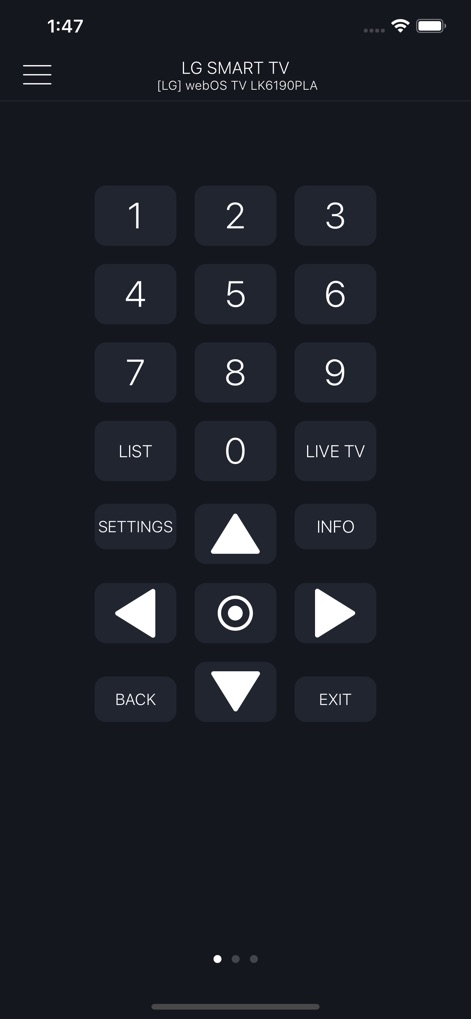
Für präzise Eingaben verfügt die App über ein übersichtliches numerisches Tastenfeld, ergänzt durch direkte Zugriffstasten wie „LIST“ und „LIVE TV“ für sofortige Navigation.
Präzise Zahleneingabe
Beschreibung
Download
Ähnliche Apps
Apps mit ähnlichen Funktionen und Nutzererfahrung

The Roku App (Official)
ROKU INC

TV Remote & Smart TV Control
To Ngoc Mai

Universal TV Remote Control .
Apps Venture Inc.

TV Remote, Universal Remote
Hangzhou Yingshitong Technology Co., Ltd.

TV Remote Control “Universo”
Nemo Apps LLC

TV Remote・Universal Control #1
Mihai Turlea

Remote Smart Tv Universal
clement gasner

Remote TV Control TCL Onn App
CEMAL CAGLAR KIRICI

TV Remote Control Universal AI
Anh Ngo
Diese Seite ist keine offizielle Seite der App oder ihres Entwicklers, sondern eine unabhängige redaktionelle Veröffentlichung, die zu Informations- und Kommentarzwecken erstellt wurde. Sofern nicht ausdrücklich anders angegeben, sind weder die App noch ihr Entwickler mit MWM, Apple, Google Play, dem App-Herausgeber oder dem Entwickler der App verbunden, von ihnen unterstützt, gesponsert, autorisiert oder anderweitig offiziell verbunden, und nichts auf dieser Seite impliziert, dass die App unter Verwendung der Dienste von MWM entwickelt wurde. Alle Marken, Logos, Screenshots und andere Inhalte bleiben Eigentum ihrer jeweiligen Inhaber.