Stagehand: PRO DJ LINK Manager
Herunterladen auf App Store

Diese Seite ist keine offizielle Seite der App oder ihres Entwicklers, sondern eine unabhängige redaktionelle Veröffentlichung, die zu Informations- und Kommentarzwecken erstellt wurde. Sofern nicht ausdrücklich anders angegeben, sind weder die App noch ihr Entwickler mit MWM, Apple, Google Play, dem App-Herausgeber oder dem Entwickler der App verbunden, von ihnen unterstützt, gesponsert, autorisiert oder anderweitig offiziell verbunden, und nichts auf dieser Seite impliziert, dass die App unter Verwendung der Dienste von MWM entwickelt wurde. Alle Marken, Logos, Screenshots und andere Inhalte bleiben Eigentum ihrer jeweiligen Inhaber.

Logo von Stagehand: PRO DJ LINK Manager
Herunterladen auf App Store

Stagehand: PRO DJ LINK Manager

Optimieren Sie Ihren Produktionsablauf mit Fernsteuerung der Hardware, Echtzeit-Statusüberwachung und präziser Lichtsynchronisation für CDJ-3000 und DJM-A9 Setups.

Kennzahlen

Downloads

1K+

Bewertung

1.0/5

Bewertungen gesamt

0

Herausgeber

AlphaTheta Corporation

Kategorie

Entertainment

Sprachen

12

Neueste Version

1.0.4

Größe

8.9 MB

Erstveröffentlichung

17. Apr. 2023
Funktionen

Volle Kontrolle über den Booth, überall im Veranstaltungsort

Die branchenweit erste iPad-Lösung für FOH-Ingenieure und Produktionsteams zur Fernverwaltung, Überwachung und Synchronisation von Pioneer DJ-Hardware über PRO DJ LINK.

Effiziente Fern-Soundchecks

Lösen Sie Tracks aus, verwalten Sie Dienstprogrammeinstellungen und testen Sie die Akustik vom Tanzboden aus. Eliminieren Sie die Zwei-Mann-Regel und halbieren Sie die Einrichtungszeit.

Echtzeit-Zustandsüberwachung

Halten Sie professionellen Abstand zum Booth und überwachen Sie Master-Pegel und Gerätestatus. Erkennen Sie Übersteuerungen und technische Probleme, bevor sie den Auftritt ruinieren.

Die folgenden Screenshots und die Beschreibung stammen direkt aus dem offiziellen Store-Eintrag der App und sind Eigentum des Entwicklers.

App Store

Screenshots
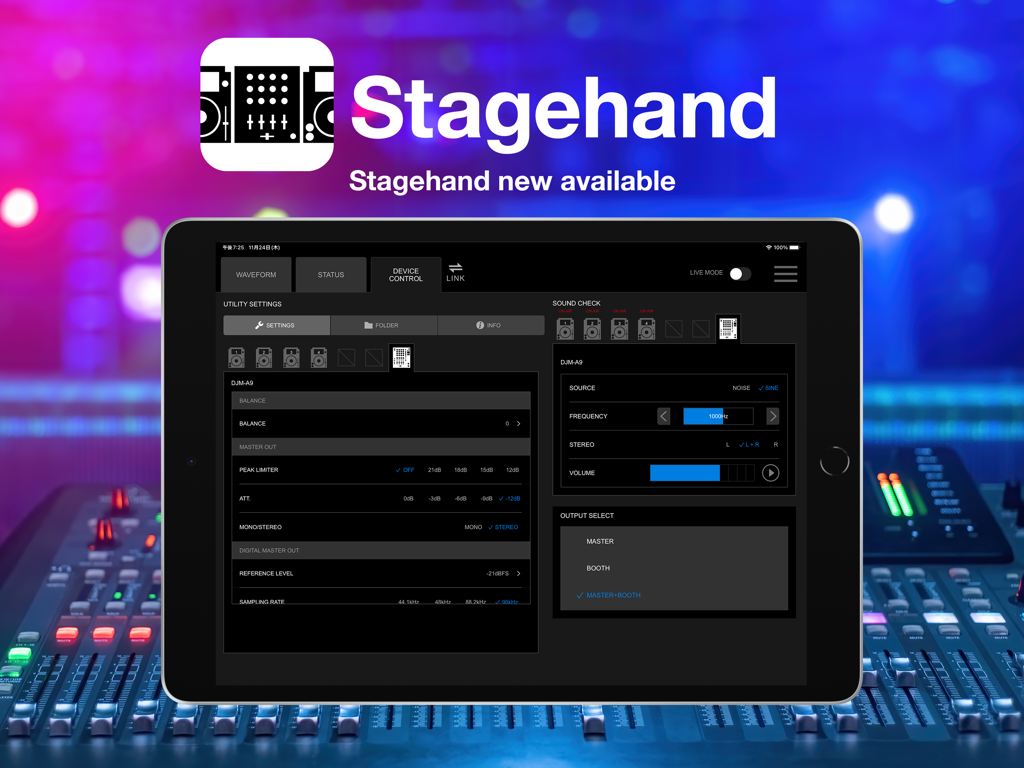
Stagehand: PRO DJ LINK Manager - iPad zeigt die Stagehand PRO DJ LINK Manager-Oberfläche zur Fernsteuerung von DJ-Equipment an
iPad zeigt die Stagehand PRO DJ LINK Manager-Oberfläche zur Fernsteuerung von DJ-Equipment an

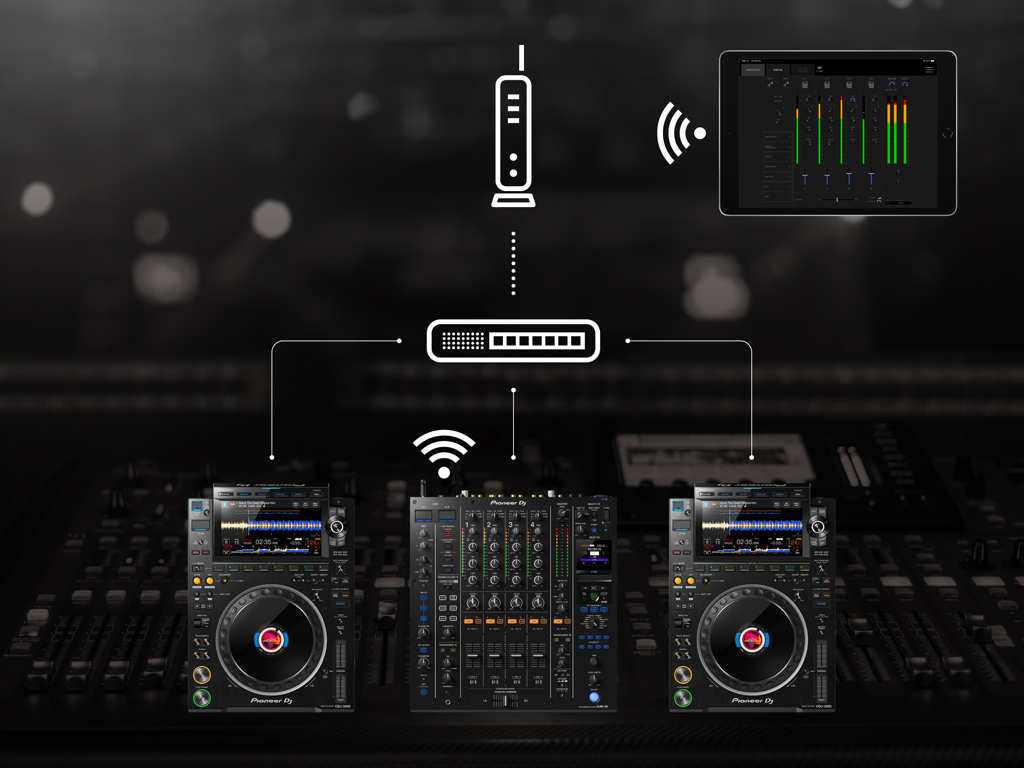
Stagehand: PRO DJ LINK Manager - Ein iPad, das die Stagehand-App verwendet, um einen Pioneer DJ-Mixer und Multiplayer drahtlos über ein Netzwerk zu überwachen und zu steuern
Ein iPad, das die Stagehand-App verwendet, um einen Pioneer DJ-Mixer und Multiplayer drahtlos über ein Netzwerk zu überwachen und zu steuern

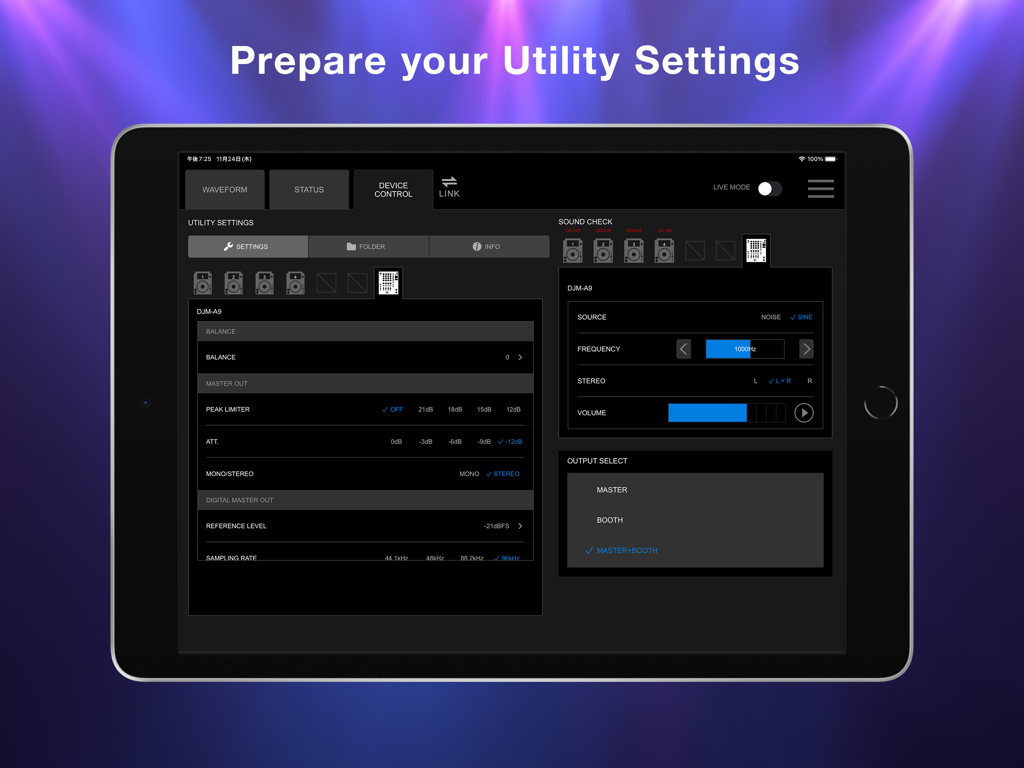
Stagehand: PRO DJ LINK Manager - iPad-Bildschirm mit der Stagehand-App-Oberfläche zur Steuerung von DJM-A9-Mischereinstellungen und Soundcheck-Bedienelementen
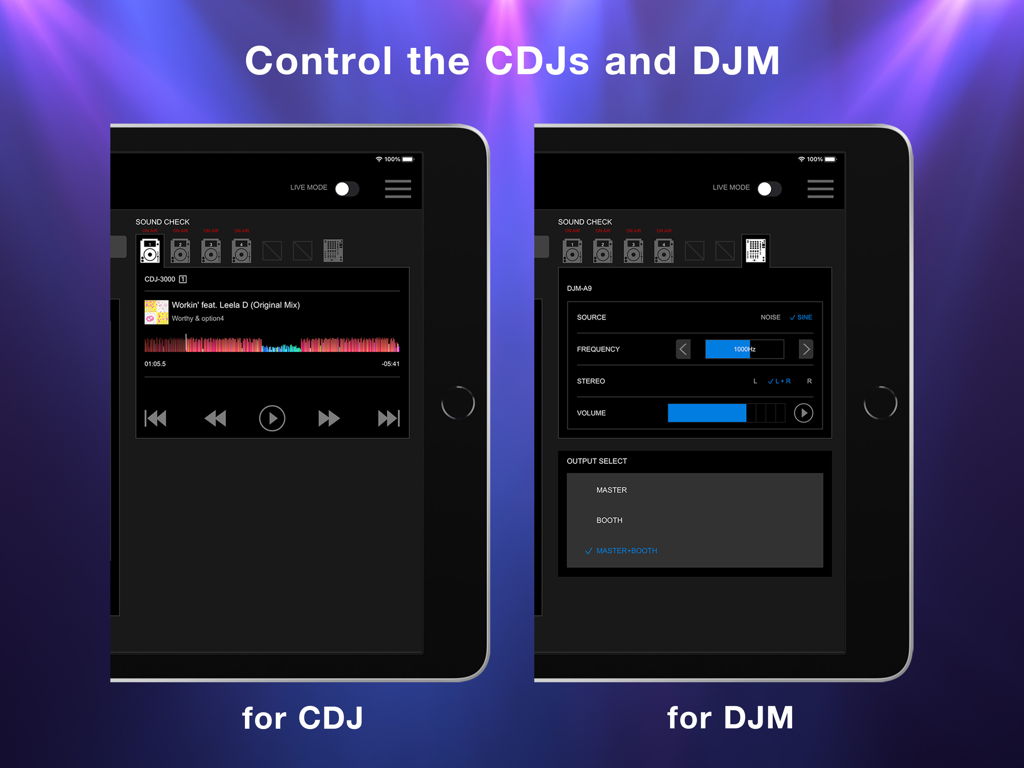
iPad-Bildschirm mit der Stagehand-App-Oberfläche zur Steuerung von DJM-A9-Mischereinstellungen und Soundcheck-Bedienelementen

Stagehand: PRO DJ LINK Manager - iPad-Bildschirm mit der Stagehand-App-Oberfläche zur Fernsteuerung von CDJ-Playern und DJM-Mischern
iPad-Bildschirm mit der Stagehand-App-Oberfläche zur Fernsteuerung von CDJ-Playern und DJM-Mischern

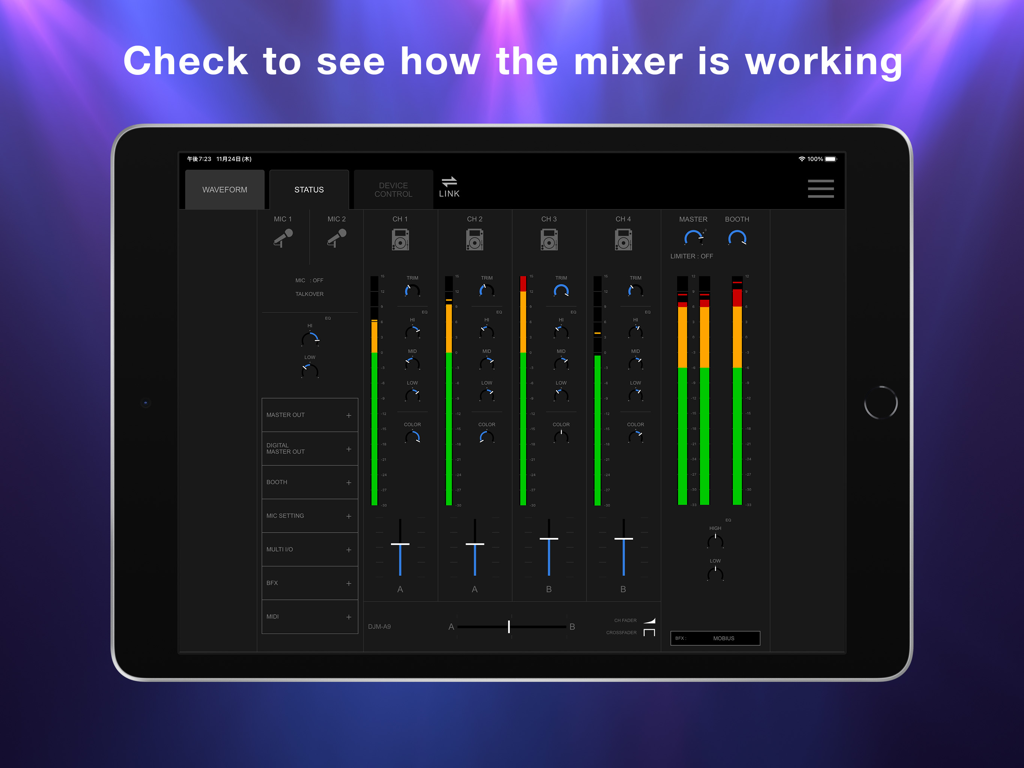
Stagehand: PRO DJ LINK Manager - iPad zeigt den Stagehand-App-Statusbildschirm mit Echtzeit-DJ-Mixer-Kanalpegeln und Faderpositionen an
iPad zeigt den Stagehand-App-Statusbildschirm mit Echtzeit-DJ-Mixer-Kanalpegeln und Faderpositionen an

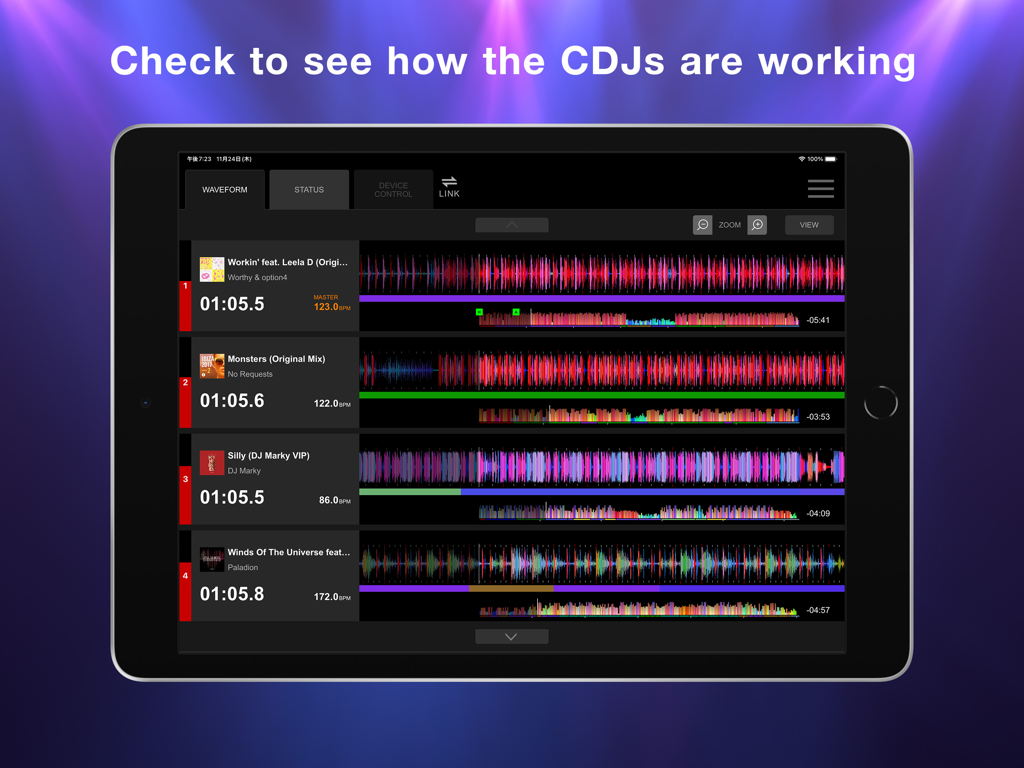
Stagehand: PRO DJ LINK Manager - iPad-Bildschirm mit der Stagehand-App-Wellenformanzeige zur Überwachung mehrerer CDJ-Einheiten.

iPad-Bildschirm mit der Stagehand-App-Wellenformanzeige zur Überwachung mehrerer CDJ-Einheiten.

Beschreibung

This indispensable new app, the first of its kind, enables you to keep an eye on a host of information and remotely adjust settings on DJM-A9 and CDJ-3000, CDJ-3000X units in a PRO DJ LINK network, all from your iPad. By managing the mixer and multi players via Stagehand, you can run smoother shows and produce more exciting lighting in sync with sound. Before your event begins, you can use Stagehand to remotely check and change the Utility settings of the DJM-A9 and CDJ-3000, CDJ-3000X units for quicker setup. Stagehand is also useful once a gig is underway as you can monitor the DJ’s use of the mixer and players without needing to enter the booth. The app enables you to keep an eye on volume levels and settings, and use beatgrid, BPM, and time information to help create effective lighting displays. There’s a Live mode too, which disables many of the app’s features so you can’t accidentally stop the music during the show. You can try Stagehand free for 60 days. Download the app from App Store to use it with an iPad. To use Stagehand, update the mixer and player's firmware to the latest version via our support page [https://www.pioneerdj.com/support/software/]. A device with the A12 Bionic chip or later is recommended. [Key Features] - Device Control If you’re the designated Admin user of the system, you can easily check and change the Utility settings of the DJM-A9 and CDJ-3000, CDJ-3000X units in the PRO DJ LINK network via the Device Control screen. You can create multiple settings files in advance, giving you the option to apply multiple changes in one go if you need to, and you can share them in numerous ways, including via AirDrop or email to make event preparations run smoother. Speed up sound checks with remote control of the CDJ-3000, CDJ-3000X. There’s no need to go back and forth between the booth and the dancefloor; simply use Sound Check in Stagehand to play, stop, fast-forward, and rewind tracks. You can also control sine waves and noise from the DJM-A9 to make sure the sound system is set up correctly for the room’s acoustics. When the gig starts, turn on Live mode to disable Device Control functions so you can’t accidentally interrupt the music in the middle of a DJ’s set. - Status Keep an eye on a host of information without needing to look over the DJ’s shoulder – or even enter the booth. The Status screen gives you a remote view of almost everything happening on the DJM-A9, including the status of Utility settings, enabling you to quickly spot problems such as excessive volume from the trim and master levels so you can troubleshoot effectively. You can also check the playing information on the CDJ-3000, CDJ-3000X units from here. - Waveform Remotely view various elements of track information from your iPad to help you create exciting lighting sequences in sync with sound. From the Waveform screen, you can view not only the waveforms of tracks playing on CDJ-3000, CDJ-3000X units in real time but also the beatgrid, BPM, and time information. DJs have a choice of public and private settings in their own rekordbox account for sharing most of the music information, and settings made in advance will be reflected in Stagehand.

Download

Herunterladen auf App Store

Diese Seite ist keine offizielle Seite der App oder ihres Entwicklers, sondern eine unabhängige redaktionelle Veröffentlichung, die zu Informations- und Kommentarzwecken erstellt wurde. Sofern nicht ausdrücklich anders angegeben, sind weder die App noch ihr Entwickler mit MWM, Apple, Google Play, dem App-Herausgeber oder dem Entwickler der App verbunden, von ihnen unterstützt, gesponsert, autorisiert oder anderweitig offiziell verbunden, und nichts auf dieser Seite impliziert, dass die App unter Verwendung der Dienste von MWM entwickelt wurde. Alle Marken, Logos, Screenshots und andere Inhalte bleiben Eigentum ihrer jeweiligen Inhaber.








