
Diese Seite ist keine offizielle Seite der App oder ihres Entwicklers, sondern eine unabhängige redaktionelle Veröffentlichung, die zu Informations- und Kommentarzwecken erstellt wurde. Sofern nicht ausdrücklich anders angegeben, sind weder die App noch ihr Entwickler mit MWM, Apple, Google Play, dem App-Herausgeber oder dem Entwickler der App verbunden, von ihnen unterstützt, gesponsert, autorisiert oder anderweitig offiziell verbunden, und nichts auf dieser Seite impliziert, dass die App unter Verwendung der Dienste von MWM entwickelt wurde. Alle Marken, Logos, Screenshots und andere Inhalte bleiben Eigentum ihrer jeweiligen Inhaber.


Status Saver: Download Status
Nie wieder Freunde anbetteln: Diese App macht Sie zum Meister der flüchtigen Momente. MWMs Kreation konzentriert sich darauf, Ihnen die Kontrolle über WA-Status zu geben. Sie bietet einen direkten Zugriff auf geteilte Bilder und Videos, die sonst nach 24 Stunden verschwinden würden. Nutzer finden hier ein pragmatisches Werkzeug, das genau das tut, was es verspricht: Status speichern. Ohne Schnickschnack. Und ganz ohne Bittgesuche. Die App erweist sich als diskreter Helfer für alle, die digitale Inhalte dauerhaft sichern wollen.
Downloads
1M+Bewertung
Bewertungen gesamt
56.1KHerausgeber
Kategorie
UtilitiesSprachen
9Neueste Version
2.10Größe
80.2 MBErstveröffentlichung
1. Sept. 2024Eine Funktionsanalyse für WhatsApp- und Social-Media-Nutzer
Analytische Bewertung der App 'Status Saver: Download Status'
Lokale Datenspeicherung und Datenschutz
Es stellt sicher, dass alle gespeicherten Statusmedien lokal auf dem Gerät des Nutzers verbleiben, ohne Zugriff auf das WhatsApp-Konto, was maximale Privatsphäre und Kontrolle über persönliche Daten bietet.
Video Splitter für Status-Updates
Dieses Tool ermöglicht es Nutzern, lange Videos direkt in der App in kürzere Segmente zu schneiden, um sie optimal für Status-Updates oder andere soziale Medien zu formatieren, was den Workflow erheblich vereinfacht.
Ein-Klick-Status-Speicherung
Die App bietet eine intuitive Funktion, mit der Nutzer WhatsApp-Statusbilder und -Videos mit nur einem einzigen Klick speichern können, was den Prozess extrem schnell und benutzerfreundlich gestaltet.
Multi-Status-Speicherung
Es ermöglicht Nutzern, mehrere Bilder und Videos von Status-Updates gleichzeitig zu speichern, was die Effizienz steigert und Zeit spart, insbesondere wenn viele Inhalte archiviert werden sollen.
Schnelles Speichern und Reposten
Die App erleichtert nicht nur das Speichern von Statusinhalten, sondern auch deren sofortiges Reposten auf WhatsApp oder anderen Plattformen, wodurch Nutzer beliebte Inhalte schnell weiterverbreiten können.
Kostenlose Kernfunktionen
Die App bietet die grundlegende Funktion zum Speichern von Status-Videos und -Bildern kostenlos an, was einen niedrigschwelligen Zugang zu den Hauptvorteilen der Anwendung ermöglicht.
Unterstützung für Bilder und Videos
Dieses Tool gewährleistet eine umfassende Abdeckung, indem es das Speichern von sowohl Bild- als auch Video-Status-Updates ermöglicht, um keine Art von ephemeralem Inhalt auszuschließen.
Integrierter Offline-Video-Player
Es ermöglicht Nutzern, gespeicherte Videos direkt in der App anzusehen, ohne eine Internetverbindung oder eine externe Anwendung zu benötigen, was den Komfort erhöht.
Integrierte Offline-Galerie
Die App bietet eine eigene Galerie zur Offline-Ansicht aller gespeicherten Statusbilder, wodurch eine übersichtliche Verwaltung und einfacher Zugriff auf die Inhalte gewährleistet wird.
Kompatibilität mit WA & WA Business
Die App unterstützt sowohl persönliche WhatsApp-Konten als auch WhatsApp Business, was ihre Nützlichkeit für eine breitere Nutzerbasis, einschließlich professioneller Anwender, erweitert.
Häufig gestellte Fragen
Alles, was Sie über wissen müssen Status Saver: Download Status
What is Status Saver: Download Status?
Status Saver: Download Status is an app that allows users to easily save WhatsApp and WhatsApp Business image and video statuses with one click. It also provides features for reposting, sharing, and offline viewing.
How does Status Saver: Download Status work?
The Status Saver app works by requiring users to scan a QR code to link their WhatsApp Web. After watching a desired status, users click a save button. The status is then stored in the app's Collection.
Can Status Saver: Download Status save videos?
Yes, Status Saver: Download Status can save video statuses. The app includes a built-in video player for offline playback and stores videos in the "Collection" tab.
Can Status Saver: Download Status save images?
Yes, Status Saver: Download Status can save image statuses. The app stores images in the "Collection" tab and includes a built-in gallery for offline viewing.
Is Status Saver: Download Status free to use?
No, the Status Saver app is not entirely free. It offers weekly, yearly, and lifetime subscription options for its features. Payment occurs upon purchase confirmation.
Does Status Saver: Download Status access my WhatsApp account?
No, Status Saver: Download Status does not access your WhatsApp account. All user data is stored locally on the device, providing privacy and control over your account.
What is the price of Status Saver: Download Status?
Status Saver: Download Status offers a weekly subscription for $9.99, a yearly subscription for $29.99, and a lifetime in-app purchase for $49.99.
Does Status Saver: Download Status include a video splitter?
Yes, the Status Saver app includes a Video Splitter feature. This allows users to split long videos into perfectly sized clips for status updates or social media posts without using multiple apps.
How do I manage my subscription for Status Saver: Download Status?
Users manage Status Saver: Download Status subscriptions and disable automatic renewal by going to their user account settings after purchasing.
Is Status Saver: Download Status affiliated with WhatsApp?
No, Status Saver: Download Status is not endorsed by or affiliated with WhatsApp Inc. The app's disclaimer states it is a separate entity.
Die folgenden Screenshots und die Beschreibung stammen direkt aus dem offiziellen Store-Eintrag der App und sind Eigentum des Entwicklers.
App Store
Screenshots
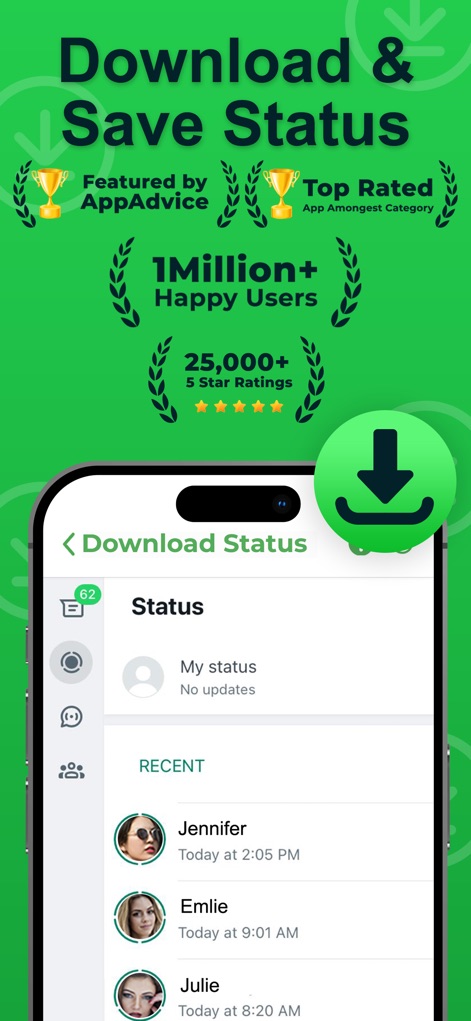
Dieser Screenshot zeigt die intuitive Oberfläche zum Herunterladen von Statusmeldungen mit einer klaren Liste aktueller Status und hebt zugleich die Auszeichnungen der App als 'Top Rated' mit über '1 Million+ Happy Users' hervor.
Statusübersicht & Vorteile

Nutzer können Statusmeldungen mühelos speichern, was durch die Vollbildansicht des Statusinhalts und den prominenten Button 'Status Unduhan' für den sofortigen Download visualisiert wird.
Einfaches Speichern

Die 'Collection'-Ansicht präsentiert eine übersichtliche Galerie aller gesicherten Statusmeldungen, kategorisiert in 'Images' und 'Videos', und zeigt eine Vielzahl von Thumbnails, die sowohl Bilder als auch Videos mit Play-Symbolen umfassen.
Gespeicherte Medien verwalten
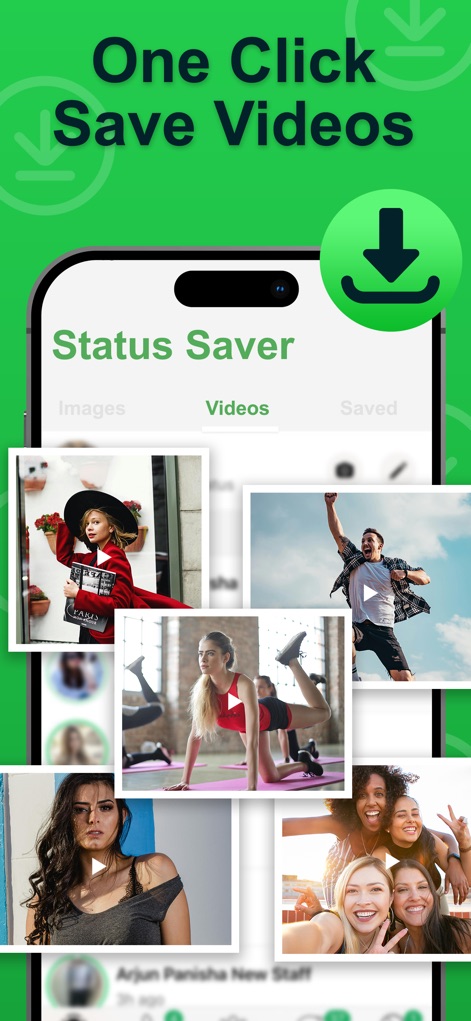
Die App ermöglicht das Speichern von Videos mit nur einem Klick, visualisiert durch den aktiven 'Videos'-Tab und eine ansprechende Collage von Video-Thumbnails, die sofort abspielbereit sind.
Videos aufbewahren
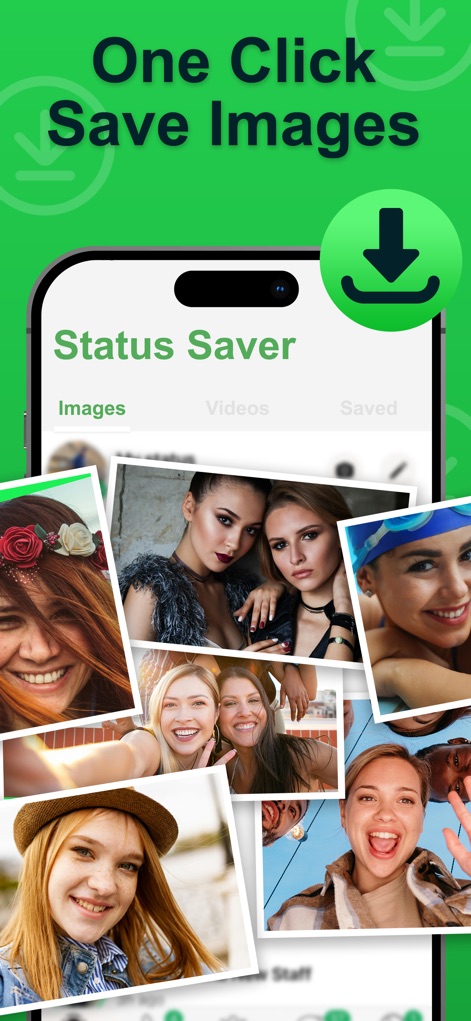
Nutzer können Bild-Statusmeldungen mühelos sichern, was durch den aktiven 'Images'-Tab und eine lebendige Collage aus verschiedenen Foto-Thumbnails, die zur direkten Ansicht bereitstehen, veranschaulicht wird.
Bilder sofort speichern
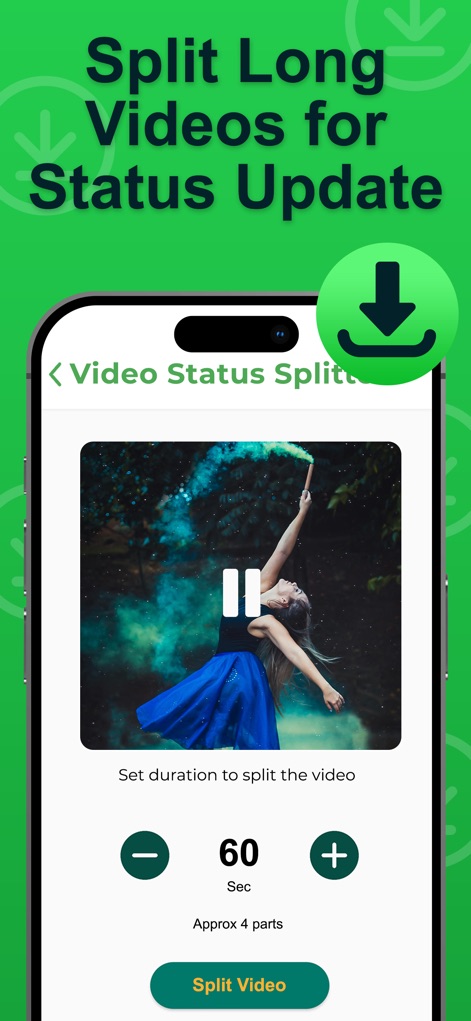
Der 'Video Status Splitter' vereinfacht das Teilen langer Videos für Status-Updates, erkennbar am integrierten Videoplayer mit Pause-Funktion und der präzisen Einstellung der Segmentdauer über Plus- und Minus-Buttons.
Videos intelligent teilen
Beschreibung
Download
Ähnliche Apps
Apps mit ähnlichen Funktionen und Nutzererfahrung

Status Video Saver Reposter
Ketan Kathiriya

Status Saver and Save Story
Ahmed Bastam

Status Saver : Videos
Natalie Stirner

Status Saver: Photo & Video
Kubra Gurler

Status Saver - Videos Saver
NAITIK, RAMESHBHAI VIRANI

Story saver : Video saver
Erasoft

Status Download For Whatsapp +
Pramod Tapaniya
Diese Seite ist keine offizielle Seite der App oder ihres Entwicklers, sondern eine unabhängige redaktionelle Veröffentlichung, die zu Informations- und Kommentarzwecken erstellt wurde. Sofern nicht ausdrücklich anders angegeben, sind weder die App noch ihr Entwickler mit MWM, Apple, Google Play, dem App-Herausgeber oder dem Entwickler der App verbunden, von ihnen unterstützt, gesponsert, autorisiert oder anderweitig offiziell verbunden, und nichts auf dieser Seite impliziert, dass die App unter Verwendung der Dienste von MWM entwickelt wurde. Alle Marken, Logos, Screenshots und andere Inhalte bleiben Eigentum ihrer jeweiligen Inhaber.