TapMark: One-Tap Word Marking
Herunterladen auf App Store

Diese Seite ist keine offizielle Seite der App oder ihres Entwicklers, sondern eine unabhängige redaktionelle Veröffentlichung, die zu Informations- und Kommentarzwecken erstellt wurde. Sofern nicht ausdrücklich anders angegeben, sind weder die App noch ihr Entwickler mit MWM, Apple, Google Play, dem App-Herausgeber oder dem Entwickler der App verbunden, von ihnen unterstützt, gesponsert, autorisiert oder anderweitig offiziell verbunden, und nichts auf dieser Seite impliziert, dass die App unter Verwendung der Dienste von MWM entwickelt wurde. Alle Marken, Logos, Screenshots und andere Inhalte bleiben Eigentum ihrer jeweiligen Inhaber.


Logo von TapMark: One-Tap Word Marking
Herunterladen auf App Store

TapMark: One-Tap Word Marking

Der minimalistische Reader für das KI-Zeitalter. Markieren Sie unbekannte Wörter mit einem einzigen Tippen und exportieren Sie sie dann direkt an Ihre bevorzugte KI für sofortige, kontextbezogene Erklärungen, ohne Wörterbuch-Müdigkeit.

Kennzahlen

Downloads

0

Bewertung

1.0/5

Bewertungen gesamt

0

Herausgeber

鹏 王

Kategorie

Education

Sprachen

25

Neueste Version

1.0.1

Größe

34.6 MB

Erstveröffentlichung

25. Juli 2024
Funktionen

Meistern Sie Originaltexte ohne Reibungsverluste

Bleiben Sie in Ihrem Flow-Zustand. TapMark überbrückt die Lücke zwischen dem Lesen von Originalinhalten und der Nutzung von generativer KI für personalisierte Vokabelmeisterung.

Kontextmarkierung mit einem Fingertipp

Heben Sie unbekannte Wörter mit einem einfachen Klick hervor. Behalten Sie Ihre Lesedynamik bei, während die App Begriffe automatisch für eine präzise KI-Analyse später klammert.

KI-freundlicher Workflow

Exportieren Sie markierte Passagen nahtlos mit benutzerdefinierten Prompts an ChatGPT oder Claude. Erhalten Sie Definitionen, die auf den spezifischen Kontext Ihres Artikels zugeschnitten sind.

Die folgenden Screenshots und die Beschreibung stammen direkt aus dem offiziellen Store-Eintrag der App und sind Eigentum des Entwicklers.

App Store

Screenshots
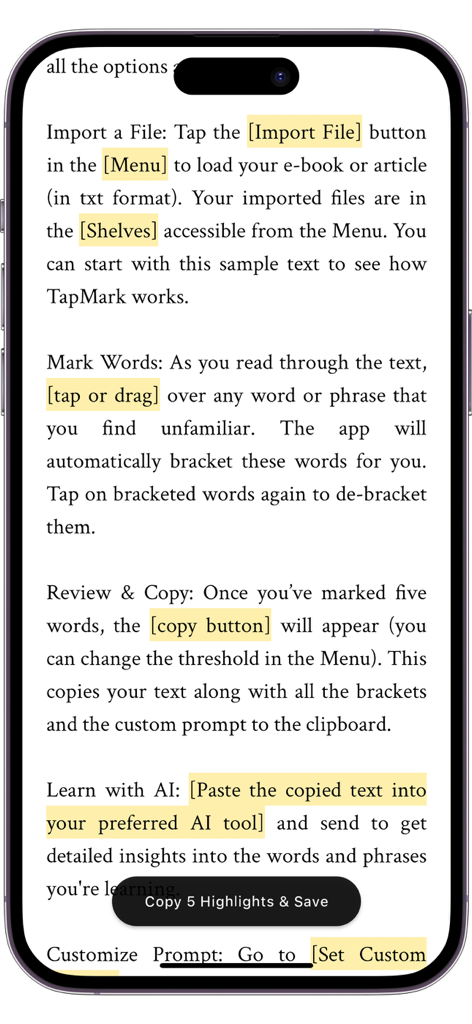
TapMark: One-Tap Word Marking - Ein Smartphone-Bildschirm, der das Tutorial der TapMark-App mit Text und hervorgehobenen Wörtern zum Sprachenlernen anzeigt.
Ein Smartphone-Bildschirm, der das Tutorial der TapMark-App mit Text und hervorgehobenen Wörtern zum Sprachenlernen anzeigt.

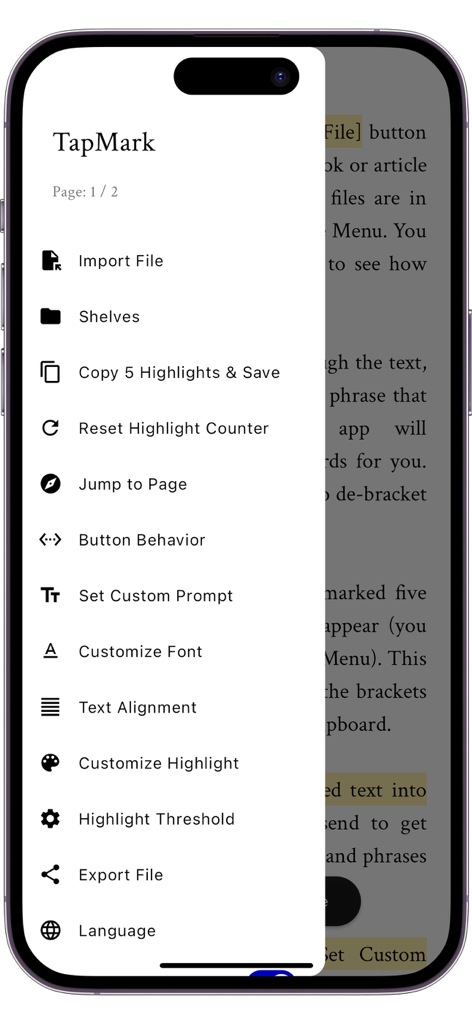
TapMark: One-Tap Word Marking - Das Seitenmenü der TapMark-App mit Funktionen wie DateImport und benutzerdefinierten KI-Prompts
Das Seitenmenü der TapMark-App mit Funktionen wie DateImport und benutzerdefinierten KI-Prompts

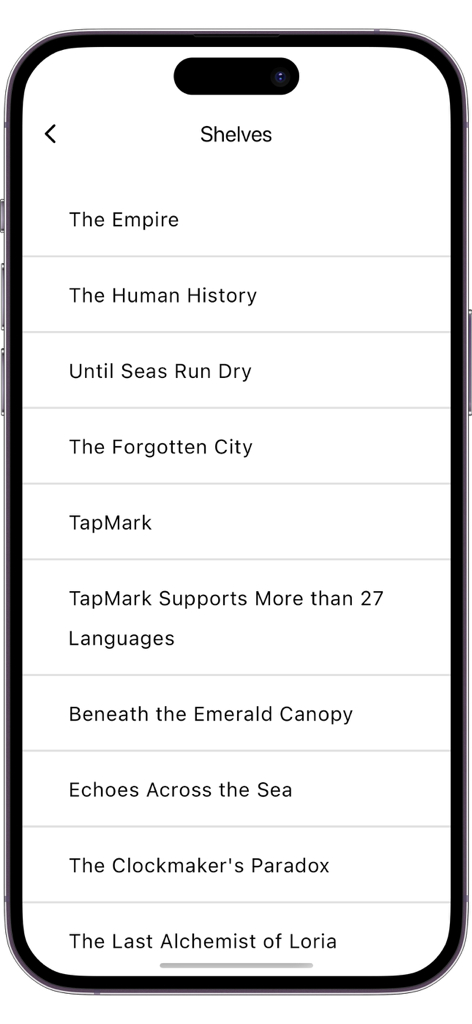
TapMark: One-Tap Word Marking - Eine minimalistische Liste importierter TXT-Dateien und Bücher in der TapMark-App-Oberfläche

Eine minimalistische Liste importierter TXT-Dateien und Bücher in der TapMark-App-Oberfläche

Beschreibung

TapMark: Easy Foreign Language Reading with One-Click Word Marking Introduction TapMark is an innovative language learning tool designed for learners who want to improve their foreign language skills through reading original texts. This app makes learning new vocabulary from texts smooth and efficient. With just a click or a drag, you can mark unfamiliar words or phrases. The app automatically brackets the marked text and offers a one-click copy function, allowing you to paste the content into any generative AI platform for precise explanations and detailed descriptions. Main Features - Import TXT Files: Directly import your e-books or articles. - Click to Mark Words: Highlight and bracket unfamiliar words with a touch. - One-Click Copy: After accumulating a number of marks, easily copy the complete paragraph with marked words and preset prompts to the clipboard. - Simplified AI Queries: The copied text is ready to be used for requesting AI explanations, no manual sorting needed. - Extensive Language Support: English, Chinese, Arabic, Spanish, French, German, Bengali, Japanese, Thai, Vietnamese, Hindi, Russian, Italian, Indonesian, Polish, Korean, Portuguese, Dutch, Swedish, Turkish, Hebrew, Pashto, Persian, Urdu, and more. - Elegant Reading Interface: No distractions, adjustable fonts, highlight colors and more. Why Choose TapMark? Traditional dictionary lookup methods often disrupt reading flow, requiring guesses among multiple meanings of a word, leading to a fragmented and strenuous experience. TapMark aims to change this by allowing you to mark unfamiliar words directly during reading. These marked words are bracketed, and after accumulating enough, you can copy the text with contextual information and preset prompts, and send it directly to a third-party AI for precise explanations. This innovative reading method not only improves learning efficiency but also enhances the reading experience by avoiding the interruptions and friction typically associated with language learning through reading, eliminating the need to constantly refer to a dictionary or switch contexts. TapMark streamlines the learning-through-reading process, making it straightforward, linear, and coherent, helping maintain enthusiasm and motivation for learning, turning foreign language learning into a pleasurable and painless experience. Recommended Reading Workflow 1. Import the book or article of interest (in TXT format). 2. Open the AI webpage in your browser or AI app, ready for use. 3. Read in TapMark, marking unfamiliar words with a click or drag gesture, and continue until enough marks accumulate. 4. Copy the text with one click and paste it into the AI dialogue page to get detailed and accurate explanations of the words. 5. Read the AI responses to understand the meanings of the words (and ask follow-up questions if needed). 6. Continue reading and marking in TapMark, repeating the steps above to gradually expand your vocabulary. TapMark is dedicated to making reading foreign language texts a smooth and enjoyable learning experience, effectively expanding your vocabulary without the interruptions of dictionary lookups. Try TapMark and enjoy the ease of reading foreign languages! Note TapMark is dedicated to streamlining the reading and marking process and does not include built-in AI capabilities. You can utilize the app’s customizable prompts in conjunction with various generative AI platforms available out there to obtain explanations of the words.

Download

Herunterladen auf App Store

Diese Seite ist keine offizielle Seite der App oder ihres Entwicklers, sondern eine unabhängige redaktionelle Veröffentlichung, die zu Informations- und Kommentarzwecken erstellt wurde. Sofern nicht ausdrücklich anders angegeben, sind weder die App noch ihr Entwickler mit MWM, Apple, Google Play, dem App-Herausgeber oder dem Entwickler der App verbunden, von ihnen unterstützt, gesponsert, autorisiert oder anderweitig offiziell verbunden, und nichts auf dieser Seite impliziert, dass die App unter Verwendung der Dienste von MWM entwickelt wurde. Alle Marken, Logos, Screenshots und andere Inhalte bleiben Eigentum ihrer jeweiligen Inhaber.








