V1Driver
V1Driver
Herunterladen auf App Store

Diese Seite ist keine offizielle Seite der App oder ihres Entwicklers, sondern eine unabhängige redaktionelle Veröffentlichung, die zu Informations- und Kommentarzwecken erstellt wurde. Sofern nicht ausdrücklich anders angegeben, sind weder die App noch ihr Entwickler mit MWM, Apple, Google Play, dem App-Herausgeber oder dem Entwickler der App verbunden, von ihnen unterstützt, gesponsert, autorisiert oder anderweitig offiziell verbunden, und nichts auf dieser Seite impliziert, dass die App unter Verwendung der Dienste von MWM entwickelt wurde. Alle Marken, Logos, Screenshots und andere Inhalte bleiben Eigentum ihrer jeweiligen Inhaber.

Logo von V1Driver
Herunterladen auf App Store

V1Driver

Beseitigen Sie die Ermüdung durch Fehlalarme mit automatisierten GPS-basierten Sperren und intelligentem Stummschalten. Modernisieren Sie Ihr Valentine One, Uniden oder Radenso mit 2D-Bogey-Mapping und fortschrittlicher Frequenzverfolgung für eine ruhigere, intelligentere Fahrt.

Kennzahlen

Downloads

12K+

Bewertung

4.7/5

Bewertungen gesamt

600

Herausgeber

George Mills

Kategorie

Utilities

Sprachen

1

Neueste Version

3.0.10

Größe

22.9 MB

Erstveröffentlichung

19. Mai 2016
Funktionen

Präzisionssteuerung für Ihren Radardetektor

Verwandeln Sie Ihre Premium-Hardware mit datengesteuerter Automatisierung, fortschrittlicher Filterung und einer modernen grafischen Benutzeroberfläche in einen intelligenten Fahrassistenten.

Intelligente GPS-Sperren

Eliminieren Sie die Ermüdung durch Fehlalarme, indem Sie stationäre Signale wie automatische Türen durch langfristige Frequenz- und Standortverfolgung automatisch stummschalten.

Live 2D-Bedrohungskartierung

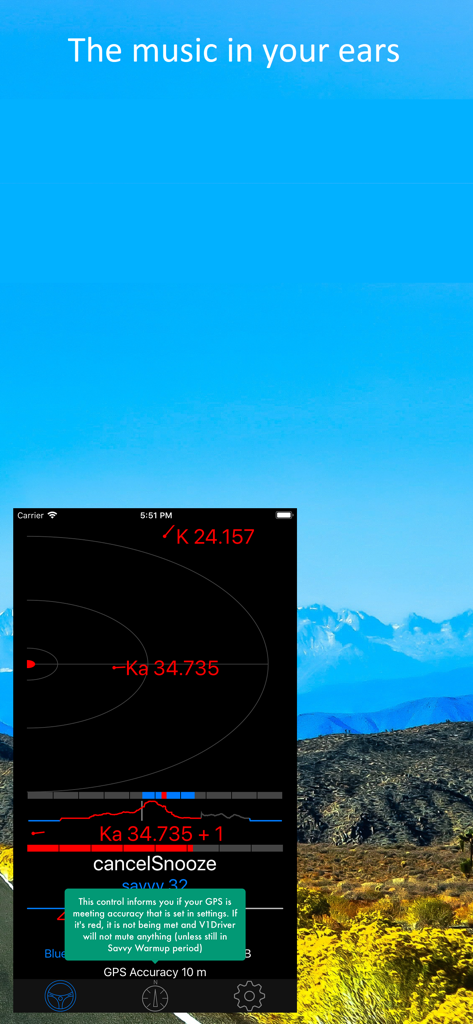
Visualisieren Sie Bogeys auf einer dynamischen 2D-Karte für überlegene Situationswahrnehmung, damit Sie relative Positionen genauer verfolgen können als mit einfachen Pfeilen.

Die folgenden Screenshots und die Beschreibung stammen direkt aus dem offiziellen Store-Eintrag der App und sind Eigentum des Entwicklers.

App Store

Screenshots
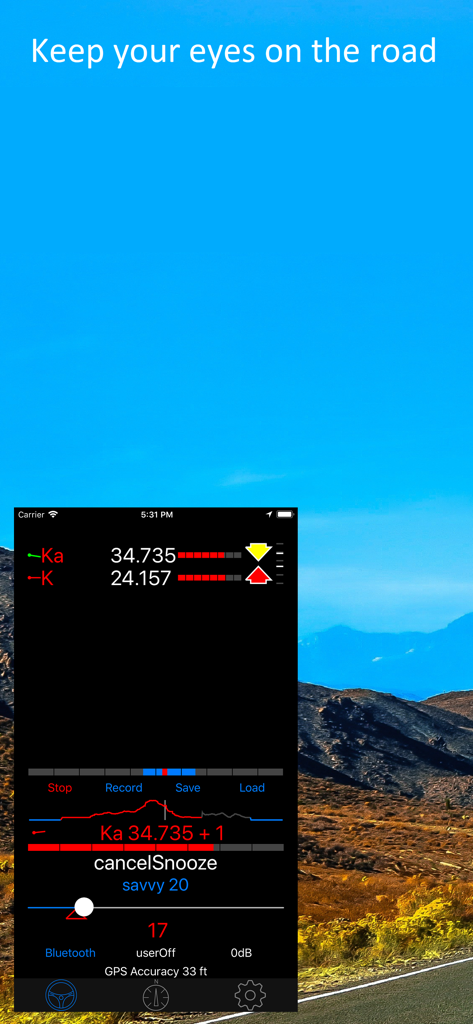
V1Driver - V1Driver App Screenshot mit Radarfrequenzen und Signalstärke auf einem malerischen Straßenhintergrund
V1Driver App Screenshot mit Radarfrequenzen und Signalstärke auf einem malerischen Straßenhintergrund

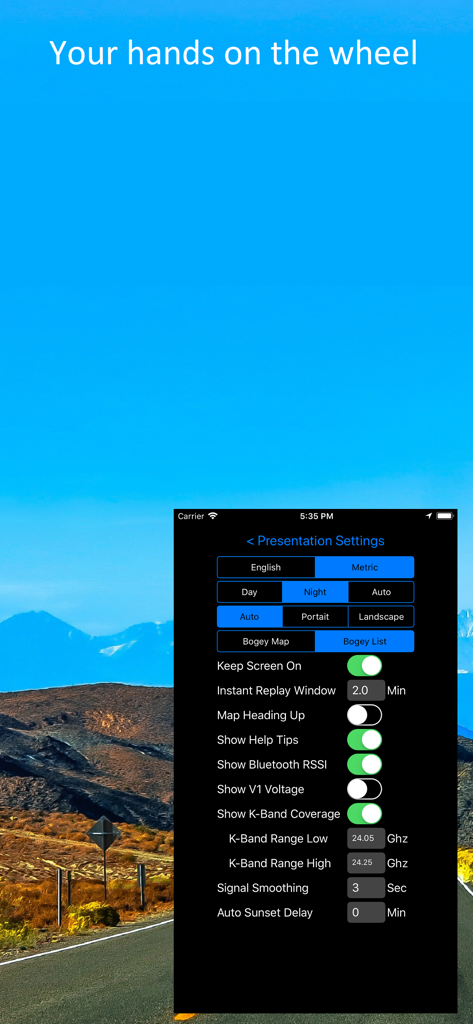
V1Driver - V1Driver App Präsentationseinstellungen-Bildschirm mit Anpassungsoptionen für Einheiten und Radardetektor-Frequenzbänder.
V1Driver App Präsentationseinstellungen-Bildschirm mit Anpassungsoptionen für Einheiten und Radardetektor-Frequenzbänder.

V1Driver - V1Driver App-Oberfläche, die Echtzeit-Radarsignalverfolgung und GPS-Genauigkeitswarnungen anzeigt

V1Driver App-Oberfläche, die Echtzeit-Radarsignalverfolgung und GPS-Genauigkeitswarnungen anzeigt
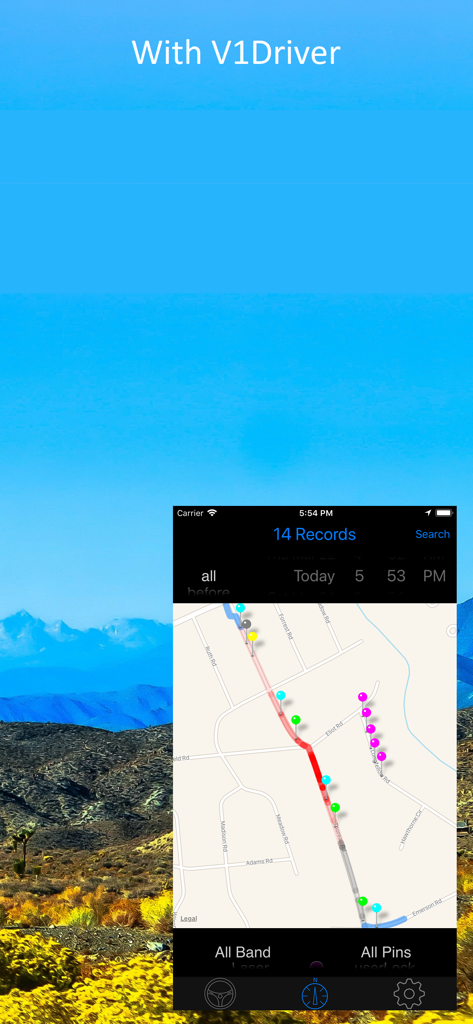
V1Driver - V1Driver App-Oberfläche, die Radarsignalaufzeichnungen auf einer GPS-Karte anzeigt

V1Driver App-Oberfläche, die Radarsignalaufzeichnungen auf einer GPS-Karte anzeigt

Beschreibung

V1Driver is designed to add intelligence to your Radar Detector so you can enjoy your Drive. V1Driver now supports the following Radar Detectors (you must have at least one) Valentine One Gen 2 Valentine One Gen 1 (BLE Dongle Only) Uniden R8,R4 (R9 coming soon) Radenso DS1 It adds 3 forms of automatic muting (all selectable by Band): 1) By Speed (Savvy Emulation), if you are under the specified speed it will keep the Radar Detector muted. 2) By Time, it will AutoMute (or AutoSnooze) after a specified time. AutoSnooze tracks Blind Spot Monitor frequency 3) By GPS Location, by long term frequency tracking. This tracks hits of the same frequency in the same location spread over several days before considering it for lockout. If a signal later becomes absent it will remove the lock. V1Driver takes the famous V1 "Arrows" to a new level by displaying the bogeys on a 2 dimensional map. So you can track relative position more accurately before waiting for the arrows to "flip" direction. It has extensive audible options. Including Text-To-Speech of Band and Frequency. Audio can optionally use Hands Free Protocol (a phone call) on your car or motor cycle. This app is compatible with all iPhones and iPads that support iOS 12.0 or greater that include GPS. It will work in any orientation. An active cellular connection is not required. For viewing the map or backing up to the iCloud you will need a Data connection, but that is not required for day to day operation. iPads that do not have Cellular Chips have no GPS chip and will NOT work. V1Driver will automatically connect to the Radar Detector in the background. This feature of watching for the Radar Detector when away from your car does not use the GPS, it uses very little battery and can be disabled if you wish. There is no guarantee V1Driver won't lock out an undesired signal. But it should clean itself up over time if it does. Other features include: - Alert Notifications with "Mute", "Lock" or "Snooze" acknowledgment - Alerts are Apple Watch compatible - Manual Mute (with automatic unmute from other bands) - Snooze feature (e.g. you are stuck near someones Blind Spot Monitor) - Live Map showing learning and unlearning process as V1Driver does it's thing - Live Alert status on the Map (strongest threat only, mirrors V1 display) - Compatible with Hardware version of Savvy and still Band selectable - Signal Strength meter with higher resolution than 8 fixed levels. - Rate of Ramp Up on Main threat and each Bogey on the Bogey Map. - iCloud Backup and Restore of your Database and Settings - Two Level Savvy Speed Setting (Startup and Quick Override) with automatic Reset and integrated current Speed - Extensive Data Filtering on the "Pin Map" to closer inspect what V1Driver is doing. - Delete unwanted individual or groups of pins or any "filtered" view directly on the Map. - View detailed information on any collected data point (Pin) from the Map - Savvy Warmup feature to allow GPS to get good lock but keep detector quiet in false dense areas (e.g. Parking Garage) - Integrated help on each control throughout the app. - Savvy GPS Learning, it can learn what you set your Savvy Setting to and reapply it on your next trip to the same location. - User Settable GPS Accuracy. - Instant Replay that captures all events in real time all the time and can be played back at any time. - Live Histogram of your signal strength also shown as color intensity on your route on the Map - Support for Ku Band for European Users - Demo mode that uses the "Instant Replay" feature that has Speed, Location, Direction and Alerts, etc. of a real encounter. It will even drop "New Pins" along the route. - Support for "White Areas" these are designated areas like Police stations that you never want to lock out Note: "Continued use of GPS running in the background can dramatically decrease battery life."

Download

Herunterladen auf App Store

Diese Seite ist keine offizielle Seite der App oder ihres Entwicklers, sondern eine unabhängige redaktionelle Veröffentlichung, die zu Informations- und Kommentarzwecken erstellt wurde. Sofern nicht ausdrücklich anders angegeben, sind weder die App noch ihr Entwickler mit MWM, Apple, Google Play, dem App-Herausgeber oder dem Entwickler der App verbunden, von ihnen unterstützt, gesponsert, autorisiert oder anderweitig offiziell verbunden, und nichts auf dieser Seite impliziert, dass die App unter Verwendung der Dienste von MWM entwickelt wurde. Alle Marken, Logos, Screenshots und andere Inhalte bleiben Eigentum ihrer jeweiligen Inhaber.








