
Diese Seite ist keine offizielle Seite der App oder ihres Entwicklers, sondern eine unabhängige redaktionelle Veröffentlichung, die zu Informations- und Kommentarzwecken erstellt wurde. Sofern nicht ausdrücklich anders angegeben, sind weder die App noch ihr Entwickler mit MWM, Apple, Google Play, dem App-Herausgeber oder dem Entwickler der App verbunden, von ihnen unterstützt, gesponsert, autorisiert oder anderweitig offiziell verbunden, und nichts auf dieser Seite impliziert, dass die App unter Verwendung der Dienste von MWM entwickelt wurde. Alle Marken, Logos, Screenshots und andere Inhalte bleiben Eigentum ihrer jeweiligen Inhaber.


VivaCut - AI Video Editor
Mobile Kreationen schienen stets ein Kompromiss. VivaCut legt dir die absolute Kontrolle eines Schnittstudios in die Hand.
Downloads
12.5M+Bewertung
Bewertungen gesamt
911.8KHerausgeber
Kategorie
Photo & VideoSprachen
19Neueste Version
4.5.6Größe
318.5 MBErstveröffentlichung
28. Nov. 2019Analytische Bewertung der Kernfunktionen von VivaCut - AI Video Editor
Eine detaillierte Betrachtung der Schlüsselmerkmale für mobile Content-Ersteller und Filmemacher.
Keyframe-Animation
Es ermöglicht Nutzern, dynamische und komplexe Bewegungen sowie Effekte für Objekte und Text zu erstellen, was für professionelle Animationen unerlässlich ist.
Mehrspur-Timeline für präzise Bearbeitung
Die App bietet eine intuitive und flexible Bearbeitungsumgebung, die Frame-genaue Kontrolle und die gleichzeitige Arbeit mit mehreren Video- und Audiospuren ermöglicht.
Erweiterte Compositing-Funktionen (PiP, Maskierung, Überblendungsmodi)
Dieses Tool ermöglicht das Überlagern und Mischen von Clips, die Erstellung von Bild-in-Bild-Effekten und komplexen Maskierungen für anspruchsvolle visuelle Kompositionen.
Professionelle visuelle Effekte und Übergänge
Es enthält eine Vielzahl von trendigen visuellen Effekten (z.B. Glitch, VHS) und filmischen Übergängen, um Videos stilvoll und ansprechend zu gestalten.
Hochauflösender Export (1080p und 4K)
Die App ermöglicht den Export von Projekten in hoher Qualität und Auflösung (1080p und 4K), was für die Veröffentlichung auf professionellen Plattformen und Social Media entscheidend ist.
Genaue Schneide- und Geschwindigkeitskontrollen
Dieses Tool bietet präzise Werkzeuge zum Trimmen, Schneiden und Zusammenfügen von Videoclips sowie zur Anpassung der Wiedergabegeschwindigkeit für Zeitlupen- oder Zeitraffer-Effekte.
Musik-Synchronisation und Audio-Extraktion
Die App verfügt über Werkzeuge zum Markieren von Musikspuren und Hinzufügen von Effekten im Rhythmus sowie zur Extraktion von Audio aus vorhandenen Videos.
Animierter Text
Es ermöglicht Nutzern die einfache Erstellung von animierten Textelementen, um Botschaften hervorzuheben und Videos dynamischer zu gestalten.
Häufig gestellte Fragen
Alles, was Sie über wissen müssen VivaCut - AI Video Editor
What is VivaCut - AI Video Editor?
VivaCut is a professional AI video editor app designed for full-screen video creation. It allows users to produce artistic films, share memories, and edit videos with advanced tools and effects.
Does VivaCut support multi-layer video editing?
Yes, VivaCut provides an intuitive multi-layer timeline for precise frame-by-frame editing. This feature allows users to create complex video collages and overlays with multiple video tracks.
Can I use Chroma Key in VivaCut for green screen effects?
Yes, VivaCut offers a Chroma Key feature. This tool enables users to remove backgrounds, like green screens, for professional video compositing and special effects within the app.
What visual effects does VivaCut provide?
VivaCut offers various visual effects including VHS, RGB, Trippy, Glitch, GB, Grainy, and Fisheye. It also includes cool transition effects and specific glitch effects for creative video editing.
Does VivaCut include keyframe animation?
Yes, VivaCut features Keyframe Animation. Users can apply keyframes to Mask, Video Collage, Text, Stickers, and Emoji for precise control over the motion and properties of visual elements.
What are the export resolution options in VivaCut?
VivaCut allows users to export videos in high-quality custom resolutions, including 1080p and 4K. This ensures professional output for various sharing platforms and display needs.
How does the VivaCut subscription work?
VivaCut offers monthly or annual subscriptions for unlimited feature access. Subscriptions auto-renew unless canceled 24 hours prior to the period end and are managed through your iTunes Account.
Can I add animated text to my videos in VivaCut?
Yes, VivaCut includes animated text tools. This feature allows users to add dynamic text elements with various styles and effects to their videos for enhanced visual engagement and storytelling.
Can I control video speed in VivaCut?
Yes, VivaCut offers a Speed Control feature. Users can create fast and slow-motion effects to adjust the pace of their videos, enhancing dramatic or comedic moments with precise timing.
Does VivaCut allow combining or blending video clips?
Yes, VivaCut allows users to combine and blend video clips. Features like "Combine video clips" merge content, while "Blend videos" offers modes such as Color Burn, Multiply, and Screen for creative layering.
Die folgenden Screenshots und die Beschreibung stammen direkt aus dem offiziellen Store-Eintrag der App und sind Eigentum des Entwicklers.
App Store
Screenshots
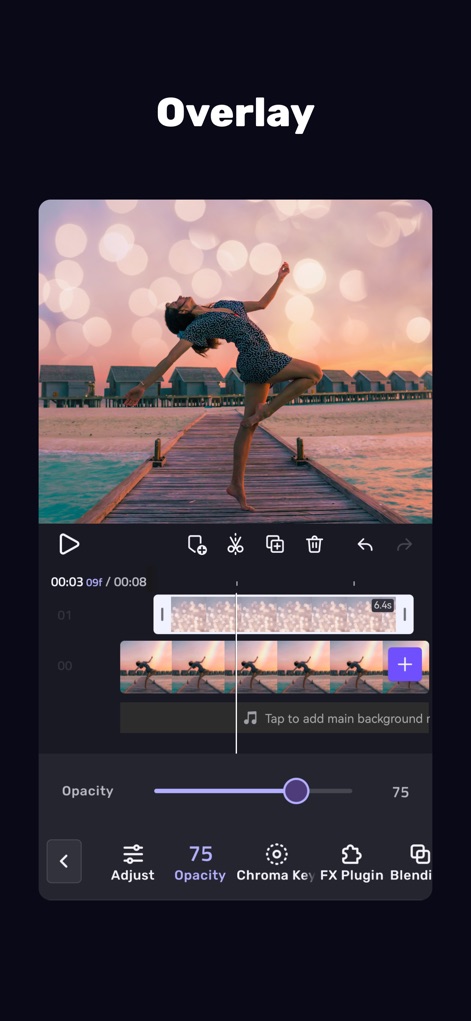
Kreative Überlagerungseffekte
Die App demonstriert die Nutzung von Überlagerungen, wobei der Opazitätsregler zur Anpassung der Transparenz und die Mehrspur-Timeline für eine präzise Bearbeitung sichtbar sind.

Umfassende Videobearbeitung
Dieses Tool präsentiert eine breite Palette an Bearbeitungswerkzeugen am unteren Bildschirmrand und die gut sichtbare Exportfunktion für den finalen Videoschnitt.

Dynamische Animationseffekte
Nutzer können hier verschiedene dynamische Animationseffekte erkunden, insbesondere die Auswahl an 3D-Übergängen und die präzise Anpassung der Effektlänge auf der Timeline.

Vielfältige visuelle Effekte
Die App zeigt eine Auswahl an vielfältigen visuellen Effekten, kategorisiert in Bereiche wie "General" und "Body/Face", und bietet detaillierte Vorschauen wie "Strobe" und "Glitch".

Kreative Textgestaltung
Dieses Tool ermöglicht die Integration von kreativen Texten, wobei auffällige Neon-Texteffekte wie "Glow" und eine dedizierte Text-Timeline für die präzise Platzierung hervorgehoben werden.

Professionelle Keyframe-Animation
Nutzer können hier die professionelle Keyframe-Animation nutzen, erkennbar an den präzisen Keyframe-Punkten auf der Timeline und den umfangreichen Transformationsoptionen für Position und Rotation.

Präziser Chroma Key
Die App demonstriert die fortschrittliche Chroma-Key-Funktion, die eine effiziente Hintergrundentfernung ermöglicht und über ein intuitives Farbwähler-Tool für genaue Ergebnisse verfügt.
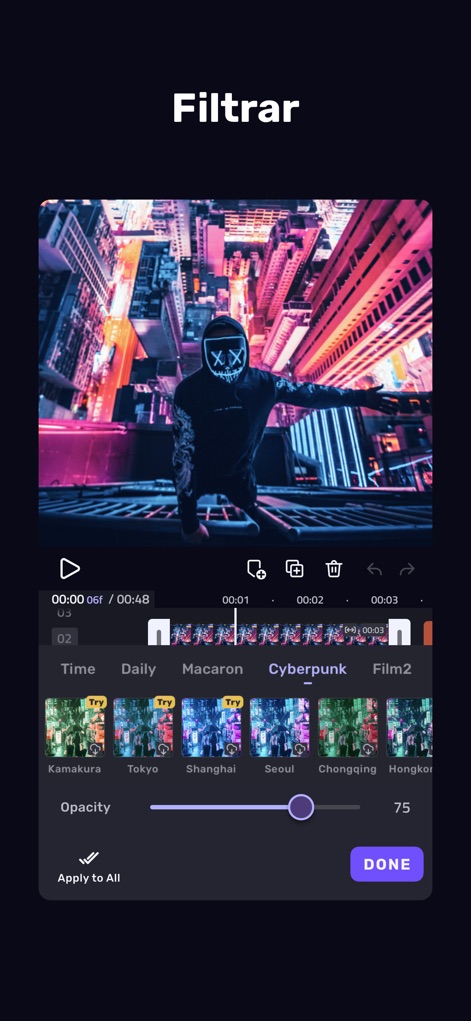
Stilvolle Farbfilter
Nutzer können eine breite Palette stilvoller Farbfilter anwenden, die in Kategorien wie "Cyberpunk" und "Macaron" organisiert sind, und deren Intensität mithilfe des Opazitätsreglers anpassen.
Beschreibung
Download
Ähnliche Apps
Apps mit ähnlichen Funktionen und Nutzererfahrung

Edits: Video Editor
Instagram, Inc.

VLLO- Video Editor, Vlog Edits
vimosoft

YouCut - AI Video Editor
SHANTANU PTE. LTD.

必剪-B站官方出品
Shanghai Bilibili Animation Co.,Ltd

剪影 - 视频剪辑 & 卡点影集制作
Shanghai Jian Ji Software Technology Co., Ltd

Videoshop - Video Editor
Jajijujejo Inc.

VDIT - Video Maker & Editor
ImgBase, Inc.

Video Editor with Music・VidLab
Onelight Apps CY Ltd

Video Maker-movie maker&Editor
Changsha Fugui Bamboo Network Technology Co., Ltd.
Diese Seite ist keine offizielle Seite der App oder ihres Entwicklers, sondern eine unabhängige redaktionelle Veröffentlichung, die zu Informations- und Kommentarzwecken erstellt wurde. Sofern nicht ausdrücklich anders angegeben, sind weder die App noch ihr Entwickler mit MWM, Apple, Google Play, dem App-Herausgeber oder dem Entwickler der App verbunden, von ihnen unterstützt, gesponsert, autorisiert oder anderweitig offiziell verbunden, und nichts auf dieser Seite impliziert, dass die App unter Verwendung der Dienste von MWM entwickelt wurde. Alle Marken, Logos, Screenshots und andere Inhalte bleiben Eigentum ihrer jeweiligen Inhaber.