VOR Tracker - IFR Nav Trainer
Herunterladen auf App Store

Diese Seite ist keine offizielle Seite der App oder ihres Entwicklers, sondern eine unabhängige redaktionelle Veröffentlichung, die zu Informations- und Kommentarzwecken erstellt wurde. Sofern nicht ausdrücklich anders angegeben, sind weder die App noch ihr Entwickler mit MWM, Apple, Google Play, dem App-Herausgeber oder dem Entwickler der App verbunden, von ihnen unterstützt, gesponsert, autorisiert oder anderweitig offiziell verbunden, und nichts auf dieser Seite impliziert, dass die App unter Verwendung der Dienste von MWM entwickelt wurde. Alle Marken, Logos, Screenshots und andere Inhalte bleiben Eigentum ihrer jeweiligen Inhaber.

Logo von VOR Tracker - IFR Nav Trainer
Herunterladen auf App Store

VOR Tracker - IFR Nav Trainer

Verschwende keine teuren Flugstunden mehr. Übe IFR-Verfahren in Echtzeit, Radialabfangungen und NDB-Tracking mit der realistischsten Instrumentensimulation für iPhone und iPad.

Kennzahlen

Downloads

197K+

Bewertung

4.6/5

Bewertungen gesamt

600

Herausgeber

Karsten Heiland

Kategorie

Education

Sprachen

1

Neueste Version

2.9.13

Größe

30.6 MB

Erstveröffentlichung

11. Feb. 2014
Funktionen

Meistere IFR-Navigation ohne hohe Treibstoffkosten

Hör auf, dich "hinter dem Flugzeug" zu fühlen. Übe Holding Patterns, Radialabfangungen und DME-Arcs in einer High-Fidelity-Simulation, die für Flugschüler und Profis zur Vorbereitung auf Checkrides entwickelt wurde.

Echtzeit-Übung von Verfahren

Gehe über die Theorie hinaus. Übe komplexe Manöver mit authentischen CDI-, RMI- und HSI-Instrumenten, die genau wie im echten Cockpit reagieren, um echtes Muskelgedächtnis aufzubauen.

Bestehe deinen Checkride für weniger

Vermeide die Verschwendung von 200 US-Dollar pro Stunde in einer Cessna. Baue dein räumliches Vorstellungsvermögen und Selbstvertrauen in einer risikofreien Umgebung vor deiner Flugsimulationsprüfung oder der FAA-Prüfung auf.

Die folgenden Screenshots und die Beschreibung stammen direkt aus dem offiziellen Store-Eintrag der App und sind Eigentum des Entwicklers.

App Store

Screenshots
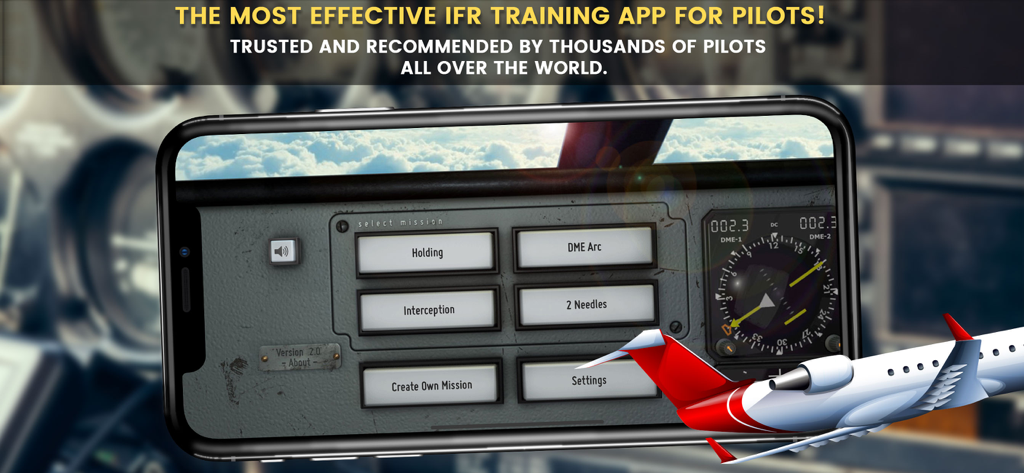
VOR Tracker - IFR Nav Trainer - VOR Tracker App-Oberfläche, die die Missionsauswahl für das IFR-Flugtraining anzeigt
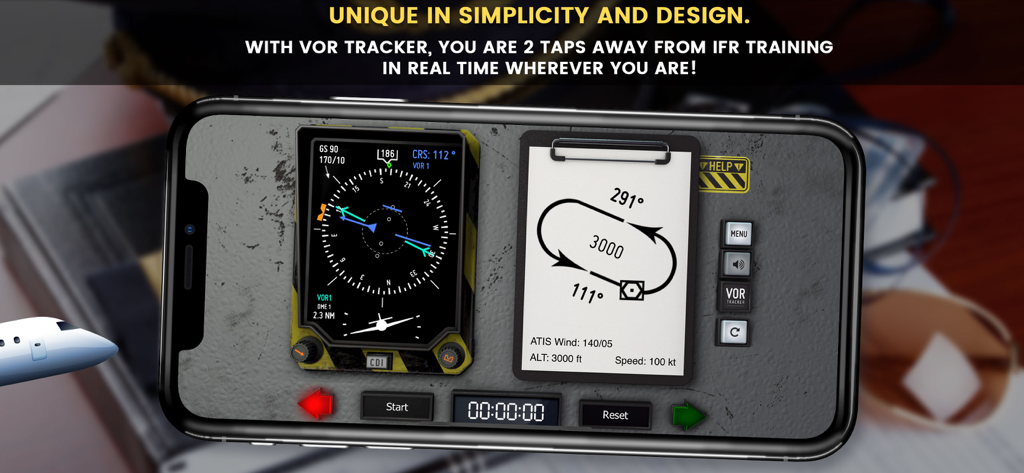
VOR Tracker App-Oberfläche, die die Missionsauswahl für das IFR-Flugtraining anzeigt

VOR Tracker - IFR Nav Trainer - Smartphone-Bildschirm mit der VOR Tracker App, IFR-Navigationsinstrumenten und einer Holding Pattern-Anleitung
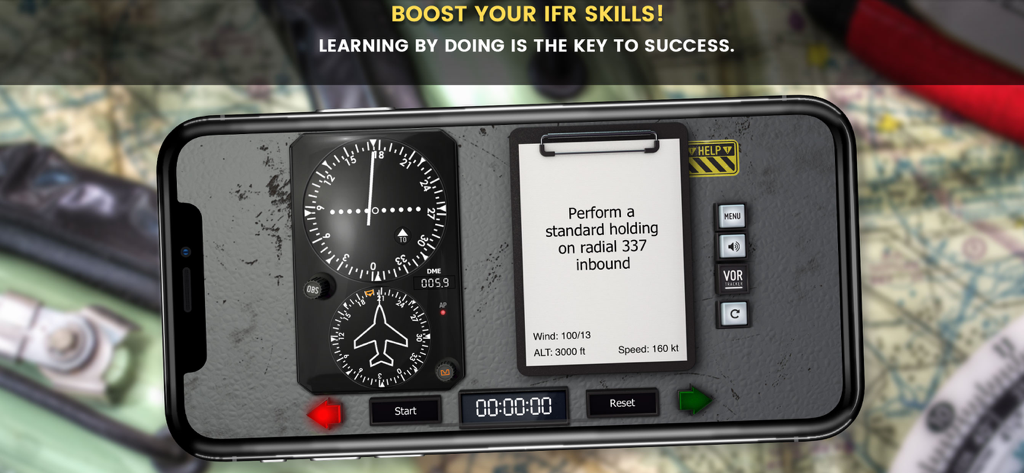
Smartphone-Bildschirm mit der VOR Tracker App, IFR-Navigationsinstrumenten und einer Holding Pattern-Anleitung

VOR Tracker - IFR Nav Trainer - VOR Tracker App-Oberfläche mit Flugnavigationsinstrumenten und einer Holding Pattern-Mission
VOR Tracker App-Oberfläche mit Flugnavigationsinstrumenten und einer Holding Pattern-Mission

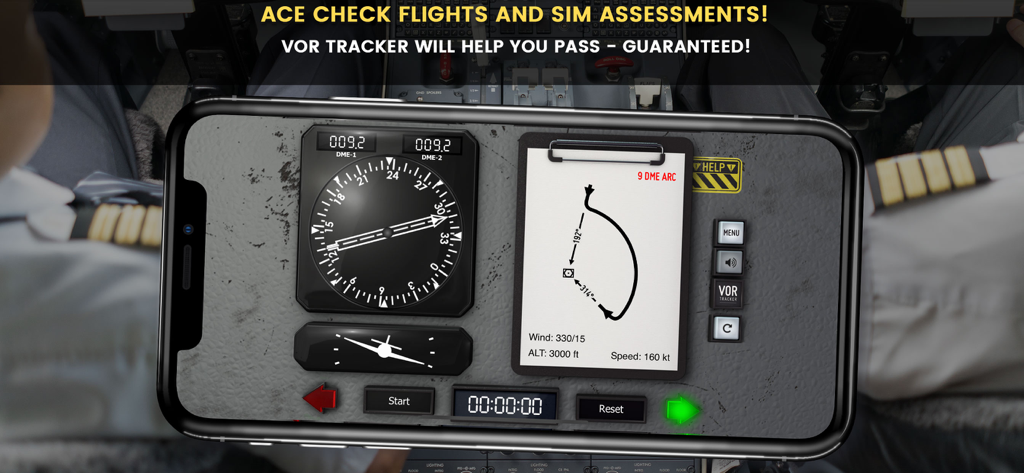
VOR Tracker - IFR Nav Trainer - VOR Tracker App-Oberfläche zum Üben von IFR-Navigation und DME-Arcs.
VOR Tracker App-Oberfläche zum Üben von IFR-Navigation und DME-Arcs.

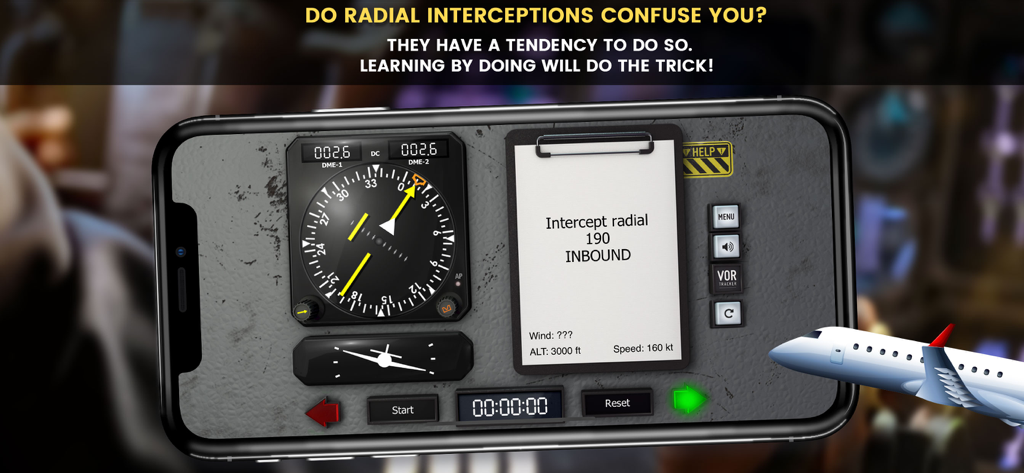
VOR Tracker - IFR Nav Trainer - VOR Tracker App-Oberfläche, die eine Radialabfangungsübung auf einem Fluginstrument für das Pilotentraining zeigt
VOR Tracker App-Oberfläche, die eine Radialabfangungsübung auf einem Fluginstrument für das Pilotentraining zeigt

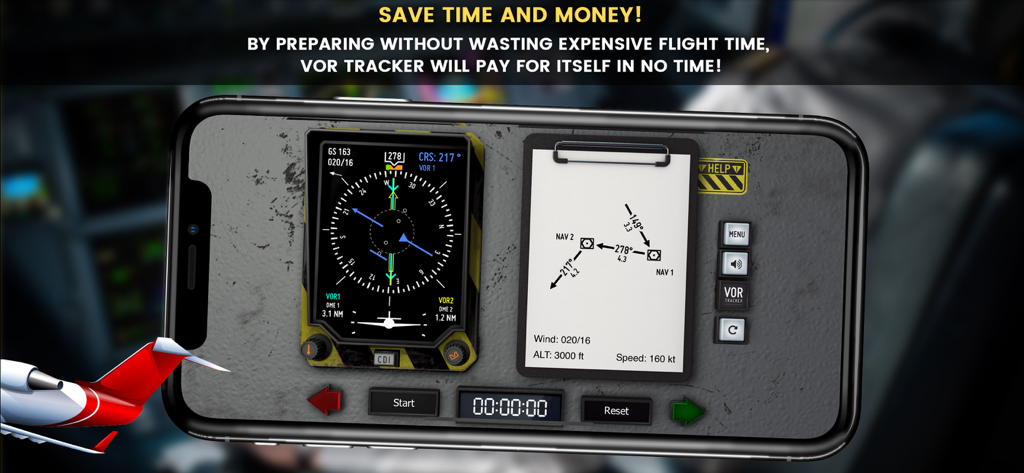
VOR Tracker - IFR Nav Trainer - Ein Smartphone zeigt die VOR Tracker App mit Fluginstrumenten und einem Navigationsdiagramm an
Ein Smartphone zeigt die VOR Tracker App mit Fluginstrumenten und einem Navigationsdiagramm an

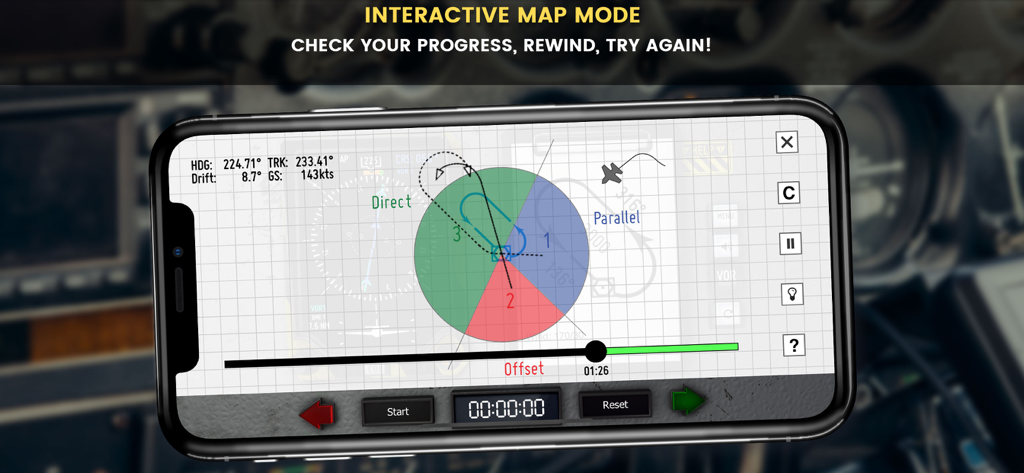
VOR Tracker - IFR Nav Trainer - Interaktiver Kartenmodus in VOR Tracker, der Holding Pattern-Einflugsektoren und den Flugfortschritt anzeigt.
Interaktiver Kartenmodus in VOR Tracker, der Holding Pattern-Einflugsektoren und den Flugfortschritt anzeigt.

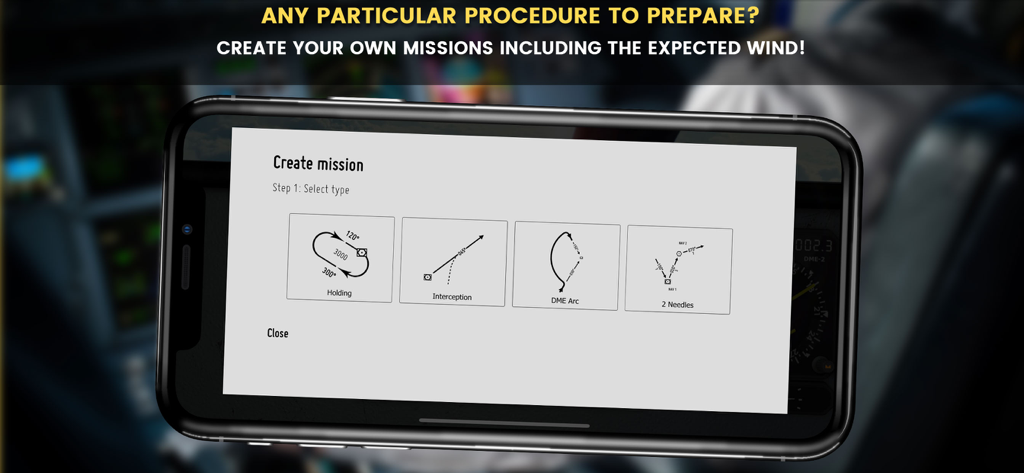
VOR Tracker - IFR Nav Trainer - Der Missionsauswahlbildschirm in VOR Tracker mit Optionen für Holding Patterns, Abfangübungen, DME-Arcs und Zwei-Nadel-Navigationstraining
Der Missionsauswahlbildschirm in VOR Tracker mit Optionen für Holding Patterns, Abfangübungen, DME-Arcs und Zwei-Nadel-Navigationstraining

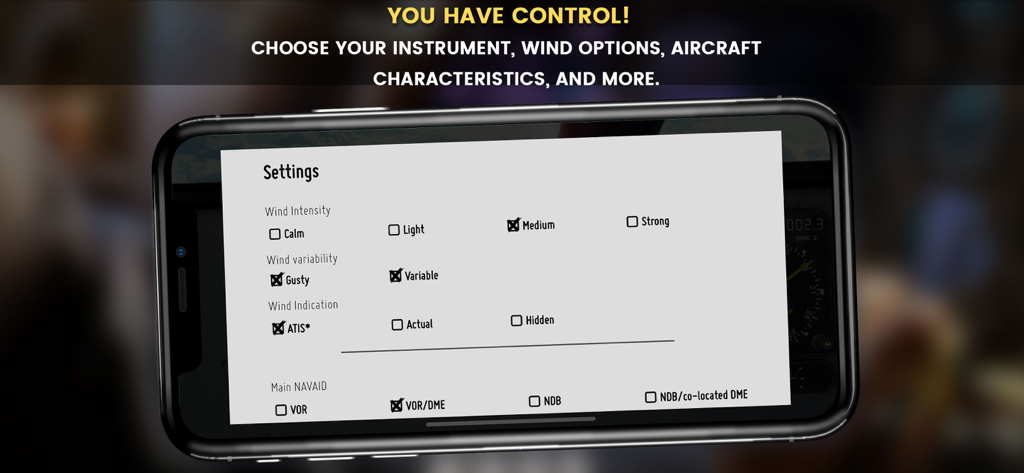
VOR Tracker - IFR Nav Trainer - Anpassbare Wind- und Navigationseinstellungen in der VOR Tracker Flugtrainer-App
Anpassbare Wind- und Navigationseinstellungen in der VOR Tracker Flugtrainer-App

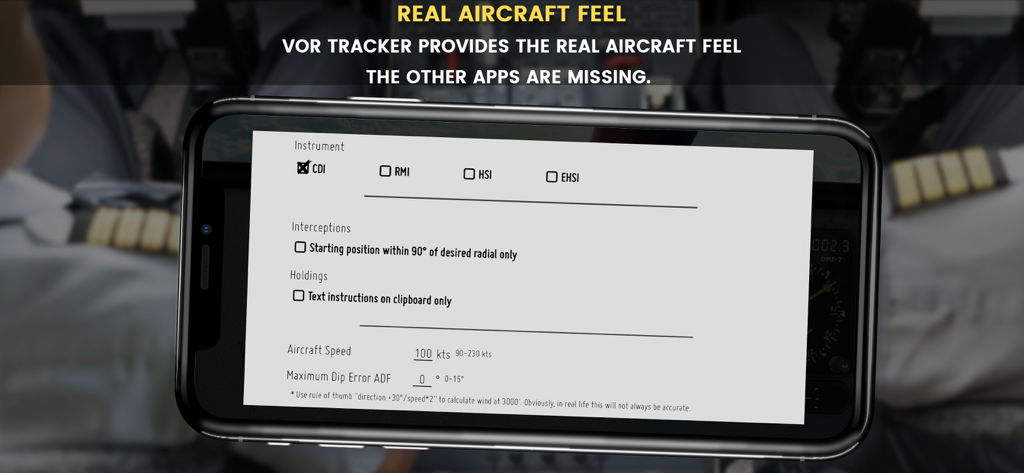
VOR Tracker - IFR Nav Trainer - VOR Tracker App-Einstellungen-Bildschirm mit Instrumenten- und Flugparameteroptionen

VOR Tracker App-Einstellungen-Bildschirm mit Instrumenten- und Flugparameteroptionen

Beschreibung

tl;dr: Simply the best training app for VOR/NDB navigation. Are you not comfortable with flying holding patterns and radial interceptions, especially in stressful situations like a check ride or a sim assessment? You do understand what you have learnt, but find it difficult to apply once the needles start moving? Then look no further, VOR Tracker is what you need. VOR Tracker is a small but powerful training tool for pilots. It is the only one of its kind for the iPhone & iPad, providing the real aircraft feel the other apps are missing! VOR Tracker is a real IFR simulation, so you will find no multiple choice questions or yet more methods which might or might not work for you.  You can actually practice IFR procedures in real time, using either a fixed card CDI, RMI, HSI, or EHSI, which provides additional information like wind, track, and groundspeed. Practice holding patterns, DME arcs, radial interceptions, and 2 needle tracking in real time. It is practice what it is all about! There is no need for explaining again and again what you already know from flight school. It is about applying your knowledge when the flight instruments start moving! Wherever you are, IFR training is only two taps away! Chose between a VOR and NDB and get used to the different characteristics. The NDB comes with atmospheric disturbances and an adjustable dip error to match the instrument you are used to. Don’t waste your time trying to imagine what you would do in the aircraft – just do it! VOR Tracker is designed for: - Student pilots who have the theoretical knowledge for flying IFR procedures, and want to save money by preparing for their pilot training. - Pilots who want to refresh their IFR navigation skills for an upcoming check ride. - Pilots going for an assessment. Holding patterns and radial interceptions are commonly used during sim assessments and can really spoil the day. Being prepared will make the difference! - People who have the knowledge of flying IFR procedures and want to give it a try. VOR Tracker is NOT: - a game. - a flight simulator, it focuses on navigation at a constant speed and altitude. - a flight training course teaching you how to fly IFR procedures. Still interested? Read on to find out how VOR Tracker will boost your skills in no time! - Choose between a fixed card CDI, RMI, HSI, or EHSI. - Use the instruments like you would do in the real aircraft. - Use the map mode to verify your progress. - Lost? Use the help function to display the holding pattern entries in the map mode. - Things are going a bit too fast? Use the freeze mode to orientate. - Getting bored in straight flight? Use the fast mode. - You want to start over or change the aircraft’s position or heading? Just drag & drop, or twist the aircraft symbol. - Practice a particular holding pattern or radial interception exercise over and over again from new, random starting positions using the reposition button. - Start with no wind and increase the difficulty later on by adding wind. - To add more realism, the wind can be selected to be gusty and/or variable in direction. - Getting settled? Why not increase the aircraft’s speed in the settings menu? - Customize your own missions and adjust the wind the way you want. - Use the hidden wind function to add a realistic challenge. - Analyze your progress in the map mode. Rewind and start over. The previous track lines will still be displayed for you to see the difference. Prepare yourself without wasting expensive flight time – use VOR Tracker to brush up your IFR skills! VOR Tracker is the most efficient trainer for holding patterns and radial interceptions available on the App Store. Supporting you during your IFR training, it will pay for itself in no time. Take that as a promise!

Download

Herunterladen auf App Store

Diese Seite ist keine offizielle Seite der App oder ihres Entwicklers, sondern eine unabhängige redaktionelle Veröffentlichung, die zu Informations- und Kommentarzwecken erstellt wurde. Sofern nicht ausdrücklich anders angegeben, sind weder die App noch ihr Entwickler mit MWM, Apple, Google Play, dem App-Herausgeber oder dem Entwickler der App verbunden, von ihnen unterstützt, gesponsert, autorisiert oder anderweitig offiziell verbunden, und nichts auf dieser Seite impliziert, dass die App unter Verwendung der Dienste von MWM entwickelt wurde. Alle Marken, Logos, Screenshots und andere Inhalte bleiben Eigentum ihrer jeweiligen Inhaber.








