
Diese Seite ist keine offizielle Seite der App oder ihres Entwicklers, sondern eine unabhängige redaktionelle Veröffentlichung, die zu Informations- und Kommentarzwecken erstellt wurde. Sofern nicht ausdrücklich anders angegeben, sind weder die App noch ihr Entwickler mit MWM, Apple, Google Play, dem App-Herausgeber oder dem Entwickler der App verbunden, von ihnen unterstützt, gesponsert, autorisiert oder anderweitig offiziell verbunden, und nichts auf dieser Seite impliziert, dass die App unter Verwendung der Dienste von MWM entwickelt wurde. Alle Marken, Logos, Screenshots und andere Inhalte bleiben Eigentum ihrer jeweiligen Inhaber.


WeatherHub
Schützen Sie Ihr Eigentum mit sofortigen Alarmen bei Lecks, Temperaturschwankungen und Klimaveränderungen. Erleben Sie eine einfache Plug-and-Play-Einrichtung ohne Registrierung und ohne monatliche Gebühren.
Downloads
144K+Bewertung
Bewertungen gesamt
200Herausgeber
Kategorie
WeatherSprachen
3Neueste Version
1.54Größe
11.2 MBErstveröffentlichung
30. Aug. 2014Schützen Sie, was Ihnen am wichtigsten ist
WeatherHub verbindet Ihr Zuhause mit Ihrem Smartphone mit professionellen Sensoren und bietet Echtzeit-Überwachung und Sorgenfreiheit, ohne dass Abonnements oder persönliche Registrierungen erforderlich sind.
Sofortige Notfallalarme
Vermeiden Sie teure Reparaturen mit sofortigen Push-Benachrichtigungen, wenn ein Leck erkannt wird oder die Temperaturen unter Ihre benutzerdefinierten Grenzwerte fallen.
Privat & Kostenlos
Genießen Sie die volle Funktionalität ohne Kontoanmeldung oder monatliche Gebühren. Ihre Daten bleiben bei unserem sicheren, anonymen Plug-and-Play-System bei Ihnen.
Häufig gestellte Fragen
Alles, was Sie über wissen müssen WeatherHub
Was ist die WeatherHub App?
Die WeatherHub App ist ein Hausüberwachungssystem zur Überwachung verschiedener Bedingungen mit drahtlosen Sensoren. Sie liefert Echtzeitdaten und Benachrichtigungen an Ihr Smartphone.
Wie benachrichtigt das WeatherHub-System Benutzer über Probleme?
Das WeatherHub-System benachrichtigt Benutzer über Probleme durch Push-Benachrichtigungen auf ihr Smartphone. Es alarmiert sofort, wenn Probleme auftreten, und ermöglicht proaktives Handeln.
Ist eine persönliche Registrierung zur Nutzung der WeatherHub App erforderlich?
Nein, eine persönliche Registrierung ist zur Nutzung der WeatherHub App nicht erforderlich. Benutzer können die App nach der Installation ohne Erstellung eines Kontos bedienen.
Welche Hardware ist für den Betrieb des WeatherHub-Systems notwendig?
Für den Betrieb des WeatherHub-Systems benötigen Benutzer eine essenzielle Hardware, die aus einem Gateway und mindestens einem Sensor ihrer Wahl besteht.
Können Benutzer Alarmgrenzen innerhalb der WeatherHub App anpassen?
Ja, Benutzer können Alarmgrenzen innerhalb der WeatherHub App anpassen. Die grafische Benutzeroberfläche ermöglicht das Einstellen spezifischer Alarmgrenzwerte für jeden drahtlosen Sensor.
Zeigt die WeatherHub App aktuelle Temperatur- und Luftfeuchtigkeitswerte an?
Ja, die WeatherHub App zeigt aktuelle Temperatur- und Luftfeuchtigkeitswerte von angeschlossenen Sensoren an. Zum Beispiel zeigt "Sample Sensor Humidity Guard" 23,4°C und 33,0% an.
Wie lange speichert die WeatherHub App Daten von Standard-Sensoren?
Die WeatherHub App speichert Daten von Standard-Sensoren für 90 Tage. Einige spezialisierte Sensoren bieten eine erweiterte Historie von bis zu 18 Monaten in der SensorCloud.
Können WeatherHub-Sensoren Wasserlecks erkennen?
Ja, WeatherHub bietet einen Wasserdetektor-Sensor (Kat.-Nr. 30.3305.02), der meldet, wenn beispielsweise eine Waschmaschine undicht ist.
Welche Informationen sind über den "Info"-Tab in der WeatherHub App verfügbar?
Der "Info"-Tab in der WeatherHub App liefert zusätzliche Informationen und ein Video zur Installation. Er leitet Benutzer zu www.mobile-alerts.eu oder www.tfa-dostmann.de/weatherhub.
Ist die WeatherHub App kostenlos herunterladbar?
Ja, die WeatherHub App ist kostenlos aus dem AppStore herunterladbar. Sie benötigt jedoch separate Hardware wie ein Gateway und Sensoren, um zu funktionieren.
Die folgenden Screenshots und die Beschreibung stammen direkt aus dem offiziellen Store-Eintrag der App und sind Eigentum des Entwicklers.
App Store
Screenshots
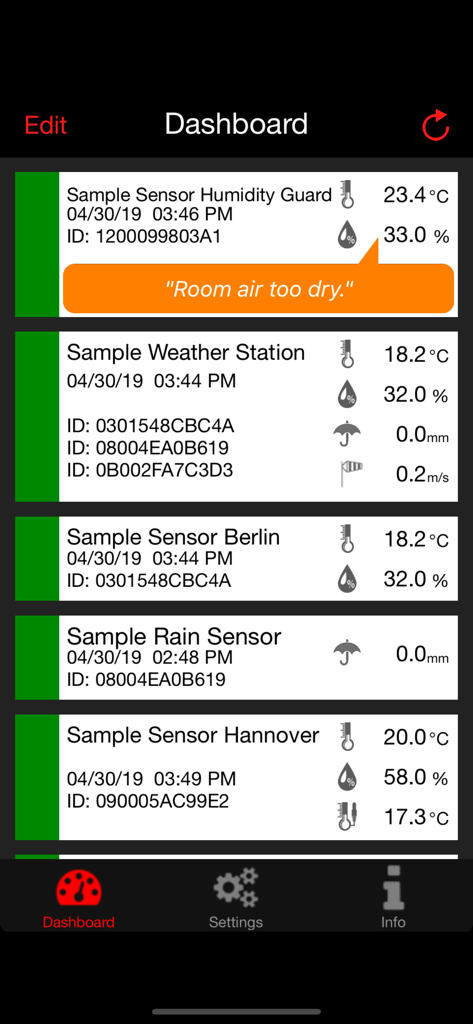
Dashboard der WeatherHub-App, das Echtzeit-Temperatur-, Luftfeuchtigkeits- und Niederschlagsdaten von mehreren drahtlosen Heimsensoren anzeigt.
Beschreibung
Download
Ähnliche Apps
Top-gerankte Apps in derselben Kategorie

墨迹天气-MojiWeather
Beijing MojiFengyun Technology Co.,Ltd.

The Weather Channel - Radar
The Weather Channel

Windy.com
Windyty, SE

天气预报-精准15日天气预报
Chongqing Caochen Technology Co., Ltd.

My Aurora Forecast & Alerts
JRustonApps B.V.

AccuWeather: Weather Forecast
AccuWeather International, Inc.

Weather & Radar - Storm radar
WetterOnline - Meteorologische Dienstleistungen GmbH

天气通
Weibo Internet Technology (China) Co.Ltd.

The Thermometer -Digital-
Vida Apps Incorporated
Diese Seite ist keine offizielle Seite der App oder ihres Entwicklers, sondern eine unabhängige redaktionelle Veröffentlichung, die zu Informations- und Kommentarzwecken erstellt wurde. Sofern nicht ausdrücklich anders angegeben, sind weder die App noch ihr Entwickler mit MWM, Apple, Google Play, dem App-Herausgeber oder dem Entwickler der App verbunden, von ihnen unterstützt, gesponsert, autorisiert oder anderweitig offiziell verbunden, und nichts auf dieser Seite impliziert, dass die App unter Verwendung der Dienste von MWM entwickelt wurde. Alle Marken, Logos, Screenshots und andere Inhalte bleiben Eigentum ihrer jeweiligen Inhaber.