Who's On - Basketball
Herunterladen auf App Store

Diese Seite ist keine offizielle Seite der App oder ihres Entwicklers, sondern eine unabhängige redaktionelle Veröffentlichung, die zu Informations- und Kommentarzwecken erstellt wurde. Sofern nicht ausdrücklich anders angegeben, sind weder die App noch ihr Entwickler mit MWM, Apple, Google Play, dem App-Herausgeber oder dem Entwickler der App verbunden, von ihnen unterstützt, gesponsert, autorisiert oder anderweitig offiziell verbunden, und nichts auf dieser Seite impliziert, dass die App unter Verwendung der Dienste von MWM entwickelt wurde. Alle Marken, Logos, Screenshots und andere Inhalte bleiben Eigentum ihrer jeweiligen Inhaber.


Logo von Who's On - Basketball
Herunterladen auf App Store

Who's On - Basketball

Eliminieren Sie Stress an der Seitenlinie und sorgen Sie für faire Spielzeiten mit intuitiver Drag-and-Drop-Verwaltung, Echtzeit-Tracking und einfachen Werkzeugen, die für die Hitze des Spiels entwickelt wurden.

Kennzahlen

Downloads

17K+

Bewertung

1.0/5

Bewertungen gesamt

0

Herausgeber

Left Coast Labs Ltd.

Kategorie

Sports

Sprachen

1

Neueste Version

2.6.5

Größe

38.2 MB

Erstveröffentlichung

24. März 2014
Funktionen

Meistern Sie die Seitenlinie mit Zuversicht

Hören Sie auf, mit Klemmbrettern und Stress herumzujonglieren. Who's On hilft Ihnen, Rotationen zu verwalten, Fairness zu gewährleisten und Chaos am Spieltag direkt aus Ihrer Tasche zu bewältigen.

Ausgewogene Spielzeit

Halten Sie jeden Spieler und jedes Elternteil zufrieden. Visuelle 'Heiß-Kalt'-Anzeigen verfolgen genau, wie viel Spielzeit jedes Kind bekommt, um sicherzustellen, dass jeder fair behandelt wird.

Stressfreie Rotationen

Bewältigen Sie späte Ankünfte oder kurzfristige Änderungen mit Leichtigkeit. Ziehen Sie Spieler-Icons per Drag & Drop und führen Sie Auswechslungen mit einem einzigen Fingertipp aus, während die Spielzeit läuft.

Die folgenden Screenshots und die Beschreibung stammen direkt aus dem offiziellen Store-Eintrag der App und sind Eigentum des Entwicklers.

App Store

Screenshots
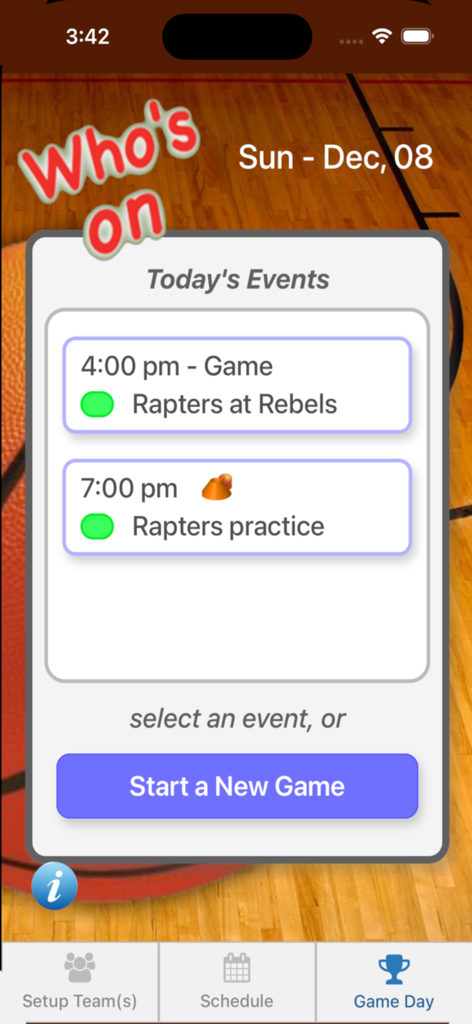
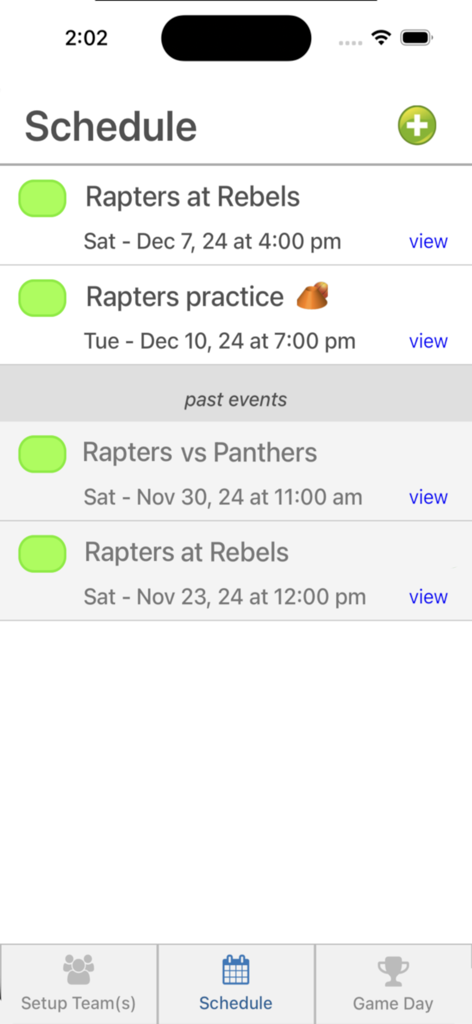
Who's On - Basketball - Screenshot der Who's On Basketball App, der einen Spieltagsplan mit bevorstehenden Spielen und Trainingseinheiten zeigt.
Screenshot der Who's On Basketball App, der einen Spieltagsplan mit bevorstehenden Spielen und Trainingseinheiten zeigt.

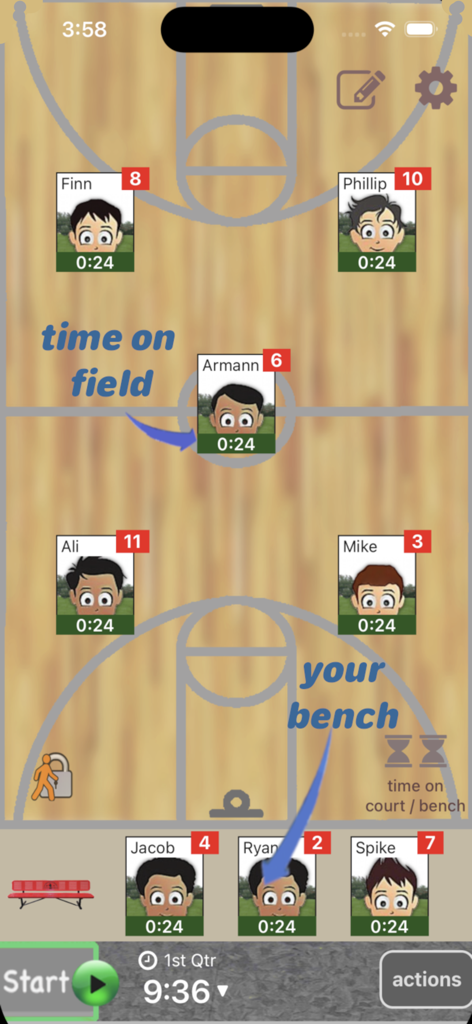
Who's On - Basketball - Oberfläche der Who's On - Basketball App, die Spielerpositionen auf dem Spielfeld und der Bank mit individuellen Spielzeit-Trackern zeigt.
Oberfläche der Who's On - Basketball App, die Spielerpositionen auf dem Spielfeld und der Bank mit individuellen Spielzeit-Trackern zeigt.

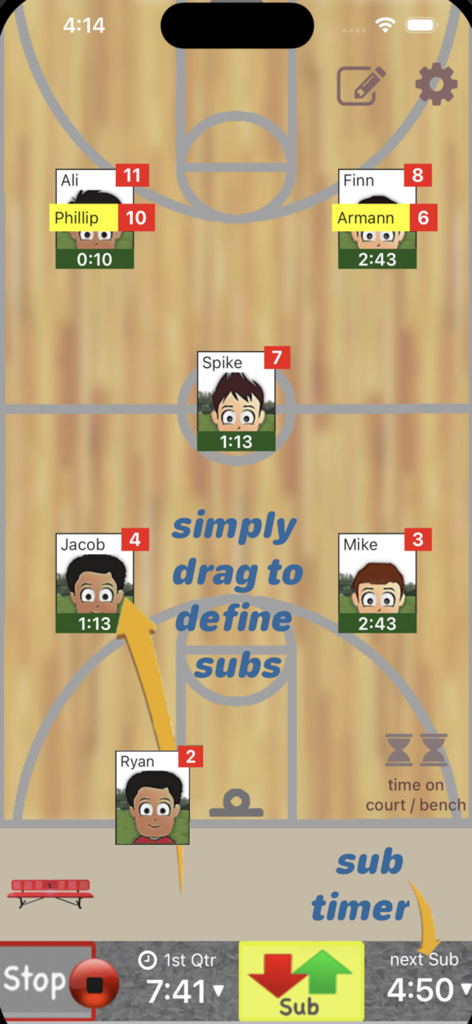
Who's On - Basketball - App-Oberfläche für Basketballtrainer zur Verwaltung von Spielerrotationen und Auswechslungen auf einem digitalen Spielfeld
App-Oberfläche für Basketballtrainer zur Verwaltung von Spielerrotationen und Auswechslungen auf einem digitalen Spielfeld

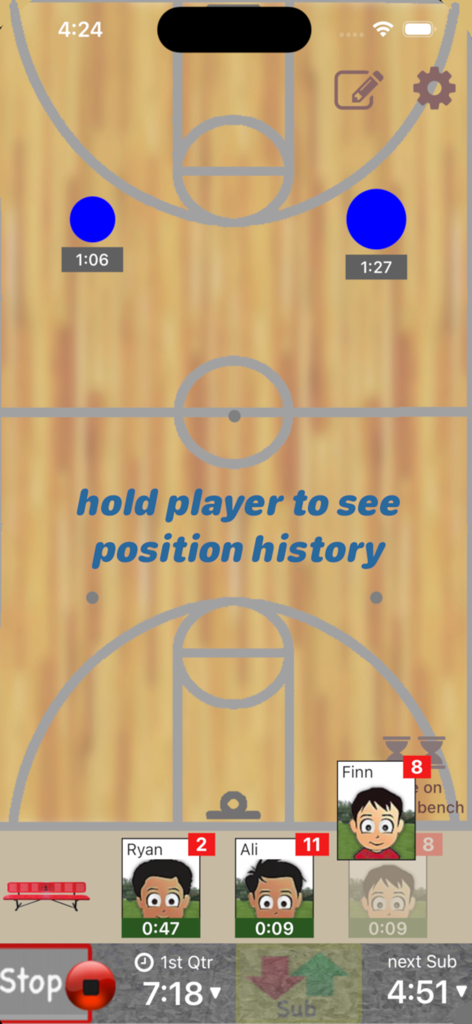
Who's On - Basketball - Mobile App-Oberfläche für Basketballtrainer, die das Management von Spielerrotationen auf einem Spielfeldhintergrund mit aktiven Spieltimern zeigt.
Mobile App-Oberfläche für Basketballtrainer, die das Management von Spielerrotationen auf einem Spielfeldhintergrund mit aktiven Spieltimern zeigt.

Who's On - Basketball - Planungsbildschirm der Whos On Basketball App, der eine Liste bevorstehender Mannschaftsspiele und Trainingseinheiten anzeigt
Planungsbildschirm der Whos On Basketball App, der eine Liste bevorstehender Mannschaftsspiele und Trainingseinheiten anzeigt

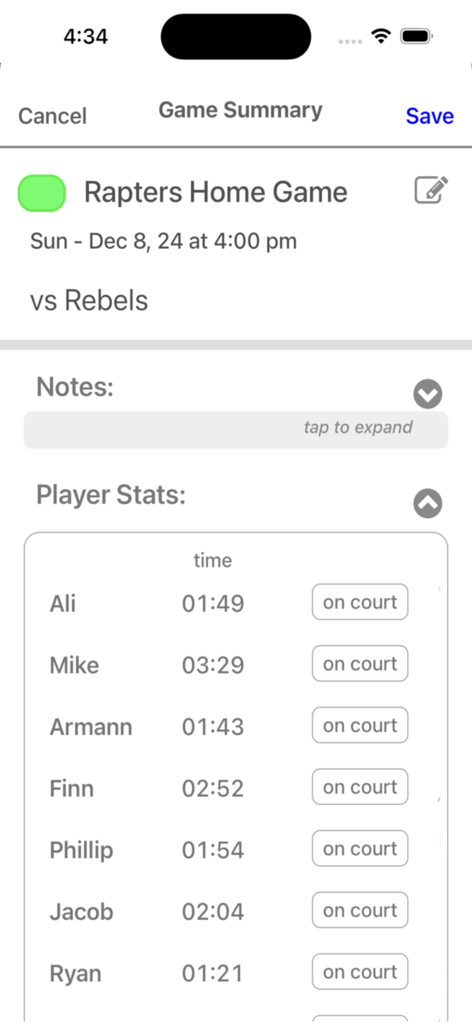
Who's On - Basketball - Ein Bildschirm einer Basketball-Coaching-App, der Spielernamen und ihre Gesamtspielzeit während eines Spiels anzeigt

Ein Bildschirm einer Basketball-Coaching-App, der Spielernamen und ihre Gesamtspielzeit während eines Spiels anzeigt

Beschreibung

Who's On-Basketball helps youth-basketball coaches manage who's on the floor and who's going on next. It has been developed for the iPhone and iPad with experienced coaches who find managing rotations and balancing play time awkward and stressful. Watch our feature videos at "http://whos-on.leftcoastlabs.biz/videos/basketball". What coaches have said about Who's On apps... "It's intuitive and easy of use." "It can handle all the unpredictability of coaching youth sports. For instance, I don't know who's going to be there [on game day] until I show up at the game. Players sometimes show up late or leave early. Young players decide at the last minute that they don't want to go on, messing up my planned rotation. This app allows me to handle all this... with ease." "I like how clearly each player's name, number and picture is presented on the screen. I have a lousy memory and remembering new player names at the start of a season is always a problem for me." "The 1-touch Position History is really well done... I wouldn't want to coach again without it!" "I love how easy it is to add player photos to the team." Feature Summary: Simple drag and drop - With Who's On-Basketball, you simply drag player icons from the "bench" to "floor positions" as you make decisions for your starting lineup or substitutions. The app remembers "who" you've assigned "where" and tracks how long each player has been in each position during the game. 1-screen game information - All game-time information is displayed clearly on one screen (as shown in the screen shots). Bright yellow banners clearly indicate where you've pre-assigned substitutes for your next rotation. 1-button rotation - When it's time to make substitutions, you press one button to indicate that the subs have taken the floor and the app records this event. The app then places the icons of the players coming off the floor back on the bench ready for their next rotation assignments. Built-in substitution timer - A built-in timer can be used to balance rotation times. Press-and-hold play history (a unique and celebrated feature of Who's On-Soccer) – By simply dragging a player's icon to the bottom of the screen, the display will change to show a Position History (graphically indicating where the player has played and for how long). Hot-Cold Indicators - shows which players have significantly more or less play time than the average. Players with significantly more play time are highlighted red (Hot). Similarily, blue (Cold) for less play time. Fast team setup - We've built Who's On-Basketball to allow you to enter a team's information quickly. Typically it only takes a few minutes to enter all your team's information. 1-touch player pictures - Capture player pictures with the app's integrated camera function. 1-touch, point and click. Multiple teams - If you coach or assist with two or more teams, this app supports multiple teams. Simply select the team you want to use from the team list and your ready to go. Game / Practice schedules - Who's On-Basketball let's you store your team's schedule in your phone if you desire. Game data and notes - Use game notes to track pre-game thoughts and reminders as well as post-game comments. All game data is stored in the team's schedule as a completed game. Game stats can be reviewed at any time or sent to the team's record keeper via email. Supported platforms: - built for iPhone or iPod Touch - will work on iPad or iPad Mini as iPhone app

Download

Herunterladen auf App Store

Diese Seite ist keine offizielle Seite der App oder ihres Entwicklers, sondern eine unabhängige redaktionelle Veröffentlichung, die zu Informations- und Kommentarzwecken erstellt wurde. Sofern nicht ausdrücklich anders angegeben, sind weder die App noch ihr Entwickler mit MWM, Apple, Google Play, dem App-Herausgeber oder dem Entwickler der App verbunden, von ihnen unterstützt, gesponsert, autorisiert oder anderweitig offiziell verbunden, und nichts auf dieser Seite impliziert, dass die App unter Verwendung der Dienste von MWM entwickelt wurde. Alle Marken, Logos, Screenshots und andere Inhalte bleiben Eigentum ihrer jeweiligen Inhaber.








