WiDI - MIDI Studio
WiDI - MIDI Studio
Herunterladen auf App Store

Diese Seite ist keine offizielle Seite der App oder ihres Entwicklers, sondern eine unabhängige redaktionelle Veröffentlichung, die zu Informations- und Kommentarzwecken erstellt wurde. Sofern nicht ausdrücklich anders angegeben, sind weder die App noch ihr Entwickler mit MWM, Apple, Google Play, dem App-Herausgeber oder dem Entwickler der App verbunden, von ihnen unterstützt, gesponsert, autorisiert oder anderweitig offiziell verbunden, und nichts auf dieser Seite impliziert, dass die App unter Verwendung der Dienste von MWM entwickelt wurde. Alle Marken, Logos, Screenshots und andere Inhalte bleiben Eigentum ihrer jeweiligen Inhaber.

Logo von WiDI - MIDI Studio
Herunterladen auf App Store

WiDI - MIDI Studio

Verwandeln Sie Ihr iOS-Gerät in einen professionellen MIDI-Hub. Entwerfen Sie maßgeschneiderte Layouts, automatisieren Sie CCs und lösen Sie komplexe Sequenzen drahtlos aus für einen schnelleren, taktileren Studio-Workflow.

Kennzahlen

Downloads

2K+

Bewertung

4.4/5

Bewertungen gesamt

0

Herausgeber

HYPERTIDE

Kategorie

Music

Sprachen

1

Neueste Version

1.8.3

Größe

26.1 MB

Erstveröffentlichung

7. Aug. 2018
Funktionen

Ihr Studio, Ihre Regeln

Verwandeln Sie Ihr iOS-Gerät in eine professionelle MIDI-Control-Surface und einen Sequenzer, der die Lücke zwischen Ihrem kreativen Fluss und Ihrer DAW schließt.

Maßgeschneiderte Control-Surfaces

Erstellen Sie das exakte MIDI-Layout, das Sie benötigen, mit benutzerdefinierten Reglern, Fadern und Pads. Hören Sie auf, Ihre Maus zu bedienen, und interagieren Sie mit Ihrer Musik über taktische, reaktionsschnelle Bedienelemente.

Nahtlose drahtlose Integration

Schneiden Sie die Kabel mit nativer MIDI Network Session-Unterstützung durch. Steuern Sie Ableton, Logic oder Ihre Hardware-Synthesizer von überall in Ihrem Studio aus mit müheloser drahtloser Konnektivität.

Die folgenden Screenshots und die Beschreibung stammen direkt aus dem offiziellen Store-Eintrag der App und sind Eigentum des Entwicklers.

App Store

Screenshots
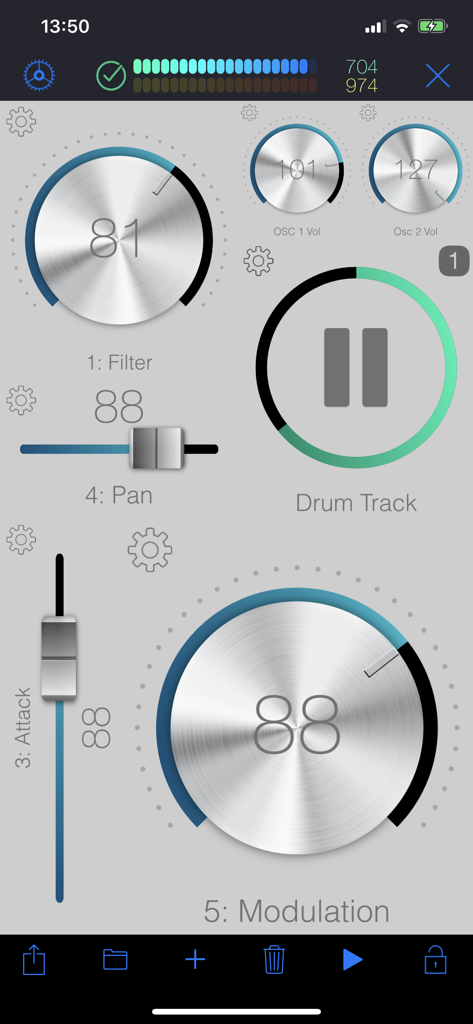
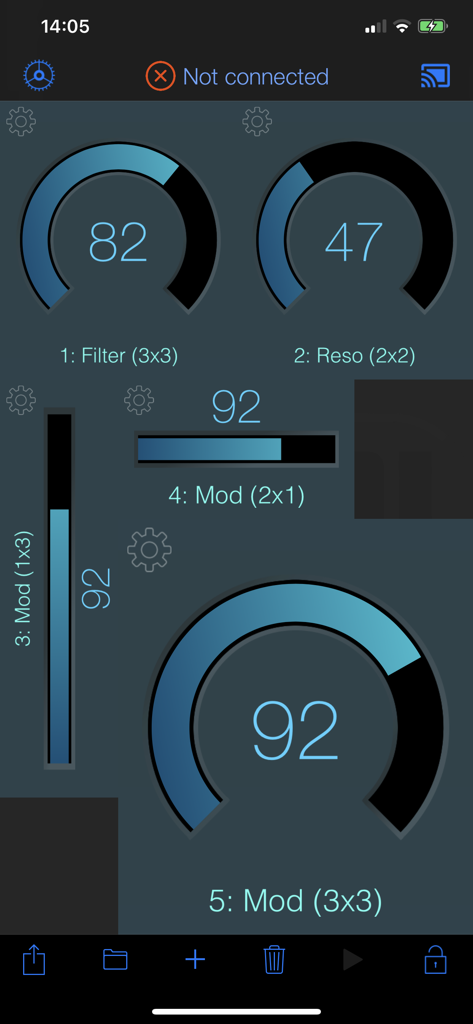
WiDI - MIDI Studio - Eine anpassbare MIDI-Control-Surface in der WiDI-App mit virtuellen Reglern und Fadern für die Musikproduktion.
Eine anpassbare MIDI-Control-Surface in der WiDI-App mit virtuellen Reglern und Fadern für die Musikproduktion.

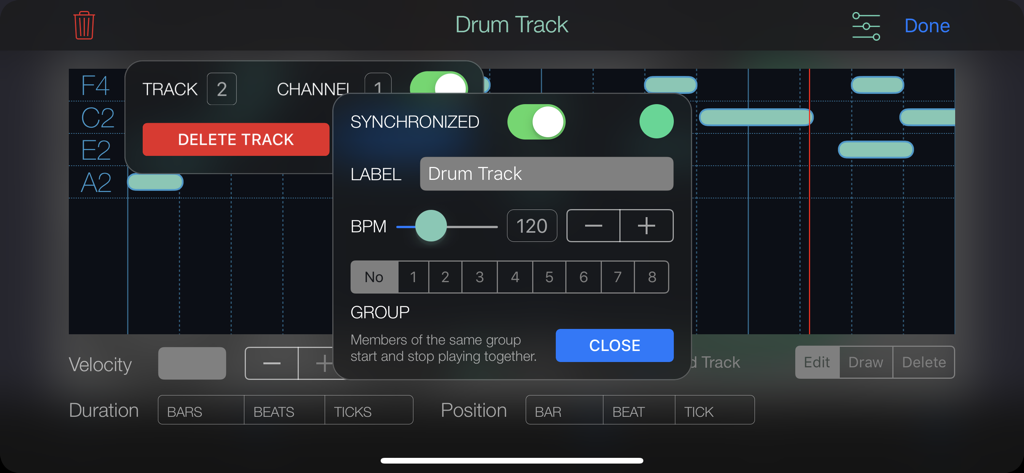
WiDI - MIDI Studio - WiDI MIDI Studio App-Oberfläche mit Einstellungen für Drum-Track-Sequenzer und BPM-Steuerung
WiDI MIDI Studio App-Oberfläche mit Einstellungen für Drum-Track-Sequenzer und BPM-Steuerung

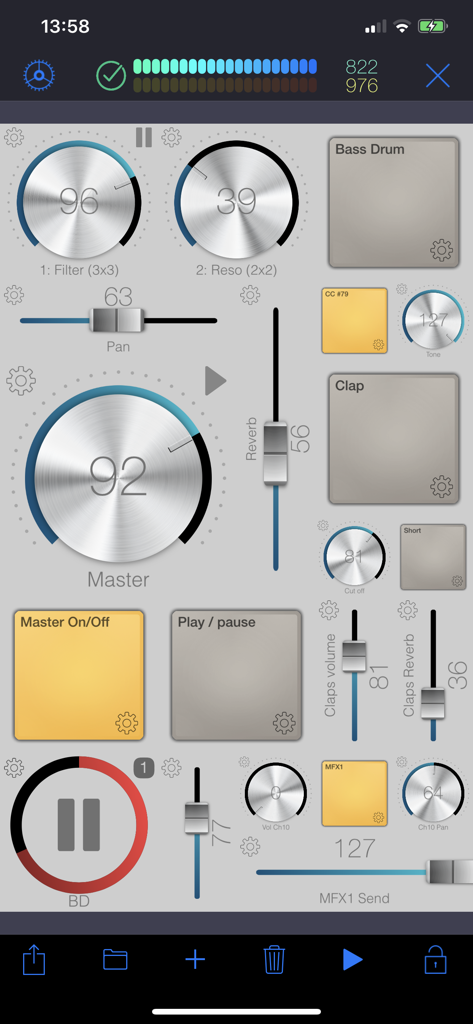
WiDI - MIDI Studio - Oberfläche der WiDI MIDI Studio App mit einem benutzerdefinierten Layout aus virtuellen Reglern, Fadern und Pads zur Musiksteuerung
Oberfläche der WiDI MIDI Studio App mit einem benutzerdefinierten Layout aus virtuellen Reglern, Fadern und Pads zur Musiksteuerung

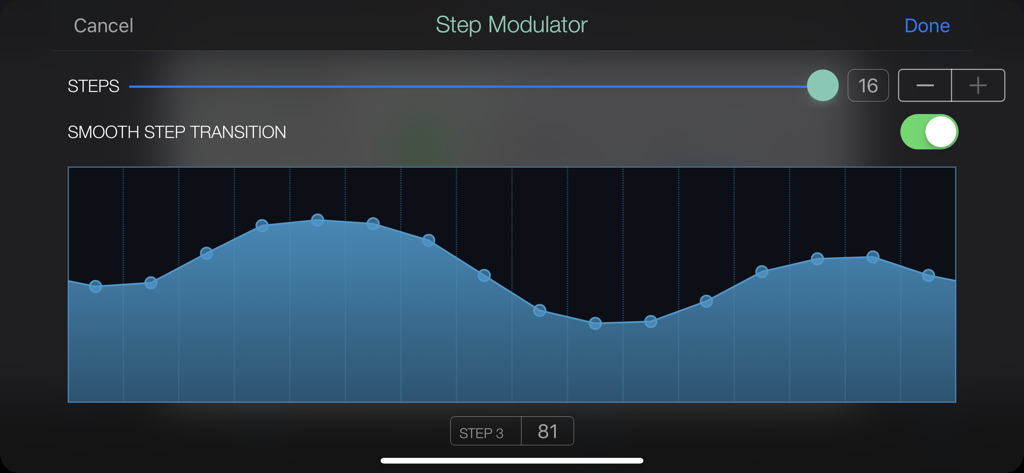
WiDI - MIDI Studio - Step-Modulator-Oberfläche in WiDI MIDI Studio mit einem 16-stufigen Modulationsmuster mit aktivierten sanften Übergängen
Step-Modulator-Oberfläche in WiDI MIDI Studio mit einem 16-stufigen Modulationsmuster mit aktivierten sanften Übergängen

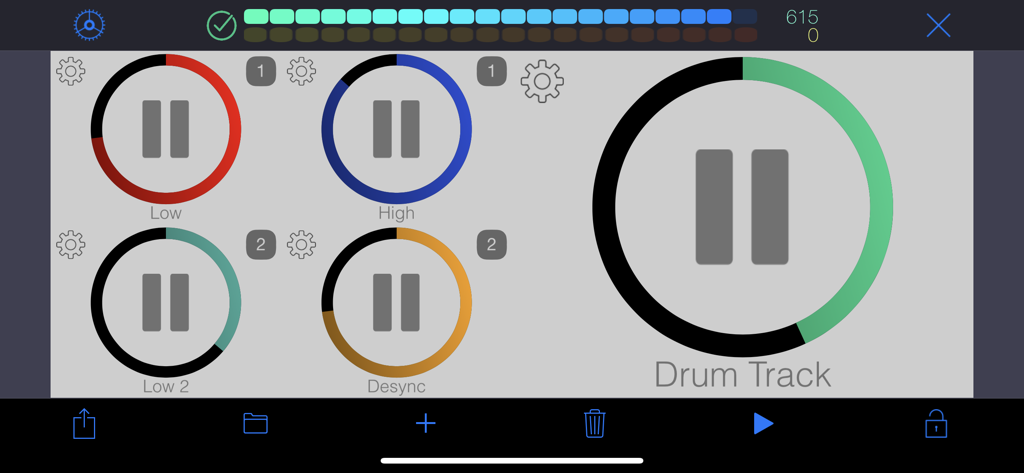
WiDI - MIDI Studio - Anpassbare MIDI-Control-Surface mit farbcodierten Wiedergabetasten für die Musikproduktion
Anpassbare MIDI-Control-Surface mit farbcodierten Wiedergabetasten für die Musikproduktion

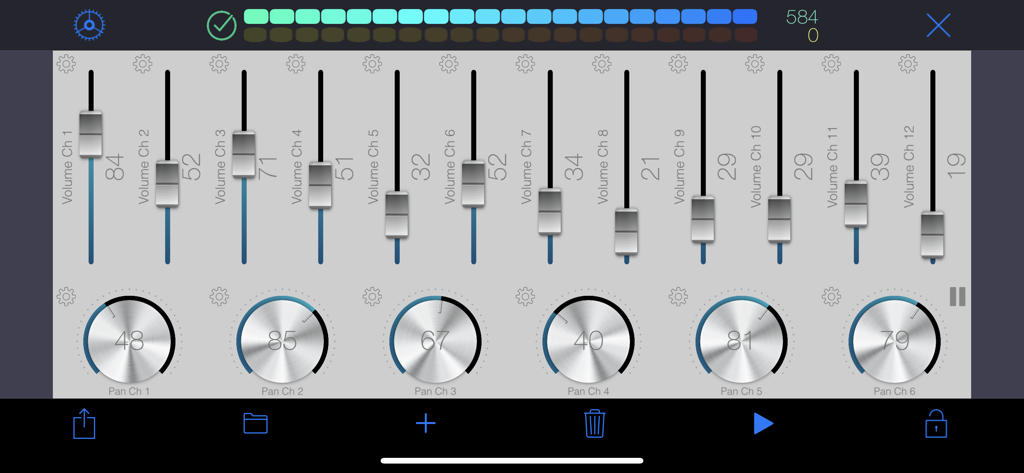
WiDI - MIDI Studio - WiDI MIDI Studio App-Oberfläche mit Lautstärkereglern und Panning-Reglern für die Musiksteuerung
WiDI MIDI Studio App-Oberfläche mit Lautstärkereglern und Panning-Reglern für die Musiksteuerung

WiDI - MIDI Studio - WiDI App-Oberfläche mit anpassbaren MIDI-Reglern und Sliders für die Musikproduktion
WiDI App-Oberfläche mit anpassbaren MIDI-Reglern und Sliders für die Musikproduktion

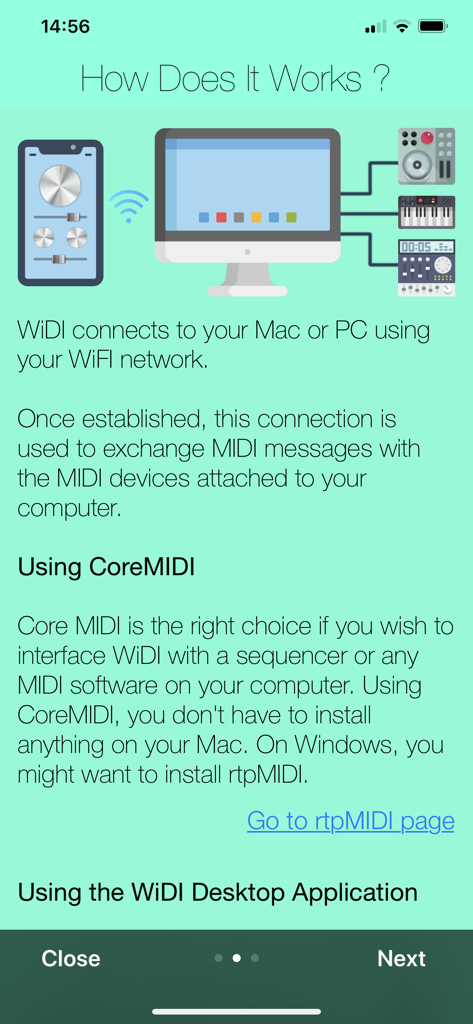
WiDI - MIDI Studio - Grafik, die die drahtlose Verbindung der WiDI-App mit einem Computer und externen Musikgeräten über WLAN zeigt.

Grafik, die die drahtlose Verbindung der WiDI-App mit einem Computer und externen Musikgeräten über WLAN zeigt.

Beschreibung

WiDI is a control surface with an integrated step sequencer in which you create controls such as buttons, pads, knobs and faders to send MIDI events and play sequences. • CONTROL SURFACE AND SEQUENCER: A control is bound to a channel and a specific MIDI Control Change. You can either specify the CC number if you know it, or let the app learn it. Once placed on the surface, use this control to interact with your MIDI device. Alternatively, any CC event sent by your device will be shown live by the control(s) bound to this CC. Pads are special controls: they can either produce MIDI CC events, Notes or Program changes. If bound to a CC, the pad can act as an on/off switch (you specify the values for each state.) If bound to a note, each tap produces the specified MIDI note. This is especially useful to operate MIDI instruments without keyboards such as synthesizer modules or drum machines. A sequence can hold as many tracks as you wish, and send notes to different MIDI channels. Sequences can play in sync or running freely. You may also group sequences together to start or pause them at the same time. • MIDI: To interface WiDI with any MIDI instruments/devices connected to your Mac or PC, connect to a MIDI Network Session on your Mac or your PC. On a Mac, this is natively supported by macOS, and you do not need to install third party software (use Audio MIDI Setup.) On a PC running Windows, you might want to install rtpMIDI. As an alternative to MIDI Network Sessions, you may use the WiDI Desktop Application. It acts as a MIDI bridge between the network and your MIDI hardware. You can install the desktop application on as many computers as you want (it's free!). It's a very lightweight package that doesn't need to perform any installation procedure whatsoever. You may download the WiDI Desktop Application for macOS on the Mac App Store, or go to : https://www.hypertide.com/widi/ for both macOS and Windows archives. Additionally, any class-compliant MIDI interface natively supported by iOS can also be used directly by WiDI without the need of a network connection. • FEATURES: ○ Use any CoreMIDI-supported MIDI interface connected to your device ○ MIDI network session: use WiDI as an external control surface for any DAW such as Logic Pro, Ableton Live, Cubase, ... ○ Multiple iPhone and iPad can connect to your computer, allowing different control surfaces simultaneously ○ Integrated step sequencer: create sequences, each one holding as many tracks as needed ○ Sequences can run freely or in sync and start simultaneously if grouped together in fire groups ○ Auto discover MIDI CC : you don't need to know each one to add controls, WiDI learns CC numbers sent by your devices ○ Automate CC : sweep ranges or use the step modulator to design patterns to modulate controls values, supporting various advanced options like step-by-step or smooth variations, bouncing, repeating, changing speed ○ Add as many pads as you want to generate MIDI Notes, Control Changes or Program Changes ○ Flexible control surface : set layout and grid size for both portrait and landscape orientations ○ Re-arranging controls is as simple as drag & drop ○ Fully customizable user interface : themes, colors, display of values and labels, aspect ratios, grid spacing, grid coloring, background, ... ○ Integrated File Manager to load and save your surfaces, which are also accessible in the iOS Files app and your computer's iTunes connection ○ Exchange surfaces between devices with the integrated QR code generator and scanner ○ Or use the share feature, so you may import them on any device. We'd love to hear from you! Should you be in need of support or eager to request a new feature, please contact us at support+widi@hypertide.com

Download

Herunterladen auf App Store

Diese Seite ist keine offizielle Seite der App oder ihres Entwicklers, sondern eine unabhängige redaktionelle Veröffentlichung, die zu Informations- und Kommentarzwecken erstellt wurde. Sofern nicht ausdrücklich anders angegeben, sind weder die App noch ihr Entwickler mit MWM, Apple, Google Play, dem App-Herausgeber oder dem Entwickler der App verbunden, von ihnen unterstützt, gesponsert, autorisiert oder anderweitig offiziell verbunden, und nichts auf dieser Seite impliziert, dass die App unter Verwendung der Dienste von MWM entwickelt wurde. Alle Marken, Logos, Screenshots und andere Inhalte bleiben Eigentum ihrer jeweiligen Inhaber.







