
Diese Seite ist keine offizielle Seite der App oder ihres Entwicklers, sondern eine unabhängige redaktionelle Veröffentlichung, die zu Informations- und Kommentarzwecken erstellt wurde. Sofern nicht ausdrücklich anders angegeben, sind weder die App noch ihr Entwickler mit MWM, Apple, Google Play, dem App-Herausgeber oder dem Entwickler der App verbunden, von ihnen unterstützt, gesponsert, autorisiert oder anderweitig offiziell verbunden, und nichts auf dieser Seite impliziert, dass die App unter Verwendung der Dienste von MWM entwickelt wurde. Alle Marken, Logos, Screenshots und andere Inhalte bleiben Eigentum ihrer jeweiligen Inhaber.


WinZip: #1 zip & unzip tool
Schluss mit dem Chaos: Die App verwandelt Dateiberge in geordnete Archive. Das Ergebnis? Mehr Kontrolle über Ihre digitalen Inhalte.
Downloads
2.5M+Bewertung
Bewertungen gesamt
3.1KHerausgeber
Kategorie
UtilitiesSprachen
8Neueste Version
7.14Größe
56.3 MBErstveröffentlichung
13. Feb. 2012Eine detaillierte Betrachtung der Schlüsselmerkmale von WinZip für iOS, bewertet nach ihrem Nutzen für Professionals, Studenten und aktive digitale Anwender.
Analyse: WinZip – Das unverzichtbare iOS-Tool für Dateimanagement
Umfassende Kompressions- und Dekompressionsunterstützung
Die App ermöglicht es Nutzern, eine Vielzahl gängiger Archivformate (wie .ZIP, .Zipx, .RAR, .7z und LHA) zu erstellen, zu öffnen und zu extrahieren, was die Kompatibilität mit verschiedenen Dateiquellen sicherstellt.
Nahtlose Cloud-Speicher-Integration
Dieses Tool bietet eine direkte Verbindung zu den wichtigsten Cloud-Diensten wie Dropbox, Google Drive, OneDrive und iCloud, wodurch das Zippen, Entzippen und Teilen von Dateien direkt aus der Cloud heraus und in die Cloud hinein vereinfacht wird.
Robuste AES-Verschlüsselung für Datensicherheit
Es ermöglicht Nutzern, ihre sensiblen Dateien vor dem Speichern und Teilen mit leistungsstarker 128- oder 256-Bit-AES-Verschlüsselung zu schützen, was der Priorität der Datensicherheit entgegenkommt.
Integrierte Dateivorschau für diverse Formate
Die App verfügt über die Fähigkeit, eine breite Palette gängiger Dateitypen (z.B. Office-Dokumente, PDFs, Bilder, Textdateien) direkt innerhalb komprimierter Archive anzuzeigen, was den Workflow beschleunigt und den Wechsel zwischen Apps minimiert.
Einfaches Teilen und Versenden großer Dateien
Dieses Tool erleichtert das Versenden großer Dateien per E-Mail und das Teilen über soziale Medien (Twitter, Facebook) oder AirDrop, was die Verbreitung von Inhalten vereinfacht und beschleunigt.
Kamera-Roll-Integration für Fotos und Videos
Es ermöglicht Nutzern, Fotos und Videos direkt aus der Kamera-Roll zu zippen, zu entzippen und zu teilen, inklusive Multi-Selektion für ganze Sammlungen, was besonders für aktive digitale Anwender nützlich ist.
Die folgenden Screenshots und die Beschreibung stammen direkt aus dem offiziellen Store-Eintrag der App und sind Eigentum des Entwicklers.
App Store
Screenshots

Dieses Tool bietet eine klare Dateiverwaltung mit einer intuitiven "Meine Dateien"-Ansicht und einer schnellen Navigation durch verschiedene Ordner und Dokumente über die untere Leiste.
Dateiübersicht leichtgemacht.

Nutzer können Inhalte direkt erstellen, wie Ordner oder Zip-Archive, und diese über das übersichtliche Aktionsmenü von verschiedenen Cloud-Diensten importieren oder herunterladen.
Vielseitige Dateierstellung.
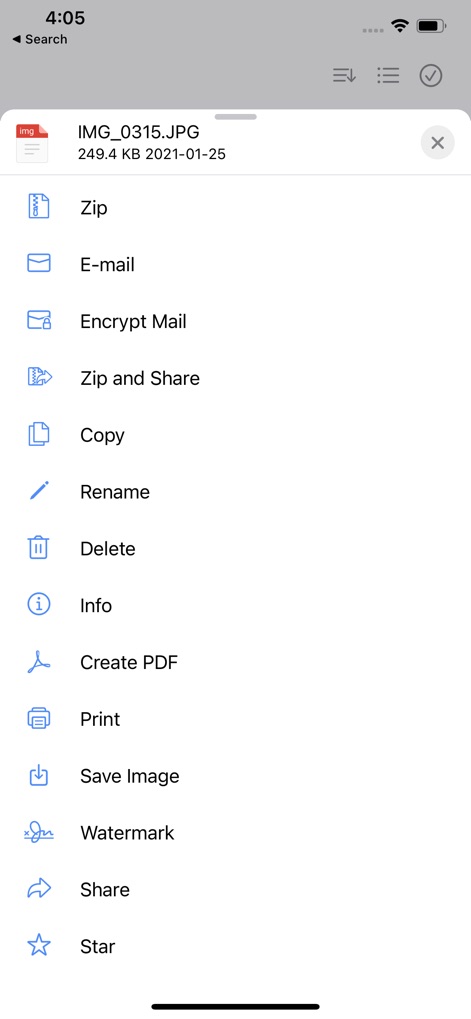
Die App bietet eine umfassende Liste von Aktionen für einzelne Dateien, die über ein Kontextmenü zugänglich sind, einschließlich spezifischer Funktionen wie "Encrypt Mail" und "Create PDF".
Leistungsstarke Dateiaktionen.

Nutzer können mehrere Dateien gleichzeitig über die Checkboxen auswählen und anschließend Stapelverarbeitungsoptionen wie das Verschlüsseln von E-Mails oder das Kopieren von Elementen nutzen.
Effiziente Mehrfachauswahl.

Die App integriert sich nahtlos mit wichtigen Cloud-Diensten wie Dropbox und Google Drive, übersichtlich aufgelistet, und unterstützt zusätzlich die Anbindung an FTP- und Samba-Server.
Nahtlose Cloud-Anbindung.
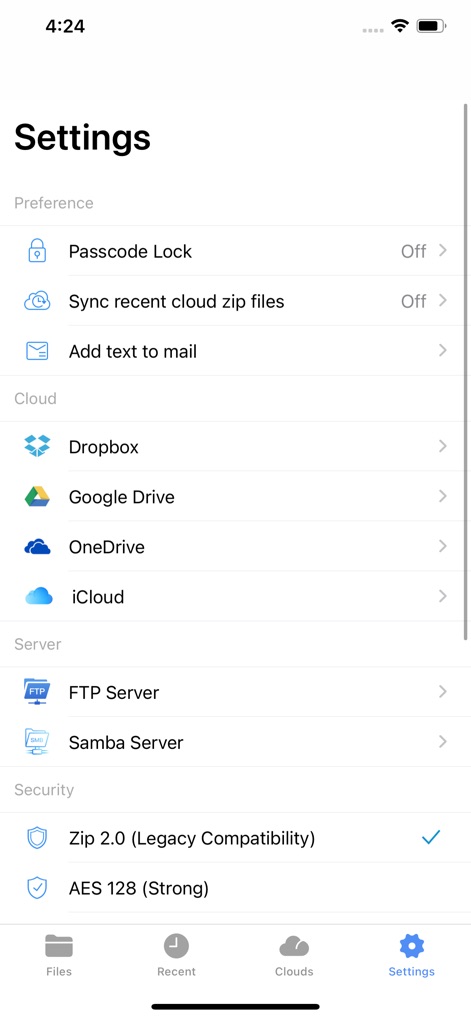
Dieses Tool bietet erweiterte Einstellungen zur Steigerung der Sicherheit, wie die Aktivierung einer Passcode-Sperre, und zur detaillierten Konfiguration der Cloud- und Server-Verbindungen.
Flexible Konfiguration.

Die App bietet einen ansprechenden Dunkelmodus für eine angenehme Nutzung und ermöglicht eine klare Mehrfachauswahl von Dateien mit sichtbaren Checkboxen für effizientes Management.
Intuitiver Dunkelmodus.
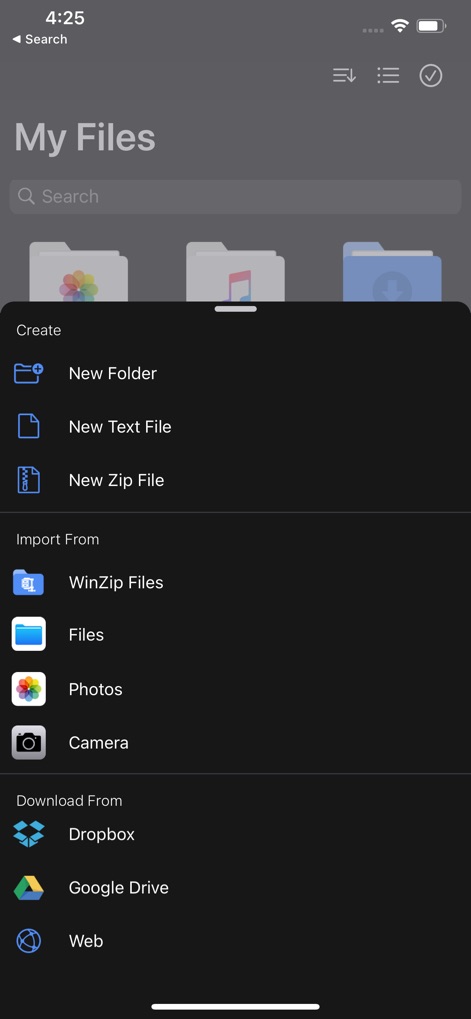
Im Dunkelmodus können Nutzer problemlos neue Ordner und Zip-Dateien über das Erstellungsmenü erstellen sowie Inhalte von Quellen wie der Kamera oder Cloud-Diensten importieren.
Dunkelmodus-Funktionen.

Die App integriert einen praktischen Bildbetrachter, der Nutzern erlaubt, sofort Aktionen wie das Speichern oder das Komprimieren und Teilen von Bildern über das Kontextmenü auszuführen.
Medien-Vorschau & Aktionen.

Nutzer können Dateien direkt aus dem Web herunterladen, indem sie eine URL in das Textfeld einfügen und über die Schaltfläche "Open URL" den Download starten.
Direkter Web-Download.
Beschreibung
Download
Ähnliche Apps
Apps mit ähnlichen Funktionen und Nutzererfahrung

Unzip – ZIP RAR 7Z Extractor
Little Sweet Technology Co., Ltd.

Unzip - zip,rar,7z file opener
书勇 贾

Zip & RAR File Extractor
PENGHUI ZHAO

iZip – Zip Unzip Unrar
ComcSoft Corporation

Zip, RAR, 7z File Extractor
FANGZHOU INTERACTIVE TECHNOLOGY CO., LIMITED

ZArchiver: UnZip, UnRar, 7Z
TIMON SOFTWARE SOLUTIONS COMPANY LIMITED

iRAR - zip,rar,7z file opener
书敏 贾

Zip & RAR & 7z File Extractor
琳 胡

MT管理器
瑞 胡
Diese Seite ist keine offizielle Seite der App oder ihres Entwicklers, sondern eine unabhängige redaktionelle Veröffentlichung, die zu Informations- und Kommentarzwecken erstellt wurde. Sofern nicht ausdrücklich anders angegeben, sind weder die App noch ihr Entwickler mit MWM, Apple, Google Play, dem App-Herausgeber oder dem Entwickler der App verbunden, von ihnen unterstützt, gesponsert, autorisiert oder anderweitig offiziell verbunden, und nichts auf dieser Seite impliziert, dass die App unter Verwendung der Dienste von MWM entwickelt wurde. Alle Marken, Logos, Screenshots und andere Inhalte bleiben Eigentum ihrer jeweiligen Inhaber.