WritePDF

WritePDF

Herunterladen auf App Store
Logo von WritePDF

WritePDF: Dokumentenleistung auf Desktop-Niveau für den mobilen Profi

Gehen Sie über einfache Anmerkungen hinaus mit der fortschrittlichsten PDF-Engine für das iPad. Bearbeiten, zusammenführen und unterschreiben Sie Dokumente mit professionellen Werkzeugen, sicherer Cloud-Verwaltung und einer globalen Suche, die findet, was Sie brauchen, ohne auch nur eine Datei öffnen zu müssen.

Herausgeber

EuroSmartz Ltd

Kategorie

Business

Downloads

129K+

Bewertung

3.8/5

Bewertungen gesamt

800

Sprachen

7

Professionelle Leistung im Überblick

Entdecken Sie die Oberfläche, die von 129K+ Nutzern verwendet wird.
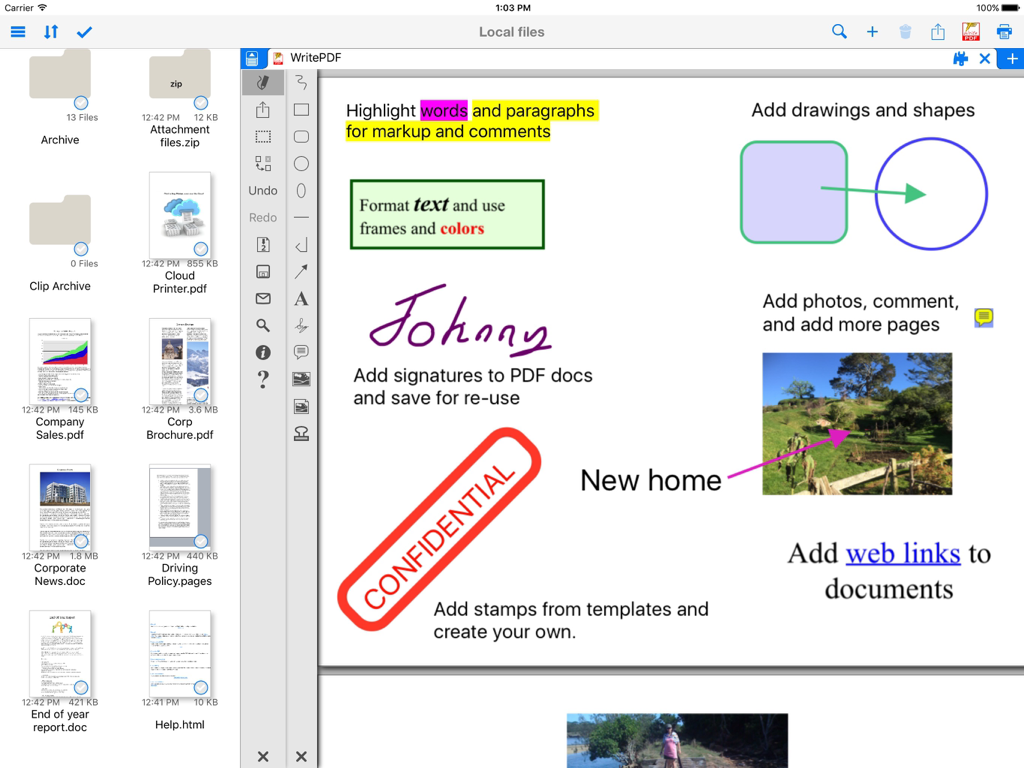
Oberfläche der WritePDF-App auf dem iPad mit Dokumenten-Annotationstools wie Text-Hervorhebung, digitalen Signaturen und Stempeln

Oberfläche der WritePDF-App auf dem iPad mit Dokumenten-Annotationstools wie Text-Hervorhebung, digitalen Signaturen und Stempeln

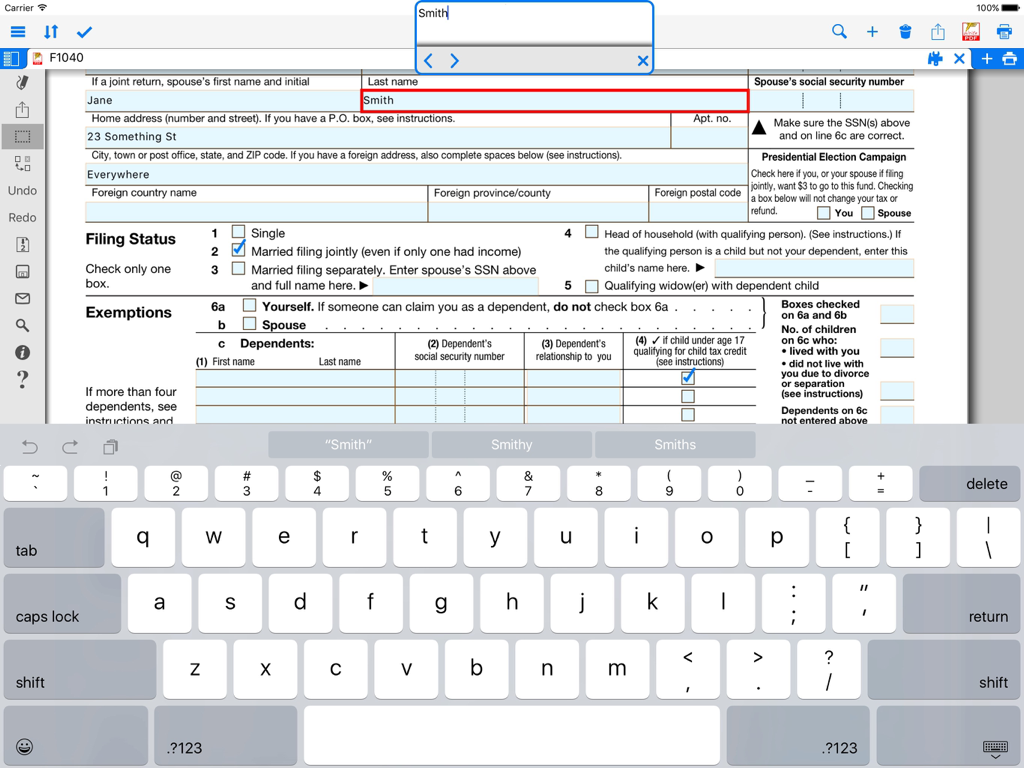
Ausfüllen eines PDF-Formulars auf einem iPad mit der WritePDF-Anwendung

Ausfüllen eines PDF-Formulars auf einem iPad mit der WritePDF-Anwendung

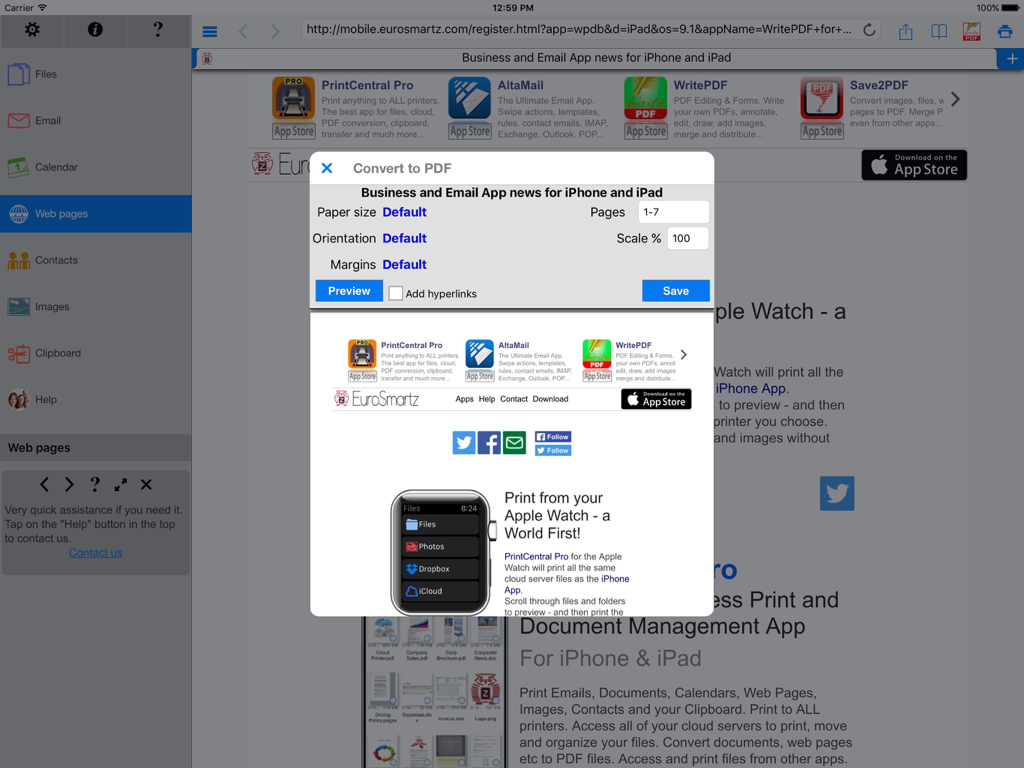
WritePDF iPad-App-Oberfläche, die den Dialog zum Konvertieren von Webseiten in PDF mit Dokumenteinstellungen anzeigt.

WritePDF iPad-App-Oberfläche, die den Dialog zum Konvertieren von Webseiten in PDF mit Dokumenteinstellungen anzeigt.

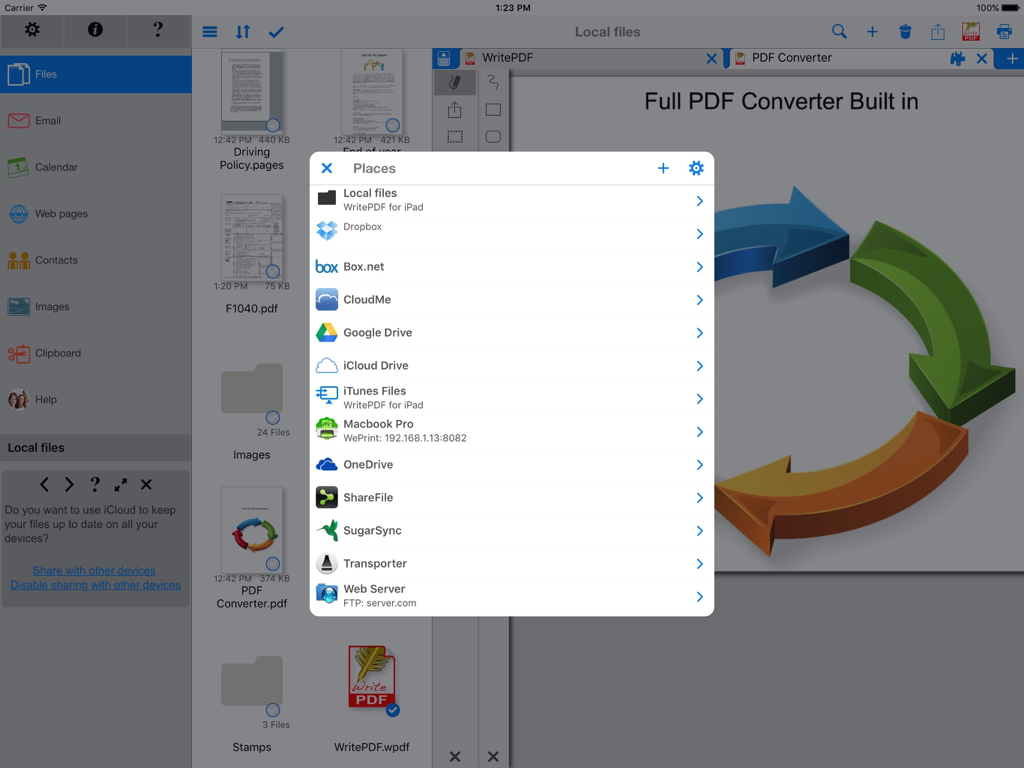
WritePDF iPad-Oberfläche, die eine Liste integrierter Cloud-Speicherdienste für die Dokumentenverwaltung anzeigt

WritePDF iPad-Oberfläche, die eine Liste integrierter Cloud-Speicherdienste für die Dokumentenverwaltung anzeigt

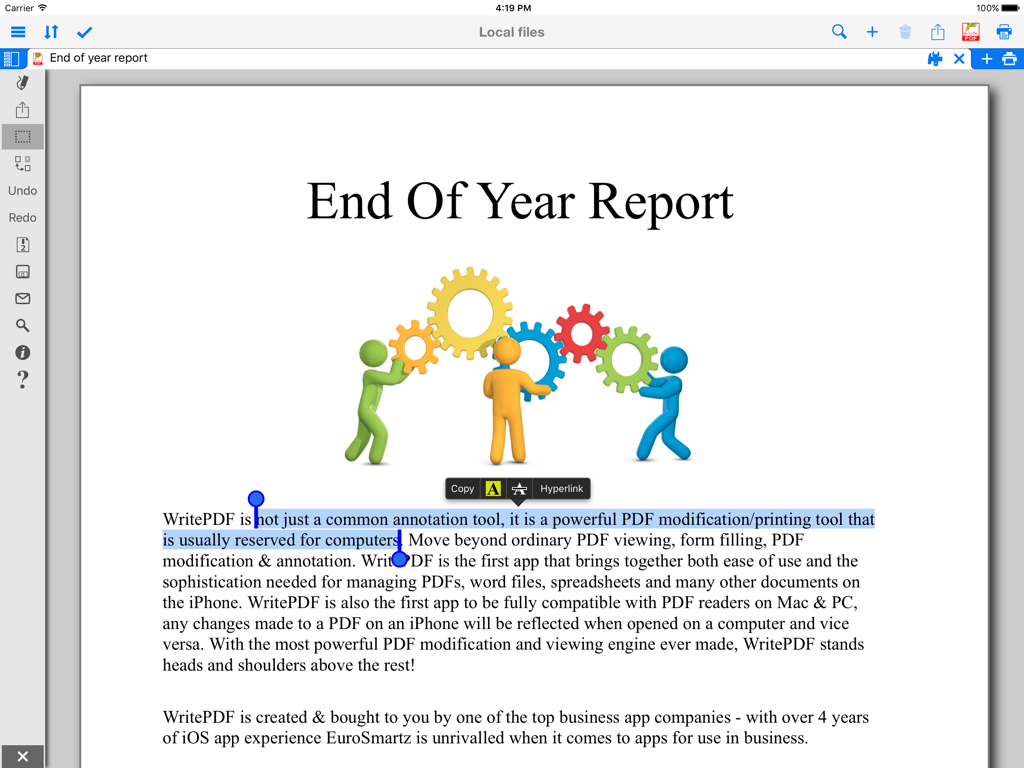
iPad-Bildschirm, der Text-Hervorhebungs- und Anmerkungsoptionen für einen professionellen PDF-Bericht zeigt

iPad-Bildschirm, der Text-Hervorhebungs- und Anmerkungsoptionen für einen professionellen PDF-Bericht zeigt

Leistung auf Desktop-Niveau auf Ihrem iPad

Die Tools, die diese App auszeichnen, gewählt von 129K+ Nutzern.

🖋️

Professionelle Dokumentenmodifikation

Führen Sie Dateitypen zusammen, füllen Sie komplexe Formulare aus und kommentieren Sie mit der Präzision und Raffinesse eines Desktop-PCs, während Sie unterwegs sind.

🔍

Sofortige globale Suche

Finden Sie kritische Informationen in Sekundenschnelle. Suchen Sie nach Schlüsselwörtern in allen gespeicherten und cloudbasierten Dateien gleichzeitig, ohne sie jemals öffnen zu müssen.

🔒

Sicherer Cloud-Workflow

Bearbeiten und konvertieren Sie Dokumente direkt in der Cloud, ohne sie herunterzuladen. Bewahren Sie strikte Datenintegrität und professionelle Sicherheitskonformität.

Über die App

Alles, was Sie über wissen müssen WritePDF.

Beschreibung

WritePDF is more than just a common annotation tool, it is a powerful PDF modification/printing tool that is usually reserved for computers. Move beyond ordinary PDF viewing, form filling, PDF modification & annotation. WritePDF is the first app that brings together both ease of use and the sophistication needed for managing PDFs, word files, spreadsheets and many other documents on the iPad. WritePDF is also the first app to be fully compatible with PDF readers on Mac & PC, any changes made to a PDF on an iPad will be reflected when opened on a computer and vice versa. With the most powerful PDF modification and viewing engine ever made, WritePDF stands heads and shoulders above the rest! One of the most powerful and security focused features of WritePDF is the ability to read, convert and annotate PDFs in the Cloud without having to download them first. This means that you can keep all of your documents and files in the Cloud and access them on demand in a very secure environment when away from the office. It also give organisations control on documents and files. WritePDF is created & bought to you by one of the top business app companies - with years of iOS app experience from 2008, EuroSmartz is unrivaled when it comes to apps for use in business. - "Being able to quickly highlight text ready for revision is awesome" - "The ability to search for a word or phrase over all of the PDFs & files I have without opening them is something I can't even do on my PC" - "Form filling is made so easy with WritePDF, I have just applied for a new bank account using my iPad" - "The ability to quickly access a document in the cloud and modify it is the #1 feature in my book" - "I can now edit my PDF and print it to my old printer that is not AirPrint enabled, just magic!" Main Features √ Modifying PDFs > Add arrows, circles, squares and other shapes to a PDF > Fill in PDF forms & add text > Use Highlighter to highlight single words or entire sections > Add web page links to words or sections of text > Transfer PDFs to & from other apps using "Open in.." > Fully compatible with most PC, Mac & iOS App PDF viewers, shows all changes > Insert pictures to a PDF > Quickly & seamlessly transfer PDFs or files from Pages, Numbers or Keynote using Open in √ Global Search > Search for keywords or phrases in ALL files stored within WPDF without opening them > Search results displayed as tapable links √ Cloud Services > Annotate, read and convert files & PDFs directly in the Cloud without downloading > Securely access documents and files and keep control of where they are stored > CloudMe, Sharefile, Box.net, Dropbox, Google Docs, iDisk, FTP, WebDAV all supported √ PDF Page Organization > Move, delete or add pages > Add, delete, rotate, copy/paste & rearrange pages > Add selected pages to an existing PDF from docs, spreadsheets or other files √ Form Filling > Easily fill in PDF forms, even with multiple fields and boxes > Save your signature in the app and reuse when needed > Email/print completed form right from within the app √ PDF Conversion & Merging View/Convert/Merge Microsoft Office files, Photos, PDFs, Contacts, Web Pages, Email & Email attachments as well as many more file formats > Create a single PDF from multiple files even if they are a different format (i.e. merge a Word file with a Pages document with an existing PDF etc) > Print or convert PDFs from other apps using Open in or other methods √ Full featured Printing > Print direct to most existing WiFi or shared printers, or use the free printer software for ALL printers. > Print from Pages, Numbers or Keynote extremely quickly & easily without the need for an AirPrint printer using Open in > Print remotely via 3G/EDGE or Google Cloud Print √ Reminders & Keywords > Set a reminder for a file, PDF or document > Add keywords to any file for easy searching

Neueste Version

4.7

Größe

44.4 MB

Erstveröffentlichung

28. Feb. 2012

Bereit, Ihr iPad in einen professionellen Arbeitsplatz zu verwandeln?

Schließen Sie sich über 129.000 mobilen Profis an, die WritePDF für Desktop-Klasse-Bearbeitung, sichere Cloud-Verwaltung und nahtloses Drucken vertrauen – jederzeit und überall.

Herunterladen auf App Store

App information, icons, screenshots, and descriptions displayed on this page are sourced from the Apple App Store and are the property of their respective developers. Download estimates and rankings are based on MWM's proprietary models and may not reflect actual figures. This page is provided for informational and analytical purposes only.

Believe this page infringes your intellectual property? File a dispute