xFormula - Equation Editor
Herunterladen auf App Store

Diese Seite ist keine offizielle Seite der App oder ihres Entwicklers, sondern eine unabhängige redaktionelle Veröffentlichung, die zu Informations- und Kommentarzwecken erstellt wurde. Sofern nicht ausdrücklich anders angegeben, sind weder die App noch ihr Entwickler mit MWM, Apple, Google Play, dem App-Herausgeber oder dem Entwickler der App verbunden, von ihnen unterstützt, gesponsert, autorisiert oder anderweitig offiziell verbunden, und nichts auf dieser Seite impliziert, dass die App unter Verwendung der Dienste von MWM entwickelt wurde. Alle Marken, Logos, Screenshots und andere Inhalte bleiben Eigentum ihrer jeweiligen Inhaber.

Logo von xFormula - Equation Editor
Herunterladen auf App Store

xFormula - Equation Editor

Digitalisieren Sie Mathematik sofort mit KI-Erkennung, organisieren Sie benutzerdefinierte Formelbibliotheken und exportieren Sie pixelgenaue LaTeX- oder Word-Gleichungen direkt von Ihrer iPad-Tastatur.

Kennzahlen

Downloads

77K+

Bewertung

4.1/5

Bewertungen gesamt

500

Herausgeber

煦 张

Kategorie

Education

Sprachen

12

Neueste Version

4.8

Größe

55.9 MB

Erstveröffentlichung

5. Okt. 2019
Funktionen

Das ultimative Mathematik-Toolkit für Ihre MINT-Reise

Schließen Sie die Lücke zwischen handschriftlichen Notizen und professionellen digitalen Dokumenten. xFormula bietet die Präzision und Geschwindigkeit, die für fortgeschrittene Forschung und akademische Exzellenz erforderlich sind.

KI-gestützte Mathematik-Erkennung

Machen Sie ein Foto von jeder komplexen Gleichung aus einem Lehrbuch oder Whiteboard. Unser fortschrittliches Modell wandelt sie sofort in editierbaren LaTeX- oder Word-Code um und eliminiert manuelle Eingabefehler.

Nahtlose Ökosystem-Integration

Exportieren Sie Ihre Arbeit genau dorthin, wo Sie sie benötigen. Volle Kompatibilität mit Microsoft Word, Pages, Keynote und Overleaf über MathML-, UnicodeMath- und hochwertige SVG-Exporte.

Die folgenden Screenshots und die Beschreibung stammen direkt aus dem offiziellen Store-Eintrag der App und sind Eigentum des Entwicklers.

App Store

Screenshots
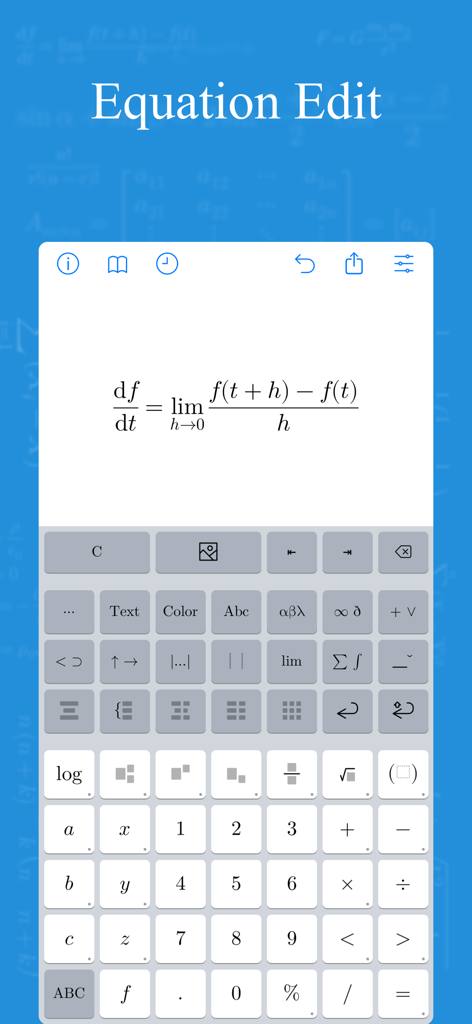
xFormula - Equation Editor - Die xFormula App-Oberfläche zeigt eine Kalkül-Gleichung, die mit einer speziellen mathematischen Tastatur bearbeitet wird.
Die xFormula App-Oberfläche zeigt eine Kalkül-Gleichung, die mit einer speziellen mathematischen Tastatur bearbeitet wird.

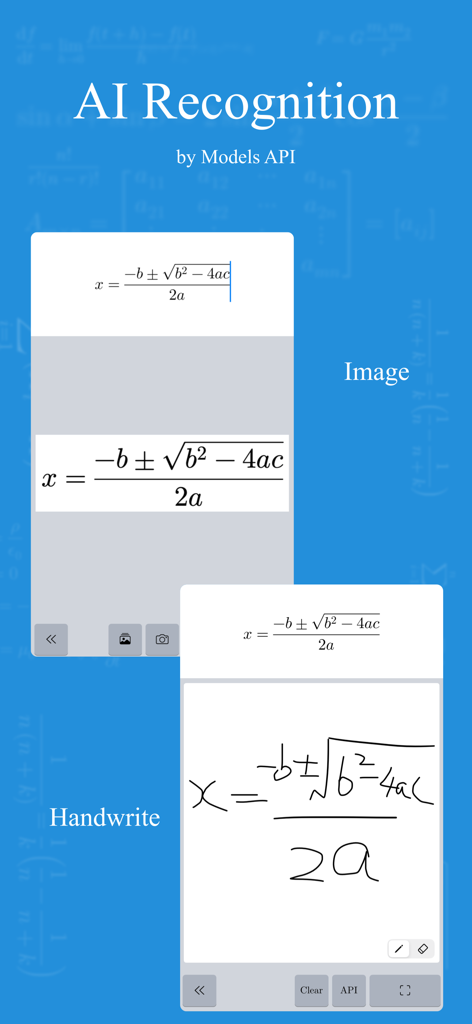
xFormula - Equation Editor - KI-Erkennung von Bild- und handschriftlichen mathematischen Formeln in der xFormula Gleichungseditor-App
KI-Erkennung von Bild- und handschriftlichen mathematischen Formeln in der xFormula Gleichungseditor-App

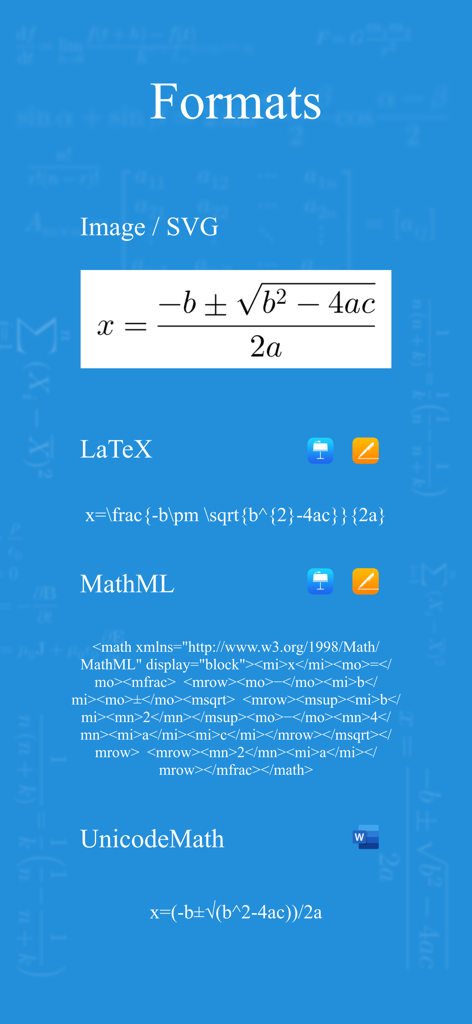
xFormula - Equation Editor - Ein Screenshot, der verschiedene Exportformate für die xFormula App zeigt, darunter Bild, LaTeX, MathML und UnicodeMath
Ein Screenshot, der verschiedene Exportformate für die xFormula App zeigt, darunter Bild, LaTeX, MathML und UnicodeMath

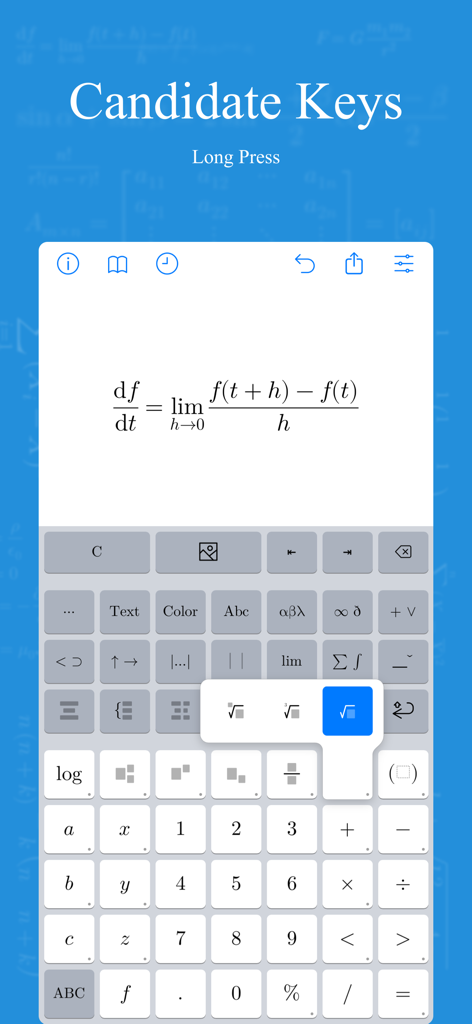
xFormula - Equation Editor - Oberfläche der xFormula App, die eine Kalkül-Gleichung und eine spezielle mathematische Symboltastatur anzeigt
Oberfläche der xFormula App, die eine Kalkül-Gleichung und eine spezielle mathematische Symboltastatur anzeigt

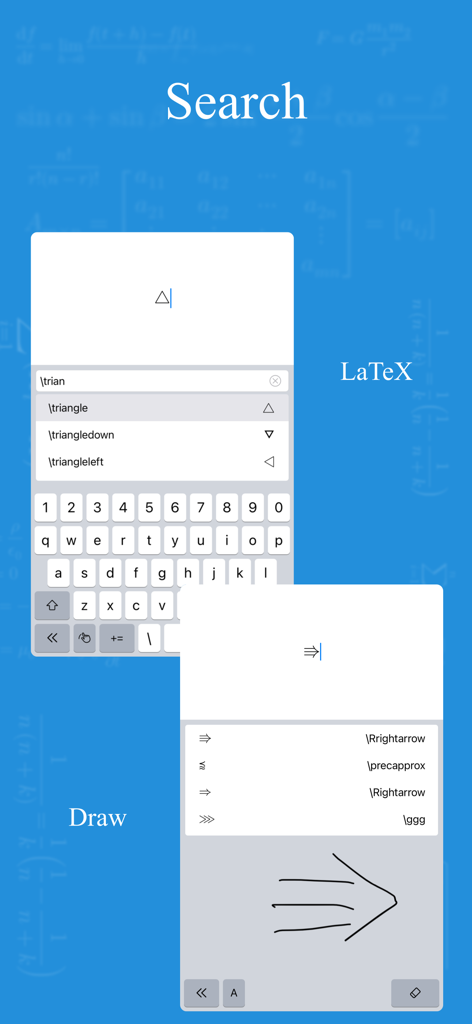
xFormula - Equation Editor - Oberfläche der xFormula App, die die Suche nach LaTeX-Symbolen und die Erkennung von handgezeichneter Mathematik zeigt
Oberfläche der xFormula App, die die Suche nach LaTeX-Symbolen und die Erkennung von handgezeichneter Mathematik zeigt

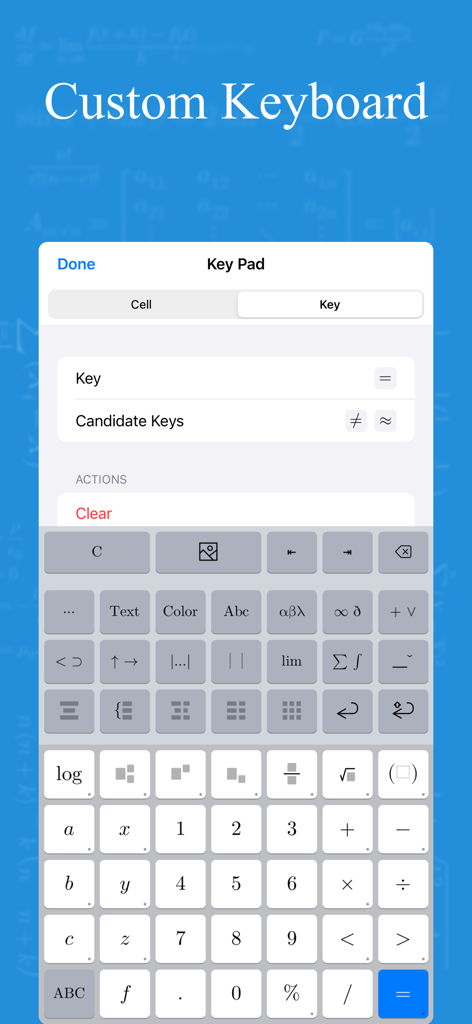
xFormula - Equation Editor - Eine anpassbare mathematische Tastaturoberfläche mit wissenschaftlichen Symbolen und Werkzeugen zur Gleichungsbearbeitung
Eine anpassbare mathematische Tastaturoberfläche mit wissenschaftlichen Symbolen und Werkzeugen zur Gleichungsbearbeitung

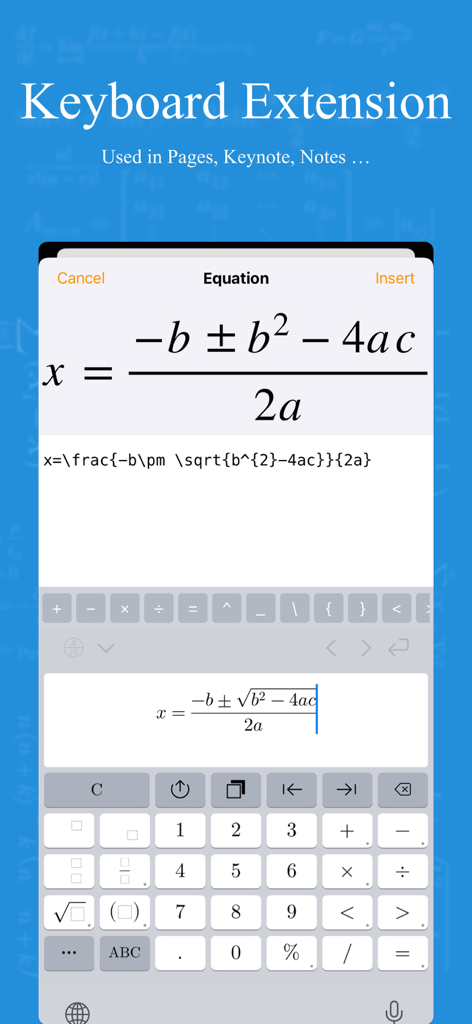
xFormula - Equation Editor - Screenshot der xFormula App Tastaturerweiterung, die die Bearbeitung der quadratischen Formel auf einem Mobilgerät zeigt
Screenshot der xFormula App Tastaturerweiterung, die die Bearbeitung der quadratischen Formel auf einem Mobilgerät zeigt

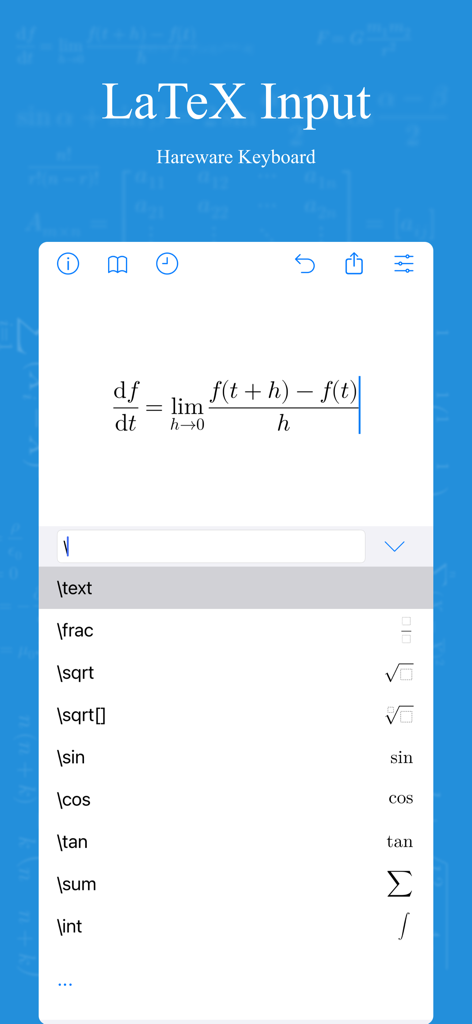
xFormula - Equation Editor - Oberfläche der xFormula App, die eine Kalkül-Grenzwert-Formel und eine Liste von LaTeX-Befehlskürzeln anzeigt
Oberfläche der xFormula App, die eine Kalkül-Grenzwert-Formel und eine Liste von LaTeX-Befehlskürzeln anzeigt

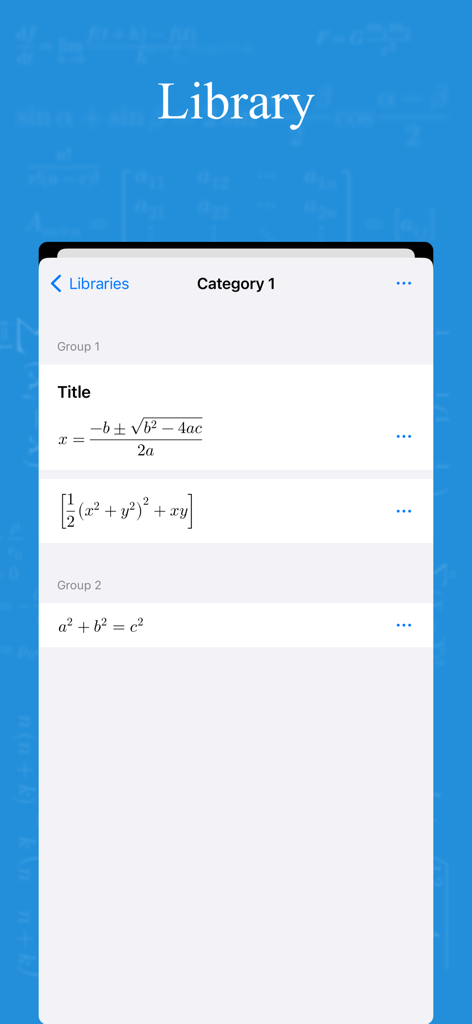
xFormula - Equation Editor - Bibliotheksansicht der xFormula App mit organisierten mathematischen Gleichungen und Kategorien

Bibliotheksansicht der xFormula App mit organisierten mathematischen Gleichungen und Kategorien

Beschreibung

This is a math equation editor which could export the result as picture, LaTeX, MathML, UnicodeMath(Word). Include variables, binary operators, arrows, relations, brackets, underline, overline, accents, fraction, radical, large operator... Just download and have a try. ----- Functions: 1. Mathematical formula editing. 2. Import & Export - LaTeX (Pages, Keynote) - MathML (Pages, Keynote) - UnicodeMath (Word) - Image - SVG: If the .svg file is exported by xFormula, then it could be imported and edit again. 3. Image recognition - Setup large model API to recognize the math formula in the image. - The recognition of mathematical formulas in large models is getting better and better, but due to the large number of LaTeX commands for mathematical formulas, there may be some situations where the same symbol is different for different commands. xFormula cannot support all LaTeX commands yet, so there may be some exceptions. However, we will continue to optimize and be compatible with more commands in future versions 4. Mathematical formula library: - You can create several formula libraries at the same time, and each formula library can be exported and imported separately; - Under each formula library, there can be many categories, and under each category, there can be many groups. Under each group, formulas can be created and edited - Example 1: High School Mathematics Formula Library > Classification 1: Set, Classification 2: Geometry, Classification 3: Algebra - Example 2: Junior High School Mathematics Formula Library>Classification 1: Rational Numbers, Classification 2: Trigonometric Functions, Classification 3: Geometry 5. Mathematical style: - Due to font limitations, the mathematical formulas currently provided may have some pixel spacing flaws, and each style may also have several mathematical characters that are not supported. Please use them as appropriate. - We will continue to optimize mathematical styles, which is what we are concerned about. 6. Custom keyboard: -The frequency of mathematical symbols used varies at each stage, from elementary school, middle school, high school to university; The frequency of symbols used for sets, limits, matrices, functions, and each knowledge range is also different. So if you use it for a long time or frequently, it is strongly recommended to create a suitable input symbol keyboard for yourself, which is more efficient and saves more time than a universal keyboard. 7. Keyboard Extension - Could be directly used in the form of a keyboard in other text editing software - Due to the system's restrictions on keyboard Extension, there may be some abnormal situations. After installing the keyboard, if it cannot appear in the keyboard list, please restart the device and try again - Although currently compatible with iOS 15, it is recommended to use new devices as old devices may experience loading failures due to memory limitations and other issues 8. Help Document ----- Purchase: 1. This is a paid software and is provided for free download in the hope that users will know what features this software has and whether it is useful before purchasing. 2. As the payment methods for iOS and macOS were not unified when this software was first released, xFormula (iOS) and xFormula (macOS) need to be paid separately. The advantage of separate payment is pricing splitting, which means that if you only have a mobile device and don't have a Mac, you can save on the purchase cost of the Mac. If merged, the pricing will also be the sum of the current two pricing. 3. If you plan to use this software for a long time and consider upgrading more features in the future, it is recommended to purchase the Professional Edition. Terms of Service : https://www.apple.com/legal/internet-services/itunes/dev/stdeula/ Privacy Policy: http://guizhenjiaoyu.com/xformula/en/privacy.html

Download

Herunterladen auf App Store

Diese Seite ist keine offizielle Seite der App oder ihres Entwicklers, sondern eine unabhängige redaktionelle Veröffentlichung, die zu Informations- und Kommentarzwecken erstellt wurde. Sofern nicht ausdrücklich anders angegeben, sind weder die App noch ihr Entwickler mit MWM, Apple, Google Play, dem App-Herausgeber oder dem Entwickler der App verbunden, von ihnen unterstützt, gesponsert, autorisiert oder anderweitig offiziell verbunden, und nichts auf dieser Seite impliziert, dass die App unter Verwendung der Dienste von MWM entwickelt wurde. Alle Marken, Logos, Screenshots und andere Inhalte bleiben Eigentum ihrer jeweiligen Inhaber.








