
Diese Seite ist keine offizielle Seite der App oder ihres Entwicklers, sondern eine unabhängige redaktionelle Veröffentlichung, die zu Informations- und Kommentarzwecken erstellt wurde. Sofern nicht ausdrücklich anders angegeben, sind weder die App noch ihr Entwickler mit MWM, Apple, Google Play, dem App-Herausgeber oder dem Entwickler der App verbunden, von ihnen unterstützt, gesponsert, autorisiert oder anderweitig offiziell verbunden, und nichts auf dieser Seite impliziert, dass die App unter Verwendung der Dienste von MWM entwickelt wurde. Alle Marken, Logos, Screenshots und andere Inhalte bleiben Eigentum ihrer jeweiligen Inhaber.


Zoom Rooms
Schluss mit dem Technik-Zirkus. MWMs Kreation verwandelt jeden Raum in eine Kommandozentrale für Videokonferenzen.
Downloads
10M+Bewertung
Bewertungen gesamt
1.2KHerausgeber
Kategorie
BusinessSprachen
17Neueste Version
7.0.1Größe
328.1 MBErstveröffentlichung
10. Jan. 2022Eine Bewertung der technologischen Fähigkeiten zur Optimierung moderner Arbeitsumgebungen und Konferenzräume für Geschäftsanwender.
Analyse der Kernfunktionen von Zoom Rooms
Native Raumsteuerungs-Integration
Dieses Tool ermöglicht die native Integration und Steuerung von Raumfunktionen wie Beleuchtung und Projektoren, um eine nahtlose und automatisierte Meeting-Umgebung zu schaffen.
Ein-Klick-Meetingstart
Die App bietet einen Ein-Klick-Mechanismus, um Besprechungen zu starten oder beizutreten, was die Effizienz erheblich steigert und den Zeitaufwand reduziert.
Vielseitige Betriebsmodi
Es verfügt über mehrere Betriebsmodi, darunter Controller, Touch-Display, Terminplanungsanzeige, Arbeitsplatz- und reiner Reservierungsmodus, was eine hohe Anpassungsfähigkeit an unterschiedliche Raumtypen und Bedürfnisse gewährleistet.
Intuitive In-Meeting-Steuerung
Das Tool stellt intuitive Raumsteuerungen bereit, die es Nutzern ermöglichen, Audio, Video, Teilnehmer und andere Meeting-Aspekte einfach zu verwalten.
Optimierte Medienübertragung
Die App gewährleistet eine hochwertige Übertragung von Video, Audio und Bildschirminhalten, was entscheidend für effektive und professionelle Kommunikation ist.
Intelligentes Raum- und Arbeitsplatzmanagement
Dieses System unterstützt die effiziente Verwaltung und ad-hoc-Reservierung von Meetingräumen und Arbeitsplätzen, einschliesslich der Anzeige von Verfügbarkeit und zukünftigen Meetings.
Häufig gestellte Fragen
Alles, was Sie über wissen müssen Zoom Rooms
What is Zoom Rooms?
Zoom Rooms is a comprehensive video conferencing system designed for high-quality video, audio, and sharing across various workspaces. It connects participants on multiple devices and locations.
What are the key features of the Zoom Rooms app?
The Zoom Rooms app offers one-touch meeting join or start, intuitive room controls for audio/video/participants, and supports native room control integration for external devices like projectors.
Can an iPad function as a Zoom Rooms controller?
Yes, an iPad running the Zoom Rooms app can serve as a dedicated Zoom Rooms Controller. It connects to a Mac, PC, or Zoom Rooms Appliance to manage the room.
What operational modes are available on the Zoom Rooms app for iPad?
The Zoom Rooms app for iPad supports five modes: Controller, for Touch, scheduling display, workspace desk, and reservation only room. Each mode offers distinct functionalities.
How can users join a meeting using the Zoom Rooms app?
Users can join a meeting through the Zoom Rooms app by entering a specific Meeting ID. The app also provides an option to join using a Personal Link Name.
Does Zoom Rooms support inviting new participants to a meeting?
Yes, the Zoom Rooms app supports inviting new participants. Users can select contacts from email, phone, or SIP/H.323 through the in-app invite function.
Die folgenden Screenshots und die Beschreibung stammen direkt aus dem offiziellen Store-Eintrag der App und sind Eigentum des Entwicklers.
App Store
Screenshots
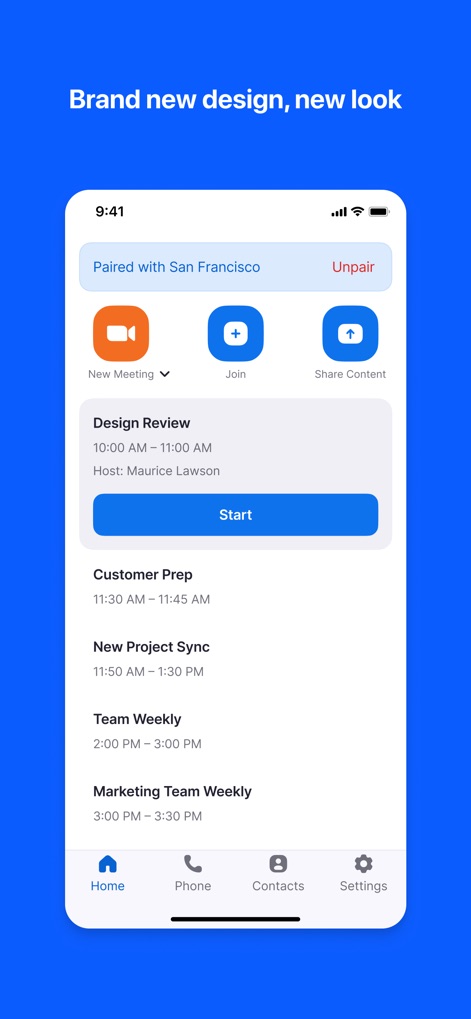
Die Startseite präsentiert eine übersichtliche Liste anstehender Besprechungen und ermöglicht Nutzern, schnell über Schaltflächen wie „Starten“ oder „Beitreten“ zu agieren.
Starten & Beitreten

Während einer Besprechung stehen zentrale Steuerelemente wie „Stummschalten“ und „Video starten“ zur Verfügung, ergänzt durch einen Lautstärkeregler für präzise Audioanpassungen.
Intuitives Meeting-Management

Nutzer können einer Besprechung mühelos über das spezielle Eingabefeld für die Meeting-ID beitreten, unterstützt durch ein übersichtliches numerisches Tastenfeld.
Besprechung Beitreten

Die App bietet vielfältige Einladungsoptionen über Registerkarten wie „Kontakte“ oder „E-Mail“ und zeigt eine organisierte Kontaktliste mit Favoriten an.
Einfach Einladen
Beschreibung
Download
Ähnliche Apps
Apps mit ähnlichen Funktionen und Nutzererfahrung



Diese Seite ist keine offizielle Seite der App oder ihres Entwicklers, sondern eine unabhängige redaktionelle Veröffentlichung, die zu Informations- und Kommentarzwecken erstellt wurde. Sofern nicht ausdrücklich anders angegeben, sind weder die App noch ihr Entwickler mit MWM, Apple, Google Play, dem App-Herausgeber oder dem Entwickler der App verbunden, von ihnen unterstützt, gesponsert, autorisiert oder anderweitig offiziell verbunden, und nichts auf dieser Seite impliziert, dass die App unter Verwendung der Dienste von MWM entwickelt wurde. Alle Marken, Logos, Screenshots und andere Inhalte bleiben Eigentum ihrer jeweiligen Inhaber.