
Esta página no es una página oficial de la aplicación ni de su desarrollador, sino una publicación editorial independiente creada con fines informativos y de comentario. Salvo que se indique expresamente lo contrario, ni la aplicación ni su desarrollador están afiliados, respaldados, patrocinados, autorizados ni conectados oficialmente con MWM, Apple, Google Play, el editor de la aplicación ni su desarrollador, y nada en esta página implica que la aplicación haya sido desarrollada utilizando los servicios de MWM. Todas las marcas comerciales, logotipos, capturas de pantalla y demás contenidos son propiedad de sus respectivos propietarios.


Duet Display
La distracción es un lujo. Duet Display te da el superpoder de multiplicar tu espacio de trabajo, transformando tu iPad en una extensión vital de tu PC o Mac. Es pura eficiencia, sin rodeos.
Descargas
2.5M+Valoración
Total valoraciones
139.6KEditor
Categoría
ProductivityIdiomas
15Última versión
3.1.4Tamaño
67.3 MBFecha de lanzamiento
18 dic 2014Análisis de Funcionalidades Clave para Profesionales y Creativos
Evaluación Detallada de 'Duet Display'
Función de Segunda Pantalla Cableada
La aplicación transforma cualquier iPad o iPhone en una pantalla externa de alta calidad para Mac o PC, utilizando una conexión por cable para máxima fiabilidad y rendimiento, lo que permite a los usuarios ampliar su espacio de trabajo digital.
iPad como Tableta Gráfica Profesional (Duet Pro)
Con la versión Duet Pro, convierte el iPad y el Apple Pencil en una tableta gráfica avanzada, optimizada para dibujo ultra-sensible y aplicaciones profesionales de diseño, lo que resulta invaluable para artistas y diseñadores.
Rendimiento Ultra Rápido y Sin Latencia
Esta herramienta ofrece una experiencia fluida y sin demoras con una calidad de pantalla superior, esencial para tareas que requieren precisión y respuesta inmediata por parte de profesionales, artistas y creadores de contenido.
Soporte Avanzado de Apple Pencil (Duet Pro)
La versión Duet Pro desbloquea la sensibilidad a la presión y la inclinación, la función de desplazamiento (hover) y el rechazo de palma para una experiencia de dibujo precisa e intuitiva con el Apple Pencil, crucial para trabajos artísticos detallados.
Interacción Táctil y Gestos Multi-Touch
Permite a los usuarios interactuar con sus aplicaciones de escritorio en Mac y PC directamente desde el iPad, incluyendo gestos como desplazamiento con dos dedos, panorámica y zoom, mejorando la eficiencia y la ergonomía.
Configuración Sencilla con Conexión por Cable
La herramienta destaca por su facilidad de uso; solo requiere conectar el dispositivo iOS al ordenador con un cable de carga para iniciar la expansión del espacio de trabajo, eliminando la complejidad de configuraciones inalámbricas.
Solución Portátil para la Productividad
Esta aplicación ofrece una manera conveniente y portátil de expandir el espacio de trabajo digital, ideal para profesionales, artistas y estudiantes que requieren movilidad sin sacrificar la productividad, ya sea en casa, en la oficina o viajando.
Emulación de Touch Bar en iPad
Permite agregar una barra táctil virtual a cualquier iPad al usarlo con un Mac, brindando acceso rápido a funciones contextuales de las aplicaciones y flujos de trabajo específicos de macOS.
Preguntas Frecuentes
Todo lo que necesitas saber sobre Duet Display
What is Duet Display?
Duet Display transforms your iPad or iPhone into an advanced extra display for your Mac or PC, providing unparalleled performance and zero lag with touch capabilities.
How do you connect devices with Duet Display?
Yes, Duet Display works by plugging your iPad or iPhone into your desktop with a charging cable. The free Duet desktop app automatically detects the device and converts it into a high-performance display.
Does Duet Display experience lag?
No, Duet Display offers zero lag performance and high display quality. It eliminates concerns about unreliable Wi-Fi or laggy performance, as affirmed by press reviews like The Guardian and Business Insider.
Does Duet Display support touch interaction?
Yes, Duet Display supports touchscreen interaction with both Mac and PC. It includes gestures like two-finger scrolling, pan, and zoom, and can add a touch bar to any iPad with any Mac.
What features are included with Duet Pro?
Duet Pro is an optional upgrade that turns your iPad and Apple Pencil into a professional graphics tablet. It offers ultra-responsive drawing, pressure and tilt sensitivity, hover, and palm rejection for creative software.
What devices are compatible with Duet Display and Duet Pro?
Duet Display is compatible with all iPhones and iPads running iOS 7.0+, all Macs with OS 10.9+, and all PCs with Windows 7+. Duet Pro requires iPad Pros with Apple Pencil and Windows 8.1+ (64 bit) for PCs.
Las siguientes capturas de pantalla y la descripción provienen directamente del listado oficial de la tienda de la aplicación y son propiedad del desarrollador.
App Store
Capturas
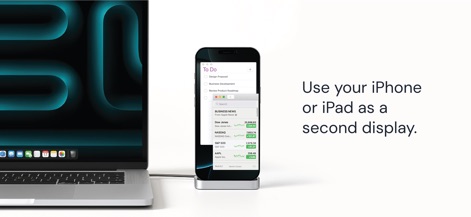
La aplicación transforma dispositivos iOS en un monitor auxiliar con una conexión por cable, mostrando la versatilidad para ejecutar aplicaciones de productividad como la lista de tareas y el seguimiento de acciones.
Pantalla Adicional Instantánea
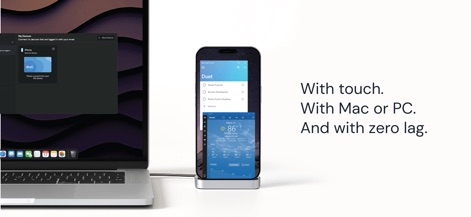
Observe la interfaz de conexión de Duet y la capacidad de los usuarios para interactuar directamente con la pantalla táctil del dispositivo iOS, beneficiándose de un rendimiento sin latencia y la compatibilidad universal con Mac o PC.
Interacción Táctil Fluida
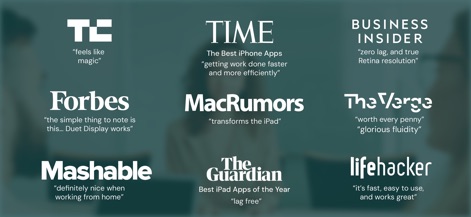
Reconocidas publicaciones como TechCrunch y Business Insider respaldan esta solución, destacando consistentemente su eficiencia
Descripción
Download
Apps Similares
Apps con características y experiencia similares

Mouse · Keyboard
Remote Sunrise LTD

Camo Camera
Reincubate Ltd

DroidCam Webcam & OBS Camera
DEV47 APPS LTD.

spacedesk - USB Display for PC
datronicsoft Technology GmbH

iVCam Webcam
俊红 柴

Remote Mouse
耀 阮

CamX - USB Camera
Touchbits Inc.

Genki Studio
Human Things, Inc

Astropad Studio Drawing Tablet
Astro HQ LLC
Esta página no es una página oficial de la aplicación ni de su desarrollador, sino una publicación editorial independiente creada con fines informativos y de comentario. Salvo que se indique expresamente lo contrario, ni la aplicación ni su desarrollador están afiliados, respaldados, patrocinados, autorizados ni conectados oficialmente con MWM, Apple, Google Play, el editor de la aplicación ni su desarrollador, y nada en esta página implica que la aplicación haya sido desarrollada utilizando los servicios de MWM. Todas las marcas comerciales, logotipos, capturas de pantalla y demás contenidos son propiedad de sus respectivos propietarios.