
Cette page n'est pas une page officielle de l'application ou de son développeur, mais une publication éditoriale indépendante créée à des fins d'information et de commentaire. Sauf indication expresse contraire, ni l'application ni son développeur ne sont affiliés, approuvés, sponsorisés, autorisés ou autrement officiellement liés à MWM, Apple, Google Play, à l'éditeur de l'application ou au développeur de l'application, et rien sur cette page n'implique que l'application a été développée en utilisant les services de MWM. Toutes les marques, logos, captures d'écran et autres contenus restent la propriété de leurs propriétaires respectifs.


BTS OFFICIAL LIGHT STICK
Votre ARMY BOMB, une extension de votre dévotion. L'application transforme un objet statique en un élément vivant du spectacle.
Téléchargements
1M+Note
Nombre d'avis
4.1KÉditeur
Catégorie
EntertainmentLangues
9Dernière version
3.1.1Taille
112.4 MBDate de sortie
1 sept. 2018Analyse des fonctionnalités clés de l'application 'BTS OFFICIAL LIGHT STICK'
Évaluation fonctionnelle pour l'ARMY
Mode Concert Interactif
Il permet aux utilisateurs de profiter d'une synchronisation lumineuse immersive et collective avec les performances scéniques, faisant de chaque fan une partie intégrante du spectacle en direct.
Appairage et Enregistrement du Siège
L'application propose un mécanisme simple d'enregistrement des informations de siège du concert, garantissant une intégration parfaite de l'expérience lumineuse personnalisée.
Personnalisation des Couleurs (Mode Selfie)
Cet outil présente la capacité de modifier la couleur de la light stick selon les préférences de l'utilisateur, favorisant l'expression individuelle et l'amusement en dehors des événements officiels.
Connectivité Bluetooth Intuitive
Il permet une liaison sans fil aisée entre la light stick et le smartphone, ouvrant la porte à toutes les fonctions de personnalisation et d'interaction.
Les captures d'écran et la description suivantes proviennent directement de la fiche officielle de l'application sur le store et sont la propriété du développeur.
App Store
Captures
Découvrez la page d'accueil élégante et la marque officielle de l'application BTS OFFICIAL LIGHT STICK, essentielle pour l'expérience ARMY BOMB.
Démarrage de l'Application
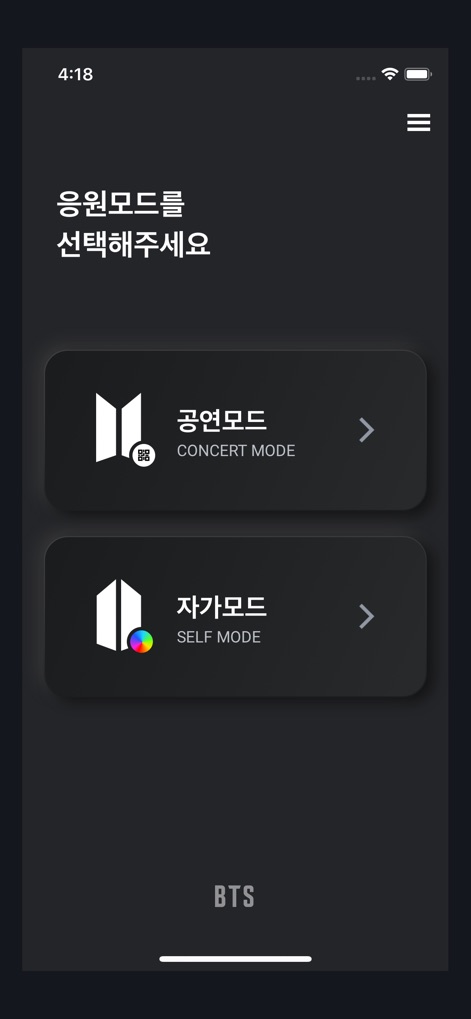
L'application propose aux fans une interface claire pour sélectionner entre le mode Concert et le mode Self, optimisant ainsi leur interaction avec l'ARMY BOMB.
Choix du Mode

Les utilisateurs peuvent facilement choisir leur version de light stick, entre les modèles SE et VER.3, assurant une compatibilité parfaite avec leur ARMY BOMB.
Sélection du Modèle

Ce visuel guide les utilisateurs pour activer le mode Bluetooth de leur light stick en abaissant l'interrupteur et en suivant les instructions de l'application.
Activation Bluetooth

L'application simplifie le processus de connexion, demandant aux fans de rapprocher leur ARMY BOMB de leur smartphone pour un jumelage Bluetooth rapide et efficace.
Jumelage Intelligent
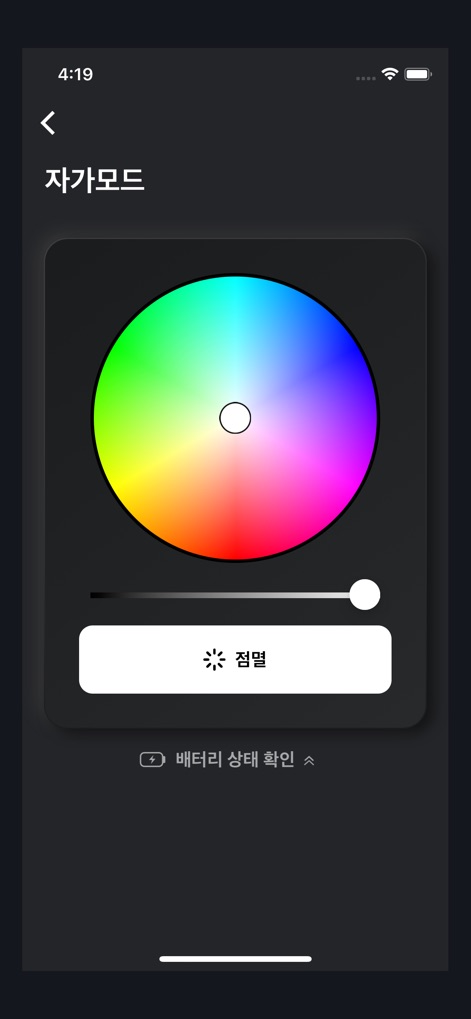
En mode Self, l'interface permet une personnalisation complète avec une roue chromatique et offre une vérification instantanée du niveau de batterie de l'ARMY BOMB pour une tranquillité d'esprit optimale.
Personnalisation & Batterie
Description
Download
Apps Similaires
Apps avec des fonctionnalités et une expérience similaires

Arntreal
ANDREA ALBRIZIO

Brickit App
Brickit inc

LEGO® Super Mario™
LEGO System A/S

Jurassic World Play
Mattel
LEGO® TECHNIC® CONTROL+
LEGO System A/S
SmartRace for Carrera Digital
Marc Bonsels

BABYMONSTER LIGHT STICK
FANLIGHT Co., Ltd
Fukuoka / Collecting Forest
teamLab Inc.

LEGO® DUPLO® Trains
LEGO System A/S
Cette page n'est pas une page officielle de l'application ou de son développeur, mais une publication éditoriale indépendante créée à des fins d'information et de commentaire. Sauf indication expresse contraire, ni l'application ni son développeur ne sont affiliés, approuvés, sponsorisés, autorisés ou autrement officiellement liés à MWM, Apple, Google Play, à l'éditeur de l'application ou au développeur de l'application, et rien sur cette page n'implique que l'application a été développée en utilisant les services de MWM. Toutes les marques, logos, captures d'écran et autres contenus restent la propriété de leurs propriétaires respectifs.