
Cette page n'est pas une page officielle de l'application ou de son développeur, mais une publication éditoriale indépendante créée à des fins d'information et de commentaire. Sauf indication expresse contraire, ni l'application ni son développeur ne sont affiliés, approuvés, sponsorisés, autorisés ou autrement officiellement liés à MWM, Apple, Google Play, à l'éditeur de l'application ou au développeur de l'application, et rien sur cette page n'implique que l'application a été développée en utilisant les services de MWM. Toutes les marques, logos, captures d'écran et autres contenus restent la propriété de leurs propriétaires respectifs.


Duet Display
Votre iPad n'est plus un écran secondaire, mais une extension nerveuse de votre machine de bureau, sans les câbles ni la latence. MWM a conçu un catalyseur de productivité qui élimine les frictions.
Téléchargements
2.5M+Note
Nombre d'avis
139.6KÉditeur
Catégorie
ProductivityLangues
15Dernière version
3.1.4Taille
67.3 MBDate de sortie
18 déc. 2014Évaluation des fonctionnalités clés pour l'amélioration de la productivité et de la créativité mobile.
Analyse des Capacités de Duet Display
Transformation en écran secondaire haute performance
L'application permet aux utilisateurs de convertir leur iPad ou iPhone en un moniteur externe avancé, augmentant significativement l'espace de travail numérique et la capacité de multitâche.
Performance sans latence et haute fidélité
Cet outil offre une expérience utilisateur exceptionnellement fluide et réactive, avec une qualité d'affichage optimale, éliminant les problèmes de délai ou de pixellisation souvent rencontrés avec des solutions sans fil.
Support Apple Pencil avancé pour la création (Duet Pro)
Il transforme l'iPad en une tablette graphique professionnelle, prenant en charge la pression, l'inclinaison, le survol et le rejet de la paume, ce qui est indispensable pour les artistes et designers.
Interaction tactile et gestuelle intuitive
L'application permet une interaction directe avec les applications Mac et PC via l'écran tactile de l'appareil iOS, incluant le défilement à deux doigts, le panoramique et le zoom.
Simplicité de configuration "Plug-and-Play"
L'outil se distingue par sa facilité d'utilisation; il suffit de brancher le câble pour que l'appareil soit automatiquement détecté et fonctionnel, sans configurations complexes ou problèmes de réseau.
Compatibilité étendue avec les écosystèmes
L'application assure une large accessibilité en étant compatible avec une vaste gamme d'appareils iOS, de systèmes d'exploitation Mac (dès 10.9) et Windows (dès 7), permettant à un grand nombre d'utilisateurs de bénéficier de ses avantages.
Questions Fréquentes
Tout ce que vous devez savoir sur Duet Display
What is Duet Display?
Duet Display transforms your iPad or iPhone into an advanced extra display for your Mac or PC, providing unparalleled performance and zero lag with touch capabilities.
How do you connect devices with Duet Display?
Yes, Duet Display works by plugging your iPad or iPhone into your desktop with a charging cable. The free Duet desktop app automatically detects the device and converts it into a high-performance display.
Does Duet Display experience lag?
No, Duet Display offers zero lag performance and high display quality. It eliminates concerns about unreliable Wi-Fi or laggy performance, as affirmed by press reviews like The Guardian and Business Insider.
Does Duet Display support touch interaction?
Yes, Duet Display supports touchscreen interaction with both Mac and PC. It includes gestures like two-finger scrolling, pan, and zoom, and can add a touch bar to any iPad with any Mac.
What features are included with Duet Pro?
Duet Pro is an optional upgrade that turns your iPad and Apple Pencil into a professional graphics tablet. It offers ultra-responsive drawing, pressure and tilt sensitivity, hover, and palm rejection for creative software.
What devices are compatible with Duet Display and Duet Pro?
Duet Display is compatible with all iPhones and iPads running iOS 7.0+, all Macs with OS 10.9+, and all PCs with Windows 7+. Duet Pro requires iPad Pros with Apple Pencil and Windows 8.1+ (64 bit) for PCs.
Les captures d'écran et la description suivantes proviennent directement de la fiche officielle de l'application sur le store et sont la propriété du développeur.
App Store
Captures
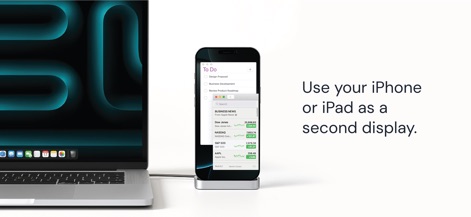
L'application transforme votre iPhone ou iPad en un écran secondaire performant, permettant aux utilisateurs d'afficher simultanément une liste de tâches et des actualités boursières pour une productivité accrue.
Espace étendu instantané
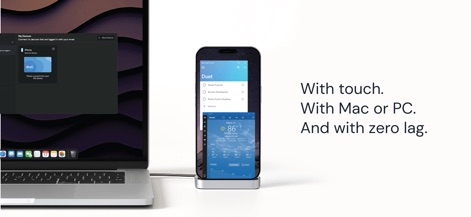
Cet outil offre une interaction tactile intuitive et une compatibilité fluide avec Mac et PC, garantissant une expérience utilisateur sans latence visible et une configuration simplifiée via l'interface "My Devices".
Performance sans compromis

Découvrez l'avis unanime de la presse mondiale, où les citations mettent en lumière sa "fluidité glorieuse" et son fonctionnement "sans latence", confirmant la fiabilité et l'efficacité de l'application.
Reconnue par les experts
Description
Download
Apps Similaires
Apps avec des fonctionnalités et une expérience similaires

Mouse · Keyboard
Remote Sunrise LTD

Camo Camera
Reincubate Ltd

DroidCam Webcam & OBS Camera
DEV47 APPS LTD.

spacedesk - USB Display for PC
datronicsoft Technology GmbH

iVCam Webcam
俊红 柴

Remote Mouse
耀 阮

CamX - USB Camera
Touchbits Inc.

Genki Studio
Human Things, Inc

Astropad Studio Drawing Tablet
Astro HQ LLC
Cette page n'est pas une page officielle de l'application ou de son développeur, mais une publication éditoriale indépendante créée à des fins d'information et de commentaire. Sauf indication expresse contraire, ni l'application ni son développeur ne sont affiliés, approuvés, sponsorisés, autorisés ou autrement officiellement liés à MWM, Apple, Google Play, à l'éditeur de l'application ou au développeur de l'application, et rien sur cette page n'implique que l'application a été développée en utilisant les services de MWM. Toutes les marques, logos, captures d'écran et autres contenus restent la propriété de leurs propriétaires respectifs.