
Questa pagina non è una pagina ufficiale dell'app o del suo sviluppatore, ma una pubblicazione editoriale indipendente creata a scopo informativo e di commento. Salvo espressa indicazione contraria, né l'app né il suo sviluppatore sono affiliati, approvati, sponsorizzati, autorizzati o altrimenti ufficialmente collegati a MWM, Apple, Google Play, all'editore dell'app o allo sviluppatore dell'app, e nulla in questa pagina implica che l'app sia stata sviluppata utilizzando i servizi di MWM. Tutti i marchi, loghi, screenshot e altri contenuti rimangono di proprietà dei rispettivi proprietari.


Duet Display
Il tuo iPad o iPhone diventa un'estensione tattile del tuo desktop, annientando i limiti fisici della produttività. L'applicazione trasforma schermi secondari in veri e propri centri di comando, offrendo una libertà operativa che ridefinisce lo spazio di lavoro digitale.
Download
2.5M+Valutazione
Valutazioni totali
139.6KEditore
Categoria
ProductivityLingue
15Ultima versione
3.1.4Dimensione
67.3 MBData di lancio
18 dic 2014Valutazione delle capacità chiave che migliorano l'efficienza e la creatività per i professionisti moderni.
Analisi Funzionale di Duet Display
Modalità Tavoletta Grafica Professionale (Duet Pro)
L'app Duet Pro consente agli artisti e ai designer di utilizzare l'iPad come una tavoletta grafica professionale, dotata di sensibilità alla pressione e all'inclinazione dell'Apple Pencil, garantendo precisione e ottimizzazione per i software di grafica più potenti.
Estensione Display Avanzata e Versatile
Questo strumento trasforma l'iPad o l'iPhone in un monitor aggiuntivo per Mac e PC, espandendo in modo significativo lo spazio di lavoro digitale e favorendo il multitasking per una maggiore produttività.
Prestazioni Ottimizzate e Zero Lag
L'app fornisce prestazioni ineguagliabili e una qualità di visualizzazione superiore, operando completamente senza ritardi. Questo è fondamentale per garantire un'esperienza utente fluida e affidabile, indispensabile per attività professionali e creative.
Aumento Produttività e Portabilità
Consente agli utenti di raddoppiare la propria produttività attraverso il multitasking su due schermi e offre una soluzione altamente portatile per mantenere l'efficienza lavorativa, anche per i professionisti in movimento.
Connettività Cablata Semplice e Affidabile
L'app facilita una configurazione incredibilmente semplice e una connessione stabile tramite cavo, eliminando la necessità di connessioni Wi-Fi e risolvendo problemi di rete, garantendo affidabilità immediata.
Interazione Touchscreen e Supporto Gesti
Questo strumento permette agli utenti di interagire con il Mac o il PC in modi innovativi tramite touchscreen e gesti intuitivi, inclusi scorrimento a due dita, panoramica e zoom, migliorando l'usabilità complessiva.
Domande Frequenti
Tutto quello che devi sapere su Duet Display
What is Duet Display?
Duet Display transforms your iPad or iPhone into an advanced extra display for your Mac or PC, providing unparalleled performance and zero lag with touch capabilities.
How do you connect devices with Duet Display?
Yes, Duet Display works by plugging your iPad or iPhone into your desktop with a charging cable. The free Duet desktop app automatically detects the device and converts it into a high-performance display.
Does Duet Display experience lag?
No, Duet Display offers zero lag performance and high display quality. It eliminates concerns about unreliable Wi-Fi or laggy performance, as affirmed by press reviews like The Guardian and Business Insider.
Does Duet Display support touch interaction?
Yes, Duet Display supports touchscreen interaction with both Mac and PC. It includes gestures like two-finger scrolling, pan, and zoom, and can add a touch bar to any iPad with any Mac.
What features are included with Duet Pro?
Duet Pro is an optional upgrade that turns your iPad and Apple Pencil into a professional graphics tablet. It offers ultra-responsive drawing, pressure and tilt sensitivity, hover, and palm rejection for creative software.
What devices are compatible with Duet Display and Duet Pro?
Duet Display is compatible with all iPhones and iPads running iOS 7.0+, all Macs with OS 10.9+, and all PCs with Windows 7+. Duet Pro requires iPad Pros with Apple Pencil and Windows 8.1+ (64 bit) for PCs.
Gli screenshot e la descrizione seguenti provengono direttamente dall'elenco ufficiale dello store dell'app e sono di proprietà dello sviluppatore.
App Store
Screenshot
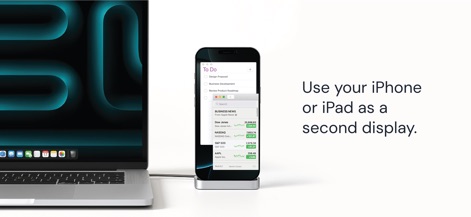
L'app trasforma il tuo iPhone o iPad in un monitor secondario, ideale per visualizzare simultaneamente una lista 'To Do' e le 'BUSINESS NEWS'.
Estendi il tuo Display
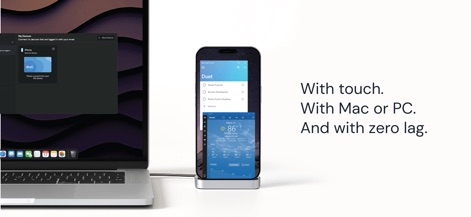
Questo strumento garantisce una 'connessione' senza interruzioni con Mac o PC e supporta pienamente l''interazione touch', per un controllo intuitivo.
Esperienza Touch Fluida
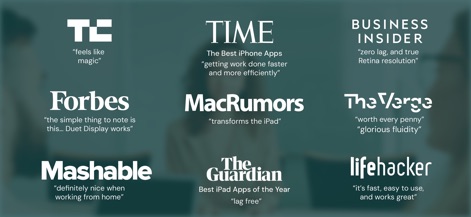
La galleria mette in risalto le recensioni entusiastiche di fonti autorevoli come 'TechCrunch' e i riconoscimenti di 'TIME', sottolineando le performance di Duet Display.
Elogi della Critica
Descrizione
Download
App Simili
App con funzionalità ed esperienza simili

Mouse · Keyboard
Remote Sunrise LTD

Camo Camera
Reincubate Ltd

DroidCam Webcam & OBS Camera
DEV47 APPS LTD.

spacedesk - USB Display for PC
datronicsoft Technology GmbH

iVCam Webcam
俊红 柴

Remote Mouse
耀 阮

CamX - USB Camera
Touchbits Inc.

Genki Studio
Human Things, Inc

Astropad Studio Drawing Tablet
Astro HQ LLC
Questa pagina non è una pagina ufficiale dell'app o del suo sviluppatore, ma una pubblicazione editoriale indipendente creata a scopo informativo e di commento. Salvo espressa indicazione contraria, né l'app né il suo sviluppatore sono affiliati, approvati, sponsorizzati, autorizzati o altrimenti ufficialmente collegati a MWM, Apple, Google Play, all'editore dell'app o allo sviluppatore dell'app, e nulla in questa pagina implica che l'app sia stata sviluppata utilizzando i servizi di MWM. Tutti i marchi, loghi, screenshot e altri contenuti rimangono di proprietà dei rispettivi proprietari.