Clean Text

Clean Text

ダウンロード: App Store
ロゴ: Clean Text

Clean Text:完璧なテキスト処理に不可欠なユーティリティ

手作業による編集時間を大幅に短縮。ワンタップの「スマートクリーン」から高度な正規表現まで、乱雑なメール、コード、文書を、すべてのAppleデバイス上で完璧なコピーに変換します。

ダウンロード: App Store

開発元

Ivan Gobbo

カテゴリ

Productivity

ダウンロード

102K+

ユーザー評価

4.7/5

評価数

300

対応言語

1

効率性を詳しく見る

このインターフェースを利用する 102K+ 人のユーザー.

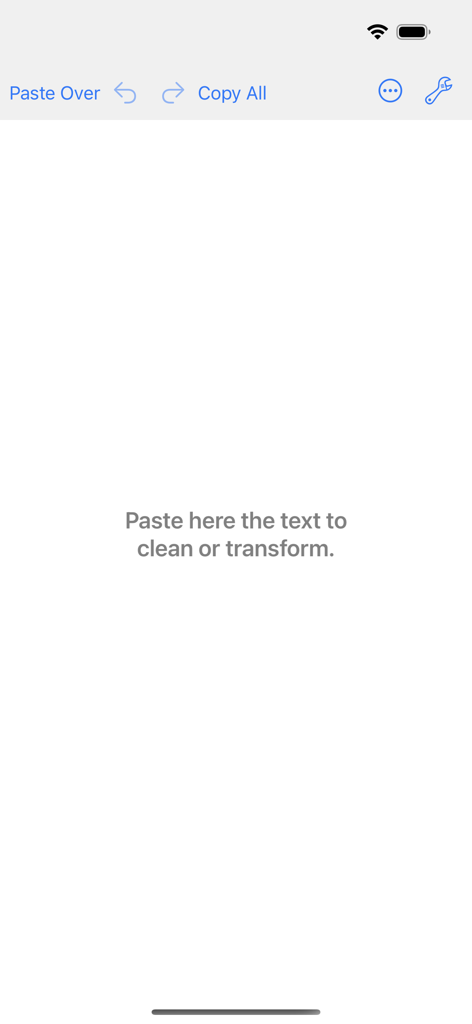
ワークスペースとテキスト処理ツールを表示するClean Textアプリのメインエディター画面

ワークスペースとテキスト処理ツールを表示するClean Textアプリのメインエディター画面

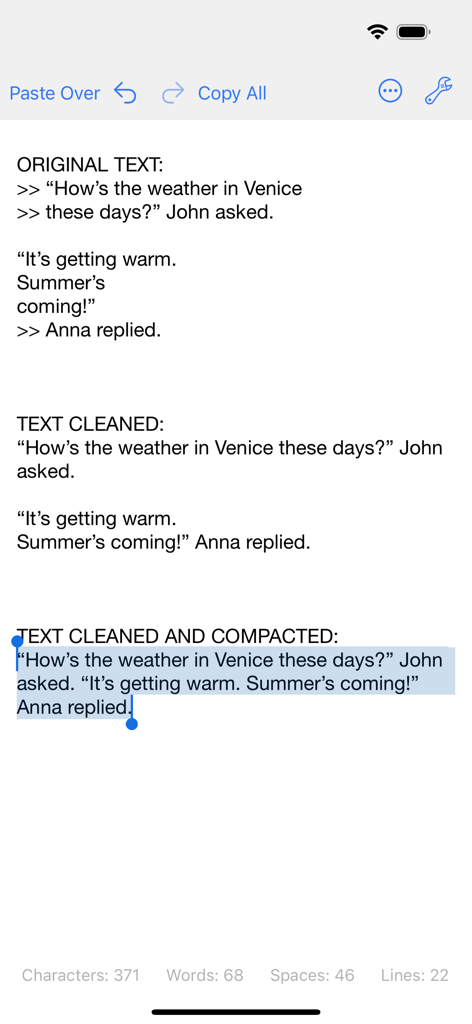
Clean Textアプリのインターフェースで、元の乱雑なテキストとクリーニングされて圧縮されたテキストの比較。

Clean Textアプリのインターフェースで、元の乱雑なテキストとクリーニングされて圧縮されたテキストの比較。

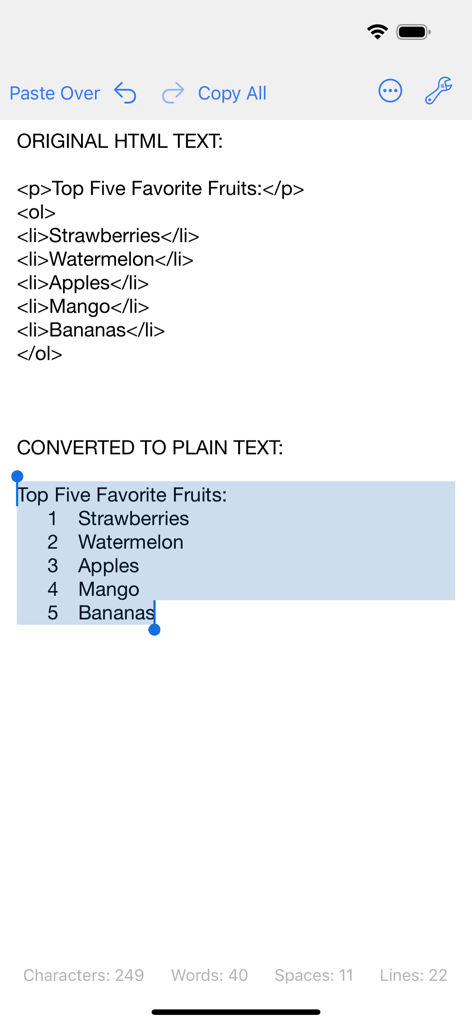
iPhoneでHTMLコードを番号付きのプレーンテキストリストに変換する様子を表示するClean Textアプリのインターフェース

iPhoneでHTMLコードを番号付きのプレーンテキストリストに変換する様子を表示するClean Textアプリのインターフェース

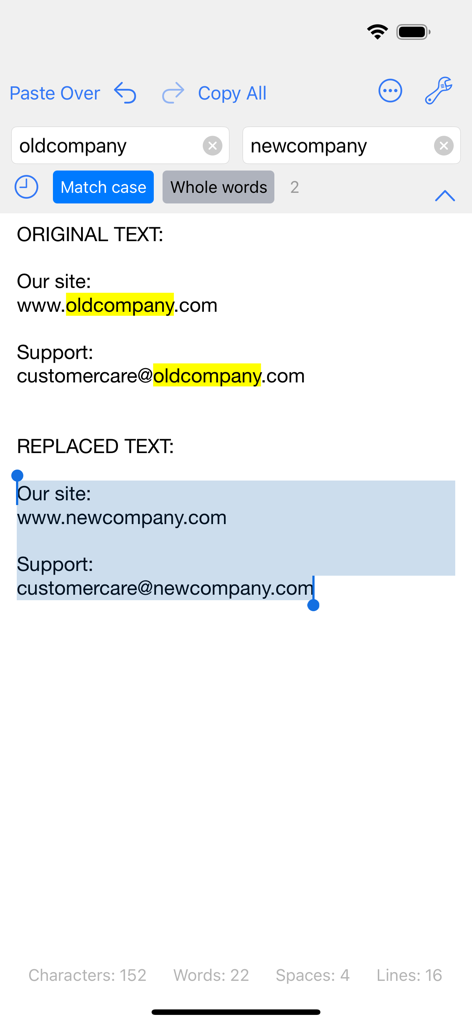
テキスト内の古い会社名を新しい会社名に置き換える、検索および置換機能を表示するClean Textアプリのスクリーンショット。

テキスト内の古い会社名を新しい会社名に置き換える、検索および置換機能を表示するClean Textアプリのスクリーンショット。

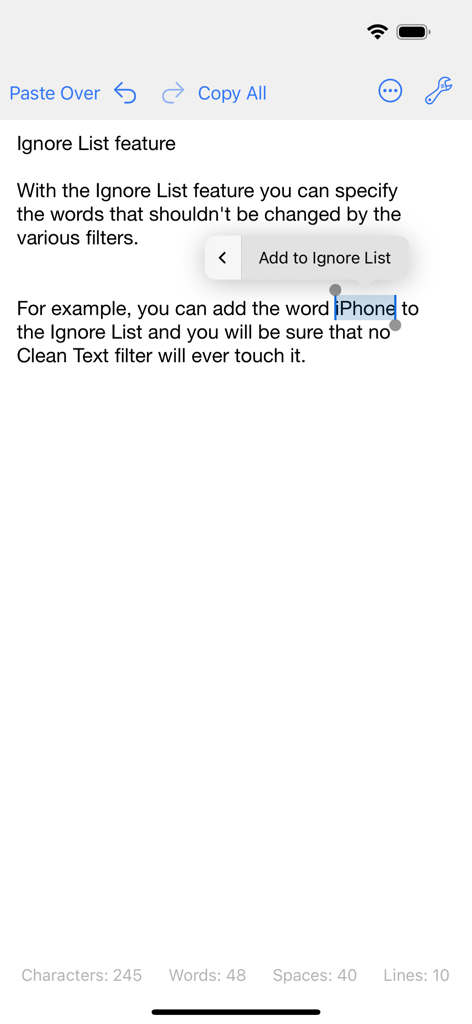
フィルターから除外される単語を選択した、無視リスト機能を表示するClean Textアプリのインターフェース

フィルターから除外される単語を選択した、無視リスト機能を表示するClean Textアプリのインターフェース

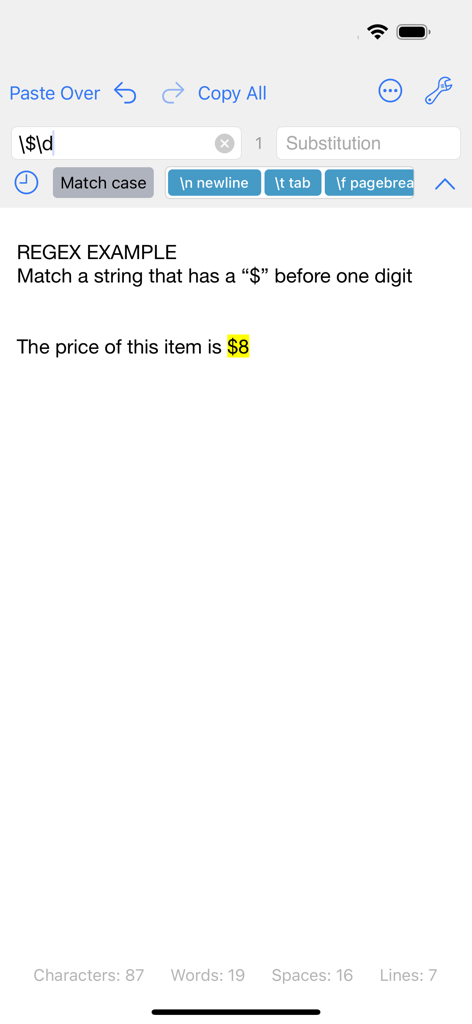
ドル記号と数字に一致する正規表現検索を表示するClean Textアプリのインターフェース

ドル記号と数字に一致する正規表現検索を表示するClean Textアプリのインターフェース

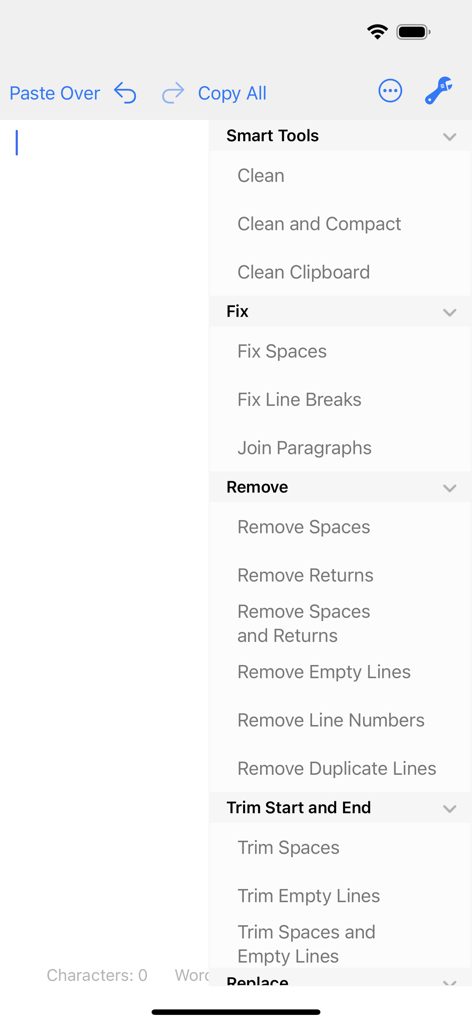
スマートクリーンや空行の削除などのテキストフォーマットおよびクリーニング機能を表示するClean Textアプリのインターフェース

スマートクリーンや空行の削除などのテキストフォーマットおよびクリーニング機能を表示するClean Textアプリのインターフェース

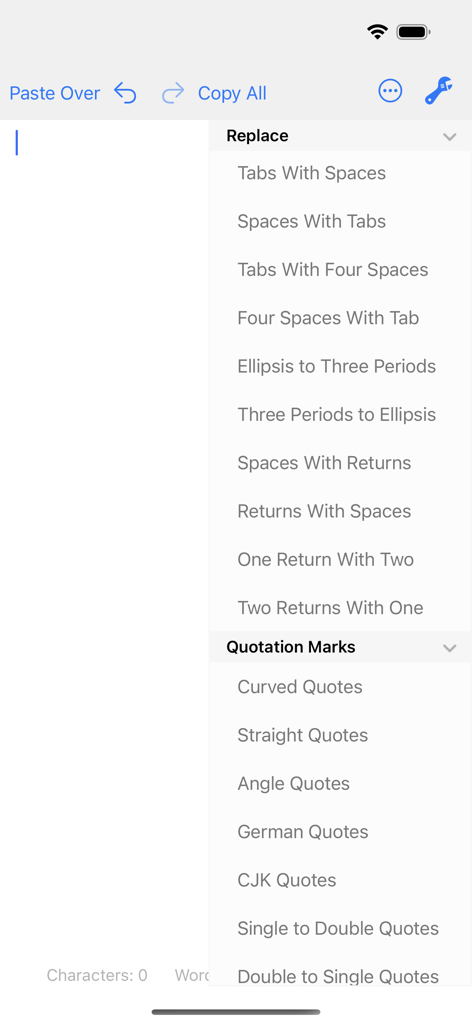
スペース、タブ、引用符を置換するためのメニューオプションを表示するClean Textアプリのインターフェース

スペース、タブ、引用符を置換するためのメニューオプションを表示するClean Textアプリのインターフェース

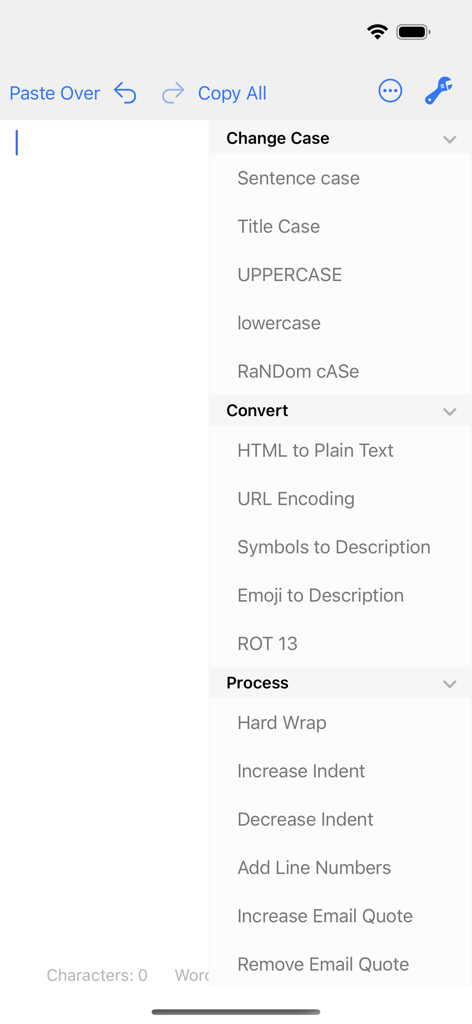
大文字・小文字の変更、HTMLからプレーンテキストへの変換、プロセスツールなどのテキストフォーマットオプションのリストを表示するClean Textモバイルアプリのインターフェース。

大文字・小文字の変更、HTMLからプレーンテキストへの変換、プロセスツールなどのテキストフォーマットオプションのリストを表示するClean Textモバイルアプリのインターフェース。

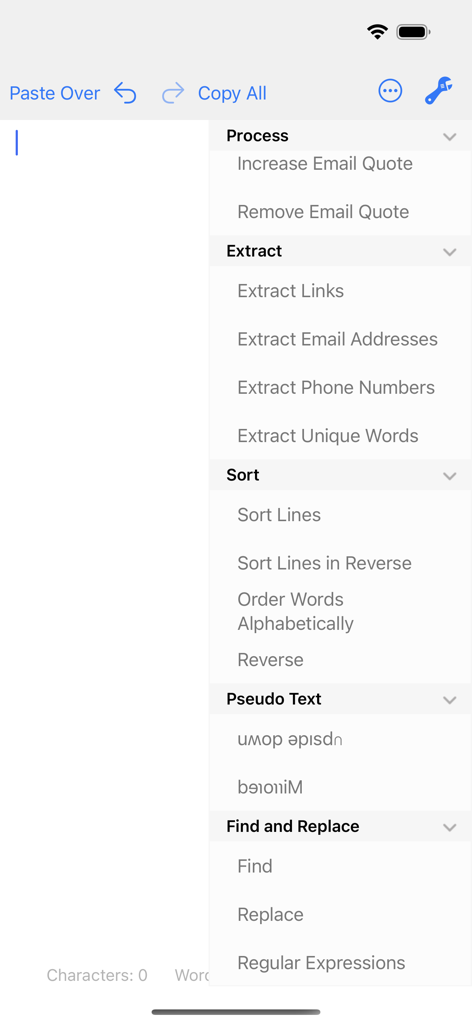
テキスト抽出、並べ替え、正規表現ツールのオプションを表示するClean Textアプリのメニュー

テキスト抽出、並べ替え、正規表現ツールのオプションを表示するClean Textアプリのメニュー

プロフェッショナルなテキストワークフローを最適化

このアプリを際立たせるツール、 102K+ 人のユーザーが選択.

インスタント・スマートクリーン

ワンタップでフォーマットの悩みを解消。空行の自動削除、二重スペースの修正、メール、PDF、ウェブページからの不要な文字の除去を自動で行います。

🔄

ユニバーサルiCloud同期

テキストがどこへでもついてきます。通勤中にiPhoneで編集を始めれば、到着したときにはMacやiPadでクリーニング済みのテキストが用意されています。

🛠️

エキスパートレベルのユーティリティ

正規表現、HTMLからプレーンテキストへの変換、メールアドレス、リンク、電話番号のインテリジェントな抽出など、複雑なタスクをこなします。

アプリについて

について知っておくべきこと Clean Text.

説明

Clean Text is an essential tool for webmasters, graphic designers, developers and magazine editors to reduce text cleanup and editing time. The app is very convenient also for all iOS users that needs to cleanup and editing text from emails, documents, or other sources. Solve text problems with a couple of taps Clean Text quickly performs many essential text processing functions such as removing empty lines, removing unwanted spaces, converting tab characters, smart quotes, and more. In addition to this, smart actions let you solve with a single tap, the most common cleaning problems of text found in email messages, documents and web pages. Type on iOS and find the text on your Mac With Clean Text Menu, you can write text on your iPhone or iPad and then find it on any iOS device or Mac. You don't have to worry about anything. Thanks to iCloud, you will find in the device that you just picked up and in your Mac, exactly the text that you have just typed on iOS. And vice versa. Live search While you type in the search box all occurrences within the text will be highlighted to give you a complete picture, then with the Select Next and Select Previous buttons you can gradually select instances to edit or change them. Also Match case and Whole words, act immediately on the highlighted text and will allow you to do the replacements with millimeter accuracy. And with infinite undoes, your chance to try, becomes a tool to do a good job. Accelerate your search and replace work using Regular Expressions If you are a true expert, there is the powerful Regular Expression panel, which in addition to make available all RegEx capabilities for search and replace, it provides you the RegEx main patterns with a simple tap. Ignore List Often when you want to change a text automatically it contains words that should not be changed. To take a simple example, if you apply the UPPERCASE filter to a sentence, you don't want the word iPhone to become IPHONE, so we've added the new Ignore List feature to Clean Text. All the words in this list will not be modified by the various filters. Clean Text supports major iOS technologies, such as: • iPad multitasking Slide Over and Split View on iPad Pro • Physical keyboard shortcuts on iPad • iCloud to access the same text from any device • Keyboard Shortcut Bar on iPad with Cut, Copy and Paste; Arrows Keys; Select and Deselect text The main features of Clean Text are: • Smart Clean and Clean and Compact text • Clean Clipboard content without the need to paste it in the app • Fix line breaks • Fix spaces • Remove empty lines • Join paragraphs • Replace tabs with spaces and replace spaces with tabs • Remove and add email quote prefix • Convert quotation marks: curved quotes, straight quotes, angle quotes, German quotes and Chinese quotes • Convert from single to double and from double to single quotes • Change case to sentence case, title case, uppercase, lovercase and random case • Increase and decrease text indent • Sort lines ascending and descending • Convert from three periods to ellipsis and from ellipsis to three periods • ROT13 encode • Reverse text • Convert HTML to plain text • URL percent encoding • Remove spaces, returns and duplicate lines • Trim leading and trailing spaces and returns • Replace spaces with returns and vice versa • Add and remove line numbers • Extract links, email addresses, phone numbers and unique words • Remove duplicate lines • Hard wrap text • Convert emoji and symbols to their description • Convert to upside down and to mirrored pseudo text • Show total number of characters, words, spaces and lines in a text • Find and Replace with live highlighting of matches • Regular Expression search and substitution with live highlighting of matches and main patterns convenient buttons • Recent Searches functionality • URL Schemes support to launch and use Clean Text features using other apps that support this technology like Apple Shortcuts • Ignore List

最新バージョン

5.0

サイズ

2.1 MB

リリース日

2016年9月7日

テキストワークフローをマスターする準備はいいですか?

10万人以上のプロフェッショナルに加わり、フォーマットの悩みから解放されましょう。iPhone、iPad、Mac向けの究極の「デジタル・ランドリー・サービス」を今すぐダウンロードしてください。

ダウンロード: App Store

App information, icons, screenshots, and descriptions displayed on this page are sourced from the Apple App Store and are the property of their respective developers. Download estimates and rankings are based on MWM's proprietary models and may not reflect actual figures. This page is provided for informational and analytical purposes only.

Believe this page infringes your intellectual property? File a dispute