
このページはアプリまたはその開発者の公式ページではなく、情報提供および論評を目的として作成された独立した編集出版物です。明示的に別段の記載がない限り、アプリおよびその開発者は、MWM、Apple、Google Play、アプリのパブリッシャー、またはアプリの開発者と提携、承認、後援、認可、またはその他の公式的な関係はなく、このページのいかなる内容も、アプリがMWMのサービスを使用して開発されたことを意味するものではありません。すべての商標、ロゴ、スクリーンショット、その他のコンテンツはそれぞれの所有者の財産です。

ダウンロード
100M+ユーザー評価
評価数
6.6M開発元
カテゴリ
Productivity対応言語
67最新バージョン
1.2026.13102サイズ
335.0 MBリリース日
2014年4月30日Google Sheets アプリケーションの機能分析
データ管理、共同作業、モバイル生産性を強化する主要機能の評価
リアルタイム共同編集
ユーザーは、複数のメンバーと同時に同じスプレッドシートを編集し、リアルタイムで変更を確認できます。これにより、チームの生産性と連携が大幅に向上します。
オフラインアクセスとデバイス間の同期
インターネット接続がない状況でも、ユーザーはスプレッドシートの作成、表示、編集が可能です。また、あらゆるデバイスから中断なく作業を継続できます。
自動保存と変更履歴の管理
本アプリケーションは、入力と同時にすべての作業内容を自動的に保存します。これにより、データ損失の心配がなく、ユーザーは変更履歴から過去のバージョンにアクセスすることも可能です。
包括的なデータ操作と分析機能
セルの書式設定、データの入力、並べ替え、フィルタリング、グラフの表示、数式の挿入、検索と置換など、多様なデータ管理および分析機能が提供されます。
Microsoft Excelファイル互換性
ユーザーは、Microsoft Excelファイルを直接開いて編集し、保存することができます。これにより、異なるソフトウェアを使用するパートナーやチームとのスムーズな連携が実現されます。
AIを活用した洞察の取得
Google AIが提供する機能により、ユーザーはデータから迅速かつ効果的な洞察を得ることが可能です。これにより、データ分析の効率と意思決定の質が向上します。
エンタープライズレベルのセキュリティ
本ツールは、企業グレードのセキュリティ機能を提供し、機密データの保護とアクセス管理を強化します。これにより、大規模な組織での利用においても高い安全性が確保されます。
他ビジネスツールとのデータ連携
ユーザーは、他の主要なビジネスツールからのデータをGoogle Sheetsで分析できます。これにより、より統合されたデータビューと効率的なワークフローが構築されます。
よくある質問
について知っておくべきこと Google Sheets
Can I collaborate with others in Google Sheets?
Yes, Google Sheets allows users to share spreadsheets and collaborate in real-time. Multiple users can edit simultaneously, see changes as they occur, and chat within the same spreadsheet.
Does Google Sheets work offline?
Yes, Google Sheets allows users to work anywhere, anytime, even offline. All changes are automatically saved as you type and when you regain connection.
Is Google Sheets compatible with Excel files?
Yes, Google Sheets enables users to open, edit, and save Microsoft Excel files directly within the application. This ensures seamless interoperability between the two spreadsheet formats.
Is Google Sheets secure for my data?
Yes, Google Sheets ensures secure handling of spreadsheets. Google Workspace subscribers benefit from enterprise-grade security features, safeguarding sensitive data.
Does Google Sheets auto-save my work?
Yes, Google Sheets automatically saves all your work as you type. Users never worry about losing their work, as every change is preserved instantly.
Does Google Sheets have a dark mode option?
Yes, Google Sheets supports a dark mode interface. This feature helps users stay productive and can reduce eye strain, especially in low-light environments.
以下のスクリーンショットと説明は、アプリの公式ストアリスティングから直接取得されたものであり、アプリ開発者の所有物です。
アプリストア
スクリーンショット

リアルタイム共同編集
財務報告書のようなスプレッドシート上で、複数のユーザーが同時にデータ編集を行うことができます。また、コメント機能を使ってチームと直接コミュニケーションを取り、詳細を議論できます。

強固なセキュリティ
本アプリはGoogleによるエンタープライズグレードのセキュリティでデータを保護し、ユーザーは共有設定を通じてアクセス権限を厳密に管理できます。
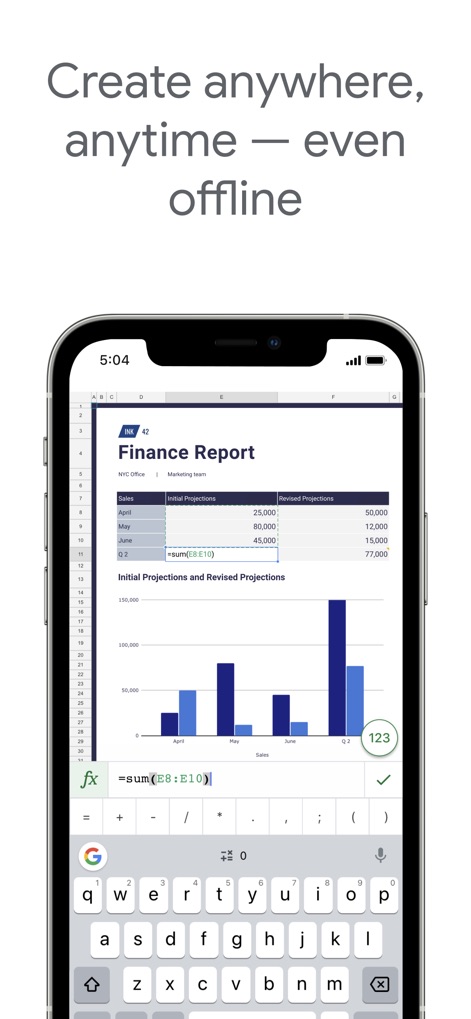
オフラインで作業
ネットワーク接続がない場所でも、ユーザーはスプレッドシートを開いてデータを編集でき、モバイルに最適化された入力機能で複雑な数式も簡単に入力できます。
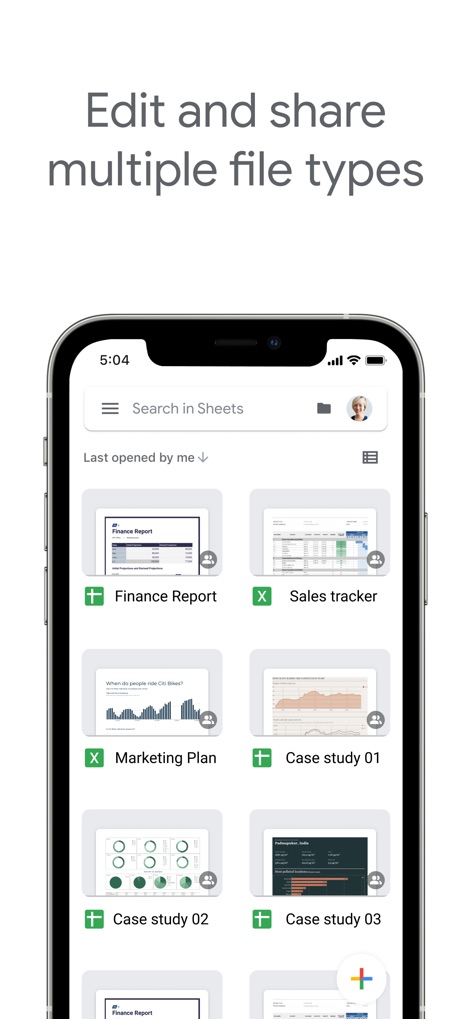
多様なファイル対応
Google Sheets形式に加え、Excelファイルなどの複数の形式を直接開いて編集・保存でき、既存のドキュメントを簡単に管理・共有できます。

ダークモード対応
長時間の作業でも目に優しいダークモードで集中力を維持でき、グラフなどのデータ視覚化もダークテーマに最適化されて表示されます。
説明
Download
類似アプリ
似た機能とユーザー体験を持つアプリ

Table Notes Spreadsheet Excel
Vivek Agarwal

Microsoft Excel
Microsoft Corporation

Spreadsheets
SMM service, s.r.o.

Spreadsheet-xlsx&csv editor
BEST MUSIC VIDEO & IMAGE MAKER LIMITED

XLSX Sheets: Edit Spreadsheet
Rhophi Analytics LLP

Sheets - Spreadsheet
CODE HARMONY LIMITED

Simple Spreadsheet:view & edit
WEN WU LI

Zoho Sheet: Spreadsheet App
Zoho Corporation

Numbers: Make Spreadsheets
Apple Inc.
このページはアプリまたはその開発者の公式ページではなく、情報提供および論評を目的として作成された独立した編集出版物です。明示的に別段の記載がない限り、アプリおよびその開発者は、MWM、Apple、Google Play、アプリのパブリッシャー、またはアプリの開発者と提携、承認、後援、認可、またはその他の公式的な関係はなく、このページのいかなる内容も、アプリがMWMのサービスを使用して開発されたことを意味するものではありません。すべての商標、ロゴ、スクリーンショット、その他のコンテンツはそれぞれの所有者の財産です。