
このページはアプリまたはその開発者の公式ページではなく、情報提供および論評を目的として作成された独立した編集出版物です。明示的に別段の記載がない限り、アプリおよびその開発者は、MWM、Apple、Google Play、アプリのパブリッシャー、またはアプリの開発者と提携、承認、後援、認可、またはその他の公式的な関係はなく、このページのいかなる内容も、アプリがMWMのサービスを使用して開発されたことを意味するものではありません。すべての商標、ロゴ、スクリーンショット、その他のコンテンツはそれぞれの所有者の財産です。

ダウンロード
100M+ユーザー評価
評価数
1.8M開発元
カテゴリ
Productivity対応言語
42最新バージョン
6.8.43サイズ
155.0 MBリリース日
2015年5月30日Microsoft Authenticatorの機能分析
テックアナリストが評価する主要セキュリティと利便性機能
多要素認証によるセキュリティ強化
このアプリは、パスワードに加えて承認通知や時間ベースのワンタイムパスワード(OTP)を利用することで、アカウントへの不正アクセスを防ぎ、二重のセキュリティ層を提供します。
パスワードレスサインイン
ユーザーは、パスワードを入力することなく、スマートフォンに送信される通知を承認することでMicrosoftアカウントにサインインできます。指紋、顔認証、またはPINによる二段階認証が追加のセキュリティを提供します。
複数アカウントの一元管理(Microsoftおよび非Microsoft)
個人用Microsoftアカウント、職場または学校のアカウントに加え、Facebook、Amazon、Dropbox、Google、LinkedIn、GitHubなどの非Microsoftアカウントを含む複数のオンラインアカウントのMFAコードを一箇所で管理できます。
パスワードの自動入力
このアプリは、保存されたパスワードを自動入力し、ウェブサイトやアプリでのサインインプロセスを簡素化します。Microsoft Edgeに保存されたパスワードとの同期もサポートしており、多要素認証によって保護されます。
職場・学校アカウントとの連携とデバイス登録
組織のリソースにアクセスするために、このツールはデバイスを組織に登録し、職場または学校のアカウントを追加することを可能にします。証明書ベースの認証もサポートし、信頼されたデバイスからのアクセスを保証します。
オフラインでのOTP生成
時間ベースのワンタイムパスワード(OTP)はネットワーク接続なしで生成されるため、インターネットアクセスがない環境でもセキュリティコードを利用してサインインできます。
よくある質問
について知っておくべきこと Microsoft Authenticator
What is Microsoft Authenticator used for?
Microsoft Authenticator provides easy, secure sign-ins for online accounts using multi-factor authentication, passwordless options, or password autofill. It also offers account management for Microsoft personal, work, or school accounts.
Does Microsoft Authenticator support multi-factor authentication?
Yes, Microsoft Authenticator provides multi-factor authentication (MFA). It offers a second layer of security by requiring approval of a notification or entry of a one-time password (OTP) generated by the app after entering your password.
How does multi-factor authentication work with Microsoft Authenticator?
Multi-factor authentication in Microsoft Authenticator works by sending a notification for approval or generating a time-based one-time password (OTP). Users either approve the notification or enter the OTP, which has a 30-second timer.
Can I use Microsoft Authenticator for non-Microsoft accounts?
Yes, Microsoft Authenticator supports adding multiple accounts, including non-Microsoft accounts. Examples include Facebook, Amazon, Dropbox, Google, LinkedIn, and GitHub.
Does Microsoft Authenticator offer passwordless sign-in?
Yes, Microsoft Authenticator enables passwordless sign-in for Microsoft accounts. Users enter their username, then approve a notification on their phone using fingerprint, Face ID, or PIN for verification.
How does passwordless sign-in work with Microsoft Authenticator?
Passwordless sign-in with Microsoft Authenticator requires entering a username for a Microsoft account. The app sends a notification to the phone, which the user approves using fingerprint, Face ID, or PIN for a second layer of security.
Can Microsoft Authenticator autofill passwords?
Yes, Microsoft Authenticator can autofill passwords. Users sign in to the Passwords tab with their personal Microsoft account to sync passwords, including those from Microsoft Edge, and can set it as the default autofill provider.
Is password autofill in Microsoft Authenticator secure?
Yes, password autofill in Microsoft Authenticator is secure. Passwords are protected with multi-factor authentication, requiring fingerprint, Face ID, or PIN verification to access and autofill them on mobile devices.
Can I import passwords into Microsoft Authenticator?
Yes, Microsoft Authenticator allows users to import passwords. It supports importing passwords from Google Chrome and other password managers.
How does Microsoft Authenticator support work or school accounts?
Microsoft Authenticator supports work or school accounts by allowing device registration for organizational resources. It provides cert-based authentication, ensuring seamless and secure access to Microsoft apps and services without needing separate logins.
Does the Microsoft Authenticator app drain battery or require a network connection for OTPs?
No, the Microsoft Authenticator app does not drain battery or require a network connection for its one-time password (OTP) feature. The OTP codes are time-based and function offline.
以下のスクリーンショットと説明は、アプリの公式ストアリスティングから直接取得されたものであり、アプリ開発者の所有物です。
アプリストア
スクリーンショット
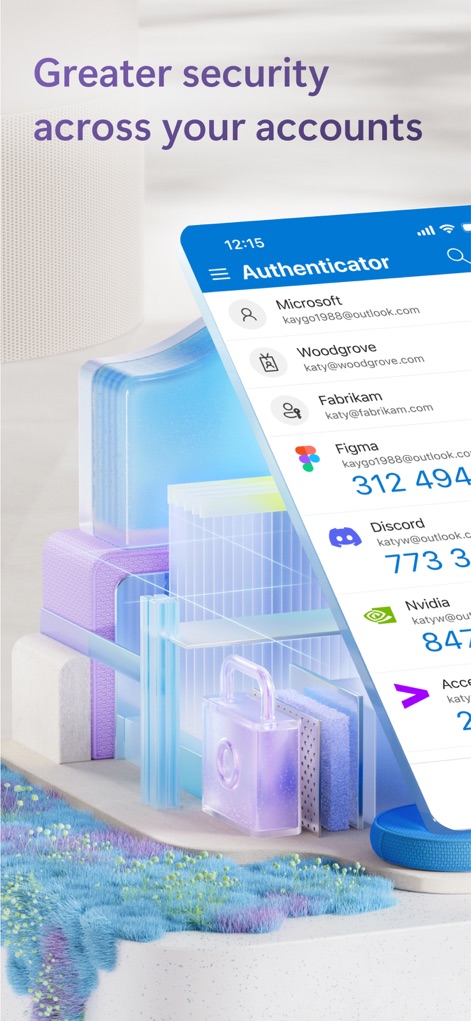
アカウントを一元管理
このアプリは、Microsoftアカウントだけでなく、FigmaやDiscordなどの複数のアカウントを一目で管理できるインターフェースと、背景に配置されたセキュリティ関連の抽象的な要素を特徴としています。

複数デバイスに対応
ユーザーはアプリ下部に表示される「Authenticator」と「Verified IDs」のタブから機能を選択でき、複数のデバイスアイコンが本アプリのマルチデバイス対応の柔軟性を示しています。

簡単サインイン承認
サインイン時に「Approve sign-in?」という緊急性の高い通知が画面上部に表示され、ユーザーはバックグラウンドにいる可愛らしい犬の画像と共に、迅速な承認操作を求められます。

パスワードなしでサインイン
ユーザーはパスワードの入力なしに、表示された複数の数字(例: 54, 48, 21)の中から正しいものをタップしてサインインを承認できるプロンプトと、紐付けられたメールアドレスを確認できます。

職場・学校アカウント連携
画面上部にはOutlookやOneDriveなどの主要なMicrosoftアプリのアイコンが表示され、ユーザーは「Pick account」画面で、複数の職場や学校アカウントからサインインに使用するアカウントを選択できます。

認証済みIDで信頼性を証明
この画面では、氏名やメールアドレスなどの個人情報が記載された「Verified Employee」カードが表示されており、ユーザーは「Verified info」タブから詳細情報を確認し、雇用状況を証明できます。

パスキーで安全にサインイン
画面中央には、「Use Microsoft Authenticator to sign in?」という明確な問いかけと、その下の「Continue」ボタンが表示され、ユーザーはセキュアなパスキーを用いた認証プロセスを進められることを示唆しています。
説明
Download
類似アプリ
似た機能とユーザー体験を持つアプリ

Google Authenticator
Google LLC

Duo Mobile
Duo Security LLC

Authenticator App - 2FA &. MFA
APPLY DIJITAL HIZMETLER TICARET LIMITED SIRKETI

authenticator . app
Mustafa Uz

SafeNet MobilePASS+
Thales DIS (Singapore) Pte Ltd

Čítačka
Tatra banka, a.s.

Authenticator App - SafeAuth
Brilliant App Limited

Authenticator App - 2FA Auth
UNIVERSE DIJITAL HIZMETLER LIMITED SIRKETI

Authenticator App : Scan & 2FA
XSOFT GLOBAL LIMITED
このページはアプリまたはその開発者の公式ページではなく、情報提供および論評を目的として作成された独立した編集出版物です。明示的に別段の記載がない限り、アプリおよびその開発者は、MWM、Apple、Google Play、アプリのパブリッシャー、またはアプリの開発者と提携、承認、後援、認可、またはその他の公式的な関係はなく、このページのいかなる内容も、アプリがMWMのサービスを使用して開発されたことを意味するものではありません。すべての商標、ロゴ、スクリーンショット、その他のコンテンツはそれぞれの所有者の財産です。