Connect My Computer

Connect My Computer

ダウンロード: App Store
ロゴ: Connect My Computer

Connect My Computer: いつでもどこでもiPadでデスクトップパワーを

アジャイルなプロフェッショナル向けの高性能VNCクライアント。Retina精細度、完全なキーボードショートカット、モバイルデバイスからの正確なジェスチャーコントロールで、MacまたはPCに安全にアクセスできます。

開発元

Hana Mobile LLC

カテゴリ

Productivity

ダウンロード

233K+

ユーザー評価

2.9/5

評価数

2K+

対応言語

13

ポケットサイズのデスクトップパワー

このインターフェースを利用する 233K+ 人のユーザー.

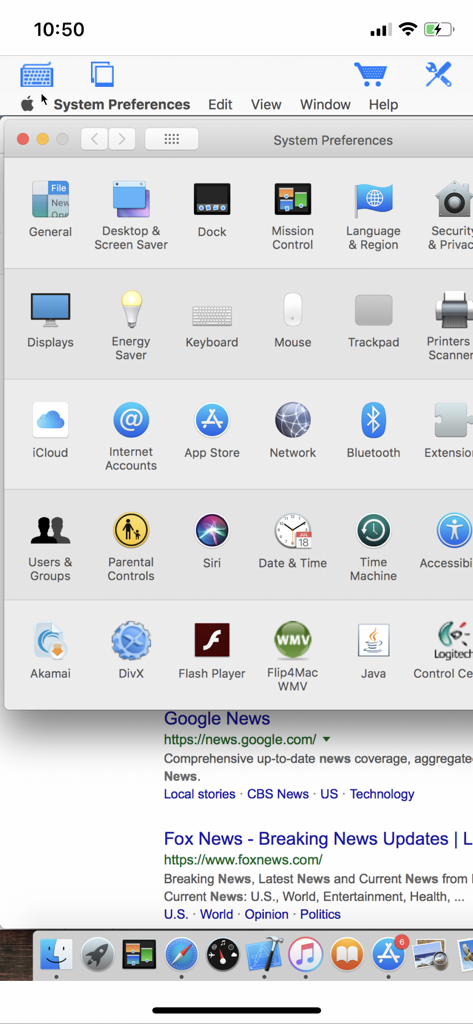
Connect My Computerアプリを使用してiPhone画面でmacOSシステム設定のリモートアクセス

Connect My Computerアプリを使用してiPhone画面でmacOSシステム設定のリモートアクセス

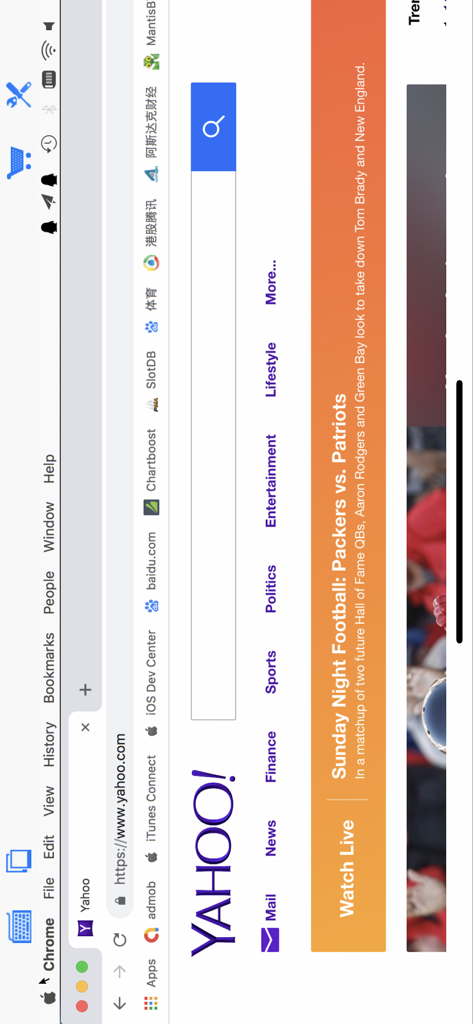
iPhoneにYahooウェブサイトが表示されたリモートデスクトップセッションとオンスクリーン仮想キーボード

iPhoneにYahooウェブサイトが表示されたリモートデスクトップセッションとオンスクリーン仮想キーボード

iPhone画面でSafariブラウザが表示されたMacデスクトップのリモートアクセス

iPhone画面でSafariブラウザが表示されたMacデスクトップのリモートアクセス

Connect My Computerアプリ経由でYahooホームページが開かれたChromeブラウザを実行しているMacデスクトップのリモートビュー

Connect My Computerアプリ経由でYahooホームページが開かれたChromeブラウザを実行しているMacデスクトップのリモートビュー

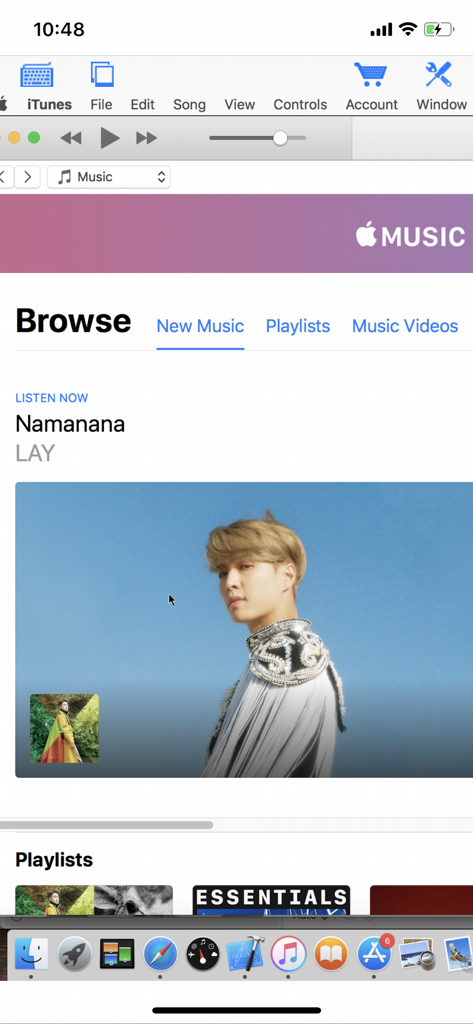
Connect My Computerモバイルアプリ経由でiTunesが開かれたMacコンピュータデスクトップのリモートビュー

Connect My Computerモバイルアプリ経由でiTunesが開かれたMacコンピュータデスクトップのリモートビュー

デスクトップ全体が、いつでも手の届くところに

このアプリを際立たせるツール、 233K+ 人のユーザーが選択.

🖥️

プロフェッショナルデスクトップアクセス

リソースを多用するMacおよびWindowsソフトウェアをモバイルデバイスから直接実行します。外出先でのレンダリングの確認、スクリプトのトリガー、ファイルへのアクセスに最適です。

🖱️

精密タッチコントロール

トラックパッドの完全サポート、右クリック機能、プロフェッショナルなワークフロー向けに設計されたカスタム修飾キーで、真のデスクトップナビゲーションを体験してください。

🚀

軽量&サブスクリプション不要

高価なエンタープライズ料金は不要です。最新のMac OSからレガシーWindowsサーバーまで、すべてをサポートする高速で費用対効果の高い接続をお楽しみください。

アプリについて

について知っておくべきこと Connect My Computer.

説明

Connect to your Mac computers from iPad/iPhone/iPod Touch at anytime! Great functionalities and It's FREE! Support Retina display for the new iPad and iPhone XS Max! Compared with this free version, the Pro version has more features: - Multiple connections - Trackpad to move mouse cursor (also support click) and do mouse wheel scroll - Mouse right click, hover and mouse drag - Modifier keypad including Shift, Ctrl and Alt which enables you to press almost any key combinations. - A cool functional keyboard: Cut, copy & paste and other shortcuts keypad, including HOME, END, PAGE UP, PAGE DOWN, Arrow keys, etc. - Virtual left button and right mouse button - Easy dragging and resizing using virtual mousepad - Support video output (need iPad or iOS4 and output connector) Features: - Specifically designed for both iPad and iPhone - Support Retina display for the new iPad and iPhone 4/4S - Take advantage of iPad's big screen - Portrait and landscape mode - Support various resolutions and colors - Tap to do click, double tap to double click, and all easy to use features - Pinch to zoom in and out. Choose the zoom scale you like - International keyboard support for many languages, including French, German, Italian, Korean, Russian, Swedish, Spanish, Portuguese etc. - Mac OS X Login - Easy to use design Supported Platform: - Mac OS X Mountain Lion - Mac OS X Lion - Mac OS X Snow Leopard - Mac OS X Leopard - Mac OS X Tiger - Windows with VNC server installed Note: This is also a full VNC client. Thus you can also use it to connect to Windows with VNC server installed. Brief install instructions (Use it if you do not need step-by-step instructions): How to configure my Mac? - Mac OS Tiger: http://www.macminicolo.net/Mac_VNC_tutor.html - Leopard or Snow Leopard: http://reviews.cnet.com/8301-13727_7-10329122-263.html For detailed setup instructions and more information, see http://www.hanajobs.com/mobile/forums/show/13.page Send your comments/suggestions to hanamobiles@gmail.com or visit our website.

最新バージョン

1.4.1

サイズ

6.6 MB

リリース日

2010年10月1日

どこからでもコンピュータにアクセスする準備はできましたか?

iPadとiPhoneをモバイルワークステーションに変える233,000人以上のプロフェッショナルに加わりましょう。今すぐ無料のVNCクライアントをダウンロードして、ラップトップを家に置いていきましょう。

ダウンロード: App Store

App information, icons, screenshots, and descriptions displayed on this page are sourced from the Apple App Store and are the property of their respective developers. Download estimates and rankings are based on MWM's proprietary models and may not reflect actual figures. This page is provided for informational and analytical purposes only.

Believe this page infringes your intellectual property? File a dispute