Dote Timer - Time Management

Dote Timer - Time Management

ダウンロード: App Store
ロゴ: Dote Timer - Time Management

Dote Timer: 裏返して集中、正確に計画、そして貢献

ユニークなフリップタイマーで邪魔を克服し、10分ごとのドットプランナーで進捗を視覚化し、集中した作業時間を実際の寄付に変えましょう。

開発元

Smartdong School

カテゴリ

Productivity

ダウンロード

56K+

ユーザー評価

4.6/5

評価数

1K+

対応言語

18

フローをマスターする

このインターフェースを利用する 56K+ 人のユーザー.

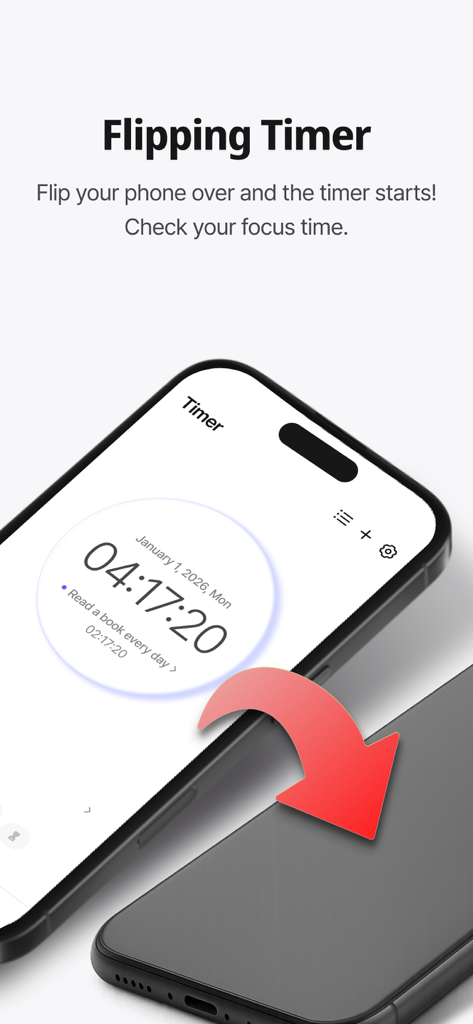
Dote Timerアプリの集中タイマー機能を有効にするために裏返されたスマートフォン。

Dote Timerアプリの集中タイマー機能を有効にするために裏返されたスマートフォン。

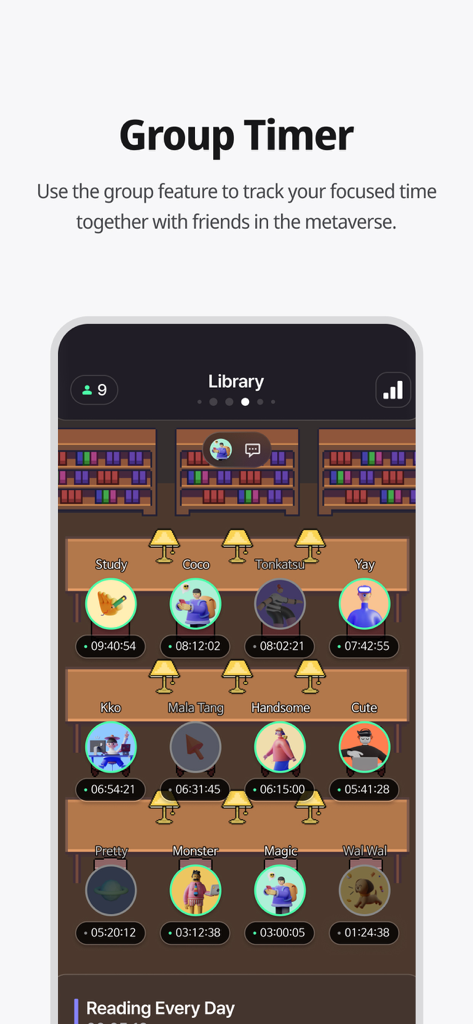
ユーザーが一緒に勉強する仮想ライブラリ設定でグループタイマー機能を示すDote Timerアプリのスクリーンショット。

ユーザーが一緒に勉強する仮想ライブラリ設定でグループタイマー機能を示すDote Timerアプリのスクリーンショット。

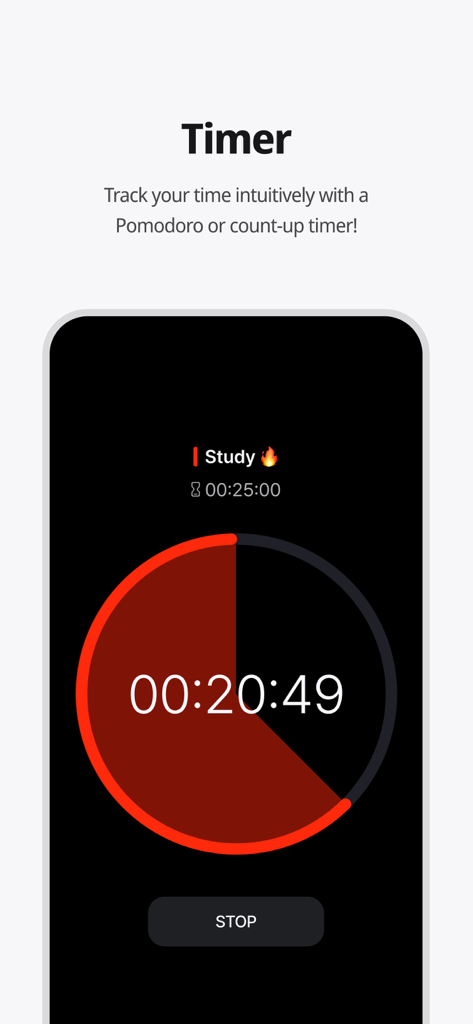
Dote Timerアプリのインターフェースに円形のポモドーロ学習タイマーのカウントダウンが表示されている。

Dote Timerアプリのインターフェースに円形のポモドーロ学習タイマーのカウントダウンが表示されている。

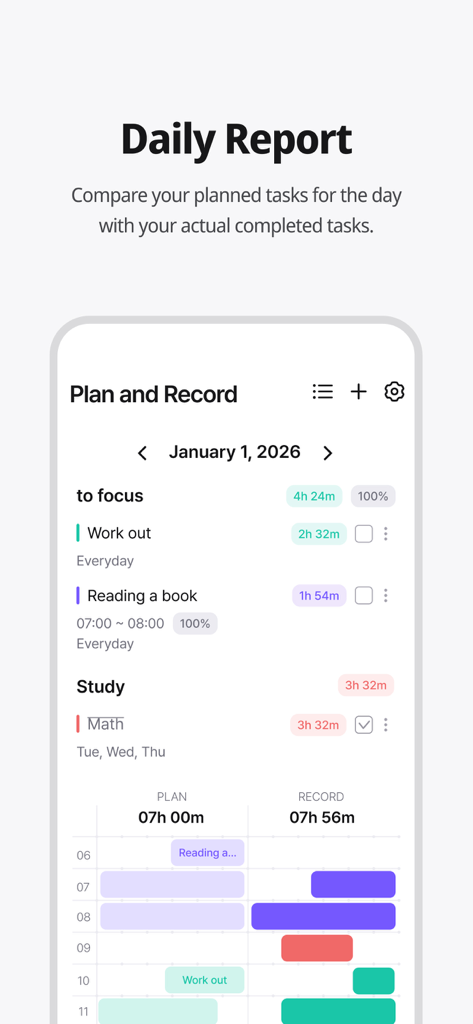
Dote Timerのデイリーレポート画面で、計画されたタスクと実際の記録時間を比較している。

Dote Timerのデイリーレポート画面で、計画されたタスクと実際の記録時間を比較している。

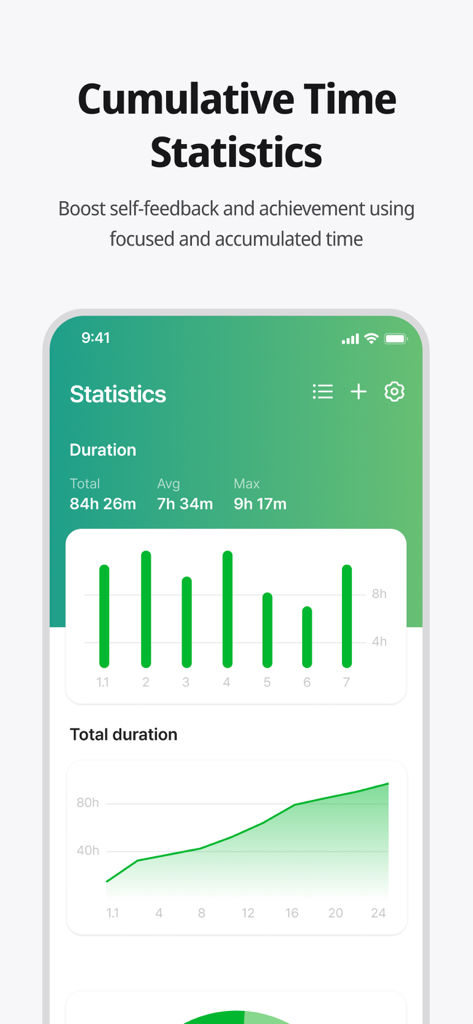
Dote Timerアプリに累積集中時間統計とグラフが表示されている。

Dote Timerアプリに累積集中時間統計とグラフが表示されている。

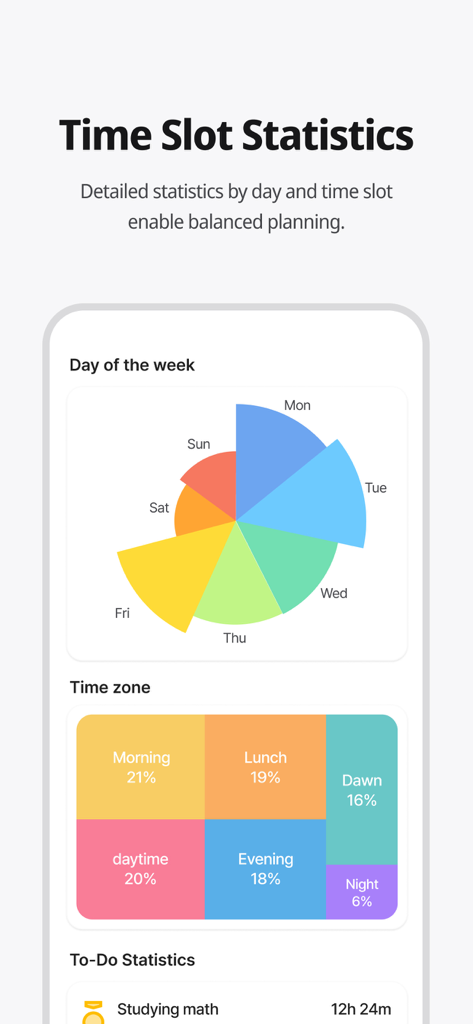
曜日と時間帯別の時間管理統計を示すカラフルな分析ダッシュボード。

曜日と時間帯別の時間管理統計を示すカラフルな分析ダッシュボード。

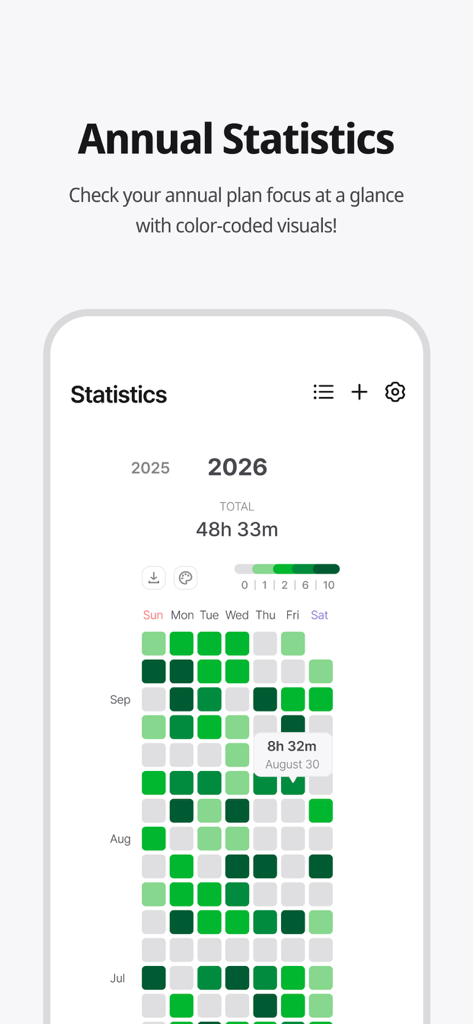
Dote Timerアプリのカラフルな年次集中統計ヒートマップ。

Dote Timerアプリのカラフルな年次集中統計ヒートマップ。

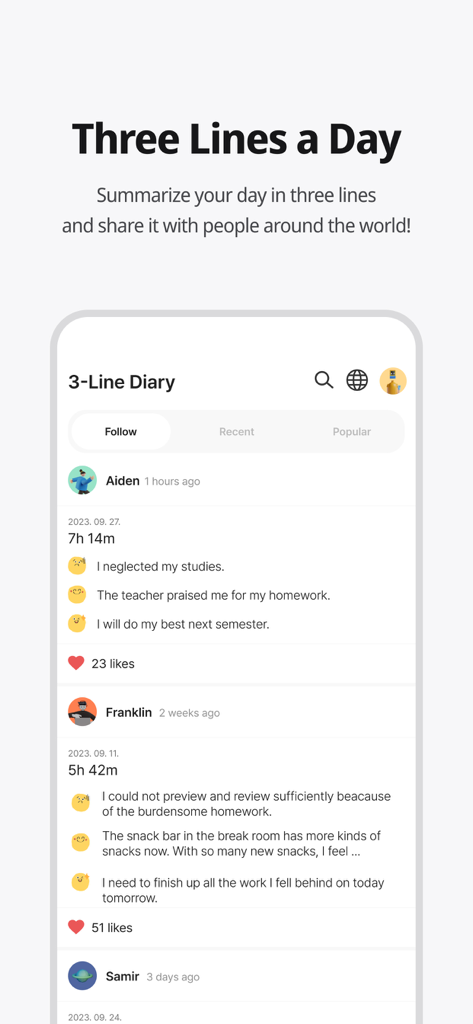
ユーザーの要約と集中時間を示すDote Timerアプリの3行日記コミュニティ機能。

ユーザーの要約と集中時間を示すDote Timerアプリの3行日記コミュニティ機能。

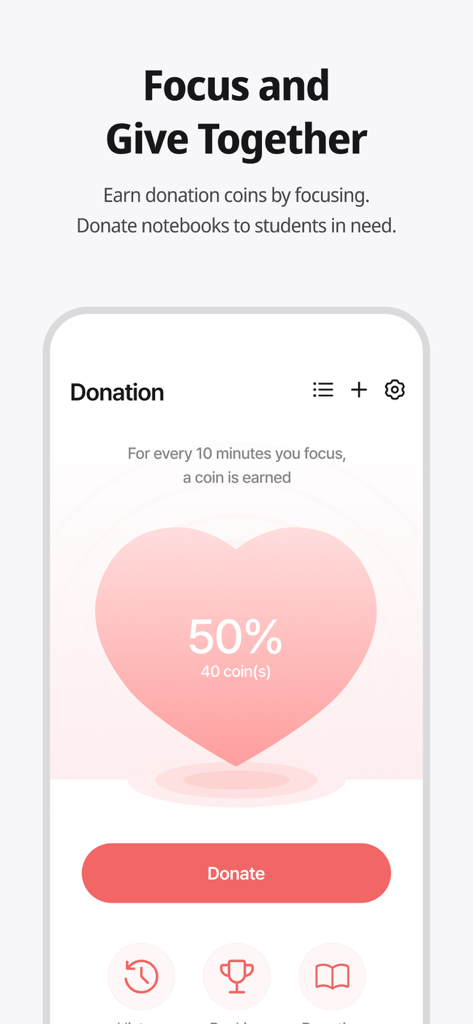
Dote Timerアプリの寄付機能画面。ユーザーは集中することでコインを獲得し、必要としている学生に寄付できる。

Dote Timerアプリの寄付機能画面。ユーザーは集中することでコインを獲得し、必要としている学生に寄付できる。

目的意識を持って生産性を向上させる

このアプリを際立たせるツール、 56K+ 人のユーザーが選択.

📱

深い集中へ裏返す

携帯を裏返している間だけ動作するタイマーで、スマートフォンの依存症を解消しましょう。すぐに注意力を取り戻し、フロー状態に入りましょう。

📈

計画 vs. 現実の分析

10分単位の精度で、目標と実際の集中時間を比較しましょう。視覚的なヒートマップを使って、最も生産性の高い時間帯を特定しましょう。

🌍

インパクトのある生産性

あなたの集中力を善の力に変えましょう。作業中にコインを獲得し、世界中の恵まれない学生の教材に資金提供しましょう。

アプリについて

について知っておくべきこと Dote Timer - Time Management.

説明

#Time Management Secret of Successful People# Try Dot Timer now, the king of time management! Are you having trouble managing your time? Need to concentrate, but your smartphone is distracting you? Organizing your work or even recording your study time, everything can be done with Dot Timer! ##Flip Timer UP your concentration with a timer that runs when your flip your smartphone! Let's get away from smartphone addiction! Get donation coins every 10 minutes of concentration ##Time Table Unique time table that allows you to compare your plans with the actual records at a glance! Maximize time utilization with a 10-minute dot-separated planner ##Various statistical charts It's not end with record! Analyze your concentration time in detail with various graphs and charts! Identify your improvement with daily statistics, annual statistics, cumulative statistics, weekly statistics, hourly statistics and plan leaderboards at a glance ##Donation Program You can donate the collected coins to gift notes for underprivileged students! Donation rangking are changing in real time basis ##Three Lines a Day How are you today? Share your diary in three lines. Motivate each other with friends around the world ‍##Study Group 'Study With' Try taking notes with your friends in real time! There are various themes such as classrooms, libraries, offices, fitness places and others. Group member statistics. ##Premium Features Try premium features that are constantly being updated. More efficient time management developed by time management experts How to Use Dote Timer Apple Watch 1. Add a to-do in the Dote timer app. 2. Open the Dote Timer Apple Watch app and select a task by pressing the ‘Select Task’ button. 3. Press the START button to start recording. 4. When the recording is finished, press the STOP button to save the recording and end it. Caution : 1. The Apple Watch must be connected to the iPhone. 2. The Dote timer must be installed on the iPhone. * Notice * First, You need to click To Do List and create category to use this app. reporting translation errors -> skyktc75@gmail.com Your review can help a lot for your developer. Thank you. When we try to concentrate on something, there are so many distractions. One of the biggest distractions is the smartphone. You need to focus on the book. But I find myself looking at the phone. The plan was to study for 5 hours But you actually spent only 1 hour on the book? Dote Timer is the answer! Let’s start with the special proprietary features of Dote Timer. First, Dote Timer starts only when you flip the device (screen facing down). It will automatically stop when you use or move the phone after activating the timer. Thus, you can concentrate on study or work. Second, you can compare the plan with your actual concentration record. Set up the D-Day of your task. And categorize it into A, B, or C depending on the importance to set up a precise plan. The actual length of concentration is recorded and can be compared with your original plan. Third, the thickness of color denotes how much you concentrated. Thus, you can easily find out the days when you concentrated on your tasks. Especially the app shows in different colors the days of concentration and the days you failed to concentrate throughout the year. So you can compare how you fared yesterday and today to make your day more productive. In addition, collect coins by using the timer and donate them for underserved people. My accumulated time of concentration is converted into coins. When they reach a certain threshold, Dote Planner and Dote Book will be donated to underserved students. There are also the standings of donation, Which motivates the users to compete in the donation of coins. Dote Timer can be set up as desired. Just focus on what you have to do to contribute to society. The most efficient time management app for the perfect time allocation. Download Dote Timer now!

最新バージョン

2.6.6

サイズ

103.5 MB

リリース日

2021年7月6日

あなたのスクリーンタイムを社会貢献に

先延ばし癖に打ち勝ちたいですか?携帯を裏返して集中する何千人もの学生や専門家と共にDote Timerをダウンロードし、集中した作業時間を実際の寄付に変えましょう。

ダウンロード: App Store

App information, icons, screenshots, and descriptions displayed on this page are sourced from the Apple App Store and are the property of their respective developers. Download estimates and rankings are based on MWM's proprietary models and may not reflect actual figures. This page is provided for informational and analytical purposes only.

Believe this page infringes your intellectual property? File a dispute