PDF to Pages by PDF2Office

PDF to Pages by PDF2Office

ダウンロード: App Store
ロゴ: PDF to Pages by PDF2Office

PDF to Pages by PDF2Office:静的なPDFを完全に編集可能なPagesドキュメントに変換

再入力をやめて、編集を始めましょう。iPhone上で直接、プロフェッショナルな精度でレイアウト、スタイル、表を維持します。ファイル全体または特定の領域を変換し、iCloud、Dropbox、Google Driveとシームレスに同期します。

開発元

Recosoft Corporation

カテゴリ

Productivity

ダウンロード

32K+

ユーザー評価

1.0/5

評価数

0

対応言語

5

精密な操作

このインターフェースを利用する 32K+ 人のユーザー.

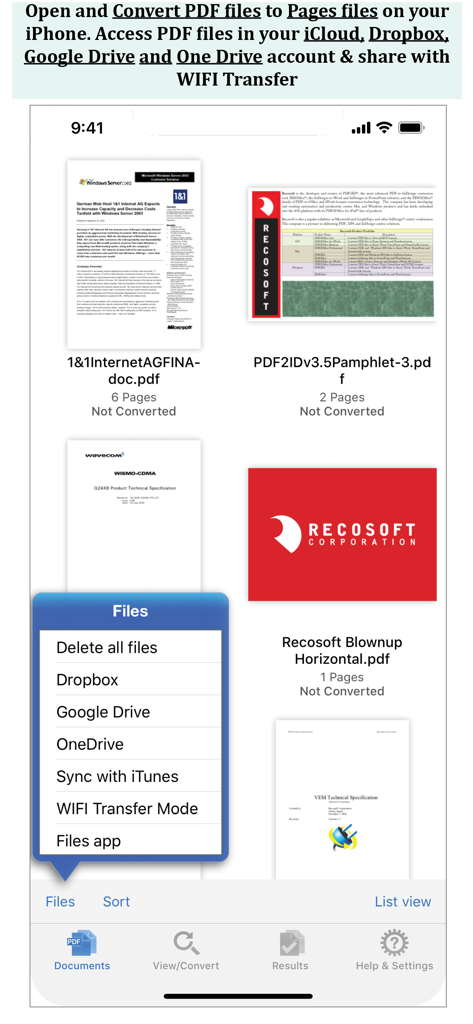
iPhoneアプリ画面にPDFファイルリストと、Dropbox、Google Drive、OneDriveのオプションメニューが表示されています。

iPhoneアプリ画面にPDFファイルリストと、Dropbox、Google Drive、OneDriveのオプションメニューが表示されています。

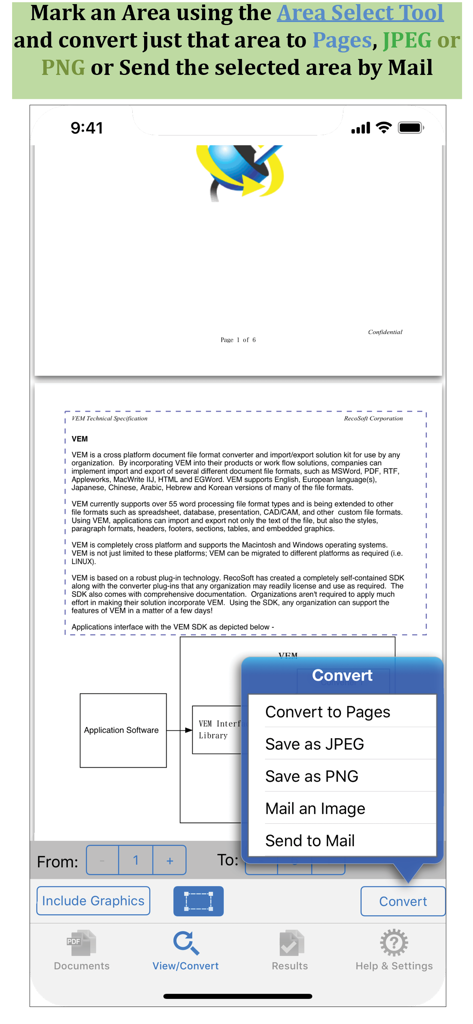
PDF to Pagesアプリのスクリーンショット。ドキュメントの特定の部分を変換するための領域選択ツールが表示されています。

PDF to Pagesアプリのスクリーンショット。ドキュメントの特定の部分を変換するための領域選択ツールが表示されています。

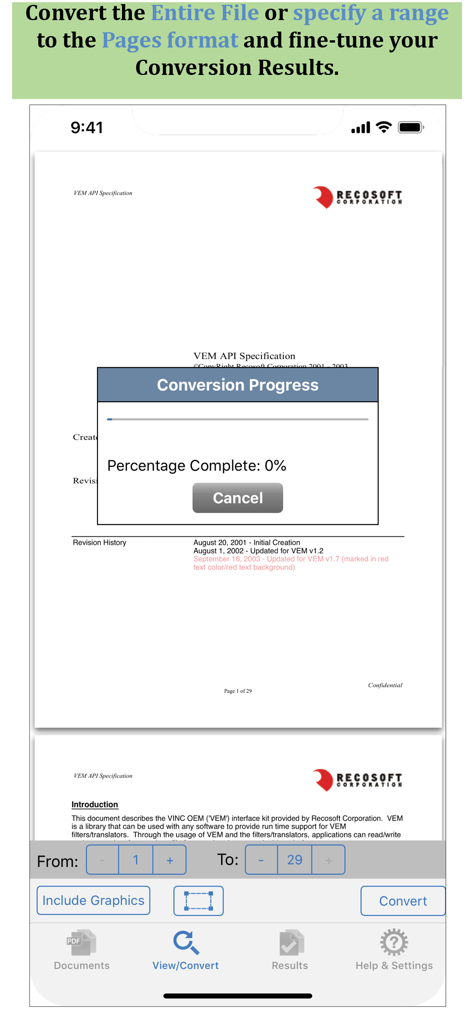
PDF to Pagesアプリのインターフェイス。変換進行状況ウィンドウとページ範囲選択オプションが表示されています。

PDF to Pagesアプリのインターフェイス。変換進行状況ウィンドウとページ範囲選択オプションが表示されています。

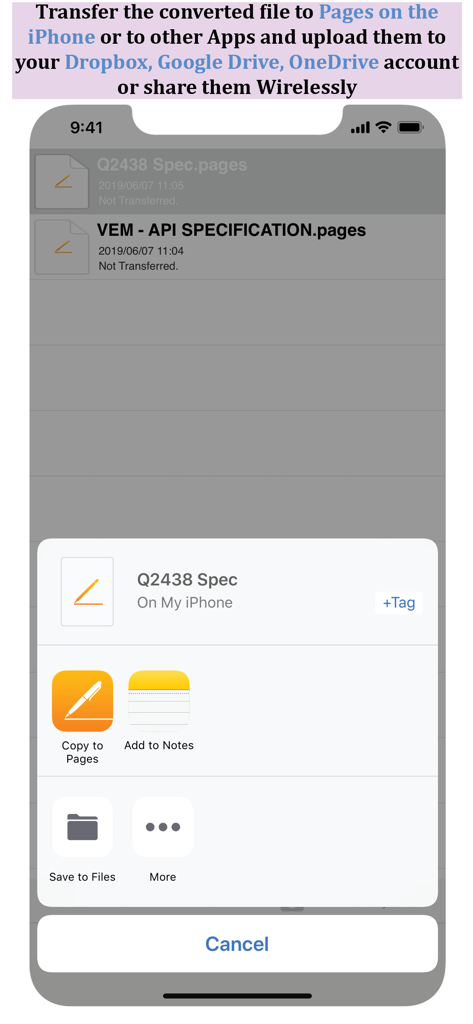
Pagesに変換済みファイルをコピーするか、iPhoneのクラウドストレージに保存するオプションが表示されている共有シート。

Pagesに変換済みファイルをコピーするか、iPhoneのクラウドストレージに保存するオプションが表示されている共有シート。

静的なPDFを動的なPagesドキュメントに変換

このアプリを際立たせるツール、 32K+ 人のユーザーが選択.

📄

高忠実度レイアウト保持

段落、表、スタイルを完全にそのまま保持します。再フォーマットをスキップして、すぐにPagesでの編集を開始してください。

🎯

精密領域選択

必要なものだけを変換します。特定のセクションを選択して、編集可能なテキストまたは画像として抽出し、迅速に共有および再利用できます。

☁️

シームレスなワークフロー統合

Dropbox、Google Driveに接続するか、WiFi転送を使用して、Appleエコシステム全体でドキュメントを簡単に同期できます。

アプリについて

について知っておくべきこと PDF to Pages by PDF2Office.

説明

PDF to Pages by PDF2Office converts your PDF to editable Pages files on your iPhone. Convert PDF to Pages documents instantly with a simple tap. Convert the entire document, range of pages or select and mark specific areas in a page to convert using the Area Select tool and have it editable on your iPhone! PDF to Pages converts PDF files to fully editable Pages files by recreating the intended construction and layout of the document. PDF to Pages forms paragraphs; applies styles; re-groups independent graphic elements; extracts images and creates tables automatically. PDF to Pages also provides detailed options for fine-tuning the conversion process. Every page in a PDF file is converted to an equivalent page in the resulting Pages document. PDF to Pages comes with a fully integrated PDF viewer allowing you to view the file you want to convert. Features * Convert PDFs to editable Pages files * Read PDF Files using the integrated PDF viewer. * Mark just the area within a page to convert. You can convert just the marked area to Pages, JPEG or PNG types * Select an area and have the contents embedded into a new Mail automatically. * Cloud services integration allows you to transfer files between your Dropbox/OneDrive/GoogleDrive account * Use WIFI transfer mode to transfer files between your computer and iPhone * Use standard Pinch in/Pinch Out to change the viewing magnification * Use the all in 1 interface to Convert and View PDF files. * The converted result is easily editable in Pages * Transfer your converted files to any other software on the iPhone that can accept Pages files. * Convert the entire file or a range of pages only Recosoft is the developer of PDF2Office the de-facto PDF conversion software for the Mac and iPad; PDF2ID the PDF-to-InDesign converter and ID2Office, the InDesign to Word/PowerPoint tool. Refer to our web site to view the entire desktop line of products that we are now bringing to the iOS. Note: PDF to Pages by PDF2Office does not perform Optical Character Recognition. An image in a PDF file is treated as an image.

最新バージョン

1.7.5

サイズ

57.8 MB

リリース日

2013年12月13日

PDFを編集可能なPagesドキュメントに変換

再入力をやめて、編集を始めましょう。PDF2Officeを使用して、モバイルワークフローを精度と容易さで維持している32,000人以上のプロフェッショナルに加わりましょう。

ダウンロード: App Store

App information, icons, screenshots, and descriptions displayed on this page are sourced from the Apple App Store and are the property of their respective developers. Download estimates and rankings are based on MWM's proprietary models and may not reflect actual figures. This page is provided for informational and analytical purposes only.

Believe this page infringes your intellectual property? File a dispute