iWatermark Lite Watermark Pics

iWatermark Lite Watermark Pics

ダウンロード: App Store
ロゴ: iWatermark Lite Watermark Pics

iWatermark Lite:あなたのクリエイティブな作品を保護し、プロフェッショナルなブランドを構築する

写真家、不動産業者、中小企業オーナー向けの必須一括ウォーターマーキングツール。カスタムロゴ、署名、QRコードでデジタル資産を数秒で保護します。

ダウンロード: App Store

開発元

Plum Amazing Software LLC

カテゴリ

Photo & Video

ダウンロード

92K+

ユーザー評価

2.5/5

評価数

500

対応言語

14

プロフェッショナルなエッジ

このインターフェースを利用する 92K+ 人のユーザー.

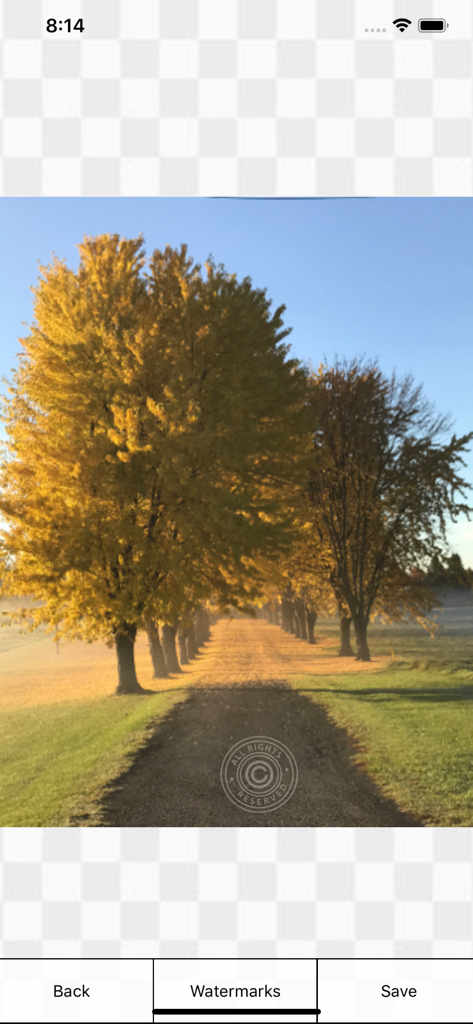
iWatermark Liteモバイルアプリインターフェースを使用して、All Rights Reservedの著作権ウォーターマークが適用された、風光明媚な秋の風景写真。

iWatermark Liteモバイルアプリインターフェースを使用して、All Rights Reservedの著作権ウォーターマークが適用された、風光明媚な秋の風景写真。

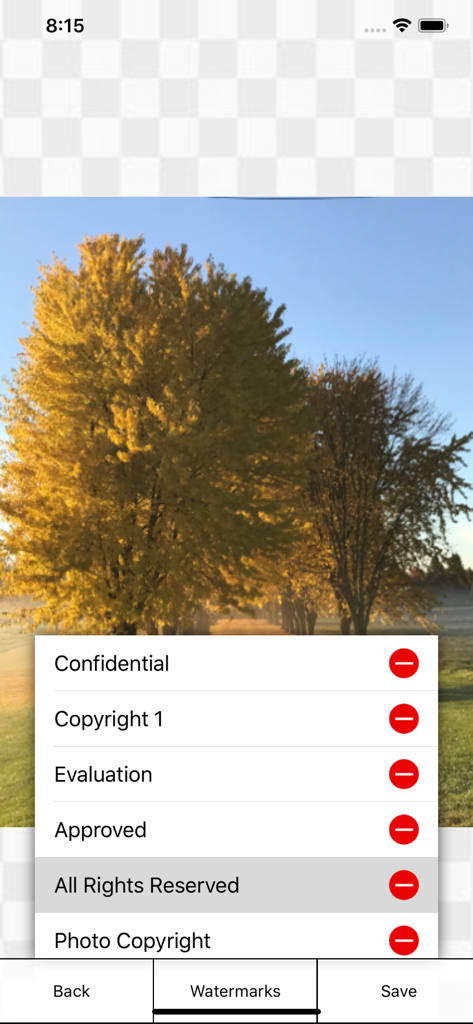
iWatermark Liteアプリのインターフェースに、木の写真の上にCopyrightやAll Rights Reservedなどのウォーターマークオプションのメニューが表示されている。

iWatermark Liteアプリのインターフェースに、木の写真の上にCopyrightやAll Rights Reservedなどのウォーターマークオプションのメニューが表示されている。

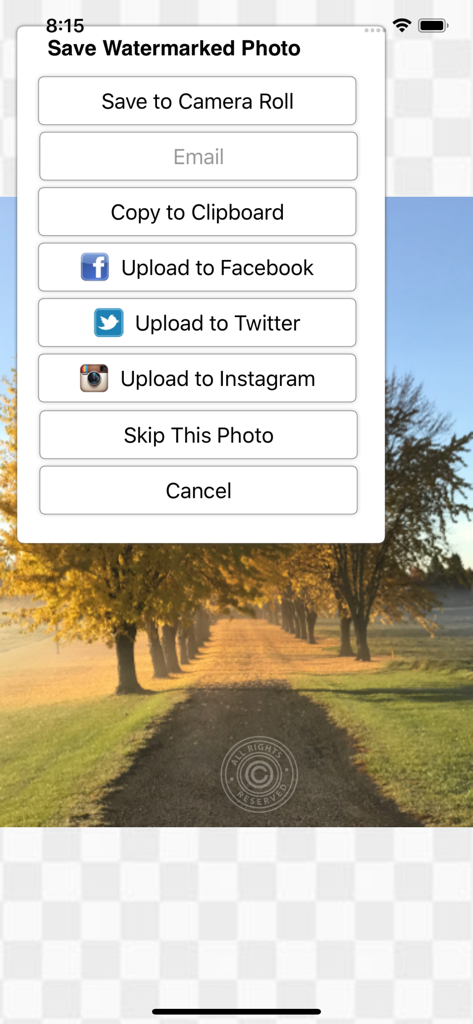
iWatermark Liteアプリのインターフェースに、ウォーターマーク付きの写真をカメラロールに保存したり、Facebook、Twitter、Instagramで共有したりするオプションが表示されているメニューが表示されている。

iWatermark Liteアプリのインターフェースに、ウォーターマーク付きの写真をカメラロールに保存したり、Facebook、Twitter、Instagramで共有したりするオプションが表示されているメニューが表示されている。

ビジュアルアセットのためのプロフェッショナルツール

このアプリを際立たせるツール、 92K+ 人のユーザーが選択.

高効率一括処理

一枚ずつ編集する時間を無駄にするのはやめましょう。忙しい不動産業者やeコマース販売者に最適な、ギャラリー全体に独自のブランドまたは署名を同時に適用できます。

✒️

完全なブランドカスタマイズ

独自のロゴ、手描きの署名をインポートするか、162のプロフェッショナルフォントから選択します。ピクセルパーフェクトな外観のために、不透明度、スケール、回転を完全に制御します。

🛡️

IP保護とQR統合

コンテンツのスクレイピングを抑止し、作品がバイラルになる前に権利を主張しましょう。QRコードウォーターマークを使用して、連絡先の詳細とウェブサイトをアートワークに直接埋め込みます。

アプリについて

について知っておくべきこと iWatermark Lite Watermark Pics.

説明

Works great on the latest iOS! The essential Watermarking App for Professionals, Business and Personal Use. Easily, secure and protect your photos with a text, graphic/logo, signature or QR watermark.  Once added to a photo this visible watermark displays it is created and owned by you. Watermarking is increasingly important and is like signing your name to a photo. A watermark subtly displays, no matter where your photo goes, that it's yours. Watermarking can also be used to add your email, url, a personal message or fun graphics to any photo. Before you download please be aware this lite version allows using all features but also adds our small watermark ('Created with iWatermark') to remove this mark upgrade to iWatermark. Many find the lite version fulfills their needs but we recommend upgrading, it supports the evolution of iWatermark, its a small price for such a sophisticated program. "It's by far the best watermarking App I've seen to date on iOS." - Terry White, review on bestappsite.com 11/26/12 Thanks to all iWatermark users for the great reviews and suggestions. iWatermark, is the only watermarking tool available for all 4 OS platforms and the most popular professional watermarking tool for photos. Social media sharing via full resolution to Facebook, Instagram, Twitter, Camera Album, Clipboard or Email (3 resolution options). Features * Touch to operate. ** Click to move the watermark location. ** Pinch/zoom to expand/contract the size of the watermark. ** Two fingers at once to rotate the watermark to any angle. * Batch processing (all at once) or sequential. * Easily adjust the watermarks scale, opacity, font, color, size, position and angle. * Create your own subtle text or graphic watermarks or select from the included example watermarks (both text and graphics). * Included examples are both text (names, dates, tag data, etc.) and graphic (signatures, logos, etc.) watermarks which can be used immediately. * 162 fonts for your text watermarks 112 + 50 iOS fonts * Displays each font. * 34 high-res watermarks. * Import your own graphic watermarks by sending yourself an email with attached graphic. * One button import of your signature for use as a watermark. * Complete and easy to understand manual. * Create a QR watermark which is like a barcode. QR codes can contain up to 4000 chars of information. QR codes can then be read with a scanner or smartphone with the right app revealing the info you encoded. Why Watermark? Digitally sign your photos/artwork with iWatermark to claim, secure and maintain your intellectual property and reputation. - Photos go viral then they fly off globally. Watermark with name, email or url so your photo has a visible and legal connection to you. - Build your company brand, by having your company logo on all your images. - Promote your company, name and website by using QR codes as watermarks. - Avoid the surprise of seeing your photos and/or artwork elsewhere on the web or in an ad. - Avoid the conflicts, costly litigation and headaches from plagiarists who claim they didn't know that you created it. - Avoid intellectual property (IP) squabbles. Q:I want to use my signature as my watermark. How do I add my graphic signature like the examples by Picasso, Ben Franklin, etc.? A:Use our signature tool or make the .png graphics on your computer, email it to yourself, open the email on your device and save to your photo album. In iWatermark create a graphic watermark and choose the graphic from your photo album to add it as a new watermark. Q:Will it work with Canon, Sony, Nikon, Fuji, Olympus? A:Yes Manual http://www.plumamazing.com/iphone/iwatermark-iphone/iwatermarkhelp/

最新バージョン

6.9.7

サイズ

23.2 MB

リリース日

2011年6月14日

今日からコンテンツを保護し、ビジネスにブランドを付けましょう

プロフェッショナルな一括ウォーターマーキングのパワーを体験してください。iWatermark Liteで知的財産を保護する92,000人以上のクリエイターの仲間入りをしましょう。

ダウンロード: App Store

App information, icons, screenshots, and descriptions displayed on this page are sourced from the Apple App Store and are the property of their respective developers. Download estimates and rankings are based on MWM's proprietary models and may not reflect actual figures. This page is provided for informational and analytical purposes only.

Believe this page infringes your intellectual property? File a dispute