
このページはアプリまたはその開発者の公式ページではなく、情報提供および論評を目的として作成された独立した編集出版物です。明示的に別段の記載がない限り、アプリおよびその開発者は、MWM、Apple、Google Play、アプリのパブリッシャー、またはアプリの開発者と提携、承認、後援、認可、またはその他の公式的な関係はなく、このページのいかなる内容も、アプリがMWMのサービスを使用して開発されたことを意味するものではありません。すべての商標、ロゴ、スクリーンショット、その他のコンテンツはそれぞれの所有者の財産です。


CapCut: Photo & Video Editor
このアプリがユーザーにもたらすのは、凡庸な素材を瞬時にSNSの覇者へと変貌させる魔法だ。AIが編集の壁を打ち壊し、誰もが注目を集める映像の錬金術師となる。
ダウンロード
500M+ユーザー評価
評価数
5.5M開発元
カテゴリ
Photo & Video対応言語
21最新バージョン
17.2.1サイズ
800.2 MBリリース日
2020年4月14日CapCut: Photo & Video Editor 分析レポート
最先端のAIとプロフェッショナルツールを統合したコンテンツクリエーションプラットフォーム
AI搭載のスマート編集機能
自動キャプション、テキスト読み上げ、背景除去といった高度なAI機能により、ユーザーはコンテンツ作成の手間を大幅に削減し、より魅力的なビデオを効率的に制作できます。
高度なキーフレームアニメーションとエフェクト
キーフレームアニメーション、スムーズなスローモーション、クロマキー合成、手ブレ補正などのプロフェッショナルなツールを利用することで、ユーザーはよりダイナミックで洗練された視覚効果をビデオに追加できます。
多様なトレンドエフェクトとフィルター
何百ものトレンドエフェクト(グリッチ、ブラー、3Dなど)や多様なフィルターが毎週更新されるため、ユーザーは常に最新の視覚表現を取り入れ、ビデオを魅力的に演出できます。
豊富な音楽と効果音ライブラリ
数百万もの音楽クリップと効果音のライブラリ、およびビデオからの音声抽出機能により、ユーザーはコンテンツに最適なオーディオトラックを簡単に追加し、感情的な深みを与えられます。
高解像度エクスポートとソーシャルメディア共有
4K 60fpsおよびスマートHDRでのカスタム解像度エクスポートに対応しており、ユーザーは高品質なビデオを作成し、TikTok、YouTube、Instagramなどの主要なプラットフォームへ簡単に共有できます。
直感的な基本ビデオ編集ツール
クリップのトリミング、分割、結合、再生速度調整、トランジションの適用など、基本的な編集機能が使いやすいインターフェースで提供され、初心者でも迅速にビデオを制作できます。
よくある質問
について知っておくべきこと CapCut: Photo & Video Editor
What is CapCut: Photo & Video Editor?
CapCut is an all-in-one video editor and video maker application. It provides easy-to-use editing functions and advanced features for creating high-quality videos. Beginners and advanced users can utilize its tools to snip and enhance moments.
Does CapCut offer advanced video editing features like keyframe animation and chroma key?
Yes, CapCut supports advanced video editing features. It includes keyframe animation for all settings, smooth slow-motion with optical flow, chroma key for color removal, and video stabilization to keep footage steady.
Can CapCut automatically generate captions for videos?
Yes, CapCut automatically generates captions using speech recognition. It also offers text-to-speech functionality in multiple languages and voices, and automatic background removal as intelligent features.
What export resolution options does CapCut provide for videos?
CapCut offers custom video export resolution. The HD video editor supports 4K 60fps exports and smart HDR. Users can also adjust the format and share videos directly to social media platforms.
How can I contact CapCut support for assistance?
You can contact CapCut support by emailing capcut.support@bytedance.com. The app also provides links to its official social media pages on platforms like Facebook, Instagram, YouTube, and TikTok.
Does CapCut include an AI Story Maker feature?
Yes, CapCut includes an AI Story Maker feature. This allows users to generate stories and select various visual styles, including "Realistic Film," "Cartoon 3D," and "Anime," as shown in the app.
Can CapCut translate text or dialogue within videos?
Yes, CapCut features an AI Translator. It enables users to choose target languages such as English, Mandarin, or Japanese, and provides an option to match mouth shapes for translated dialogue.
Does CapCut offer AI tools for creating dialogue scenes?
Yes, CapCut includes an AI Dialogue Scene feature. Users can input text or add audio, then select from various voices and assign acting reactions to create interactive dialogue scenes.
Can users create or utilize AI avatars in CapCut?
Yes, CapCut provides AI Avatars. The feature allows users to choose from a selection of trending avatars or create their own, with options for background removal and usage tracking.
Does CapCut offer pre-designed text templates for video editing?
Yes, CapCut provides a variety of text templates. Users can browse categories such as Trending, Title, Social media, and Vlog to add professionally designed text styles to their videos.
以下のスクリーンショットと説明は、アプリの公式ストアリスティングから直接取得されたものであり、アプリ開発者の所有物です。
アプリストア
スクリーンショット
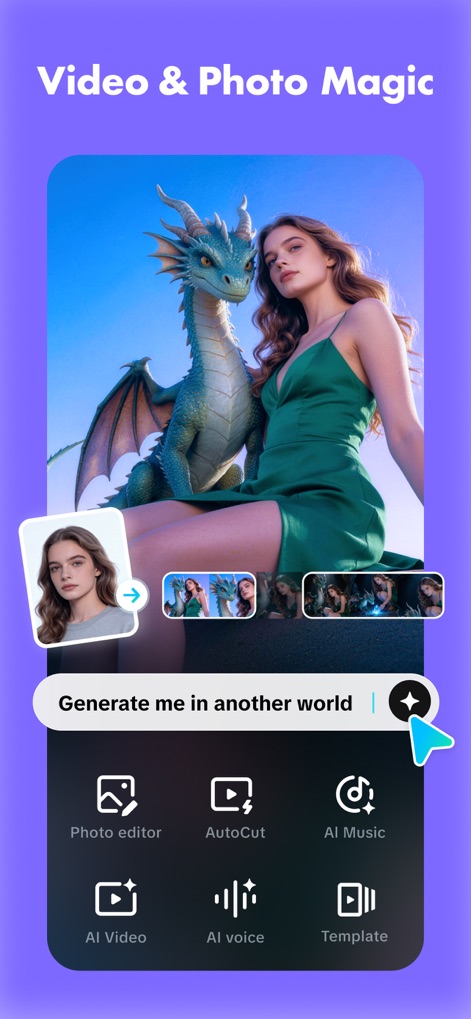
創造的なAI編集
本アプリの高度なAI機能により、ユーザーは「別の世界」に自分を生成したり、AIビデオオプションでユニークなコンテンツを作成したりできます。

簡単な自動カット
複数のビデオクリップを自動で結合し、AI vlogsを瞬時に生成することで、コンテンツ作成を簡素化します。

言語の壁を超える
このツールは、AIによる音声翻訳でテキストを変換し、さらに「口の動きの同期」機能で自然な表現を実現します。

AIが紡ぐ対話
テキストを入力してAIに会話を生成させ、複数の「声の選択」肢から最適なナレーションを選んで、魅力的なダイアログシーンを作成できます。

魅力的なAIアバター
背景を自動的に除去し、トレンドやジャンル別の「多様なAIアバター」から選択して、ユーザーのコンテンツに個性的なキャラクターを導入できます。
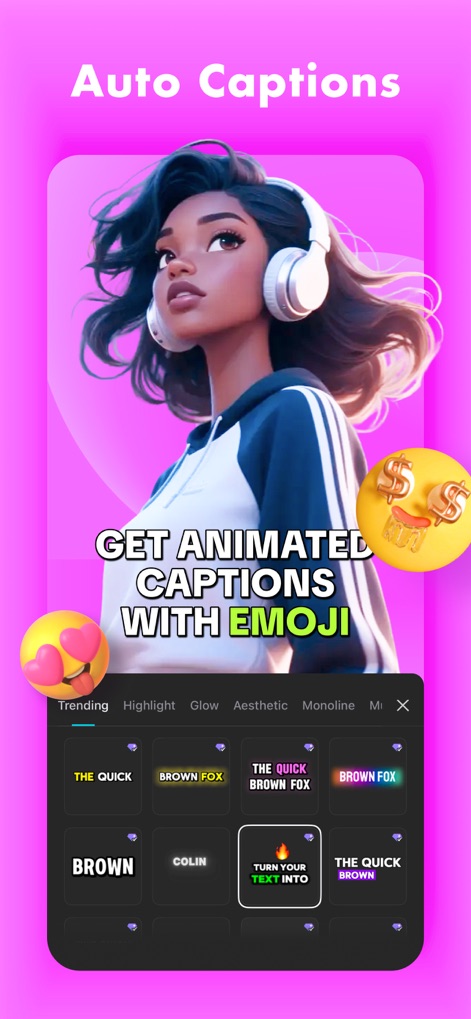
表現豊かな自動字幕
この機能は、アニメーション付きキャプションを自動生成し、さらに「絵文字を追加」することで、動画に視覚的な魅力を加えます。

プロフェッショナルな文字表現
多彩な「テキストテンプレート」を利用し、フォントやスタイルをカスタマイズすることで、動画に合わせたプロフェッショナルな文字表現が可能です。
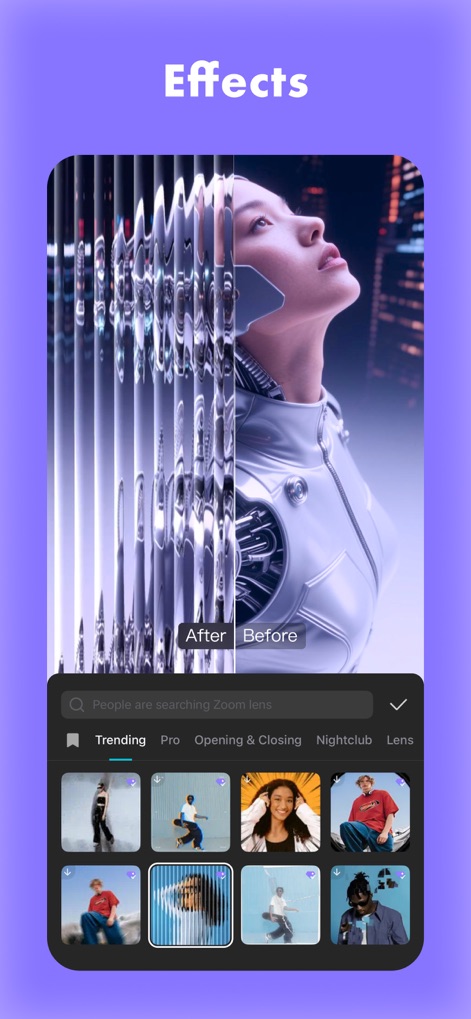
視覚的なインパクト
ビデオに「グリッチエフェクト」などの視覚的なインパクトを与え、最新の「トレンドエフェクト」を適用することで、コンテンツを際立たせます。

簡単なビデオ作成
多様な「ビデオテンプレート」から選択し、ボタン一つで「テンプレートを適用」することで、迅速に高品質な動画を作成できます。

最先端のAI活用
AIによって生成された魅力的なコンテンツのギャラリーを探索し、気に入ったものを「テンプレートとして利用」することで、クリエイティブな表現を広げます。
説明
Download
類似アプリ
似た機能とユーザー体験を持つアプリ

Wink: Video Enhancer & Editor
Xiamen Meitu Technology Co., Ltd.

Instories: AI Photo & Video
Ylee Studio LTD

秒剪 - 视频创作 & Live 实况制作
Tencent Technology (Shenzhen) Company Limited

Vids AI - Reels Video Editor
Viral Vision Ltd

Reels Maker for Instagram BEAT
Onelight Apps CY Ltd

Mojo: AI Video & Reels Editor
Archery Inc.

Unfold: Reels & Story Maker
Squarespace, Inc.

Reels Editor, AI Video: inMelo
APPBYTE PTE. LTD.

Reelsapp: reel & video editor
Rustam Achilov
このページはアプリまたはその開発者の公式ページではなく、情報提供および論評を目的として作成された独立した編集出版物です。明示的に別段の記載がない限り、アプリおよびその開発者は、MWM、Apple、Google Play、アプリのパブリッシャー、またはアプリの開発者と提携、承認、後援、認可、またはその他の公式的な関係はなく、このページのいかなる内容も、アプリがMWMのサービスを使用して開発されたことを意味するものではありません。すべての商標、ロゴ、スクリーンショット、その他のコンテンツはそれぞれの所有者の財産です。