Music Editor - Audio Editor

Music Editor - Audio Editor


ダウンロード: App Store
ロゴ: Music Editor - Audio Editor

Music Editor - オーディオ編集: あなたのオールインワン・モバイルサウンドスタジオ

正確なトリミング、簡単なミキシング、インスタントな動画からMP3への抽出。80万人以上のクリエイターに加わり、iPhoneから直接、TikTokやReels用のプロフェッショナルなオーディオを作成しましょう。

開発元

BetterApp Tech Co., Limited

カテゴリ

Music

ダウンロード

896K+

ユーザー評価

4.5/5

評価数

3K+

対応言語

18

指先での精密さ

このインターフェースを利用する 896K+ 人のユーザー.

女性DJと1000万以上のユーザー選択テキストが表示されたMusic Editorアプリのプロモーション画像

女性DJと1000万以上のユーザー選択テキストが表示されたMusic Editorアプリのプロモーション画像

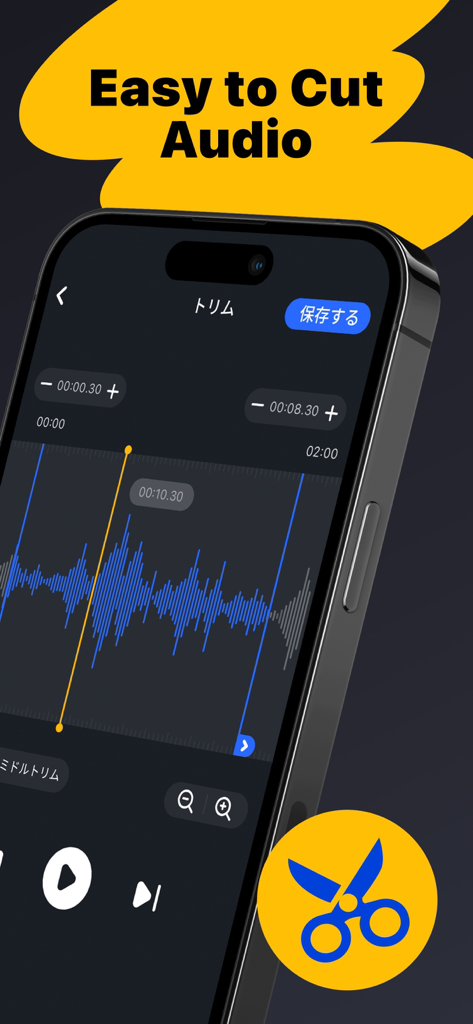
オーディオクリップをトリミングするための青い波形と「オーディオのカットが簡単」というタイトルが表示されたMusic Editorアプリのインターフェースを示すスマートフォン画面。

オーディオクリップをトリミングするための青い波形と「オーディオのカットが簡単」というタイトルが表示されたMusic Editorアプリのインターフェースを示すスマートフォン画面。

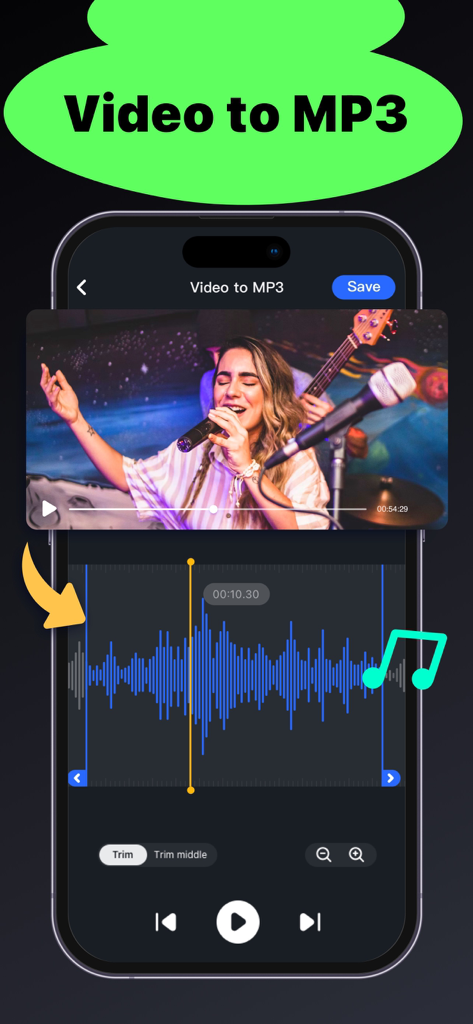
オーディオ波形トリマーによる動画からMP3への抽出を示すMusic Editorアプリのインターフェース

オーディオ波形トリマーによる動画からMP3への抽出を示すMusic Editorアプリのインターフェース

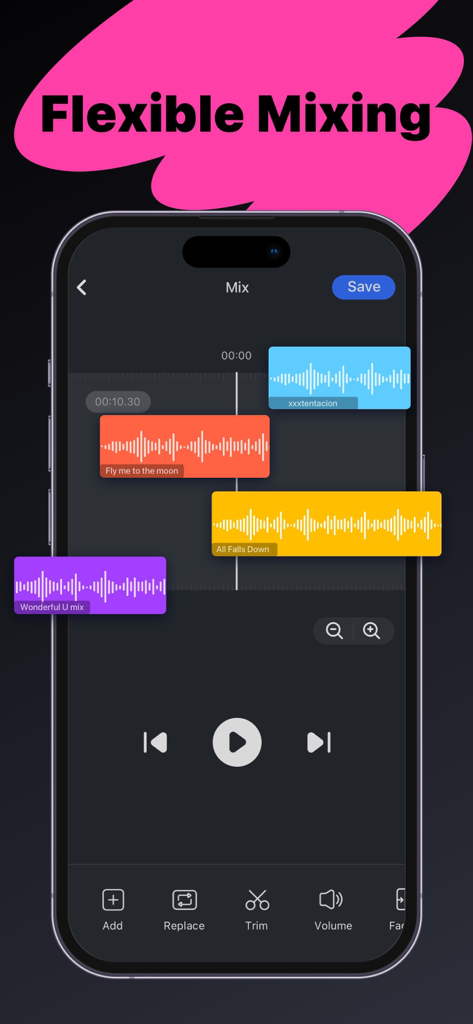
Music Editorアプリでカラフルな波形が表示されたマルチトラックオーディオミキシング機能を示すiPhone画面

Music Editorアプリでカラフルな波形が表示されたマルチトラックオーディオミキシング機能を示すiPhone画面

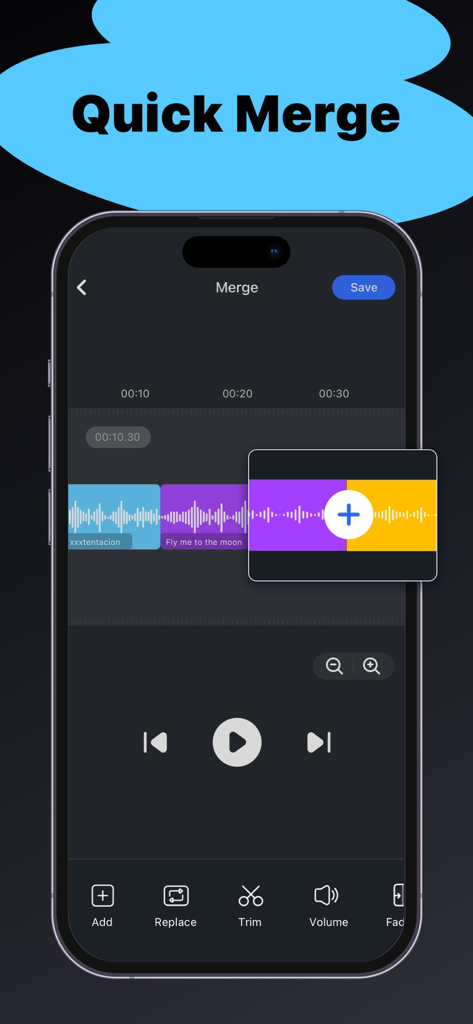
タイムライン上で結合される複数の色分けされたオーディオクリップが表示されたMusic Editorアプリのクイックマージ機能を示すiPhone画面

タイムライン上で結合される複数の色分けされたオーディオクリップが表示されたMusic Editorアプリのクイックマージ機能を示すiPhone画面

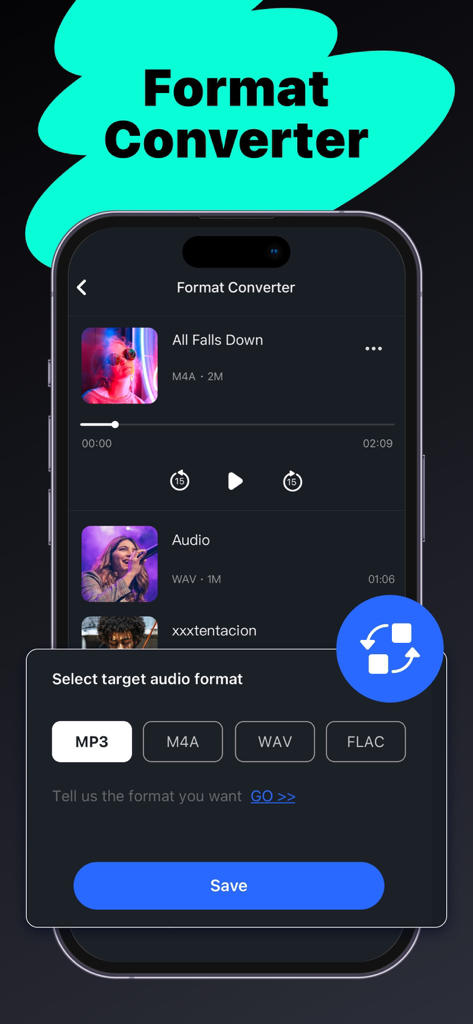
MP3やWAVなどのオーディオフォーマット変換オプションを示すMusic Editorアプリのインターフェース

MP3やWAVなどのオーディオフォーマット変換オプションを示すMusic Editorアプリのインターフェース

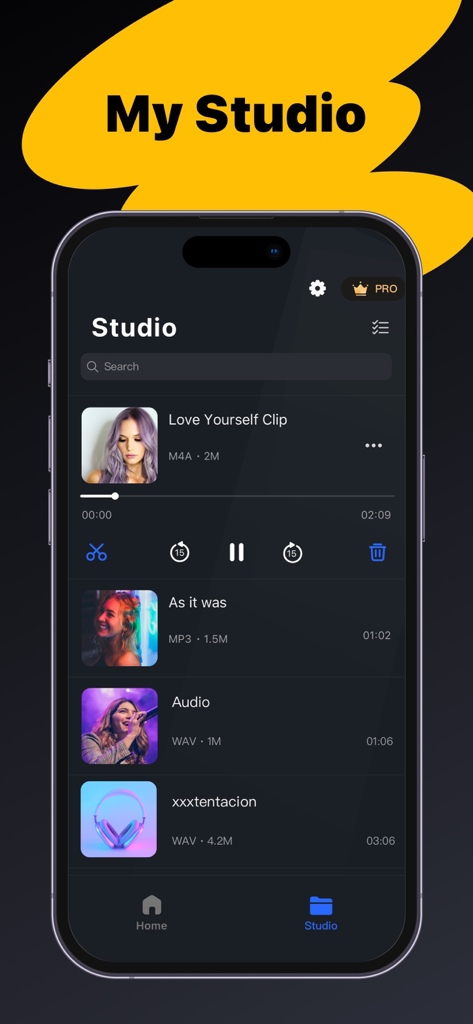
再生コントロール付きの編集済み音楽クリップのスタジオライブラリを示すモバイルアプリ画面

再生コントロール付きの編集済み音楽クリップのスタジオライブラリを示すモバイルアプリ画面

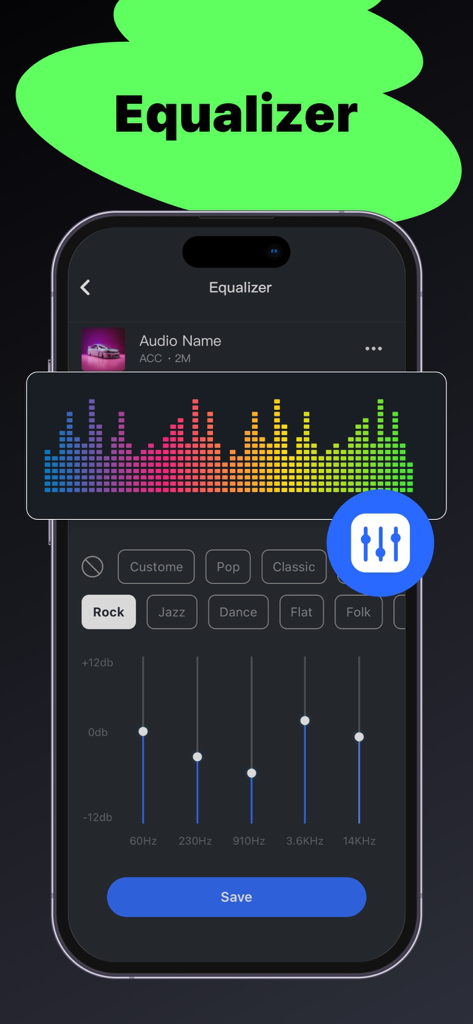
周波数スライダーと音楽ジャンルプリセットを備えたMusic Editorアプリのイコライザーインターフェース

周波数スライダーと音楽ジャンルプリセットを備えたMusic Editorアプリのイコライザーインターフェース

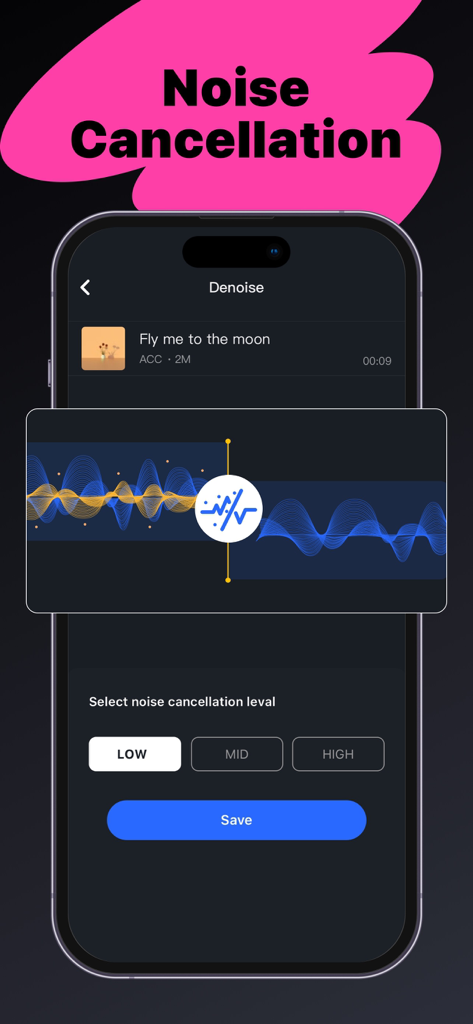
調整可能なレベルと波形視覚化を備えたノイズキャンセリング用のモバイルアプリインターフェース

調整可能なレベルと波形視覚化を備えたノイズキャンセリング用のモバイルアプリインターフェース

数秒でオーディオをマスター

このアプリを際立たせるツール、 896K+ 人のユーザーが選択.

✂️

精密トリミング

直感的な波形グラフを使用して、ミリ秒単位の精度でオーディオをカットします。次の投稿に最適なフックを捉えるのに最適です。

🎬

インスタント動画抽出

ソーシャルメディアでトレンドのサウンドを見つけましたか?あらゆる動画を高品質MP3に即座に変換し、独自のクリエイティブプロジェクトで使用しましょう。

🎚️

マルチトラックミキシング

お気に入りのトラックを重ね、BGMを追加し、クリップをシームレスに結合して、プロレベルのマッシュアップやボイスオーバーを作成します。

レビュー分析

ユーザーレビューの分析.

感情スコア

24%
ネガティブ

概要

This app receives overwhelmingly negative feedback, primarily due to numerous issues with its subscription model and core functionalities. Users frequently report being charged for pro features that either don't activate, are blocked, or cease to function after purchase or re-download, often struggling with refunds or unexpected auto-renewals. Additionally, common complaints include severe bugs such as app freezing, inability to save or merge audio, poor audio quality, and projects being inexplicably deleted. The presence of excessive ads, even for paid subscribers, further detracts from the user experience, leading many to feel the app is a waste of money with limited useful features.

主なテーマ

Subscription & Payment Issues(26)
Core Feature Malfunction(21)
General Positive Feedback(9)
Excessive Advertising(3)
Poor User Experience(2)

アプリについて

について知っておくべきこと Music Editor - Audio Editor.

説明

Audio Editor is an easy-to-use music editing application with rich editing features. Its flexible editing operations and clear layouts will bring you a pleasant editing experience. *WHAT IS AUDIO EDITOR? Audio Editor is a useful tool for your music editing needs, with a variety of audio editing features, you can: - Trim Music, and cut music clips precisely. - Merge and Mix Music, combine music clips. - Extract music from videos. - Convert audio to different formats. - Record audio file. *REASONS FOR CHOOSING THIS AUDIO EDITOR APP. This all-in-one audio editor provides rich audio editing functions, come try it! 1. Music Trimmer: - Trim music clips precisely with the built-in wave graph. - Cut music easily by dragging the trim handle. 2. Music Merger and Mixer: - Combine several music clips, even in different formats. - Add background sounds to your music, mix music flexibly with the multitrack feature. - The Music Mixing feature is available for Premium Members. 3. Convert video to MP3: - Extract audio from videos. - Make Music MV to MP3 instantly. 4. Format Converter & Compressor: - Convert format without quality loss, MP3/ M4A/ WAV/ FLAC formats are now supported. - Useful and customizable music compressor with adjustable bitrate and sample rate. 5. Recorder: - Record audio instantly with a built-in audio recorder *WHERE TO IMPORT AUDIO FILES? You have several ways to import audio files. - Import from Files/iCloud: Select music from Files, Apple Music, or iCloud. - Import from the video: Extract mp3 tracks from the video. - Import by recording. - Import from your Studio: Import edited files for re-editing. In summary, it’s an easy-to-use audio editor application that can meet all your editing needs. Audio Editor is a free app and most of the features are FREE. Premium Members now have access to additional features including music mixing. If you have any questions or feedback, please contact us at: betterapp88@gmail.com Privacy Policy: http://www.betterapptech.com/about-us/privacy-policy/ Terms of Use: http://www.betterapptech.com/about-us/terms-of-service/

最新バージョン

1.0.52

サイズ

91.1 MB

リリース日

2022年10月24日

サウンドをレベルアップする準備はできましたか?

iOSで100万人近くのクリエイターに加わりましょう。今すぐMusic Editorをダウンロードして、プロのようにトリミング、ミキシング、変換を始めましょう。

ダウンロード: App Store
FAQ

よくある質問

について知っておくべきこと Music Editor - Audio Editor

Music Editor - Audio Editorとは何ですか?

Music Editor - Audio Editorは、豊富な音楽編集機能を提供する使いやすいアプリケーションです。ユーザーは、音楽のトリミング、結合、ミキシング、録音、フォーマット変換、ビデオからのオーディオ抽出が可能です。

Music Editor - Audio Editorは無料アプリですか?

はい、Music Editor - Audio Editorは無料アプリです。ほとんどの機能は無料で利用でき、音楽ミキシングなどの追加機能はプレミアムメンバー向けに提供されています。

オーディオエディタアプリで音楽クリップをトリミングできますか?

はい、オーディオエディタアプリでは音楽クリップを正確にトリミングできます。内蔵の波形グラフと使いやすいトリムハンドルが含まれています。

Music Editorアプリはオーディオファイルの結合とミキシングをサポートしていますか?

はい、Music Editorは複数の音楽クリップ(異なるフォーマットでも)を結合することをサポートしています。また、柔軟なマルチトラックミキシング機能で、音楽とBGMを組み合わせることができます。

Music Editor - Audio Editorはビデオからオーディオを抽出できますか?

はい、Music Editor - Audio Editorはビデオからオーディオを抽出できます。この機能を使用して、ビデオファイルを即座にMP3形式に変換できます。

オーディオエディタアプリは、どのオーディオフォーマットの変換をサポートしていますか?

オーディオエディタアプリは、MP3、M4A、WAV、FLACフォーマットへの変換をサポートしています。音質を損なうことなく変換でき、カスタマイズ可能なコンプレッサーも含まれています。

Music Editorアプリにオーディオファイルをインポートするにはどうすればよいですか?

ユーザーは、ファイル/iCloudから、ビデオからの抽出、アプリ内での直接録音、または「マイスタジオ」の以前編集したファイルから、いくつかのソースからオーディオファイルをインポートできます。

オーディオエディタアプリにはイコライザー機能がありますか?

はい、オーディオエディタアプリにはイコライザー機能が含まれています。ロック、ジャズ、ポップ、クラシック、フラット、フォークなどのプリセットと、調整可能な周波数スライダーが用意されています。

Music Editorアプリはノイズキャンセリングを提供していますか?

はい、Music Editorアプリは「Denoise」というノイズキャンセリング機能を提供しています。「低」「中」「高」のレベルを選択してノイズを低減できます。

Music Editor - Audio Editorアプリ内で直接オーディオを録音できますか?

はい、Music Editor - Audio Editorアプリには内蔵のオーディオレコーダーが含まれています。ユーザーはアプリケーション内で直接オーディオを即座に録音できます。

Audio Editorアプリで、プレミアムメンバー限定の機能は何ですか?

Audio Editorアプリのプレミアムメンバーは、特に音楽ミキシング機能への追加アクセス権を得られます。その他の機能のほとんどは無料で利用できます。

App information, icons, screenshots, and descriptions displayed on this page are sourced from the Apple App Store and are the property of their respective developers. Download estimates and rankings are based on MWM's proprietary models and may not reflect actual figures. This page is provided for informational and analytical purposes only.

Believe this page infringes your intellectual property? File a dispute