NDICam

NDICam

ダウンロード: App Store
ロゴ: NDICam

NDICam:iOS向けプロフェッショナル放送グレードNDIカメラ

iPhoneやiPadを高性能なIPビデオソースに変換します。ライブ制作向けに設計されたプロ仕様のコントロールを使用して、低遅延のFull NDIまたはNDI HX3ストリームをvMix、OBS、TriCasterに直接配信できます。

ダウンロード: App Store

開発元

Mark Gilbert

カテゴリ

Photo & Video

ダウンロード

158K+

ユーザー評価

3.0/5

評価数

100

対応言語

1

プロ仕様のコントロールを一目で

このインターフェースを利用する 158K+ 人のユーザー.

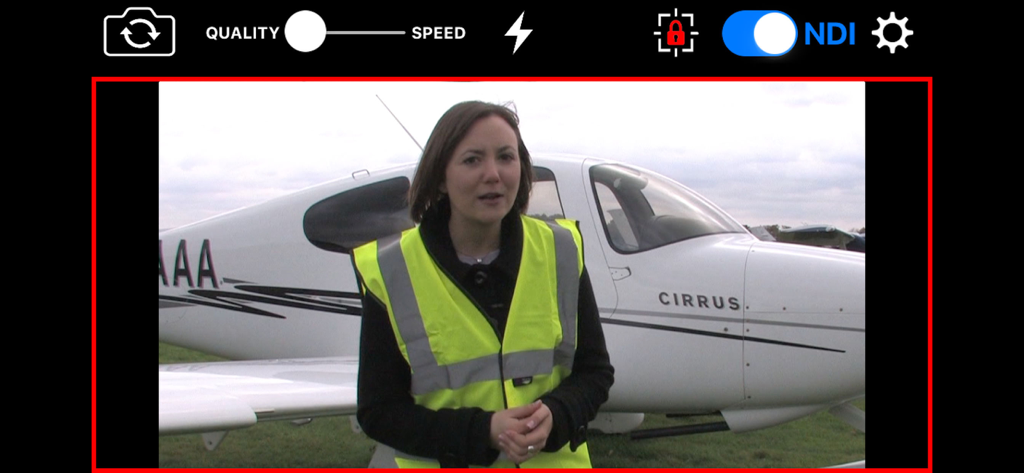
NDIトグルとライブタリーライトを備えたプロフェッショナルなビデオストリームインターフェースを表示するNDICamアプリ画面

NDIトグルとライブタリーライトを備えたプロフェッショナルなビデオストリームインターフェースを表示するNDICamアプリ画面

NDIおよびNDI HX3ロゴとSiennaデベロッパーのブランディング

NDIおよびNDI HX3ロゴとSiennaデベロッパーのブランディング

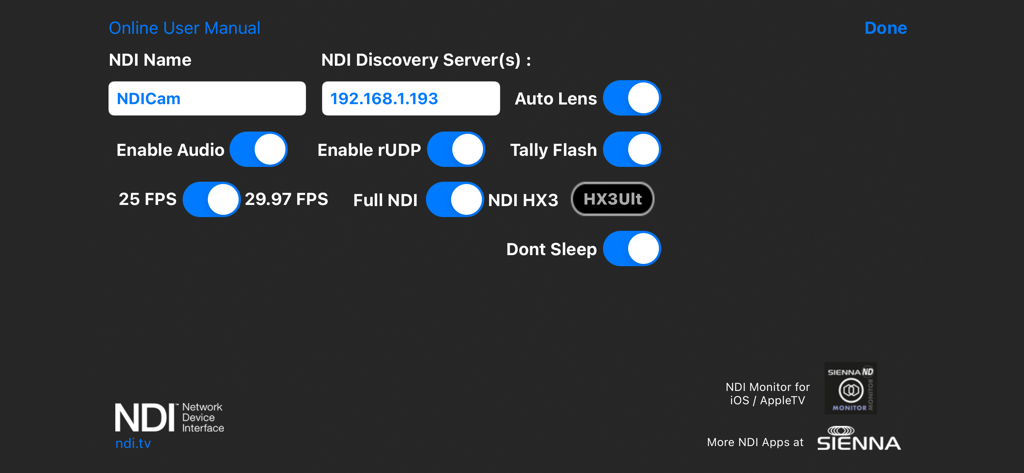
NDIディスカバリーサーバーとビデオ放送オプションを表示するNDICam設定メニュー

NDIディスカバリーサーバーとビデオ放送オプションを表示するNDICam設定メニュー

放送グレードのビデオを指先で

このアプリを際立たせるツール、 158K+ 人のユーザーが選択.

超低遅延 NDI HX3

Full NDIとNDI HX3モードを切り替えて、ネットワーク帯域幅とハードウェア性能に最適化された非常にクリアな1080pビデオを配信します。

🔴

ライブタリー & プロフェッショナルロジック

画面上のライブ/プレビュータリーインジケーターと、オンエア中であることを出演者に知らせるオプションのカメラフラッシュタリーにより、同期を維持します。

⚙️

フル制作コントロール

AF/AEロック、手動ソース命名、オーディオミュート制御、放送中のフロント/リアカメラのシームレスな切り替えにより、ショットを完全にコントロールできます。

アプリについて

について知っておくべきこと NDICam.

説明

* Special Offer Price * NDICam is the original NDI iOS camera built by the world's leading NDI broadcast infrastructure developers - Sienna. Mature and feature rich, uniquely with both Full NDI and NDI HX3 modes. The NDI (Network Device Interface) protocol connects to professional vision mixers and other devices, and delivers a high quality, low latency connection. NDICam is compatible with All TriCasters, VMix, Wirecast and hundreds of other professional IP video systems, software and hardware, which support NDI. - Simple to use - nothing to configure on your iOS device - Switch between front and rear cameras during broadcast - Auto Focus, AF Lock and Tap to Focus - Auto Exposure, AE Lock and Tap to Expose - Illumination light on/off - Audio Mute Control - Manual Naming of NDI Stream source - 4 quality / performance levels to suit your device and network, plus NDI HX Option - Pinch to zoom (where zoom is supported) - Auto-lens mode for multi-lens cameras - On screen live / preview tally plus optional use of camera flash as talent tally (with red gel cover). - Option to prevent iOS device sleep - Select 25FPS or 29.97FPS standard rate. - Choice of Full NDI or NDI HX3 compression modes (HX2 at 2 to 20 mBit, plus HX3 Ultra) - Rotation support for Portrait or Landscape Video Modes. Front and Rear cameras can be selected at the touch of a button and NDICam features a 4 position quality vs frame rate slider to deliver optimum video suited to the quality of your wifi connection and your iPhone's processing performance. Depending on your iOS device, compression mode selected and Wifi network performance NDICam supports up to 1080 full HD resolution. Control of flashlight, touch to focus, focus lock, pinch to zoom and audio enable are also included. You can even use the phone's torch as a Tally Light, by covering it with a red gel. Note: Depending on the performance of your iOS device and your WIFI network, you may not see full frame rates when operating at maximum 1080 resolution with a full HD camera. Using HX3 mode will help if the bottleneck is your WIFI network. Note: NDI is a high bandwidth protocol designed for local area Gigabit networks. In order to see good results you will need a fast, uncontested wifi connection. If you see slow frame rates, try improving the wifi environment, with a better router, less interference, directional antenna or maybe switch to 5GHz if you are on 2.4GHz. . NB HX3 Ultra will use around 50mBits of bandwidth, so it's lower than full NDI, but still quite high. Use one of the lower bandwidth HX3 modes if your network connection is struggling. NDICam is also compatible with wired ethernet connections to iOS devices which can help deliver smooth video compared to a poor quality Wifi network. Good results have been seen with lightning to ethernet adaptors. You can specify an NDI discovery server in the application settings. Note that you will need to restart the app for any changes to take effect. Specifying a discovery server will disable the standard mDNS (Bonjour) advertisement for the NDI Cam source, so your iOS device must be able to reach the discovery server one the network. If you experience problems - delete the Discovery Server entry and restart the app. NB: NDI HX3 Ultra mode requires a recent NDI compatible receiver.

最新バージョン

7.31

サイズ

3.0 MB

リリース日

2016年3月31日

プロフェッショナルなNDI®制作はここから

Full NDIおよびHX3サポートにより、iPhoneやiPadを放送対応カメラに変えましょう。今すぐモバイルデバイスをvMix、OBS、TriCasterのワークフローにシームレスに統合できます。

ダウンロード: App Store

App information, icons, screenshots, and descriptions displayed on this page are sourced from the Apple App Store and are the property of their respective developers. Download estimates and rankings are based on MWM's proprietary models and may not reflect actual figures. This page is provided for informational and analytical purposes only.

Believe this page infringes your intellectual property? File a dispute