Organize:Me To-Do's

Organize:Me To-Do's

ダウンロード: App Store
ロゴ: Organize:Me To-Do's

Organize:Me To-Do's:忙しい毎日のコントロールを取り戻そう

シンプルなチェックリスト以上のものを必要とする方のために設計された、プロフェッショナルグレードのタスクマネージャー。実証済みの3ステップシステムで、プロジェクトをキャプチャ、レビュー、完了させ、あらゆるデバイスでシームレスに同期します。

ダウンロード: App Store

開発元

taskfabric ltd

カテゴリ

Productivity

ダウンロード

3K+

ユーザー評価

1.0/5

評価数

0

対応言語

-

あなたの生産性を、視覚化する

このインターフェースを利用する 3K+ 人のユーザー.

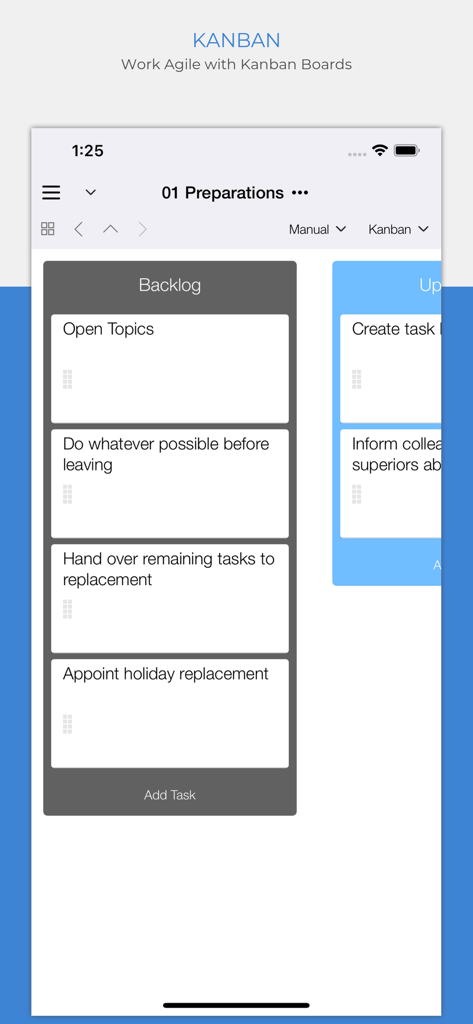
モバイルアプリのインターフェースが、アジャイルプロジェクト管理のためのタスクのバックログ列を示すカンバンボードを表示しています。

モバイルアプリのインターフェースが、アジャイルプロジェクト管理のためのタスクのバックログ列を示すカンバンボードを表示しています。

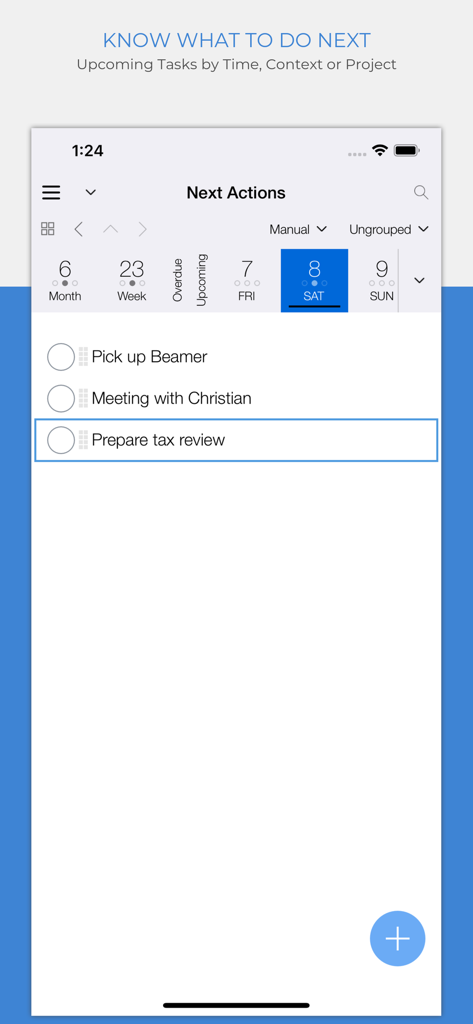
Organize Meアプリが、毎日のタスクリストとカレンダービューを備えた「次のアクション」画面を表示しています。

Organize Meアプリが、毎日のタスクリストとカレンダービューを備えた「次のアクション」画面を表示しています。

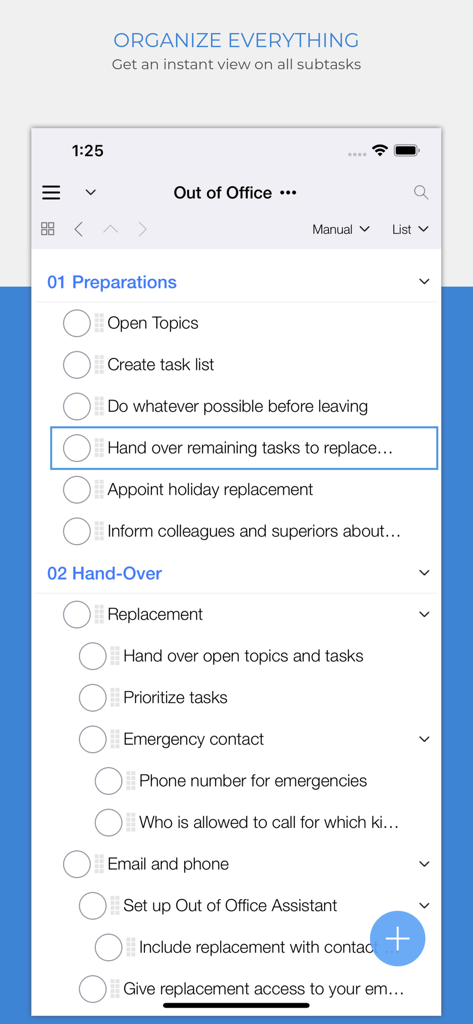
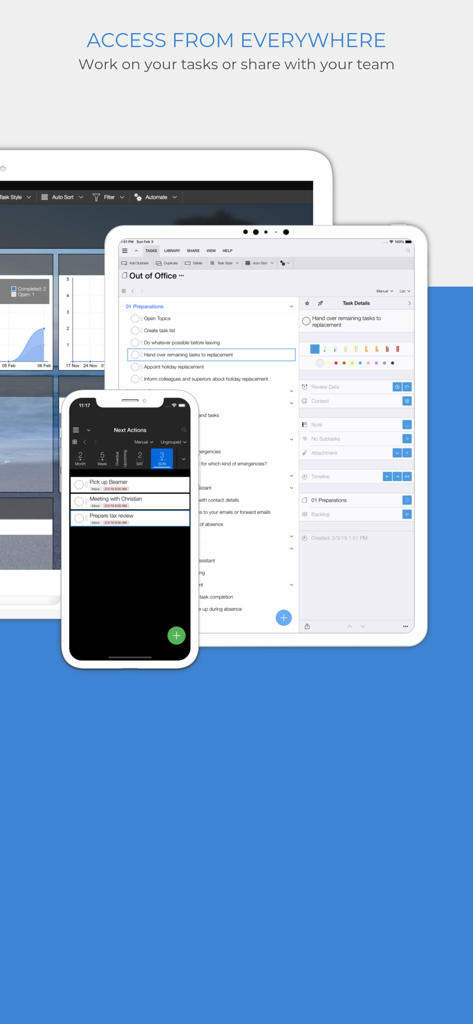
Organize:Me To-Do'sアプリのインターフェースが、「外出中」プロジェクトリスト内のネストされたサブタスクを表示しています。

Organize:Me To-Do'sアプリのインターフェースが、「外出中」プロジェクトリスト内のネストされたサブタスクを表示しています。

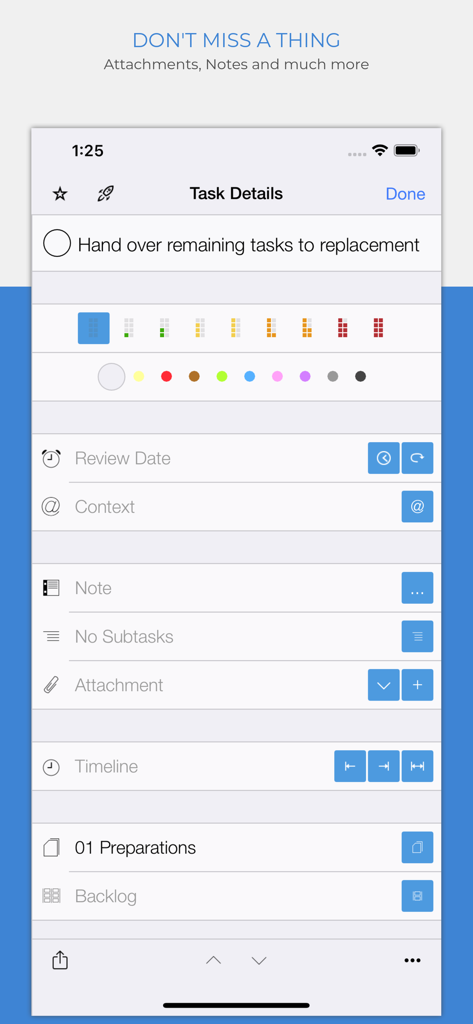
Organize Me To-Doアプリのタスク詳細画面に、タスクの優先順位と添付オプションが表示されています。

Organize Me To-Doアプリのタスク詳細画面に、タスクの優先順位と添付オプションが表示されています。

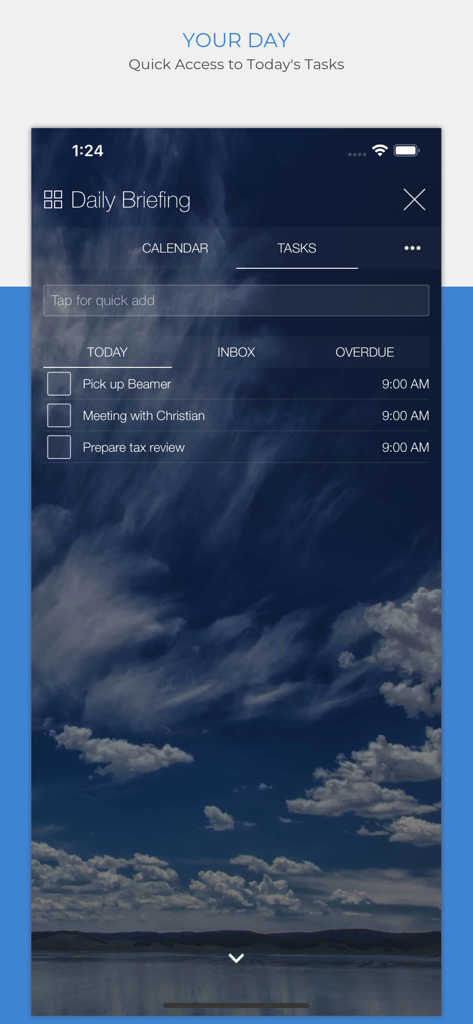
Organize Meアプリのデイリーブリーフィング画面に、今日のタスクリストが表示されています。

Organize Meアプリのデイリーブリーフィング画面に、今日のタスクリストが表示されています。

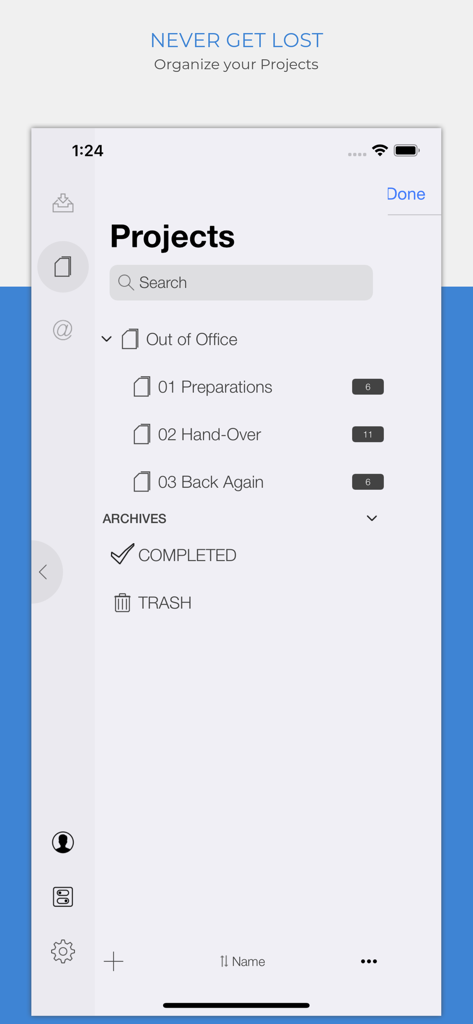
Organize Meアプリのモバイルインターフェースが、カテゴリ分けされたサブプロジェクトとタスク数を示すプロジェクト画面を表示しています。

Organize Meアプリのモバイルインターフェースが、カテゴリ分けされたサブプロジェクトとタスク数を示すプロジェクト画面を表示しています。

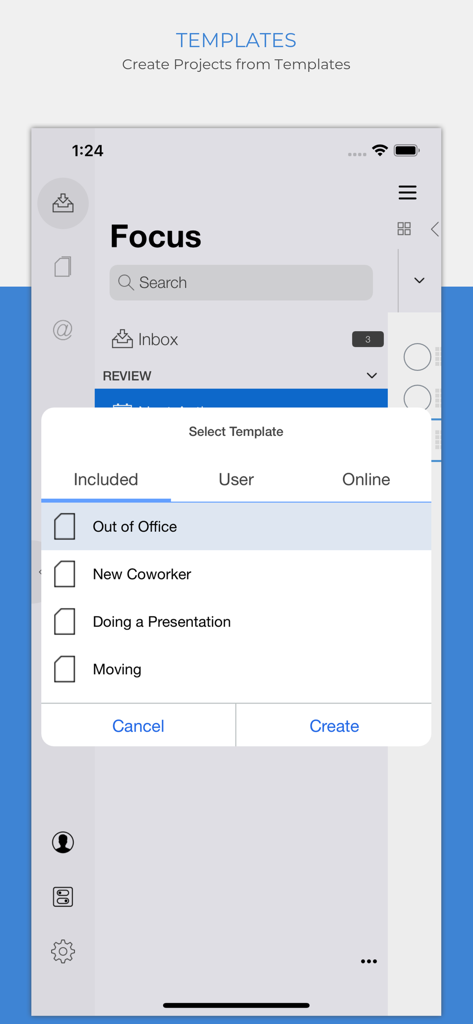
Organize Meアプリのプロジェクトテンプレート選択画面に、「外出中」や「新規同僚」などのオプションが表示されています。

Organize Meアプリのプロジェクトテンプレート選択画面に、「外出中」や「新規同僚」などのオプションが表示されています。

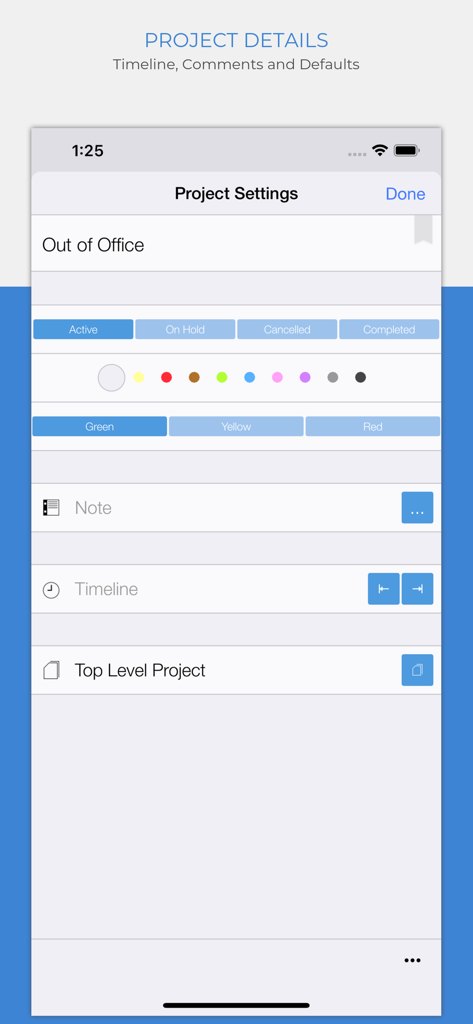
Organize Meアプリのプロジェクト詳細画面に、ステータスオプションと信号機優先順位インジケーターが表示されています。

Organize Meアプリのプロジェクト詳細画面に、ステータスオプションと信号機優先順位インジケーターが表示されています。

クロスプラットフォームタスク管理のために、iPhone、iPad、デスクトップデバイスに表示されたOrganize Me To-Doアプリのインターフェース。

クロスプラットフォームタスク管理のために、iPhone、iPad、デスクトップデバイスに表示されたOrganize Me To-Doアプリのインターフェース。

毎日の複雑さをマスターする

このアプリを際立たせるツール、 3K+ 人のユーザーが選択.

🧠

スマート3ステップ実行

キャプチャ、レビュー、完了。実証済みのシステムを使用して、圧倒的なバックログを、実行可能で優先度の高い計画に変えましょう。

🚦

視覚的な優先順位トラッキング

信号機ステータスインジケーターと色分けされたプロジェクトで、意思決定の疲労を排除し、最も重要なことに対する即時の明確さを得ましょう。

☁️

どこでも同期&コンテキスト

場所やイベントでタスクをフィルタリングし、デスクトップとモバイル間でシームレスに同期して、どこにいてもワークフローをスムーズに保ちましょう。

アプリについて

について知っておくべきこと Organize:Me To-Do's.

説明

Your personal task manager - if you need to handle more than just a simple list! Use it on all your devices - on all major mobile and desktop platforms, in your web browser and more. Organize:Me is easy to use for beginners and perfect for personal use. And if you need more, there's a whole family of products to support your business needs as well. Organize:Me helps you to cut complex situations down to what matters. With the built-in sync feature you can access your tasks with Organize:Me, Organize:Pro and Taskfabric for all major mobile and desktop platforms. Take back Control over your Tasks with a simple 3-Step System to Manage your Tasks: 1. Capture your ideas and tasks – quick and easy, wherever you are! 2. Review and process your tasks – prioritize, delegate or share your tasks 3. Complete your tasks – and keep track of the results Easily create new tasks • Quick-Add shortcuts to "just write down" your task list • Create subtasks by drag and drop • Manage repeating tasks • Add Images, Documents and Web Links to your tasks Organize your tasks • Create subtasks by drag and drop • Assign an unlimited number of contexts to each task • Color code special tasks • Unlimited number of subtasks Powerful review features • Powerful date based review • Review by date, project or context • Scope Bar to quickly filter by Project or Context Project Handling • Supports Projects, Meetings and Folders • Project Status: Active, On Hold, Cancelled, Completed • Traffic Light: Green, Yellow Red • Color code special Projects • Unlimited number of Subprojects Context Handling • Use Contexts to identify people, locations or events relevant for your tasks • Assign locations to your Contexts • Color code special Contexts • Unlimited number of Subcontexts • Easily convert Address Book entries into Contexts All the basics covered • Auto-sync with Organize:Me, Organize:Pro and Taskfabric for all major mobile and desktop platforms • Really fast search feature • Quick access to completed tasks • Multiple sorting options for projects, contexts and task lists • Choose from different interface themes and colors • Share task lists with others by Email, Print or Export • Password Protection for your Tasks • Supports notifications (reminders) Organize:Me easily handles your task lists. Straightforward and really simple to use. For a complete feature list for all Organize editions have a look at our web site.

最新バージョン

4.10.59

サイズ

69.2 MB

リリース日

2012年11月21日

今日のコントロールを取り戻す準備はできましたか?

実証済みの3ステップシステムを使用して、あらゆるデバイスでタスクをシームレスにキャプチャ、レビュー、完了させている何千人ものプロフェッショナルに加わりましょう。今日から、あなたの成功を整理し始めましょう。

ダウンロード: App Store

App information, icons, screenshots, and descriptions displayed on this page are sourced from the Apple App Store and are the property of their respective developers. Download estimates and rankings are based on MWM's proprietary models and may not reflect actual figures. This page is provided for informational and analytical purposes only.

Believe this page infringes your intellectual property? File a dispute