Project Indigo

Project Indigo

ダウンロード: App Store
ロゴ: Project Indigo

Project Indigo:ビジョナリークリエイターのためのプロフェッショナルな計算写真

処理過剰なスマートフォンの外観はもうやめましょう。Adobe Labsのカスタムパイプラインを活用して、正確なマニュアルコントロールと次世代AI画像処理への早期アクセスにより、自然な一眼レフの美学を実現しましょう。

開発元

Adobe Labs, Inc.

カテゴリ

Photo & Video

ダウンロード

2M+

ユーザー評価

3.3/5

評価数

1K+

対応言語

1

ビューファインダーの再誕生

このインターフェースを利用する 2M+ 人のユーザー.

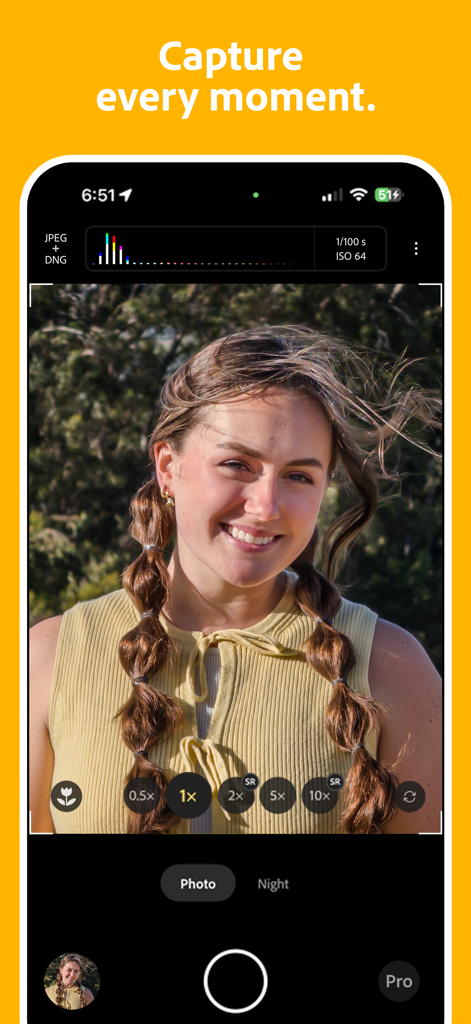
Adobe Project Indigoカメラアプリのインターフェイス、プロフェッショナルなマニュアルコントロールとポートレートショットを表示

Adobe Project Indigoカメラアプリのインターフェイス、プロフェッショナルなマニュアルコントロールとポートレートショットを表示

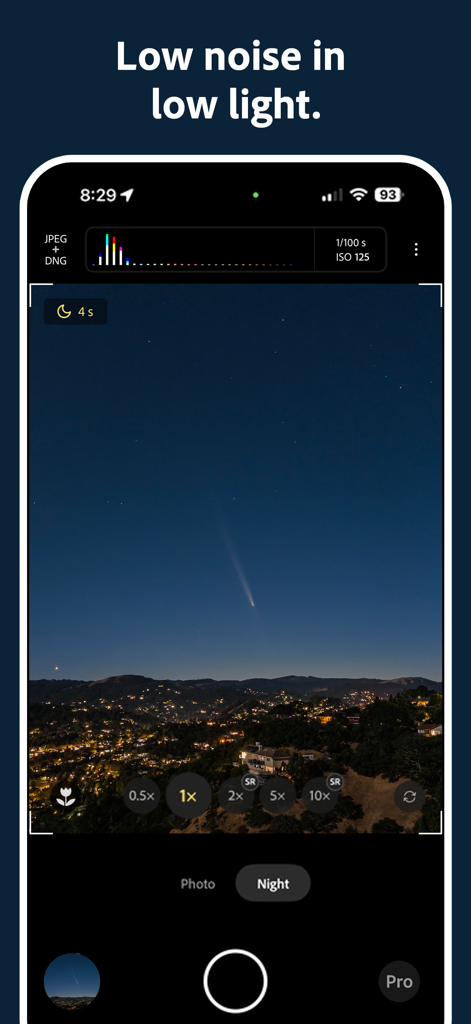
Project Indigoカメラアプリのナイトモードで、街並みの上に彗星が描かれた星空を撮影

Project Indigoカメラアプリのナイトモードで、街並みの上に彗星が描かれた星空を撮影

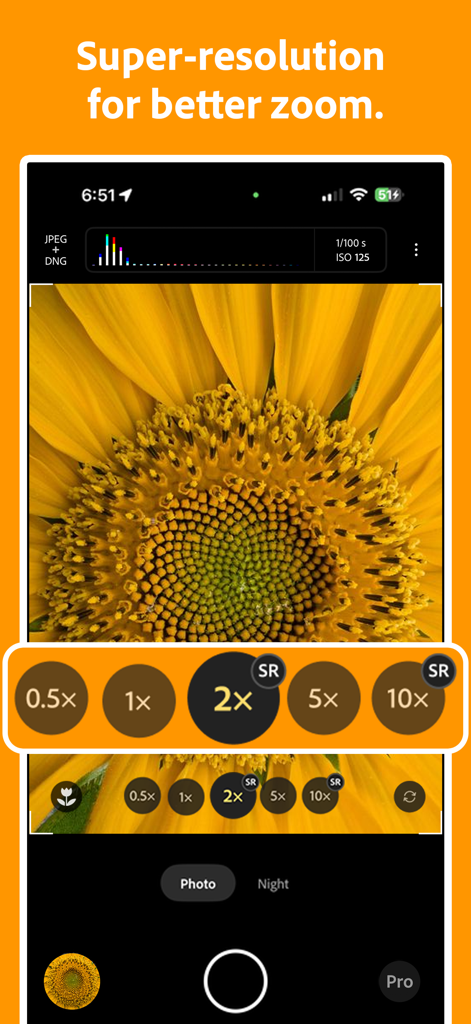
Project Indigoカメラインターフェイス、ひまわりのクローズアップにスーパーレゾリューションズーム機能を表示

Project Indigoカメラインターフェイス、ひまわりのクローズアップにスーパーレゾリューションズーム機能を表示

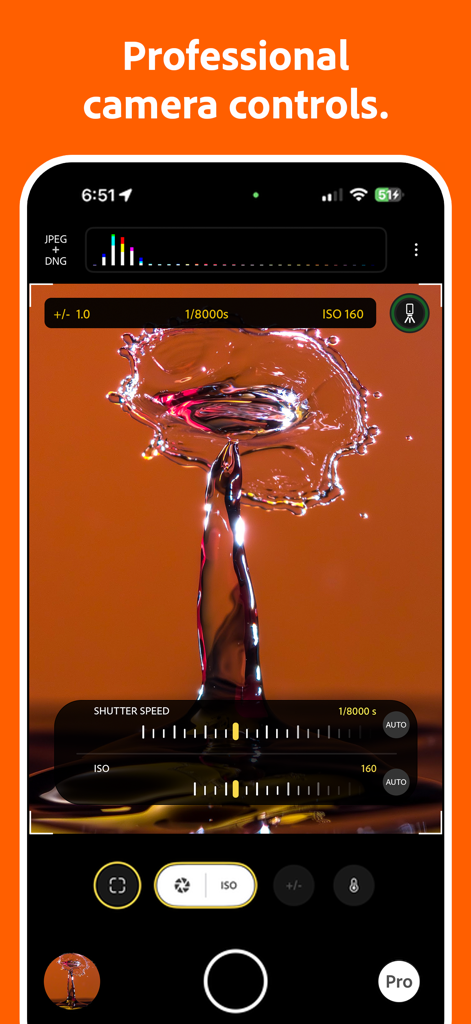
Project Indigoカメラアプリインターフェイスで、水滴の飛沫を表示するマニュアルシャッタースピードとISO設定

Project Indigoカメラアプリインターフェイスで、水滴の飛沫を表示するマニュアルシャッタースピードとISO設定

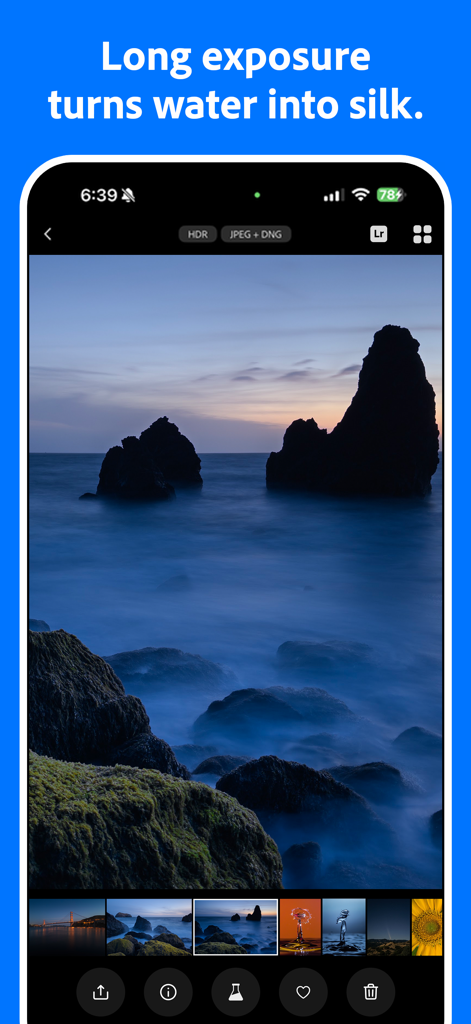
Project Indigoアプリインターフェイス、滑らかな水の効果を持つ岩場の海岸線の長時間露光写真を表示

Project Indigoアプリインターフェイス、滑らかな水の効果を持つ岩場の海岸線の長時間露光写真を表示

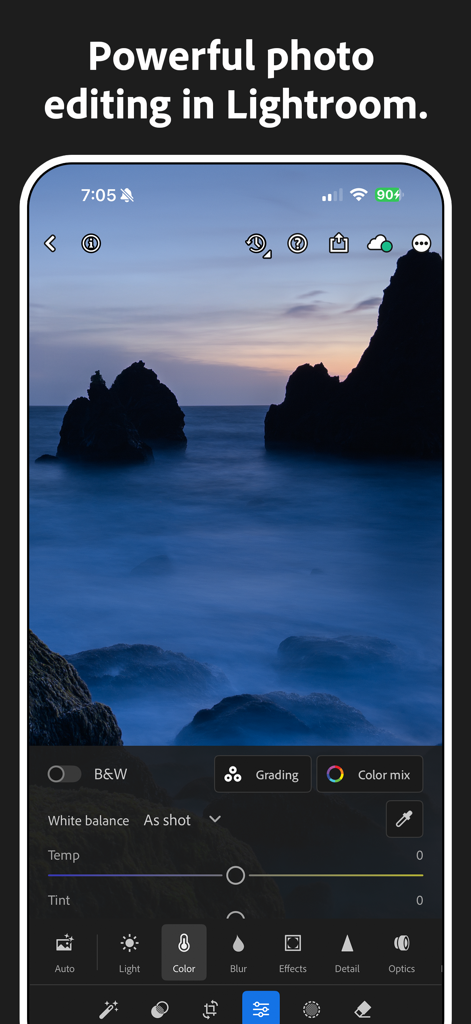
Project Indigo連携を通じてAdobe Lightroomで長時間露光の海景を編集

Project Indigo連携を通じてAdobe Lightroomで長時間露光の海景を編集

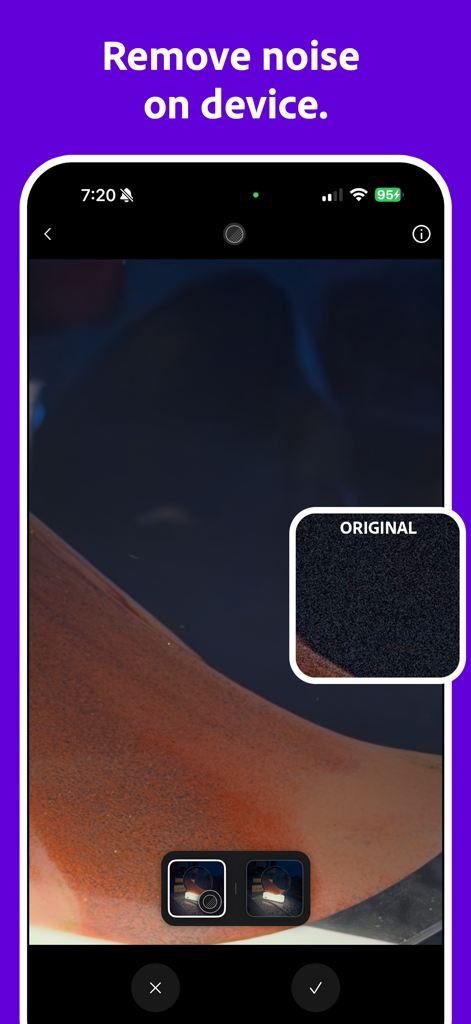
Project Indigoアプリインターフェイス、元のノイズの多い写真との比較を示すオンデバイスAIノイズリダクション機能を表示

Project Indigoアプリインターフェイス、元のノイズの多い写真との比較を示すオンデバイスAIノイズリダクション機能を表示

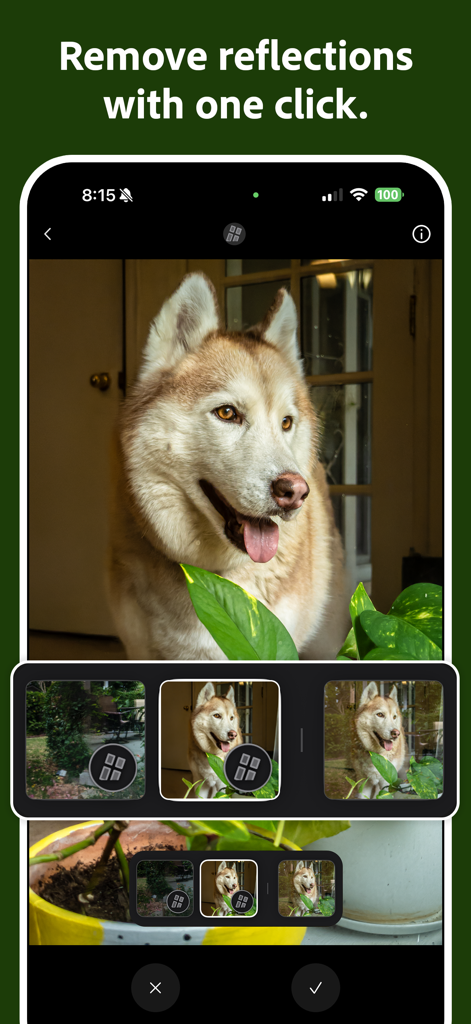
Adobe Project Indigoインターフェイス、ハスキー犬の写真でAI反射除去ツールを表示

Adobe Project Indigoインターフェイス、ハスキー犬の写真でAI反射除去ツールを表示

ポケットの中のプロフェッショナルパワー

このアプリを際立たせるツール、 2M+ 人のユーザーが選択.

📸

本物の一眼レフのような美学

カスタム計算パイプラインにより、標準的なスマホカメラの「クランチー」な外観を回避し、自然なテクスチャと柔らかくリアルな空を生成します。

🎛️

完全なマニュアル制御

ISO、シャッタースピード、フォーカスに関する詳細なコントロールにより、ハードウェアを完全に制御できます。シャープな精度を実現する拡大ルーペも含まれています。

🧪

限定テクノロジープレビュー

Adobeの最先端AIノイズ除去および反射除去ツールのいち早くテストに参加し、iPhoneセンサーが達成できる可能性の限界を押し広げましょう。

☁️

AIノイズ除去

低照度環境でも、ノイズを大幅に削減し、ディテールを保持するAIノイズ除去機能を試しましょう。

AI反射除去

光沢のある表面から不要な反射をインテリジェントに除去し、クリーンでプロフェッショナルな結果を得ることができます。

アプリについて

について知っておくべきこと Project Indigo.

説明

Welcome to Project Indigo, a new camera experience from Adobe Labs. With a custom computational photography pipeline, a natural image look, and full set of manual camera controls, it offers something for professional and casual photographers alike. Also with new controls for computational cameras and a glimpse into the future of AI image processing on our Tech Previews page. Available for iPhone 12 and 13 Pro/Pro Max, and all 14, 15, 16, or 17-series devices. For best experience we recommend using iPhone 15 Pro or newer. A COMPUTATIONAL PHOTOGRAPHY CAMERA Instead of capturing a single photo, for every shutter press Indigo captures a burst of photos and combines them together to produce a high-quality photo with lower noise and higher dynamic range. PHOTO MODE VS NIGHT MODE Photo mode is intended for everyday use in good lighting and has zero shutter lag, meaning it captures the moment you wanted. Night mode is intended for use in low light. In this mode images are captured after you press the shutter button, but use longer exposure times, further reducing noise. NATURAL LOOK Photos produced by Indigo employ computational photography and AI to produce a natural (SLR-like) look for your photos, including special (but gentle) treatment of subjects and skies. This look is applied when generating JPEG images and is embedded as a rendering suggestion in raw DNG files (if enabled). All raw pixels remain intact – the look does not alter them. PRO CONTROLS Using these you can take full control of how Indigo captures the image, manually specifying focus, exposure time and ISO, exposure compensation, and white balance. Focus control includes an optional magnified loupe for setting precise focus, and white balance control allows you to tap on an object known to be neutral gray. Unique to Indigo’s Night mode is manual control over the number of frames aligned and merged into a final photo. More frames result in lower noise but a longer time to capture a photo. There is also a Long Exposure mode: if the phone is on a tripod, this allows the capture of synthetic long exposure effects like “water-into-silk" with infinite number of frames where the camera captures and merges images until stopped. SUPER-RESOLUTION FOR ZOOM Using pinch-to-zoom in any camera app often results in image quality loss. To recover the image Indigo employs multi-frame super-resolution which can restore much of the lost quality. ‘SR’ indicator on the zoom buttons shows when it is active. MACRO MODE Enable Macro from the viewfinder and capture stunning close-up shots. VIEWFINDER Provides a view of the camera parameters that will be used for capture, a live histogram of the scene, zebra striping that shows you where there are over-exposed areas in the image, and a level to help you capture straight images. LIGHTROOM INTEGRATION Adobe Lightroom for mobile is the most powerful photo editor in the App Store. Indigo filmstrip allows you to send an image directly to Lightroom mobile app for editing. In addition, our (optional) raw DNG files provide maximum compatibility with Adobe Lightroom and Photoshop. TECHNOLOGY PREVIEWS Technology Previews will be a place where we will offer an early look at technologies that may eventually be deployed in Adobe’s flagship products, or that already appear in these products in a slightly different form. AI DENOISE One such technology is a variant of the AI-based denoising available in Camera Raw and Lightroom desktop clients. It requires raw DNG as input, and it saves a new DNG to your camera roll. REMOVE REFLECTIONS Another example is a variant of the AI-based Remove Reflections technology from Camera Raw and Lightroom desktop clients. It requires a DNG as input, and it saves a medium-resolution JPEG to your camera roll. The technology is designed to address reflections when shooting through plate glass windows that cover most of the camera field of view.

最新バージョン

1.0.10

サイズ

246.9 MB

リリース日

2025年6月12日

計算写真の未来へ踏み出そう

Adobeの最新AIとマニュアルコントロールのイノベーションを体験してください。今すぐProject Indigoをダウンロードして、お使いのiPhone Proにふさわしい、自然で一眼レフ品質のルックを与えましょう。

ダウンロード: App Store
FAQ

よくある質問

について知っておくべきこと Project Indigo

Project Indigoとは何ですか?

Project IndigoはAdobe Labsの新しいカメラ体験で、カスタム計算写真パイプライン、自然な画像ルック、写真家向けの完全なマニュアルコントロールを提供します。

Project IndigoはどのiPhoneモデルと互換性がありますか?

Project IndigoはiPhone 12/13 Pro/Pro Max、およびすべての14、15、16、17シリーズデバイスと互換性があります。最適なパフォーマンスのためには、iPhone 15 Pro以降が推奨されます。

Project Indigoの計算写真はどのように機能しますか?

Project Indigoの計算写真は、写真のバーストをキャプチャしてそれらを結合します。このプロセスにより、ノイズが削減され、ダイナミックレンジが増加した高品質の画像が生成されます。

Project Indigoの写真モードとナイトモードの違いは何ですか?

Project Indigoの写真モードは、良好な照明下での日常使用向けで、シャッターラグはありません。ナイトモードは低照度用で、より長い露出時間を使用してノイズをさらに削減します。

Project Indigoは自然に見える写真を生成しますか?

はい、Project Indigoは計算写真とAIを使用して、自然な一眼レフのようなルックを生成します。このビジュアルスタイルはJPEGに適用され、RAW DNGファイルにレンダリングの提案として埋め込まれます。

ユーザーはProject Indigoでカメラ設定を手動で制御できますか?

はい、Project Indigoは、フォーカス、露出時間、ISO、露出補正、ホワイトバランスの手動指定のためのProコントロールを提供しており、正確なフォーカスのための拡大ルーペも含まれています。

Project Indigoは長時間露光モードを提供しますか?

はい、Project Indigoは長時間露光モードを提供します。三脚を使用すると、無限のフレームをマージして「水が絹のようになる」ような合成長時間露光効果を得ることができます。

Project Indigoはズーム画像の品質をどのように向上させますか?

Project Indigoは、マルチフレーム超解像度を使用して、ピンチツー semuanyaで失われた品質を回復し、ズーム画像の品質を向上させます。ズームボタンの「SR」インジケーターがそのアクティベーションを確認します。

Project Indigoはマクロ写真に対応していますか?

はい、Project Indigoはマクロモードに対応しています。ユーザーはビューファインダーから直接この機能を有効にして、素晴らしいクローズアップショットをキャプチャできます。

Project Indigoのビューファインダーで利用できる機能は何ですか?

Project Indigoのビューファインダーには、カメラパラメータ、ライブヒストグラム、露出オーバー領域のゼブラストライプ、まっすぐな画像をキャプチャするのに役立つレベルが表示されます。

Project IndigoはAdobe Lightroomと統合されていますか?

はい、Project IndigoはAdobe Lightroomと統合されています。フィルムストリップにより、画像をLightroomモバイルアプリに直接転送して編集でき、RAW DNGは最大限の互換性を保証します。

Project IndigoはAIベースのノイズリダクションを提供しますか?

はい、Project IndigoにはAI Denoiseが含まれています。これは、Camera RawおよびLightroomデスクトップクライアントにあるテクノロジーのバリアントです。RAW DNG入力を必要とし、新しいDNGファイルを保存します。

Project Indigoは写真から反射を除去できますか?

はい、Project IndigoにはAIベースの反射除去テクノロジーが搭載されています。DNG入力を処理して、ガラス窓越しの反射に対処し、中解像度のJPEGを保存します。

App information, icons, screenshots, and descriptions displayed on this page are sourced from the Apple App Store and are the property of their respective developers. Download estimates and rankings are based on MWM's proprietary models and may not reflect actual figures. This page is provided for informational and analytical purposes only.

Believe this page infringes your intellectual property? File a dispute