
このページはアプリまたはその開発者の公式ページではなく、情報提供および論評を目的として作成された独立した編集出版物です。明示的に別段の記載がない限り、アプリおよびその開発者は、MWM、Apple、Google Play、アプリのパブリッシャー、またはアプリの開発者と提携、承認、後援、認可、またはその他の公式的な関係はなく、このページのいかなる内容も、アプリがMWMのサービスを使用して開発されたことを意味するものではありません。すべての商標、ロゴ、スクリーンショット、その他のコンテンツはそれぞれの所有者の財産です。


Blackmagic Camera
あなたのiPhoneが、デジタルシネマカメラの演算器と化す。現場からクラウドへ直結し、ハリウッドレベルのワークフローが掌で完結する。
ダウンロード
12.5M+ユーザー評価
評価数
105.0K開発元
カテゴリ
Photo & Video対応言語
9最新バージョン
3.2サイズ
180.0 MBリリース日
2023年9月14日Blackmagic Camera:モバイル映像制作を再定義する
プロフェッショナルなワークフローと「シネマティックなルック」を手のひらに
Blackmagic Cloud連携とDaVinci Resolve連携
ユーザーは、業界標準の10-bit Apple ProRes 4KファイルをBlackmagic Cloudに直接記録し、DaVinci Resolveプロジェクトで世界中の編集者とリアルタイムで共同作業が可能です。プロキシファイルを即座にアップロードすることで、迅速な編集開始と効率的なワークフローを実現し、ポストプロダクションへのシームレスな移行を可能にします。
プロフェッショナルなデジタルフィルムカメラ制御と操作性
ユーザーは、フレームレート、シャッター角度、ホワイトバランス、ISOなどの高度な設定を直感的かつ迅速に調整できます。これにより、専用機材のような「シネマティックなルック」をモバイルデバイスで実現し、プロフェッショナルな映像制作を可能にします。
映画品質の映像制作と「シネマティックなルック」の実現
ユーザーは、ハリウッド映画のような「シネマティックなルック」をiPhone/iPadで実現できます。これにより、YouTubeやTikTokコンテンツ、報道映像、ドキュメンタリーなど、あらゆるプロジェクトにおいてプロフェッショナルな品質と視覚的魅力を高めることが可能です。
高度な収録形式とプロフェッショナルなオーディオ・ルックアップテーブル(LUT)対応
本アプリは、業界標準のApple ProRes、H.264、H.265など多様な収録形式に対応し、ユーザーに柔軟な選択肢を提供します。また、外部マイク対応、PCMオーディオ、3D LUTの適用により、高品質なサウンドとカスタマイズされた映像ルックを実現し、プロフェッショナルな映像制作の幅を広げます。
スマートフォンのカメラ性能を最大限に引き出す詳細設定
本ツールは、監視、オーディオ、カメラセットアップ、記録など、スマートフォンのカメラが持つ潜在能力を最大限に引き出すための詳細な設定に素早くアクセスできます。アナモフィックレンズのデスキーズやレンズ補正設定も可能です。
Bカムとしての活用と迅速な現場撮影対応
ユーザーは、従来の大型カメラでは到達困難なアングルでのBカム撮影や、突発的なニュースイベントなど迅速な「ラン&ガン」撮影に活用できます。重要な設定を維持しつつ、機動性を活かした多角的な映像取得が可能になります。
効率的なメディア管理とDaVinci Resolveへの直接同期
ユーザーは、アプリ内でクリップの閲覧、検索、ソート、アップロード状況の確認を効率的に行えます。また、撮影したメディアをDaVinci Resolveプロジェクトに直接同期できるため、編集準備を迅速に進めることが可能です。
柔軟なアスペクト比対応と目立たない垂直撮影モード
ユーザーは16:9や垂直など複数のアスペクト比で撮影でき、スマートフォンを垂直に持ちながら16:9の横長映像を撮影する目立たないモードも利用できます。これにより、様々な配信プラットフォームや撮影状況に対応する柔軟性が提供されます。
よくある質問
について知っておくべきこと Blackmagic Camera
What is the Blackmagic Camera app?
Blackmagic Camera transforms an iPhone or iPad into a digital film camera. It provides professional controls and an operating system, enabling cinematic video production on mobile devices.
What advanced camera controls does Blackmagic Camera offer?
Blackmagic Camera offers digital film controls for frame rate, shutter angle, white balance, and ISO. Users adjust these settings with a single tap through the interactive interface and HUD.
Can Blackmagic Camera record 4K video?
Yes, Blackmagic Camera records industry-standard 10-bit Apple ProRes files up to 4K resolution. This ensures high-quality cinematic video capture on supported iPhone and iPad devices.
Does Blackmagic Camera support cloud collaboration?
Yes, Blackmagic Camera supports cloud collaboration by recording directly to Blackmagic Cloud. This feature allows users to work on DaVinci Resolve projects with editors globally.
What video recording formats are available in Blackmagic Camera?
Blackmagic Camera supports industry-standard Apple ProRes, H.264, and H.265 recording formats. Users manage video resolution and format through the dedicated settings menu.
How does Blackmagic Camera create cinematic video?
Blackmagic Camera provides professional features required for feature film, television, and documentaries. It enables users to achieve a cinematic look and broadcast quality for their content.
Does Blackmagic Camera feature an on-screen display (HUD)?
Yes, Blackmagic Camera features a Heads Up Display (HUD). This display shows status, record parameters, histogram, focus peaking, levels, and frame guides, which users can show or hide.
Can Blackmagic Camera record video vertically?
Yes, Blackmagic Camera allows recording in 16:9 or vertical aspect ratios. It also supports shooting 16:9 while holding the phone vertically for discrete recording.
How can I manage my media files within Blackmagic Camera?
Blackmagic Camera's media tab allows browsing, scrubbing, searching, and sorting clips. Users view upload status and can save files locally, to Blackmagic Cloud, or project libraries.
Does Blackmagic Camera support external microphones?
Yes, Blackmagic Camera supports external microphones. It offers professional audio options like AAC and PCM formats, with VU or PPM audio metering for precise sound control.
Can 3D LUTs be used with Blackmagic Camera?
Yes, Blackmagic Camera allows users to add 3D LUTs. This feature integrates specific film looks, providing creative control for achieving desired visual styles in recordings.
Does Blackmagic Camera offer live media syncing to the cloud?
Yes, Blackmagic Camera provides live sync to Blackmagic Cloud Storage. It instantly uploads proxy files, followed by camera originals, streamlining the workflow for quick editing access.
以下のスクリーンショットと説明は、アプリの公式ストアリスティングから直接取得されたものであり、アプリ開発者の所有物です。
アプリストア
スクリーンショット

プロフェッショナルな視覚化
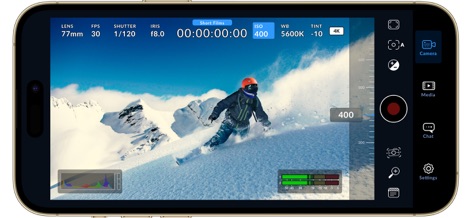
ライブヒストグラムとオーディオレベル表示により、ユーザーは撮影中の露出と音量をリアルタイムで正確にモニタリングできます。
即座の露出調整
ISO調整インターフェースと直感的なスライダーにより、ユーザーは瞬時に露出を微調整し、完璧な明るさを実現できます。

精密なフォーカス制御
フォーカスピーキング表示と視覚的な露出アシスト機能が、ユーザーに正確なフォーカスと最適な露出を確実にもたらします。

効率的な撮影管理
デジタルスレート機能とレンズデータ入力画面を活用し、ユーザーは撮影ごとに重要なメタデータを効率的に記録・管理できます。

クリップの一元管理
Blackmagic Cloudへのログイン機能と視覚的なクリップサムネイル表示により、ユーザーは全ての素材をクラウドで一元的に管理し、アクセスできます。

プロジェクトの整理
複数のプロジェクトフォルダと効率的なクリップ整理機能で、ユーザーは大量の映像素材を体系的に管理し、素早くアクセスできます。
シームレスな共同作業
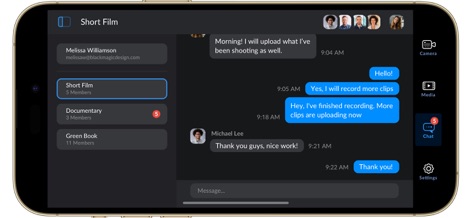
リアルタイムチャットとチームコラボレーション機能により、ユーザーはプロジェクトメンバーと迅速にコミュニケーションを取り、共同編集を円滑に進められます。
高度な記録設定
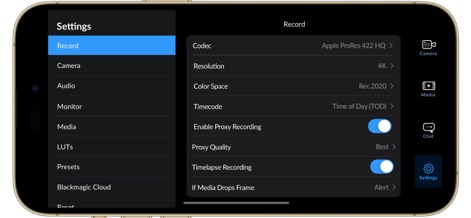
詳細な記録設定画面とプロキシ記録オプションを通じて、ユーザーはコーデック、解像度、プロキシ品質を自在に調整できます。

縦型撮影の最適化
縦向き撮影モードと完全なHUD表示により、ユーザーはモバイルデバイスでの縦型コンテンツ制作時に必要な全ての情報にアクセスできます。

垂直UIで簡単操作
直感的な垂直UIとISO調整バーを搭載し、ユーザーは縦型撮影時でも迅速かつ正確に露出設定を行えます。
説明
Download
類似アプリ
似た機能とユーザー体験を持つアプリ

飓风相机
Hangzhou Ostar Media Co.,Ltd.

ProMovie Recorder
Panda Apps Limited

ReLens Camera-DSLR Portrait
Pixl Concerto Technology Limited

Leica LUX - Pro Manual Camera
Leica Camera AG

FotorGear - Camera in Pocket
Shenzhen Fotorgear Technology Co., Ltd.

Unsharp
北北 宋

ProCam:Professional RAW Camera
BRAND CELLAR HOLDINGS PTE LTD

Vibe Cam - Moments Never Fade
森 林
Final Cut Camera
Apple Inc.
このページはアプリまたはその開発者の公式ページではなく、情報提供および論評を目的として作成された独立した編集出版物です。明示的に別段の記載がない限り、アプリおよびその開発者は、MWM、Apple、Google Play、アプリのパブリッシャー、またはアプリの開発者と提携、承認、後援、認可、またはその他の公式的な関係はなく、このページのいかなる内容も、アプリがMWMのサービスを使用して開発されたことを意味するものではありません。すべての商標、ロゴ、スクリーンショット、その他のコンテンツはそれぞれの所有者の財産です。