
このページはアプリまたはその開発者の公式ページではなく、情報提供および論評を目的として作成された独立した編集出版物です。明示的に別段の記載がない限り、アプリおよびその開発者は、MWM、Apple、Google Play、アプリのパブリッシャー、またはアプリの開発者と提携、承認、後援、認可、またはその他の公式的な関係はなく、このページのいかなる内容も、アプリがMWMのサービスを使用して開発されたことを意味するものではありません。すべての商標、ロゴ、スクリーンショット、その他のコンテンツはそれぞれの所有者の財産です。


Final Cut Camera
これは、iPhoneを本格的なプロダクションカメラに変える。制約なく、完璧なショットを捉える。
ダウンロード
7.5M+ユーザー評価
評価数
12.8K開発元
カテゴリ
Photo & Video対応言語
31最新バージョン
2.2サイズ
86.3 MBリリース日
2024年6月20日Appleエコシステムを最大限に活用する高度な機能とワークフロー統合
Final Cut Camera: プロフェッショナル向けビデオ制作ツール分析
完全マニュアルコントロールによるプロフェッショナル撮影
ユーザーはシャッタースピード、ISO、ホワイトバランス、マニュアルフォーカスなどの詳細な設定を完全に制御し、解像度、フレームレート、カラースペースなどを自由にカスタマイズすることで、プロフェッショナルな品質の映像を撮影できます。
ProRes RAW (オープンゲート) 撮影
本ツールは、ProRes RAWをオープンゲートで記録する機能を提供し、フルフレーム解像度と卓越した編集性能を実現します。これにより、ユーザーは最高の画質と最大限の編集の柔軟性を得られます。
ProResおよびApple Logでの高品質録画
このアプリは、ProResやApple Logを含む多様な解像度、フレームレート、コーデックでの録画に対応しており、ユーザーは高品質な映像素材を取得し、ポストプロダクションでの柔軟なカラーグレーディングと編集が可能です。
Live Multicam機能による複数デバイス連携
本アプリは、最大4台のFinal Cut Cameraを搭載したデバイスを接続し、iPad版Final Cut Proでライブマルチカムセッションをシームレスに開始する機能を提供します。これにより、ユーザーは複数のアングルをプレビュー、録画、同期できます。
Final Cut Proからのリモートコントロール
ユーザーはiPad版Final Cut Proから、接続されたすべてのデバイスをリモートでプレビューし、プロ設定を調整し、録画を開始することができます。これにより、マルチカメラ撮影の効率と柔軟性が大幅に向上します。
Genlockによる複数ソースのフレーム同期
互換性のあるシンクジェネレーターを使用することで、本アプリは複数のビデオソースをGenlockで正確にフレーム同期させる機能を提供します。これにより、ユーザーは大規模なマルチカメラ制作において厳密な同期を実現できます。
フォーカスピーキングとゼブラ表示による正確なモニタリング
このツールは、フォーカスピーキングで映像のシャープさを確保し、ゼブラインジケーターで露出を正確に調整するための強力なモニタリング機能を提供します。これにより、ユーザーは撮影中に映像品質を確実に確認できます。
バックグラウンドメディア転送によるポストプロダクション効率化
本アプリは、バックグラウンドでのメディア転送機能を通じてポストプロダクションの時間を節約します。ユーザーが作業中にプレビューメディアが自動的にオリジナルメディアに置き換えられるため、ワークフローがシームレスになります。
メディア管理とFinal Cut Proへの直接転送
ユーザーはFinal Cut Cameraブラウザ内で直接撮影済み素材を閲覧・確認し、iPad版Final Cut Proに直接接続してメディアをプロジェクトに転送できます。これにより、ワークフローの統合性と効率が向上します。
映像スタビライゼーション機能
このアプリはスタビライゼーションを有効にすることで、撮影中の手ブレや動きを低減する機能を提供します。これにより、ユーザーは安定した滑らかな映像を撮影できます。
よくある質問
について知っておくべきこと Final Cut Camera
What is Final Cut Camera?
Final Cut Camera provides professional controls for video production. It enables Live Multicam sessions with Final Cut Pro for iPad, allowing users to preview, record, and sync multiple video angles. It offers powerful manual settings like shutter speed, ISO, and white balance.
How does Live Multicam work in Final Cut Camera?
Live Multicam connects up to four devices running Final Cut Camera to Final Cut Pro for iPad. Users can remotely preview, adjust controls, initiate recording on all connected devices, and instantly edit synced multicam clips. Background media transfer replaces preview media with originals.
What recording formats does Final Cut Camera support?
Final Cut Camera supports recording in a range of resolutions, frame rates, and codecs, including ProRes and Apple Log. It also captures ProRes RAW in open gate for full-frame resolution and editing performance on compatible devices.
Does Final Cut Camera offer manual controls for video capture?
Yes, Final Cut Camera offers full manual control over video capture. Users can set exposure with ISO and shutter speed, adjust white balance, pull focus, and customize resolution, frame rate, and color space.
What monitoring tools are available in Final Cut Camera?
Final Cut Camera provides focus peaking, zebra indicators for exposure, tilt and roll indicators, crosshairs, and aspect ratio guides. Users can also preview Apple Log video in SDR or HDR with LUTs, and monitor recording time and audio meters.
How can users transfer and store media from Final Cut Camera?
Users can save videos directly to Files or record onto a connected external storage device. Final Cut Camera allows browsing and reviewing footage in its browser. Media can also be transferred directly into a Final Cut Pro for iPad project.
Which devices support ProRes RAW capture in Final Cut Camera?
ProRes RAW capture in open gate with Final Cut Camera requires an iPhone 17 Pro. Other advanced features like ProRes and Apple Log are available on iPhone 15 Pro or later.
Is a Final Cut Pro for iPad subscription required to use Final Cut Camera?
A Final Cut Pro for iPad subscription is required to utilize the Live Multicam feature with Final Cut Camera. The core camera app features do not explicitly state a subscription requirement.
以下のスクリーンショットと説明は、アプリの公式ストアリスティングから直接取得されたものであり、アプリ開発者の所有物です。
アプリストア
スクリーンショット
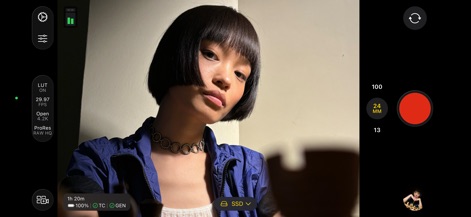
本アプリは、ProRes RAW HQでの高画質記録と、外部SSDへの直接保存に対応しており、プロフェッショナルな映像制作を強力にサポートします。
プロの撮影設定
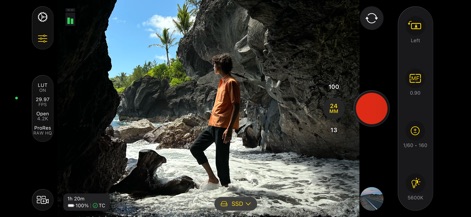
ユーザーはマニュアルフォーカスを細かく調整し、5600Kのカスタムホワイトバランス設定で、あらゆる環境下で正確な色表現を実現できます。
詳細なマニュアル調整
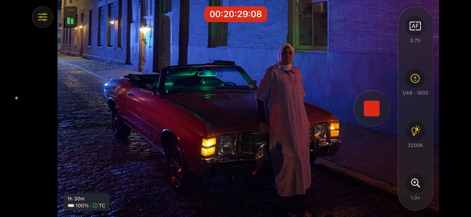
このアプリは、夜間のシーンでもAFフォーカスアシストとカスタムホワイトバランス(3200K)を活用し、クリアで色彩豊かな映像を撮影することを可能にします。
夜間撮影も完璧に
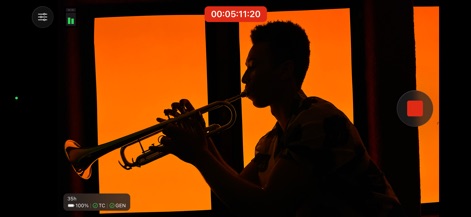
ユーザーはリアルタイムで時間軸(タイムコード)を確認しながら録画でき、被写体に集中できるクリーンなインターフェースでクリエイティブな表現が可能です。
映像に時間軸を
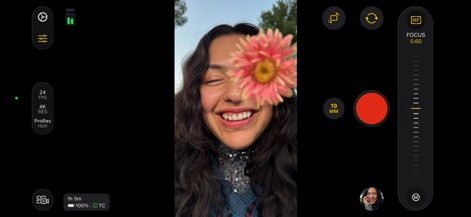
縦向きでの撮影時に、ユーザーはフォーカススライダーで被写界深度を精密に調整し、19MMの焦点距離でアーティスティックな表現を追求できます。
細やかなフォーカス制御
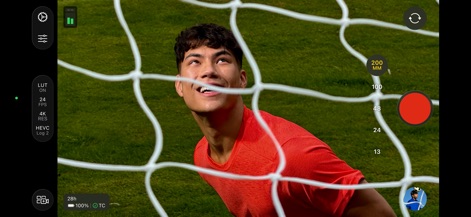
本ツールは、高効率のHEVC Log 2形式で4K解像度の映像を記録し、200MMの焦点距離で遠距離の被写体も鮮明に捉えることができます。
鮮明な4K映像
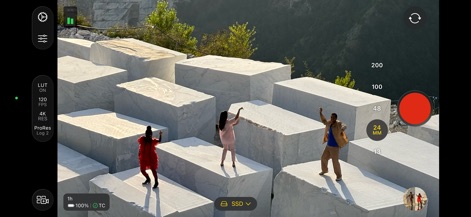
ユーザーはProRes Log 2で高解像度の映像を撮影し、120 FPSの高速フレームレート設定でスローモーションの可能性を広げ、外部SSDに直接保存できます。
高フレームレート撮影
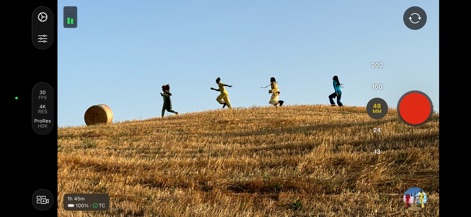
このアプリは、ProRes HDR形式で広範囲なダイナミックレンジの映像を捉え、48MMの焦点距離で被写体を魅力的に引き立て、鮮やかな色彩を表現します。
美しいHDR映像
説明
Download
類似アプリ
似た機能とユーザー体験を持つアプリ

Blackmagic Camera
Blackmagic Design Inc

飓风相机
Hangzhou Ostar Media Co.,Ltd.

ProMovie Recorder
Panda Apps Limited

ReLens Camera-DSLR Portrait
Pixl Concerto Technology Limited

Leica LUX - Pro Manual Camera
Leica Camera AG

FotorGear - Camera in Pocket
Shenzhen Fotorgear Technology Co., Ltd.

Unsharp
北北 宋

ProCam:Professional RAW Camera
BRAND CELLAR HOLDINGS PTE LTD

Vibe Cam - Moments Never Fade
森 林
このページはアプリまたはその開発者の公式ページではなく、情報提供および論評を目的として作成された独立した編集出版物です。明示的に別段の記載がない限り、アプリおよびその開発者は、MWM、Apple、Google Play、アプリのパブリッシャー、またはアプリの開発者と提携、承認、後援、認可、またはその他の公式的な関係はなく、このページのいかなる内容も、アプリがMWMのサービスを使用して開発されたことを意味するものではありません。すべての商標、ロゴ、スクリーンショット、その他のコンテンツはそれぞれの所有者の財産です。