
このページはアプリまたはその開発者の公式ページではなく、情報提供および論評を目的として作成された独立した編集出版物です。明示的に別段の記載がない限り、アプリおよびその開発者は、MWM、Apple、Google Play、アプリのパブリッシャー、またはアプリの開発者と提携、承認、後援、認可、またはその他の公式的な関係はなく、このページのいかなる内容も、アプリがMWMのサービスを使用して開発されたことを意味するものではありません。すべての商標、ロゴ、スクリーンショット、その他のコンテンツはそれぞれの所有者の財産です。


ダウンロード
12.5M+ユーザー評価
評価数
224.3K開発元
カテゴリ
Photo & Video対応言語
5最新バージョン
v1.11.10サイズ
4.3 MBリリース日
2016年5月27日ProMovie Recorder: プロフェッショナル向けビデオ撮影能力の深掘り
テックアナリストによる主要機能分析
究極の手動カメラ制御
本アプリは、露出、シャッタースピード、ISO、フォーカス、ホワイトバランスといったあらゆる主要なカメラ設定をユーザーが完全に手動で制御できるようにします。これにより、創造的なビジョンを正確に実現するためのプロフェッショナルな調整が可能です。
高解像度および高フレームレート撮影
このツールは、最大120FPSでの4Kビデオ録画、および最大240FPSでの1080pビデオ録画に対応しています。これにより、高品質な映像と印象的なスローモーション効果を実現し、詳細なコンテンツ作成を可能にします。
高ビットレートビデオ録画
最大224Mbpsの高ビットレートでのビデオ録画を提供します。これにより、映像の圧縮が最小限に抑えられ、後編集における柔軟性が向上し、最高の画質を維持できます。
外部マイクサポートとオーディオモニタリング
外部マイク(Lightning/3.5mmヘッドホンジャック/Bluetooth)の接続をサポートし、ヘッドホンでのリアルタイムオーディオモニタリングを可能にします。プロフェッショナルなオーディオ品質を確保するために不可欠な機能です。
複数カメラレンズの切り替え
ウルトラワイド、ワイド、望遠カメラ間でのシームレスな切り替えを可能にします。これにより、ユーザーは多様な視点からシーンを捉え、表現の幅を広げることができます。
高度なオーディオ制御機能
ステレオオーディオ録音、オーディオゲインコントロール、画面上のオーディオレベルインジケーターなど、詳細なオーディオ設定を提供します。これにより、ユーザーは録音される音声の質を微調整し、より専門的なサウンドを実現できます。
多様な外部アクセサリー対応
2.4:1アナモルフィックアダプター、外部ディスプレイ、Bluetoothリモートなどのアクセサリーをサポートします。これにより、撮影の可能性が大幅に広がり、映画のような映像表現や遠隔操作が可能になります。
構図補助ツール
グリッド線、クロッピングガイド、傾きインジケーター(レベル)などの補助ツールを備えています。これにより、ユーザーは正確な構図を簡単に設定し、バランスの取れたプロフェッショナルな映像を作成できます。
ビデオ安定化モード
スタンダードおよびシネマティックの安定化モードを提供します。これにより、手持ち撮影時の揺れを効果的に低減し、より滑らかでプロフェッショナルな品質の映像を実現します。
柔軟なエンコーディングオプション
HEVCとH.264の両方のエンコーディングに対応しています。これにより、ユーザーはファイルサイズと互換性の要件に応じて最適なフォーマットを選択し、効率的なワークフローを構築できます。
よくある質問
について知っておくべきこと ProMovie Recorder
What are the video recording capabilities of ProMovie Recorder?
ProMovie Recorder supports 4K video recording up to 120FPS and 1080p video recording up to 240FPS on compatible devices. It offers high-quality recording at up to 224Mbps bitrate.
Does ProMovie Recorder offer manual camera controls?
Yes, ProMovie Recorder provides manual controls for exposure, shutter speed, ISO, focus, and white balance. Users can also lock parameters and utilize white balance presets for precise adjustments.
How can I remove the watermark in ProMovie Recorder?
An In-App Purchase is required to record videos with ProMovie Recorder without the 'ProMovie Recorder' watermark. This purchase unlocks full, unbranded recording functionality.
Can ProMovie Recorder use external microphones?
Yes, ProMovie Recorder supports external microphones via Lightning/3.5 mm headphone jack or Bluetooth. It also offers stereo audio recording, monitoring, and gain control on supported devices.
What devices support 4K 60FPS recording with ProMovie Recorder?
ProMovie Recorder supports 4K @60FPS on iPhone 8/8 Plus/X and newer, iPad (2022), iPad Mini (2021 and newer), iPad Air (2020 and newer), and specific iPad Pro models.
Does ProMovie Recorder have stabilization modes?
Yes, ProMovie Recorder includes both Standard and Cinematic stabilization modes. These features help users capture smoother video footage and improve overall video quality.
Can ProMovie Recorder adjust exposure and focus separately?
Yes, ProMovie Recorder allows for separate Exposure Point and Focus Point adjustments. This offers precise control over video composition and image quality within the recording interface.
What encoding formats does ProMovie Recorder support?
ProMovie Recorder supports both HEVC and H.264 encoding. This provides flexibility for video file size and compatibility with various platforms and devices for recorded content.
以下のスクリーンショットと説明は、アプリの公式ストアリスティングから直接取得されたものであり、アプリ開発者の所有物です。
アプリストア
スクリーンショット

露出を完璧に制御
この画面では、スキーヤーに焦点を合わせ、周囲の山並みに最適な露出が設定されています。EV値の調整バーと露出ロックアイコンにより、撮影者は常に理想的な映像を作り出せます。
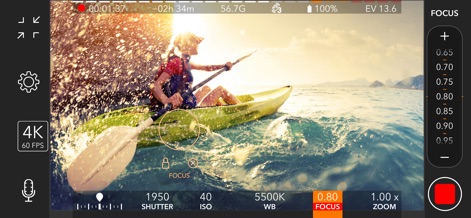
精密なフォーカス調整
カヤックに乗る人物に正確にピントが合っており、水しぶきの躍動感が見事に捉えられています。フォーカスロックインジケーターとリアルタイムのフォーカス値表示が、重要な瞬間を逃しません。

構図を極めるグリッド
鳥の被写体が中央に美しく配置され、ズーム機能で細部まで鮮明に捉えられています。多様なグリッドオプションと詳細なズーム倍率インジケーターが、完璧なフレームを実現します。

高度な設定で最適化
ユーザーは、アスペクト比や解像度など、録画の主要設定を簡単に調整できます。フレームレートや品質ビットレートも選択可能で、クリエイティブなビジョンを最大限に引き出します。

プロ品質へのアップグレード
この画面は、アプリ内購入によって、透かしなしで動画を録画するオプションが利用可能になることを示しています。「ProMovie Recorder」のブランドロゴと共に、プロフェッショナルな成果物を創造する自由を提供します。
説明
Download
類似アプリ
似た機能とユーザー体験を持つアプリ

Blackmagic Camera
Blackmagic Design Inc

飓风相机
Hangzhou Ostar Media Co.,Ltd.

ReLens Camera-DSLR Portrait
Pixl Concerto Technology Limited

Leica LUX - Pro Manual Camera
Leica Camera AG

FotorGear - Camera in Pocket
Shenzhen Fotorgear Technology Co., Ltd.

Unsharp
北北 宋

ProCam:Professional RAW Camera
BRAND CELLAR HOLDINGS PTE LTD

Vibe Cam - Moments Never Fade
森 林
Final Cut Camera
Apple Inc.
このページはアプリまたはその開発者の公式ページではなく、情報提供および論評を目的として作成された独立した編集出版物です。明示的に別段の記載がない限り、アプリおよびその開発者は、MWM、Apple、Google Play、アプリのパブリッシャー、またはアプリの開発者と提携、承認、後援、認可、またはその他の公式的な関係はなく、このページのいかなる内容も、アプリがMWMのサービスを使用して開発されたことを意味するものではありません。すべての商標、ロゴ、スクリーンショット、その他のコンテンツはそれぞれの所有者の財産です。