SA Group Text

SA Group Text

ダウンロード: App Store
ロゴ: SA Group Text

SA Group Text: プロフェッショナルなメッセージングを大規模にパーソナライズ

SMSのための究極の「差し込み印刷」。Excelスプレッドシートを、返信全員のグループチャットの混乱なしに、顧客やコミュニティにパーソナルなタッチで届く個別メッセージキャンペーンに変えましょう。

開発元

ShenZhen SamApp Technology Development Co., Ltd

カテゴリ

Productivity

ダウンロード

186K+

ユーザー評価

3.7/5

評価数

100

対応言語

7

効率性を実際に

このインターフェースを利用する 186K+ 人のユーザー.

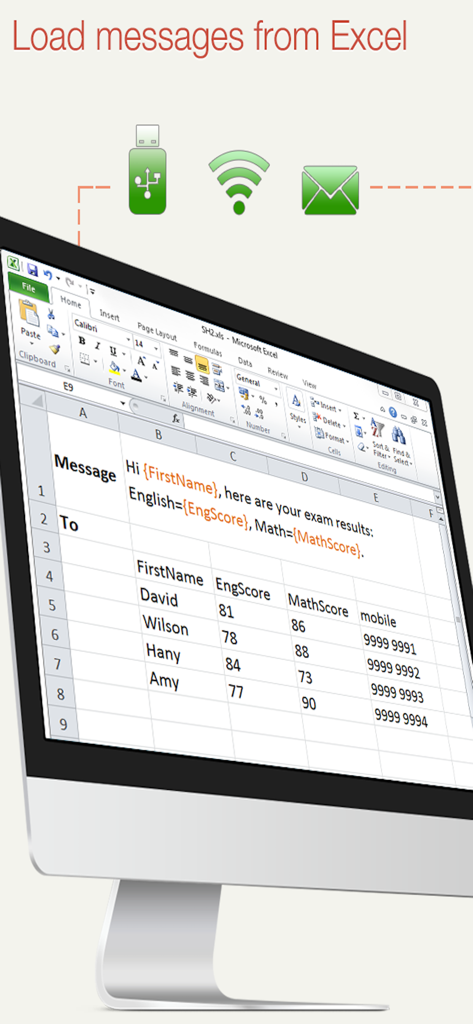
USB WiFiおよびEmailのインポートオプションを備えた、Excelスプレッドシート内のパーソナライズされたグループテキストメッセージテンプレートを表示するコンピュータ画面。

USB WiFiおよびEmailのインポートオプションを備えた、Excelスプレッドシート内のパーソナライズされたグループテキストメッセージテンプレートを表示するコンピュータ画面。

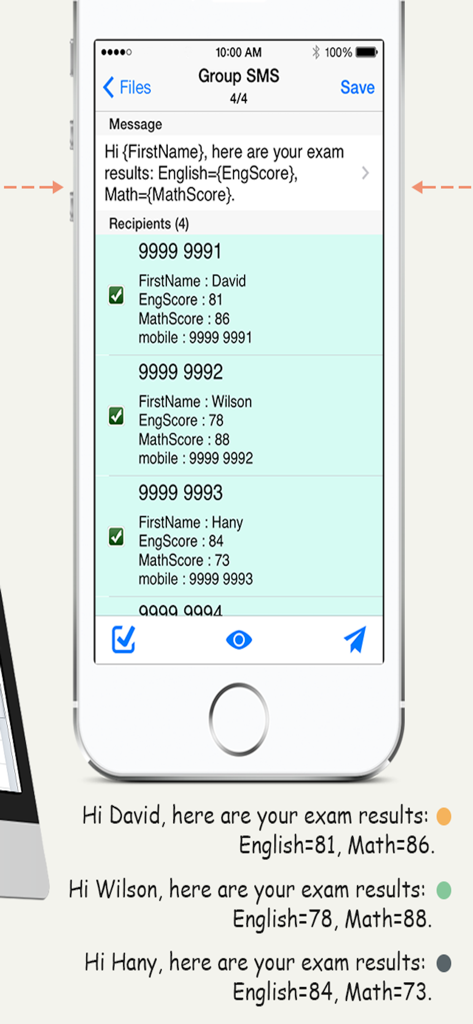
グループSMSメッセージの差し込み印刷パーソナライゼーションを示すSA Group Textアプリのスクリーンショット。

グループSMSメッセージの差し込み印刷パーソナライゼーションを示すSA Group Textアプリのスクリーンショット。

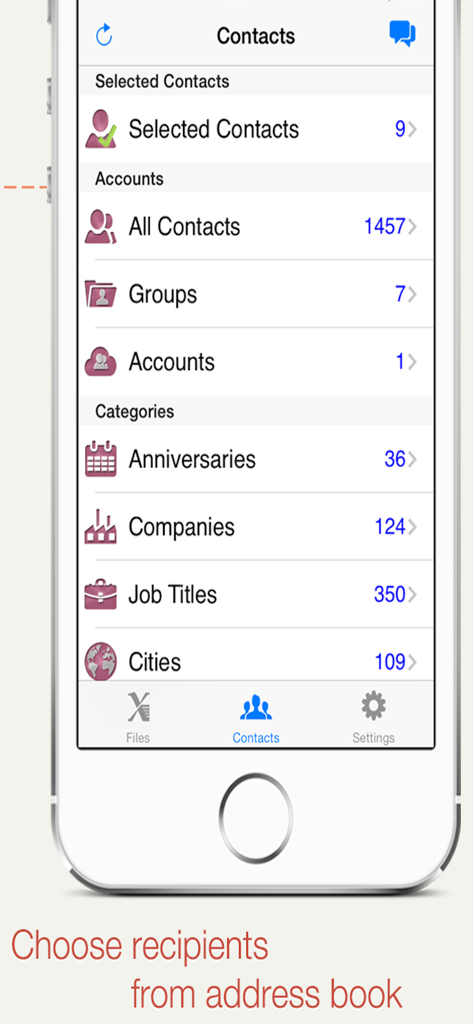
SA Group Textアプリで、グループとカテゴリ別にiPhoneアドレス帳から受信者を選択しています。

SA Group Textアプリで、グループとカテゴリ別にiPhoneアドレス帳から受信者を選択しています。

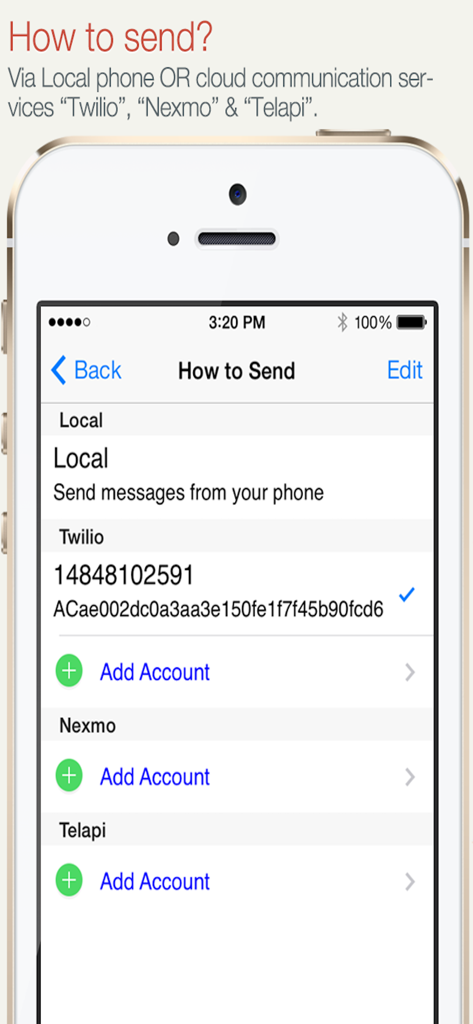
ローカル電話またはTwilioやNexmoなどのクラウドサービス経由のSMS送信オプションを示すアプリ画面。

ローカル電話またはTwilioやNexmoなどのクラウドサービス経由のSMS送信オプションを示すアプリ画面。

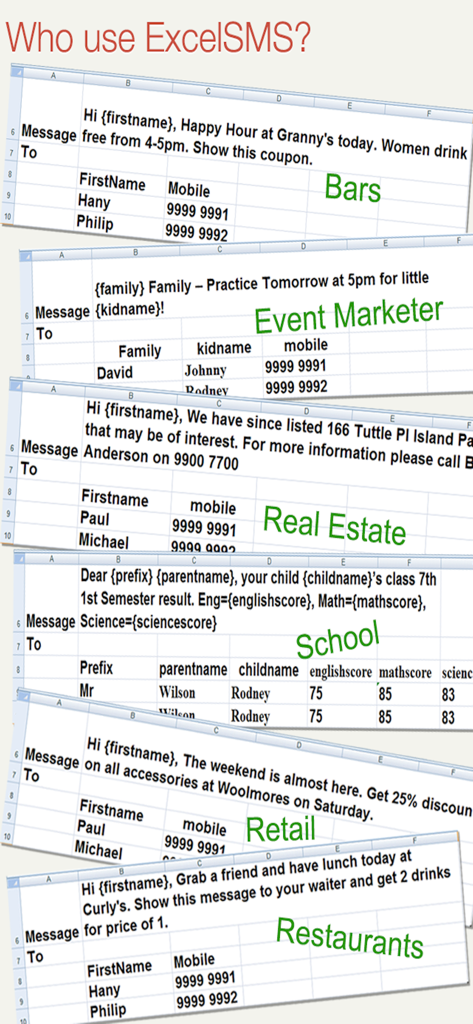
さまざまな業界のパーソナライズされたグループメッセージングのためのExcelテンプレートの例。

さまざまな業界のパーソナライズされたグループメッセージングのためのExcelテンプレートの例。

パーソナルなタッチでの一括SMS送信

このアプリを際立たせるツール、 186K+ 人のユーザーが選択.

📊

Excel & スプレッドシートのパワー

既存の連絡先名簿やリードリストを、ExcelまたはGoogleスプレッドシートから直接インポートします。これは、あなたがすでに使用している使い慣れたワークフローであり、現在完全にモバイル最適化されています。

✍️

大規模なパーソナライゼーション

{firstname}や{company}などの動的タグを使用して、すべてのメッセージを自動的に調整します。大量生産されたのではなく、手書きのように感じられるテキストで、より強力な関係を築きましょう。

🔒

プライベートな個別配信

数百人の受信者に、個別の1対1のテキストとして送信します。連絡先のプライバシーを保護し、顧客のための「返信全員」の悪夢を排除します。

アプリについて

について知っておくべきこと SA Group Text.

説明

SA Group Text is the most efficient way to send group messages. You can add recipient names and phone numbers in an Excel file. You can enter static or personalized text messages right in the Excel spreadsheet. For example, if you enter “Hi {first name}, ...” in a message, the app will take the first name of the recipients and personalize the message, generating text such as “Hi David, …” , “Hi Michael, …”… You can use an Excel spreadsheet again without editing the spreadsheet on your computer. You can just pick an Excel file, type in a quick message and send it. It is similar to sending a message to a group. SA Group Text is also an easy way to send text messages to the contacts on your iPhone. Just pick groups or individual contacts, type in a static or personalized message and send it. Who uses SA Group Text ? 1) Small Businesses 2) Religious Groups 3) Retail 4) Nightlife - Bars & Nightclubs 5) Restaurants 6) Banks/Financial Institutions 7) Insurance Companies 8) Event Marketers (With hundreds (or even thousands) of people attending your events) 9) Traditional Media 10) Schools 11) Social Groups 12) Real Estate With SA Group Text you can : 1. Import group SMS from an Excel file via USB/WiFi/Email. 2. Create your own groups in an Excel spreadsheet and send messages to them. 3. Send unsent messages . If the app is terminated while sending group SMS, the sending task will be continued next time you launch the app.. 4. Insert tags ({nickname},{firstname},{lastname},{nickname},{company} etc) in your text message in order to create personalized messages. When you use this function, each message has a personal touch. For example: Dear {firstname}, Welcome to our dinner party. 5. Use MS Excel 2003 / 2007 / 2010 , OpenOffice.org , Apple Numbers or any other Excel-compatible applications to create your group text messages. Be sure to save as an Excel 97-2003 Workbook. 6. Export an Excel template , and use it to create your own Excel file. 7. Send SMS to as many recipients as you need within your Excel file 8. Limit the number of recipients per message. The app will split a large message into multiple separate messages. 9. Create a formatted Excel file easily. The file can contain only two columns : Mobile and Message. You can find more example spreadsheets on the app’s website. 10. Create flexible group SMS in your spreadsheet. For example “{family} Family – Practice Tomorrow at 5pm for little {kidname}!” becomes “David Family – Practice Tomorrow at 5pm for little Johnny!”. The names change over and over again. 11. Create contact groups, you can create in-app groups for Exchange contacts. 12. Choose contacts organized in groups, companies, job titles and cities. 13. Preview messages before sending them out. 14. Skip duplicated phone numbers and messages. 15. The lite version has ads. 16. Send online sms, supporting Twilio and Nexmo. 17. Find a way to send messages without user interaction, please contact to samyuservice@gmail.com for details. IMPORTANT NOTE : Please check the setting of "Group Messaging" on the iPhone settings. If the option is available, set it to OFF (yes OFF) to be able to send to large groups. If it's on, the iPhone will try to send MMS instead of SMS and will fail to send to large groups. More detail and up-to-date help guides are available in samapp.com.

最新バージョン

3.3.11

サイズ

3.8 MB

リリース日

2010年12月17日

コピー&ペーストをやめて、つながる

SMSのための究極の「差し込み印刷」を使用している186,000人以上のプロフェッショナルに加わりましょう。Excelの名簿をインポートして、リスト全体にパーソナライズされた個別メッセージを数秒で送信しましょう。

ダウンロード: App Store

App information, icons, screenshots, and descriptions displayed on this page are sourced from the Apple App Store and are the property of their respective developers. Download estimates and rankings are based on MWM's proprietary models and may not reflect actual figures. This page is provided for informational and analytical purposes only.

Believe this page infringes your intellectual property? File a dispute