Sony | Creators' App

Sony | Creators' App


ダウンロード: App Storeダウンロード: Google Play
ロゴ: Sony | Creators' App

Sony | Creators' App: プロフェッショナルワークフローをモバイル向けに再考

Sonyカメラと世界とのギャップを埋めます。高品質ファイルを即座に転送し、ギアをリモートで制御し、クラウドAIを活用して、これまでにない速さで素晴らしいコンテンツを配信します。

開発元

Sony Corporation

カテゴリ

Photo & Video

ダウンロード

3M+

ユーザー評価

4.2/5

評価数

13K+

対応言語

21

プロスタジオを視覚化

このインターフェースを利用する 3M+ 人のユーザー.

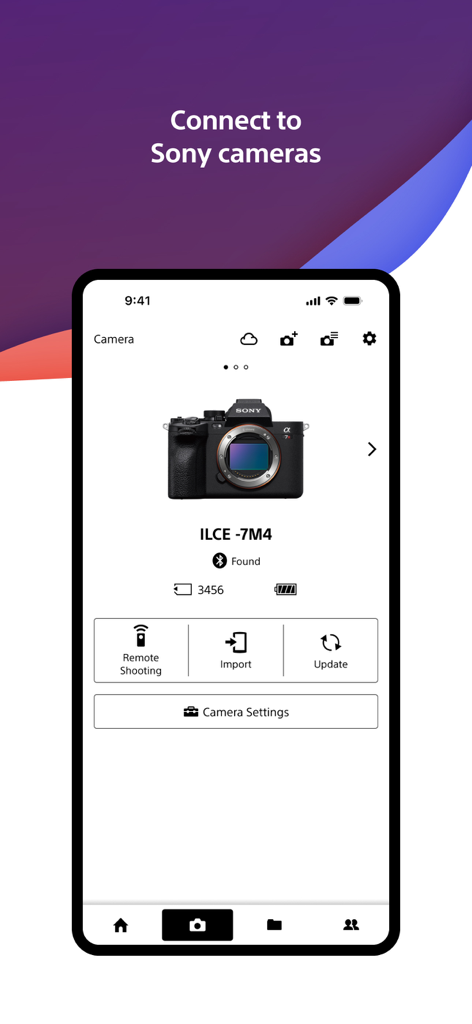
Sony Creators Appインターフェース。リモート撮影とインポートオプションが表示された接続中のSony Alphaカメラが表示されます。

Sony Creators Appインターフェース。リモート撮影とインポートオプションが表示された接続中のSony Alphaカメラが表示されます。

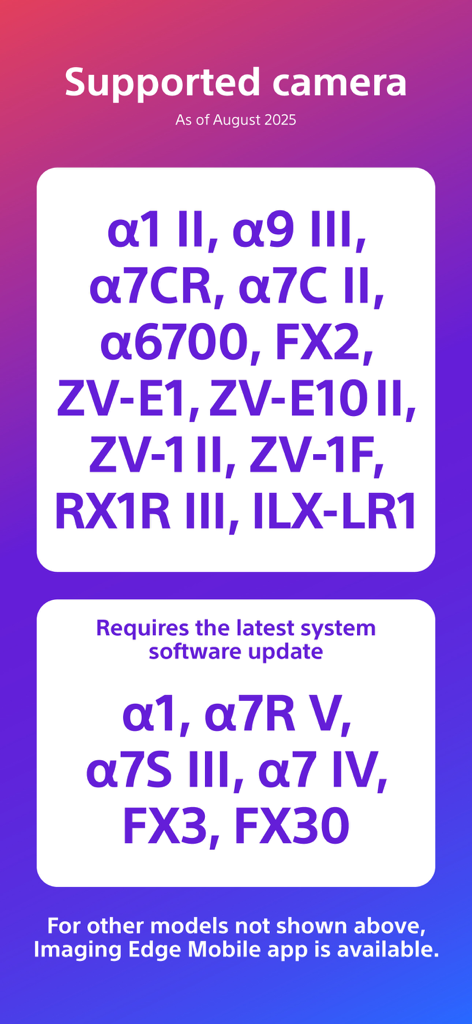
Creators Appに対応するSonyカメラモデルのリスト。

Creators Appに対応するSonyカメラモデルのリスト。

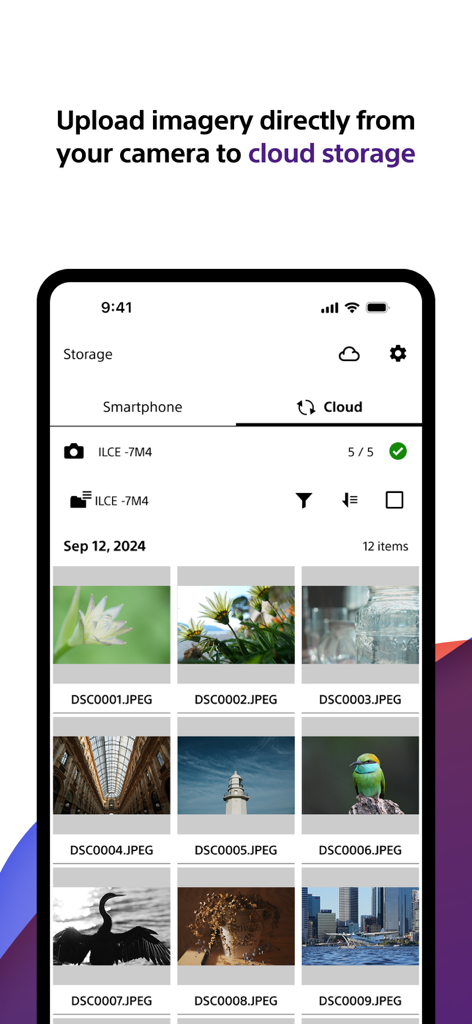
Sony Creators Appインターフェース。カメラからクラウドストレージにアップロードされている高品質写真のギャラリーが表示されます。

Sony Creators Appインターフェース。カメラからクラウドストレージにアップロードされている高品質写真のギャラリーが表示されます。

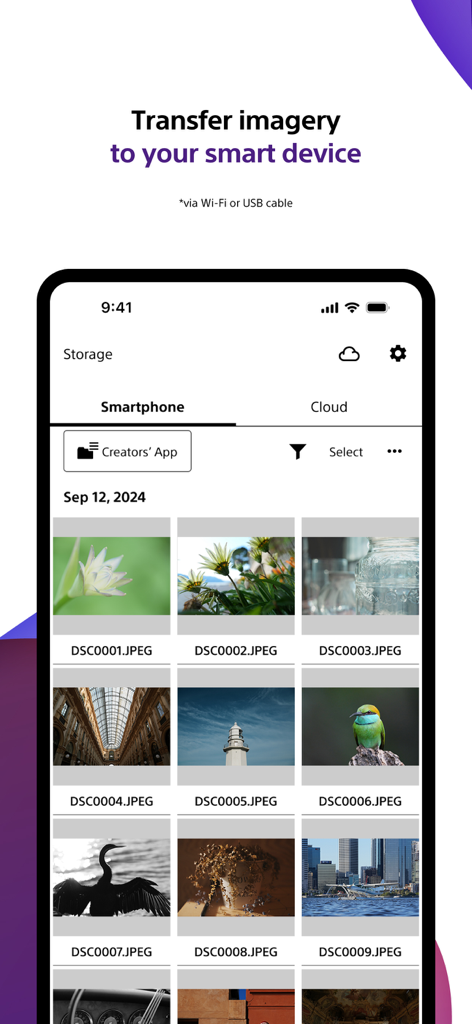
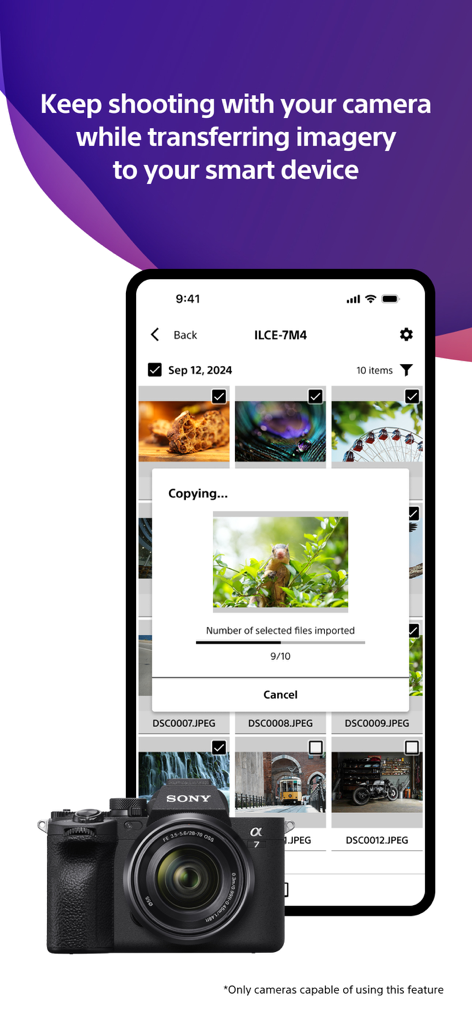
Sony Creators App画面。カメラからスマートフォンへの写真転送が表示されます。

Sony Creators App画面。カメラからスマートフォンへの写真転送が表示されます。

Sony Alphaカメラから写真を転送しているSony Creators Appを表示しているスマートフォンスクリーン。

Sony Alphaカメラから写真を転送しているSony Creators Appを表示しているスマートフォンスクリーン。

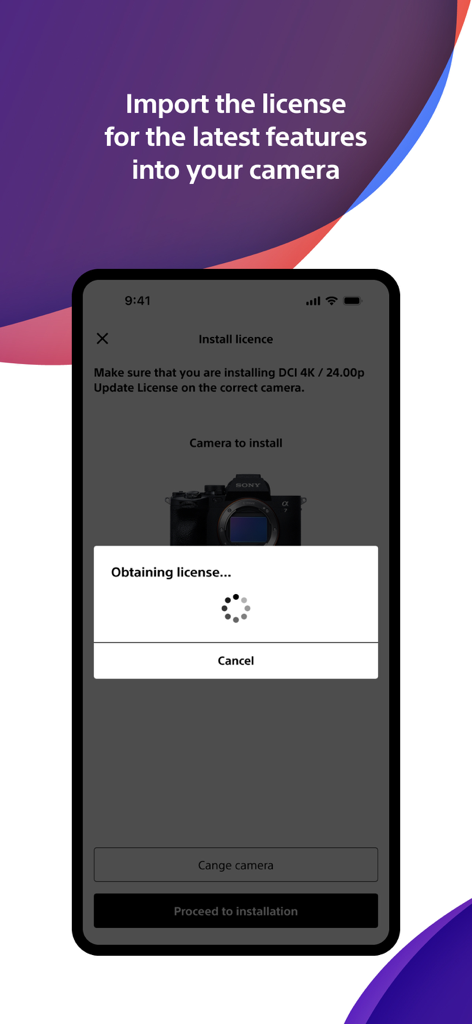
新しい機能のためにカメラライセンスをインポートしているSony Creators Appを表示しているスマートフォンスクリーン。

新しい機能のためにカメラライセンスをインポートしているSony Creators Appを表示しているスマートフォンスクリーン。

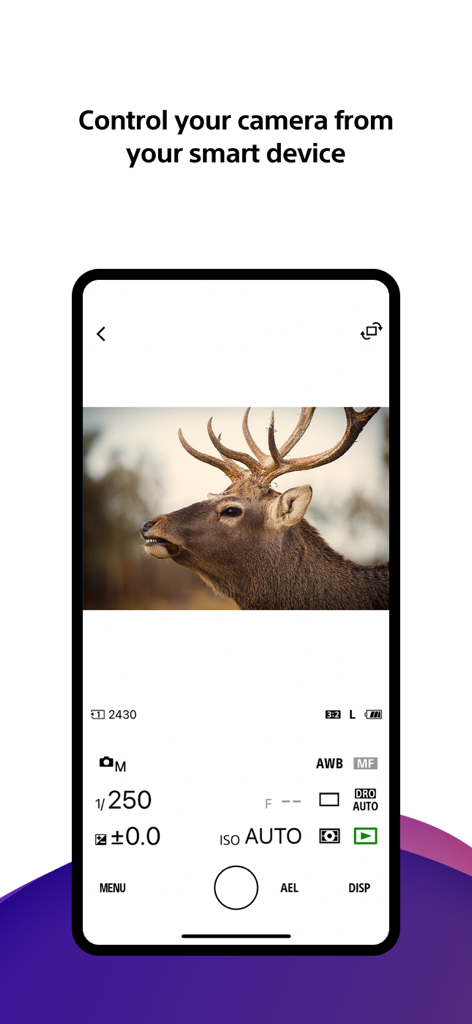
マニュアル写真設定と鹿のライブビューが表示されているSony Creators Appリモートカメラコントロールインターフェースを表示しているスマートフォンスクリーン。

マニュアル写真設定と鹿のライブビューが表示されているSony Creators Appリモートカメラコントロールインターフェースを表示しているスマートフォンスクリーン。

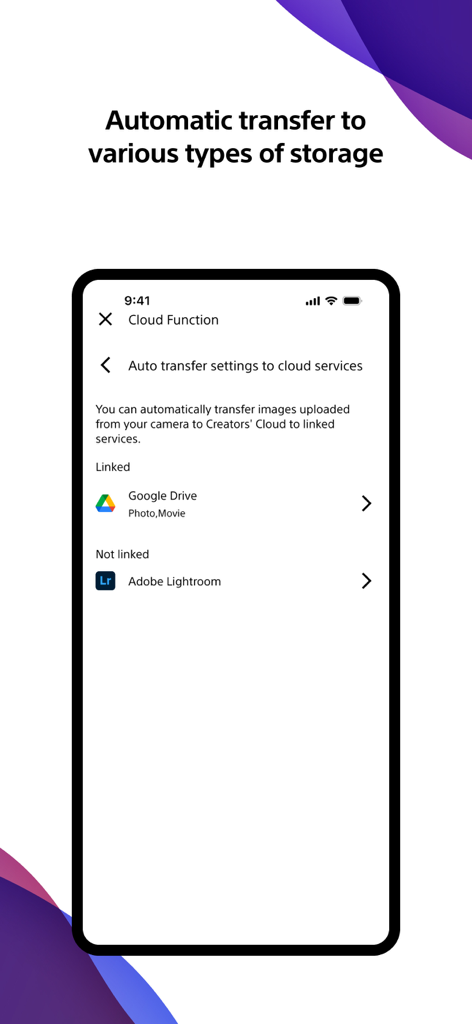
Google DriveやAdobe Lightroomなどのクラウドサービスへの自動写真およびビデオ転送を設定するためのSony Creators Appインターフェース。

Google DriveやAdobe Lightroomなどのクラウドサービスへの自動写真およびビデオ転送を設定するためのSony Creators Appインターフェース。

クリエイティブワークフローをマスターする

このアプリを際立たせるツール、 3M+ 人のユーザーが選択.

インスタントモバイル転送

カメラがオフの間でも、撮影した画像を自動的に携帯電話に転送できるため、数秒で編集してソーシャルメディアに共有できます。

🤳

プロリモートコントロール

カメラを遠隔操作できます。スマートフォン画面から直接、ショットをフレーミングし、設定を調整し、録画を開始します。

☁️

Creators' Cloudシナジー

ライブラリを安全にクラウドにアップロードし、プロの制作を効率化するように設計されたAI駆動の編集サービスにアクセスします。

レビュー分析

ユーザーレビューの分析.

感情スコア

20%
ネガティブ

概要

Users generally express significant frustration with the mobile app, primarily due to persistent and widespread connectivity issues between their devices and Sony cameras, often leading to black screens, app crashes, and failed photo/video transfers. While some users appreciate its capabilities for remote camera control, easy photo transfer, and free RAW image import, these positive aspects are frequently overshadowed by complaints about a convoluted user interface, slow performance, and intrusive privacy requests for full photo library access. Several users also reported problems with specific camera model support (e.g., ZVE10, a7C II 10-bit video), and version-specific bugs such as rotated thumbnails and disabled GPS data transfer on iOS 26 or after firmware updates (e.g., A7iv).

主なテーマ

Photo Transfer Functionality(2)
Remote Camera Control(1)
Ease of Use(1)
Free RAW Import(1)
App Features(1)
Connection Stability(1)
Performance(1)

アプリについて

について知っておくべきこと Sony | Creators' App.

説明

■ Please refer to the "Support Page" for the connection process and list of supported models. https://www.sony.net/ca/help/camera/ ■For app/service availability of countries and regions, please check here. https://creatorscloud.sony.net/catalog/servicearea.html This application allows anytime, anywhere smartphone access to the Creators' Cloud, a platform that provides powerful support for creators from shooting to production with Sony's camera technology and cloud AI. By connecting this application to your camera, you can easily operate convenient functions such as photo and video transfer from your smartphone. ■ Anytime access to Creators' Cloud Experience the various functions offered by Creators' Cloud, including file storage and management in cloud storage, a wide range of services and applications including video editing services using cloud AI, and access to articles and content that will serve as a source of inspiration. You can experience a variety of functions provided by Creators' Cloud. ■ Extend the shooting experience and manage shooting files more easily You can transfer and save photos and videos you have already taken, and use your smartphone as a remote control for the camera for remote shooting. In addition, the smartphone can be used to check the camera's battery and media information, set the date, time, and camera name, and easily update the camera's software. - Easy transfer of photos and videos taken anytime, anywhere Photos and videos taken can be transferred to cloud storage or a smartphone for centralized management. Data transfer can be performed while shooting or while the camera is turned off or charging. The camera also supports a variety of user shooting styles, such as transferring only those photos and videos that have been rated or marked as shots in advance. - Operate the camera from your smartphone By connecting the camera to a smartphone, the smartphone can be used as a remote control for the camera. This allows you to take pictures from a distance, such as group photos, or take pictures of night scenes without causing vibrations to the camera. In addition, you can easily check the camera's battery and media information, and set the date, time, and camera name from your smartphone. - Save camera settings and reflect changes Camera settings that change with each shooting scene can be saved to the smartphone and reflected in the camera. The ability to save settings for multiple cameras greatly streamlines setting changes during shooting. - Important announcements and software updates are also available from your smartphone. Important notifications such as software updates can be checked, and updates to the camera itself can be easily performed from a smartphone. ■ Operating environment: iOS17.7-26.1 ■ Remarks - This application is not guaranteed to work on all smartphones and tablets. ■ Terms of use https://creatorscloud.sony.net/locales_termsofuse_cc.html ■ Privacy policy https://creatorscloud.sony.net/locales_privacypolicy_cc.html

最新バージョン

3.2.1

サイズ

137.9 MB

リリース日

2022年10月13日

レンズからクラウドまで、ワークフローを向上させましょう

Sonyカメラとモバイルスタジオのギャップをシームレスに埋めます。数百万人のクリエイターに参加して、プロフェッショナルなスピードで撮影、転送、共有しましょう。

ダウンロード: App Storeダウンロード: Google Play
FAQ

よくある質問

について知っておくべきこと Sony | Creators' App

Sony | Creators' アプリとは何ですか?

Sony | Creators' アプリは、Creators' Cloud プラットフォームへのスマートフォンからのアクセスを提供します。これにより、ソニー製カメラからの写真や動画の転送、クラウドストレージの管理、リモートカメラ操作、ソフトウェアアップデートが可能になり、撮影から制作までクリエイターをサポートします。

Sony | Creators' アプリはどのようにカメラに接続しますか?

Sony | Creators' アプリは、スマートフォンとソニー製カメラを接続し、便利な機能を利用できるようにします。詳細な接続手順や対応カメラモデルのリストについては、公式サポートページ sony.net/ca/help/camera/ を参照してください。

Sony | Creators' アプリはどのソニー製カメラモデルに対応していますか?

2025年8月現在、Sony | Creators' アプリはα1 II、α9 III、α7CR、FX2、ZV-E1 II などのモデルに対応しています。α1 や α7R V などの一部のモデルでは、最新のシステムソフトウェアアップデートが必要です。

Sony | Creators' アプリでカメラから画像や動画を転送できますか?

はい、Sony | Creators' アプリを使用すると、写真や動画を簡単にクラウドストレージやスマートフォンに転送できます。撮影中やカメラ充電中でも、評価またはマークしたショットのみを転送することも可能です。

Sony | Creators' アプリを使用してカメラをリモート操作できますか?

はい、Sony | Creators' アプリを使用すると、スマートフォンをソニー製カメラのリモートコントローラーとして使用できます。この機能はリモート撮影をサポートし、カメラのバッテリーやメディア情報を確認できます。

Sony | Creators' アプリは他のクラウドサービスへの自動画像転送をサポートしていますか?

はい、Sony | Creators' アプリには、リンクされたクラウドサービスへの自動転送設定があります。例えば、クラウド機能の設定に示されているように、写真や動画を Google Drive と連携させることができます。

Sony | Creators' アプリを使用してソニー製カメラのソフトウェアをアップデートするにはどうすればよいですか?

Sony | Creators' アプリを使用すると、スマートフォンから直接、ソニー製カメラのソフトウェアアップデートを簡単に実行できます。また、これらのアップデートに関する重要な通知も表示されます。

Sony | Creators' アプリでカメラ設定を保存して適用できますか?

はい、Sony | Creators' アプリはカメラ設定をスマートフォンに保存します。これにより、保存された設定をソニー製カメラに適用でき、さまざまな撮影シナリオや複数のカメラの設定変更を効率化できます。

App information, icons, screenshots, and descriptions displayed on this page are sourced from the Apple App Store and are the property of their respective developers. Download estimates and rankings are based on MWM's proprietary models and may not reflect actual figures. This page is provided for informational and analytical purposes only.

Believe this page infringes your intellectual property? File a dispute