Timery: Time Tracker

Timery: Time Tracker


ダウンロード: App Store
ロゴ: Timery: Time Tracker

Timery: Appleエコシステムのための究極のTogglクライアント

iPhone、iPad、Mac、Apple Watch全体で、インタラクティブウィジェット、ライブアクティビティ、Siriショートカットを活用し、請求可能な毎秒を楽に追跡するために構築されたネイティブエクスペリエンスで生産性を合理化しましょう。

ダウンロード: App Store

開発元

Joseph Hribar

カテゴリ

Productivity

ダウンロード

28K+

ユーザー評価

4.8/5

評価数

2K+

対応言語

1

分単位の管理

このインターフェースを利用する 28K+ 人のユーザー.

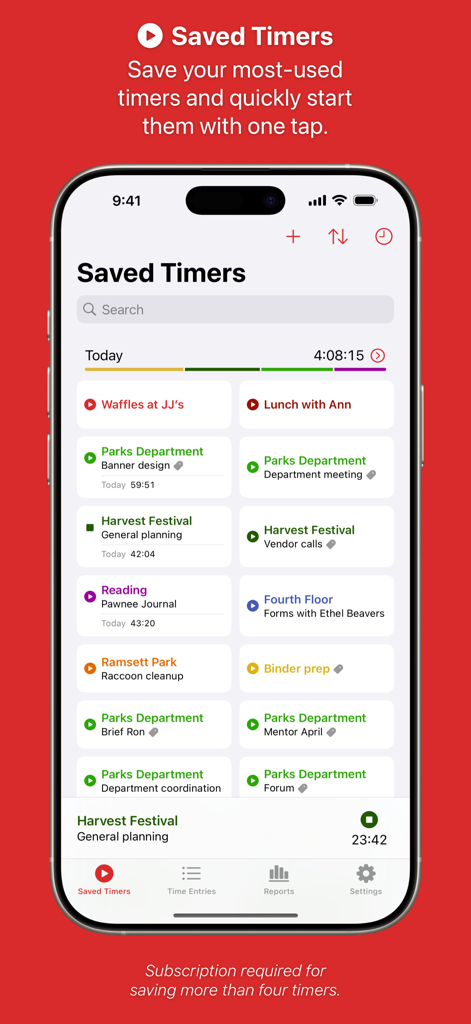
様々なタスクのための保存された時間追跡タイマーを表示するiPhone上のTimeryアプリインターフェース

様々なタスクのための保存された時間追跡タイマーを表示するiPhone上のTimeryアプリインターフェース

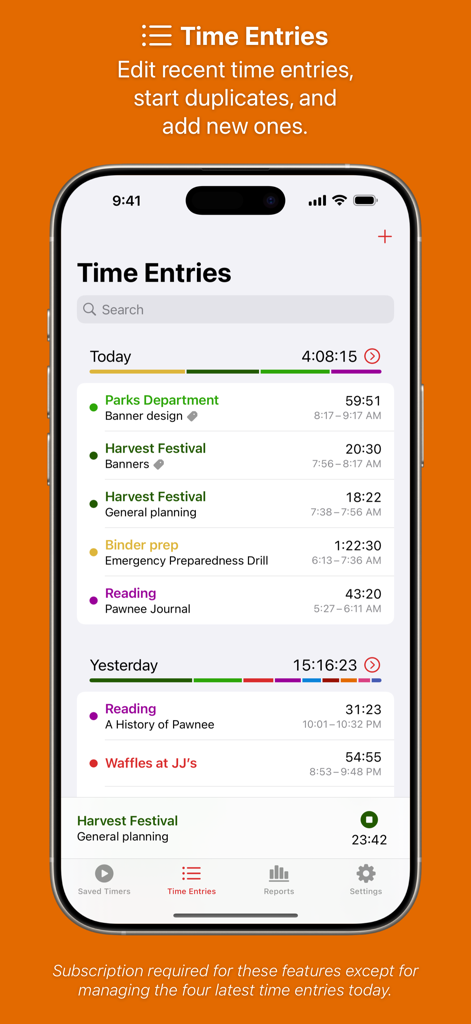
追跡されたアクティビティとプロジェクトの詳細なリストを持つ、Timeryアプリの時間入力画面を表示するスマートフォン。

追跡されたアクティビティとプロジェクトの詳細なリストを持つ、Timeryアプリの時間入力画面を表示するスマートフォン。

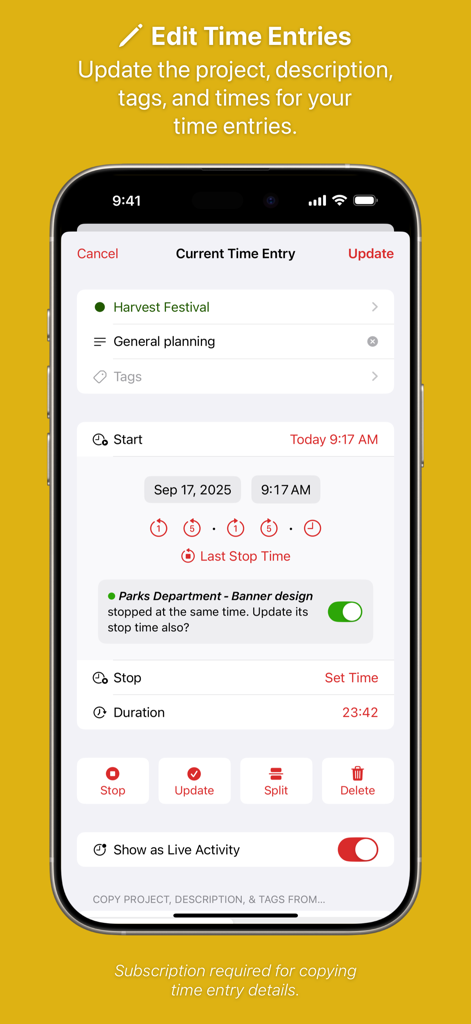
プロジェクトと期間の詳細を含む、Timeryの編集時間入力インターフェースを示すモバイル画面。

プロジェクトと期間の詳細を含む、Timeryの編集時間入力インターフェースを示すモバイル画面。

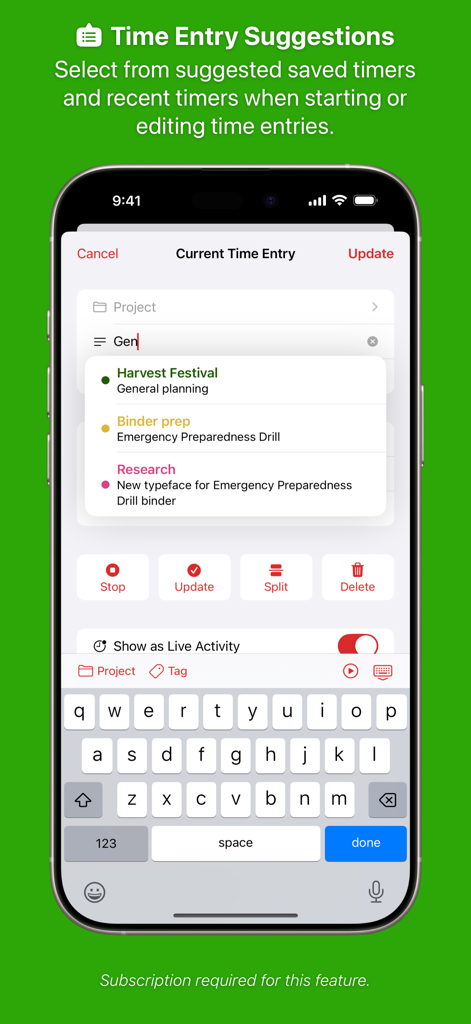
提案されたタイマーと現在の時間入力画面を表示するTimeryアプリのiPhoneスクリーンショット。

提案されたタイマーと現在の時間入力画面を表示するTimeryアプリのiPhoneスクリーンショット。

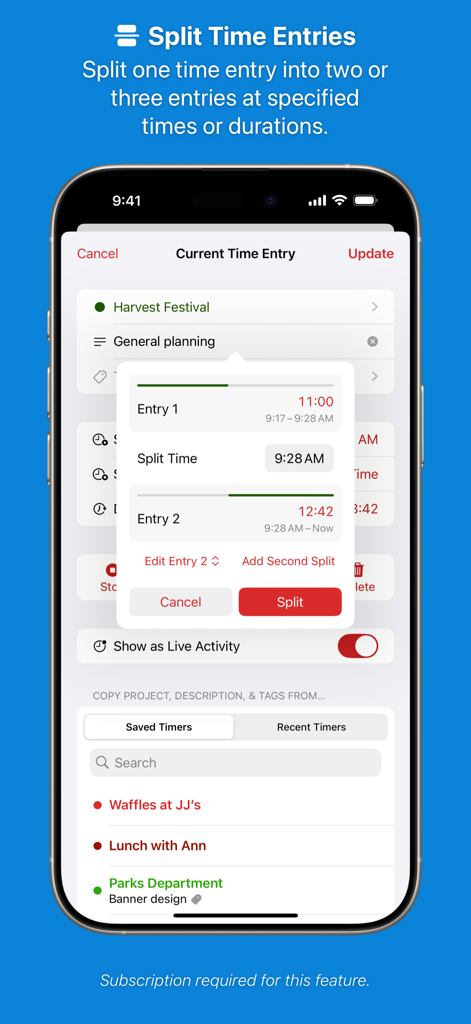
単一の時間ログを2つの別々のエントリに分割するために使用されているTimeryアプリの分割時間入力機能を示すスクリーンショット。

単一の時間ログを2つの別々のエントリに分割するために使用されているTimeryアプリの分割時間入力機能を示すスクリーンショット。

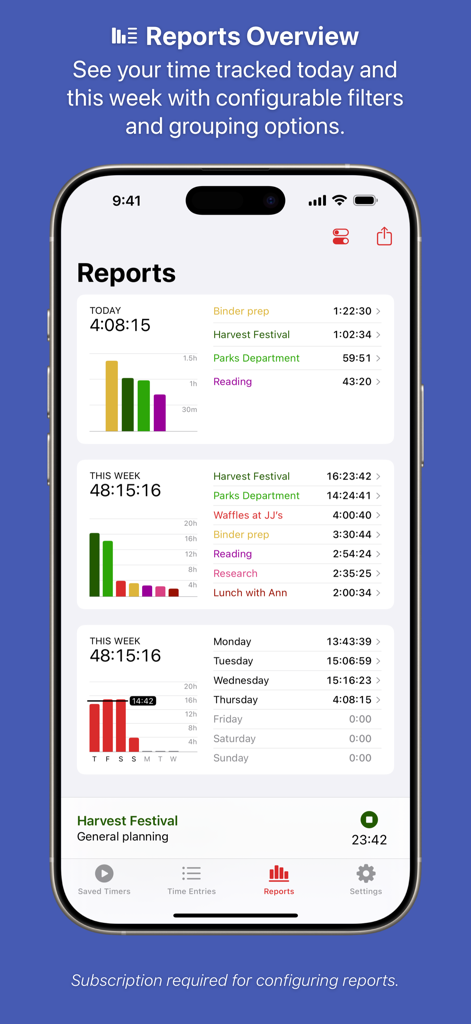
棒グラフとタスクリストを含む日次および週次の時間追跡レポートを表示するTimeryアプリのダッシュボード。

棒グラフとタスクリストを含む日次および週次の時間追跡レポートを表示するTimeryアプリのダッシュボード。

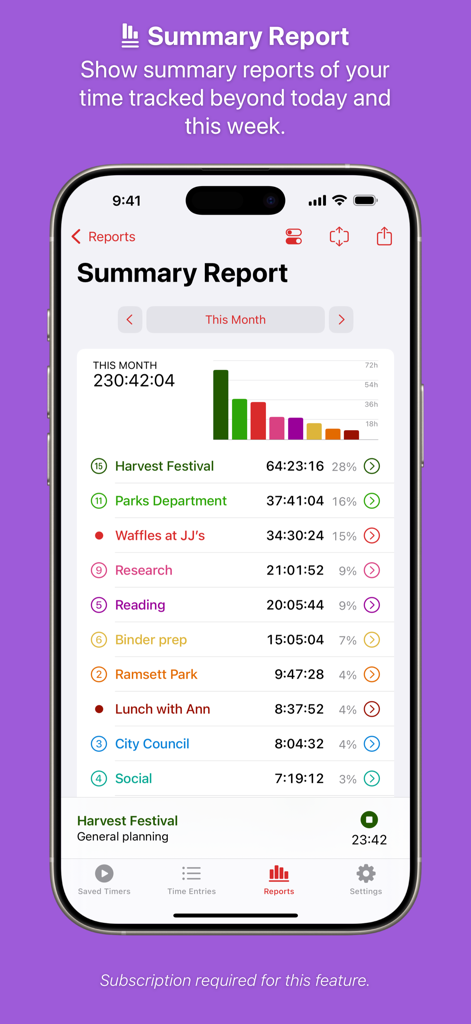
棒グラフとプロジェクトの内訳を含む月次時間追跡を示すTimeryアプリの概要レポート。

棒グラフとプロジェクトの内訳を含む月次時間追跡を示すTimeryアプリの概要レポート。

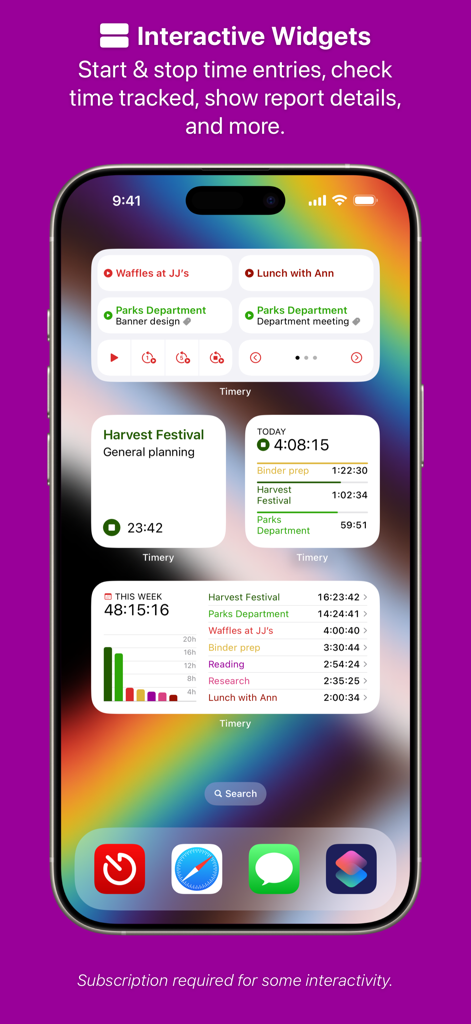
時間追跡と週次レポートの表示のためのいくつかのTimeryインタラクティブウィジェットを表示するiPhoneホーム画面。

時間追跡と週次レポートの表示のためのいくつかのTimeryインタラクティブウィジェットを表示するiPhoneホーム画面。

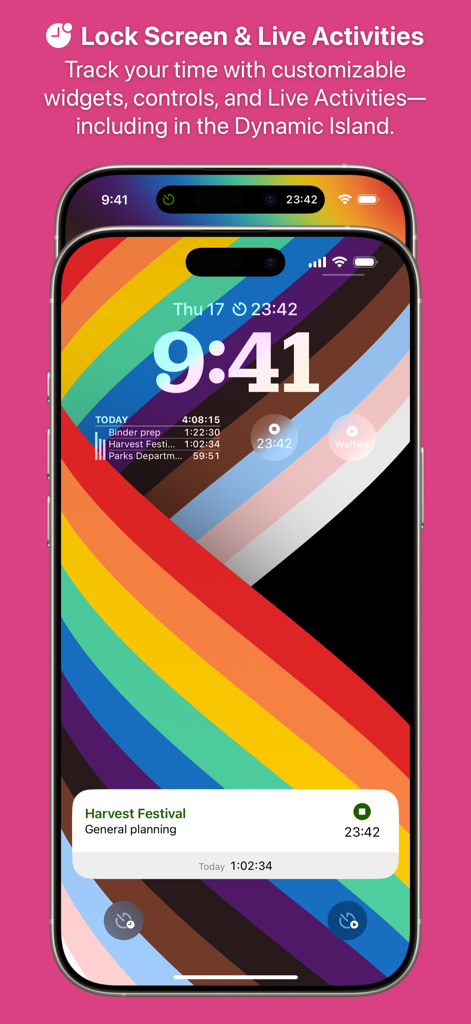
収穫祭プロジェクトの時間追跡ウィジェットとライブアクティビティ通知を表示するiPhoneロック画面上のTimeryアプリインターフェース。

収穫祭プロジェクトの時間追跡ウィジェットとライブアクティビティ通知を表示するiPhoneロック画面上のTimeryアプリインターフェース。

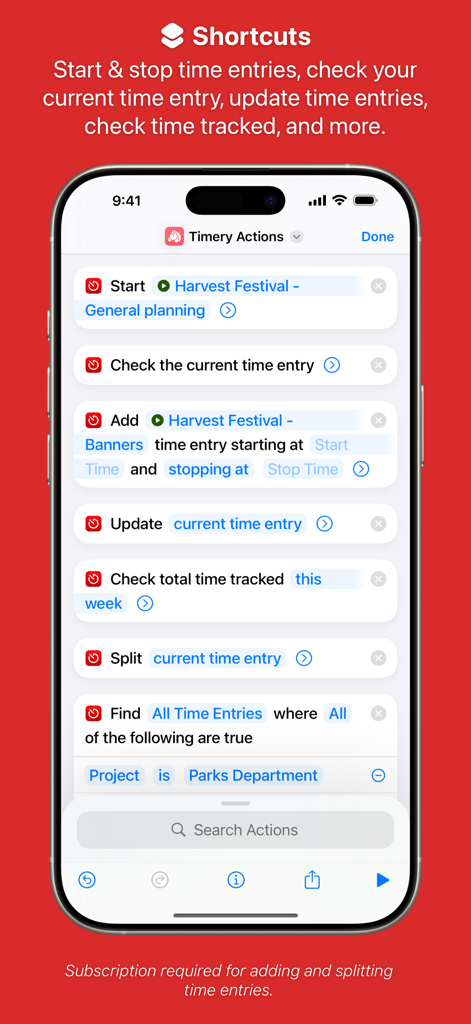
自動時間追跡のための様々なiOSショートカットアクションを示すTimeryアプリインターフェース。

自動時間追跡のための様々なiOSショートカットアクションを示すTimeryアプリインターフェース。

請求可能な時間を正確に管理

このアプリを際立たせるツール、 28K+ 人のユーザーが選択.

ワンタップ保存タイマー

ログ設定に時間を無駄にするのはやめましょう。プロジェクトごとにカスタマイズ可能な保存タイマーで、最も頻繁に使用するタスクを即座に開始できます。

📲

ライブアクティビティ統合

Dynamic Islandとロック画面のアップデートで、現在のセッションを一目で把握できます。アプリを開く必要はありません。

⚙️

強力なショートカットサポート

場所、集中モード、またはカスタムSiriコマンドに基づいてタイマーをトリガーし、ハンズフリーで時間を記録することで、ワークフローを自動化します。

アプリについて

について知っておくべきこと Timery: Time Tracker.

説明

Enhance your Toggl time-tracking experience with Timery! Start your most-used timers with one tap. Edit your time entries easily. See reports of your time tracked. With its apps, widgets, and Shortcuts actions, Timery brings you easy time tracking with Toggl. Timery works on iPhone, iPad, Mac, and Apple Watch with your free or paid Toggl Track account. It is made independently of Toggl. Timery’s features: Saved Timers Save your frequently used timers and quickly start them. Time Entries Edit recent time entries, start duplicates, and add new ones. Time Entry Suggestions Select from suggested saved timers & recent timers when starting or editing time entries. Split Time Entries Split one entry into two or three at specified times or durations. Reports See your time tracked today, this week, and beyond with filtering & grouping options. Export it too. Manage Projects & More Edit your Toggl projects & tags and add new ones. Interactive Widgets Start & stop time entries, check time tracked, show report details, and more. Live Activities Show your current time entry on the Lock Screen and in the Dynamic Island. Shortcuts Support Start & stop time entries, check your current time entry, update time entries, check time tracked, and more. Keyboard Shortcuts Start & stop time entries, edit the current time entry, navigate the app, and more. And more is planned. A few more notes: • Timery is a Toggl client and requires a Toggl Track account • Timery requires an internet connection to perform tasks • Saved timers & saved reports sync with iCloud to all your devices signed in with the same Apple ID Timery is free to use on a limited basis: save up to four timers, manage the four latest time entries today (the rest are read-only), and edit the current time entry. With a monthly or yearly subscription (which includes a two-week free trial), join the Timery Club and unlock all the app’s functionality. You’ll also be helping support the app & future development, and I greatly appreciate that! Happy time tracking! ——— Timery has been featured on MacStories, Cortex, Connected, AppStories, Upgrade, and The Sweet Setup. Federico Viticci, MacStories: “What sets Timery apart from other time tracking utilities is the unique combination of developer Hribar’s understanding of the needs of Toggl users and his embrace of modern iOS and iPadOS technologies. Timery isn’t just a more customizable Toggl client with advanced features […]; it’s also an exemplary iOS and iPadOS citizen that showcases what great iOS and iPad apps should offer.” Myke Hurley, Upgrade: “Timery is my favorite iOS app ever. I get such great use out of it, so it’s personal to me. Time tracking is a big part of my life. But this application—the amount of work that is put into this and new features is truly astounding. […] It’s really just a masterclass in long-term app development.” Mike Schmitz, The Sweet Setup: “Timery is hands down the best time tracking app for iOS. It gives you a functional user interface that is perfect for managing your timers and your time entries, the Shortcuts support is stellar, and the widgets eliminate much of the friction that typically comes from starting and stopping manual timers.” ——— Subscription Details: • Payment will be charged to your Apple ID account at the confirmation of purchase or after the free trial period if offered. • Your subscription will automatically renew unless it is canceled at least 24 hours before the end of the current period. Your account will be charged for renewal within 24 hours prior to the end of the current period. • You can manage and cancel your subscriptions by going to your account settings on the App Store after purchase. • Any unused portion of a free trial period will be forfeited when you purchase a subscription. • Privacy policy: https://timeryapp.com/privacy.html • Terms of Use: https://timeryapp.com/terms.html

最新バージョン

1.7.3

サイズ

245.7 MB

リリース日

2019年5月21日

わずかな手間なく時間をマスターする準備はできましたか?

Togglワークフローを向上させた何千人ものパワーユーザーやプロフェッショナルに加わりましょう。今すぐiPhone、iPad、Mac、Apple Watch全体でシームレスに時間を記録しましょう。

ダウンロード: App Store

App information, icons, screenshots, and descriptions displayed on this page are sourced from the Apple App Store and are the property of their respective developers. Download estimates and rankings are based on MWM's proprietary models and may not reflect actual figures. This page is provided for informational and analytical purposes only.

Believe this page infringes your intellectual property? File a dispute