Brother iPrint&Scan

Brother iPrint&Scan

다운로드: App Store다운로드: Google Play
로고: Brother iPrint&Scan

Brother iPrint&Scan: 간편한 무선 인쇄 및 스캔

모바일 장치에서 직접 문서를 인쇄하고, 클라우드로 스캔하고, 팩스를 보내세요. Brother 프린터를 위한 최고의 생산성 도구로 컴퓨터를 중간에서 제거하세요.

개발사

Brother Industries, LTD.

카테고리

Utilities

다운로드

16M+

사용자 평점

2.7/5

총 평가 수

16K+

지원 언어

21

움직이는 효율성

이 인터페이스를 사용하는 16M+ 명의 사용자.

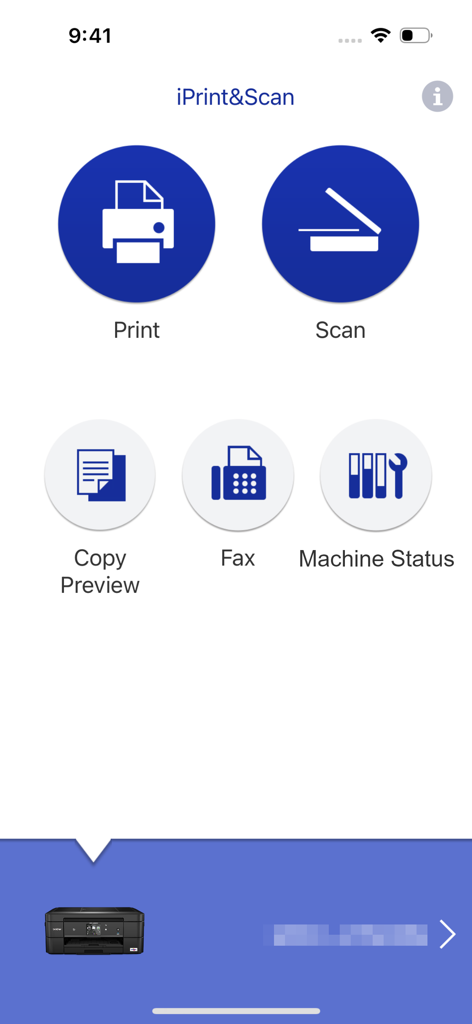
Brother iPrint 및 Scan 앱의 기본 인터페이스, 인쇄 및 스캔 옵션 포함

Brother iPrint 및 Scan 앱의 기본 인터페이스, 인쇄 및 스캔 옵션 포함

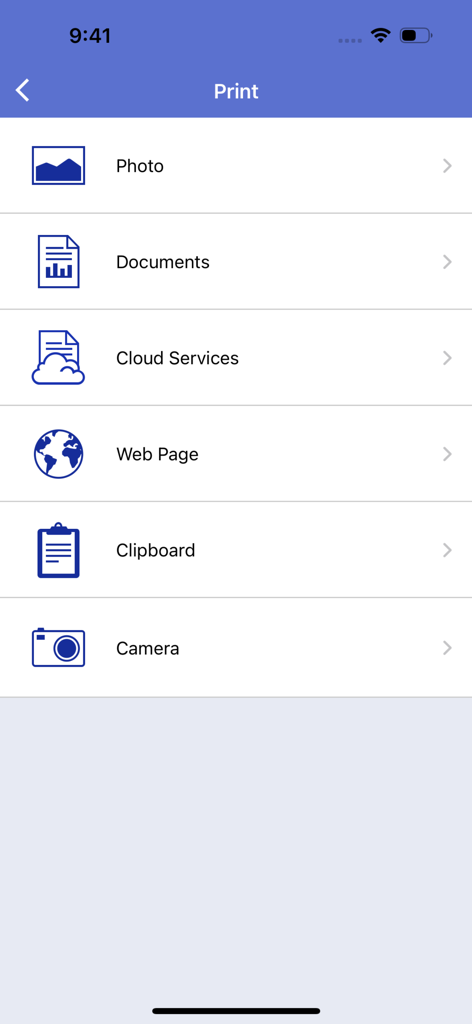
Brother iPrint 및 Scan 앱의 기본 인쇄 메뉴 화면, 사진, 문서, 클라우드 파일, 웹 페이지 등을 인쇄하는 옵션 표시

Brother iPrint 및 Scan 앱의 기본 인쇄 메뉴 화면, 사진, 문서, 클라우드 파일, 웹 페이지 등을 인쇄하는 옵션 표시

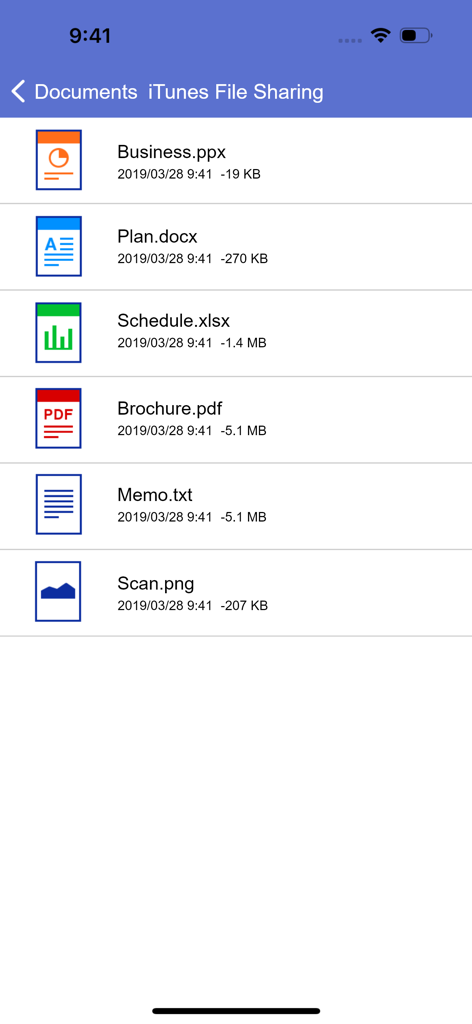
Brother iPrint 및 Scan 앱의 문서 목록, 모바일 인쇄를 위한 PDF, Word 및 Excel 파일 표시

Brother iPrint 및 Scan 앱의 문서 목록, 모바일 인쇄를 위한 PDF, Word 및 Excel 파일 표시

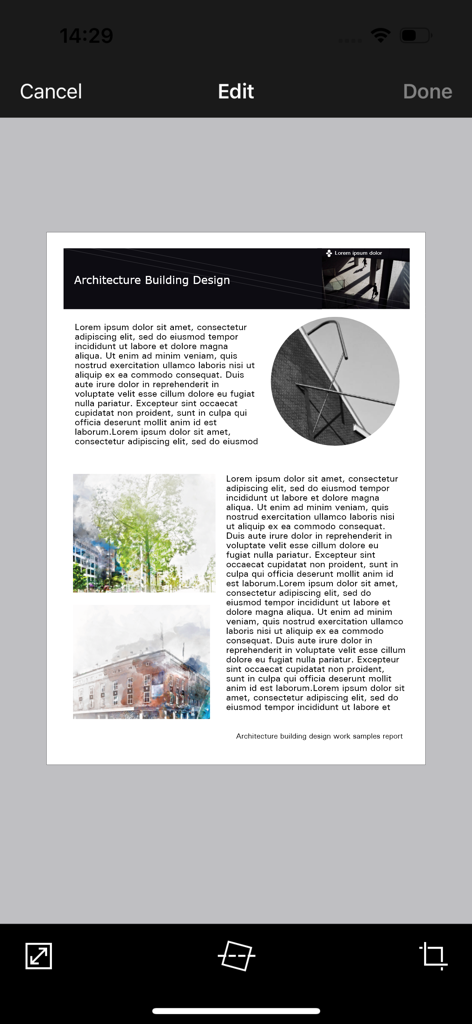
Brother iPrint 및 Scan 모바일 앱 인터페이스, 자르기 및 똑바로 펴기 도구를 사용하여 문서 편집 중인 모습 표시

Brother iPrint 및 Scan 모바일 앱 인터페이스, 자르기 및 똑바로 펴기 도구를 사용하여 문서 편집 중인 모습 표시

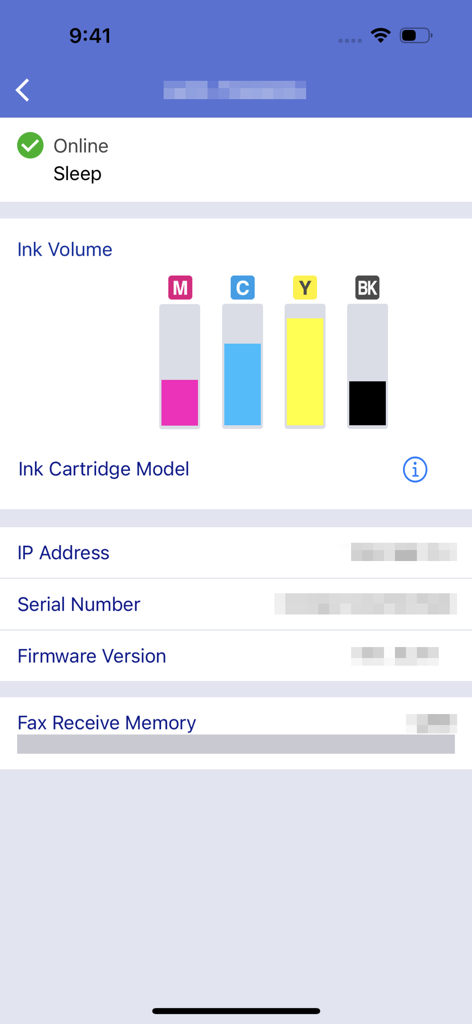
Brother iPrint 및 Scan 앱 인터페이스, 잉크 양 수준 및 기계 상태 표시

Brother iPrint 및 Scan 앱 인터페이스, 잉크 양 수준 및 기계 상태 표시

주머니 속에서 사무실을 마스터하세요

이 앱을 돋보이게 하는 도구, 16M+ 명의 사용자가 선택.

📲

원터치 클라우드 인쇄

iCloud, Dropbox 또는 OneDrive에서 계약서, 배송 라벨 및 문서를 몇 초 만에 직접 인쇄하세요.

📄

스마트 모바일 스캔

이동 중에 서류를 디지털화하세요. 휴대폰으로 직접 스캔하고, 선명도를 위해 편집하고, 컴퓨터 없이 PDF로 이메일을 보내세요.

📠

원격 팩스 및 유지 관리

다음 대규모 프로젝트를 항상 준비할 수 있도록 법적 팩스를 처리하고 잉크 잔량을 원격으로 모니터링하세요.

리뷰 분석

사용자 리뷰 인사이트.

감정 점수

31%
부정적

요약

The app receives mixed feedback, with users often praising its ease of use, simple setup, and effective wireless printing capabilities for various document and image types. Many find it convenient for printing remotely, even with older printers. However, a significant number of users report persistent connectivity issues, particularly following iOS updates (e.g., iOS 26), and general unreliability. Frustrations also stem from perceived missing features like comprehensive paper size options, consistent double-sided printing controls, and limitations in scanning functionality, alongside reports of app crashes and version-specific bugs on devices like iPhone 17.

주요 테마

Connectivity(4)
Ease of Use & Setup(3)
Wireless Printing(3)
Image Manipulation(2)
Paper Size Options(1)
iOS Compatibility & Bugs(1)

앱 소개

에 대해 알아야 할 모든 것 Brother iPrint&Scan.

설명

Brother iPrint&Scan is a free app that enables you to print from and scan to your iOS device (iPhone / iPod touch / iPad). Use your local wireless network to connect your iOS device to your Brother printer or all-in-one. Some new advanced functions have been added, including edit, fax send, fax preview, copy preview, and machine status. Visit your local Brother website for a list of supported models. [Key Features] - Easy to use menu. - Simple steps to print your favorite photos, web pages and documents (PDF, Word, Excel®, PowerPoint®, Text). - Print photos directly from your iPhone camera. - Print PDF files or Microsoft® Office documents or Text files by starting the app from "Open in..." - Print your documents and photos directly from the following cloud services: Dropbox™, OneDrive, Evernote®. - Print what you copied to the clipboard. - Use iTunes File Sharing to send compatible files (PDF, Word, Excel®, PowerPoint®, Text, JPEG, PNG, TIFF) to iPrint&Scan for convenient printing at a later time. - Scan directly to your iPhone/iPod touch/iPad. - Save scanned images to your photo album, iCloud or Facebook / X / Flickr accounts or send them in an E-mail (PDF, JPEG). - Print scanned images saved to iCloud from this app. - Automatically search for supported devices on a local wireless network. - No computer and no driver required. *To save scanned images directly to Facebook / X / Flickr, you must first register your accounts on your mobile device. [Advanced Functions] (Only available on new models.) - Edit previewed images using the editing tools (scale, straighten, crop) if necessary. - Send a fax directly from your mobile device. (This app feature requires access to the address book of your mobile device.) - View received faxes stored on your machine on your mobile device. - The copy preview function enables you to preview an image and edit it if necessary before copying to avoid copy errors. - View the machine’s status such as ink/toner volume and error messages on your mobile device. *Compatible functions will depend on the selected device. [Compatible Print Settings] - Paper Size - 4" x 6" (10 x 15cm) Photo L (3.5" x 5" / 9 x 13 cm) Photo 2L (5" x 7" / 13 x 18 cm) A4 Letter Legal A3 Ledger - Media Type - Glossy Paper Plain Paper - Copies - Up to 5 [Compatible Scan Settings] - Document Size - A4 Letter 4" x 6" (10 x 15cm) Photo L (3.5" x 5" / 9 x 13 cm) Card (2.4" x 3.5" / 60 x 90 mm) Legal A3 Ledger - Scan Type - Color Color (Fast) Black & White [Access Permission Information] You must check and allow the essential access permissions below to use Brother iPrint&Scan service. Essential Permission • Contact information: access to your contact numbers is needed when you use functions like fax, but you can limit access to the specific contact necessary for the service. Optional Permission • Location information: It is requested only when you use device search features like Wi-Fi Direct, Bluetooth, or NFC. Optional data is required to use the corresponding function, and even if permission is not granted, services other than the corresponding function can be used. *Compatible settings will depend on the selected device and function. *Evernote is a trademark of Evernote Corporation and used under a license. *Microsoft, Excel, and PowerPoint are either registered trademarks or trademarks of Microsoft Corporation in the United States and/or other countries. *To help us improve the application, send your feedback to Feedback-mobile-apps-ps@brother.com. Please note that we may not be able to respond to individual emails.

최신 버전

6.15.4

크기

37.4 MB

출시일

2010년 7월 29일

어디서든 Brother 프린터를 완벽하게 제어하세요

컴퓨터를 버린 1,600만 명 이상의 전문가 및 가족과 함께하세요. 완벽한 모바일 우선 워크플로우를 위해 휴대폰에서 직접 문서를 인쇄하고, 클라우드로 스캔하고, 팩스를 보내세요.

다운로드: App Store다운로드: Google Play
FAQ

자주 묻는 질문

에 대해 알아야 할 모든 것 Brother iPrint&Scan

Brother iPrint&Scan이란 무엇인가요?

Brother iPrint&Scan은 사용자가 iOS 기기에서 인쇄하고 스캔할 수 있도록 해주는 무료 애플리케이션입니다. 호환되는 Brother 프린터 및 복합기와 로컬 무선 네트워크를 통해 연결됩니다.

Brother iPrint&Scan으로 문서를 인쇄하려면 어떻게 해야 하나요?

네, Brother iPrint&Scan을 사용하면 사진, 웹 페이지 및 PDF, Word, Excel, PowerPoint, 텍스트 파일과 같은 문서를 인쇄할 수 있습니다. 사용자는 Dropbox와 같은 클라우드 서비스에서도 인쇄할 수 있습니다.

Brother iPrint&Scan으로 iOS 기기에 이미지를 스캔할 수 있나요?

네, Brother iPrint&Scan을 사용하면 iPhone, iPod touch 또는 iPad로 직접 스캔할 수 있습니다. 스캔한 이미지는 사진 앨범, iCloud에 저장하거나 이메일, Facebook, X 또는 Flickr 계정을 통해 공유할 수 있습니다.

Brother iPrint&Scan이 클라우드 인쇄를 지원하나요?

네, Brother iPrint&Scan은 클라우드 서비스에서 직접 문서 및 사진을 인쇄하는 것을 지원합니다. 호환되는 서비스에는 Dropbox, OneDrive 및 Evernote가 포함됩니다.

iTunes 파일 공유를 통해 인쇄할 때 Brother iPrint&Scan과 호환되는 파일 형식은 무엇인가요?

Brother iPrint&Scan은 iTunes 파일 공유를 통해 인쇄할 때 PDF, Word, Excel, PowerPoint, 텍스트, JPEG, PNG 및 TIFF와 같은 호환 파일을 지원합니다.

iPrint&Scan으로 Brother 프린터의 상태를 확인할 수 있나요?

네, Brother iPrint&Scan을 사용하면 사용자는 모바일 기기에서 직접 잉크 또는 토너 잔량 및 오류 메시지를 포함한 기기 상태를 볼 수 있습니다.

Brother iPrint&Scan 앱은 무료로 다운로드하여 사용할 수 있나요?

네, Brother iPrint&Scan은 무료 애플리케이션입니다. 비용 없이 iOS 기기에서 인쇄하고 스캔할 수 있습니다.

Brother iPrint&Scan을 사용하려면 컴퓨터나 드라이버가 필요한가요?

아니요, Brother iPrint&Scan은 작동을 위해 컴퓨터나 드라이버가 필요하지 않습니다. 로컬 무선 네트워크를 통해 호환되는 Brother 기기에 직접 연결됩니다.

Brother iPrint&Scan 모바일 앱으로 팩스를 보낼 수 있나요?

네, 사용자는 Brother iPrint&Scan을 사용하여 모바일 기기에서 직접 팩스를 보낼 수 있습니다. 이 기능은 새 모델에서 사용할 수 있으며 기기 주소록에 대한 액세스가 필요합니다.

Brother iPrint&Scan에는 어떤 고급 편집 기능이 있나요?

Brother iPrint&Scan은 미리 본 이미지에 대한 고급 편집 도구를 제공합니다. 사용자는 필요에 따라 이미지를 축소, 직선화 및 자르기하여 인쇄 또는 복사 전에 최적의 출력을 보장할 수 있습니다.

Brother iPrint&Scan은 어떤 액세스 권한을 요청하나요?

Brother iPrint&Scan은 팩스 기능을 위한 필수 연락처 정보 액세스와 Wi-Fi Direct 또는 Bluetooth와 같은 기기 검색 기능을 위한 선택적 위치 정보 액세스를 요청합니다.

Brother iPrint&Scan은 Brother 프린터에 어떻게 연결되나요?

Brother iPrint&Scan은 로컬 무선 네트워크를 사용하여 Brother 프린터 또는 복합 기기에 연결됩니다. 앱은 네트워크에서 지원되는 기기를 자동으로 검색합니다.

App information, icons, screenshots, and descriptions displayed on this page are sourced from the Apple App Store and are the property of their respective developers. Download estimates and rankings are based on MWM's proprietary models and may not reflect actual figures. This page is provided for informational and analytical purposes only.

Believe this page infringes your intellectual property? File a dispute