
이 페이지는 앱이나 개발자의 공식 페이지가 아니며, 정보 제공 및 논평을 목적으로 작성된 독립 편집 간행물입니다. 명시적으로 달리 언급되지 않는 한, 해당 앱이나 개발자는 MWM, Apple, Google Play, 앱 퍼블리셔 또는 앱 개발자와 제휴, 보증, 후원, 승인 또는 공식적으로 연결되어 있지 않으며, 이 페이지의 어떤 내용도 해당 앱이 MWM의 서비스를 사용하여 개발되었음을 의미하지 않습니다. 모든 상표, 로고, 스크린샷 및 기타 콘텐츠는 해당 소유자의 자산입니다.


HP
복잡한 기기 관리의 종말. 이 앱은 당신의 모든 HP 기기에 대한 절대적 명령권을 부여합니다.
다운로드
100M+사용자 평점
총 평가 수
12.0M개발사
카테고리
Productivity지원 언어
29최신 버전
26.0.0크기
403.8 MB출시일
2011년 10월 19일HP 앱 주요 기능 분석
HP 기기 사용자를 위한 필수 통합 솔루션 평가
쉬운 기기 설정
이 앱은 HP 기기를 처음 사용하는 사용자가 간편하게 설정을 완료할 수 있도록 단계별 안내를 제공하여, 사용자가 빠르고 쉽게 기기를 사용할 수 있도록 돕습니다.
통합 기기 관리
이 도구는 사용자가 잉크 잔량 확인 및 기기 설정 조정과 같은 중요한 기능을 포함하여 여러 HP 기기를 한곳에서 편리하게 관리할 수 있도록 지원합니다.
간편한 문서 인쇄
이 앱은 사용자가 집이나 사무실 어디에서든 다양한 문서를 쉽고 빠르게 인쇄할 수 있는 기능을 제공하여, 인쇄 작업을 효율적으로 처리하게 합니다.
효율적인 문서 스캔
이 앱은 영수증이나 중요한 문서를 몇 초 만에 스캔하고, 스캔한 파일을 이메일로 바로 보내는 등 간편하게 디지털화할 수 있는 기능을 갖추고 있습니다.
소모품 모니터링 및 주문
이 도구는 프린터의 잉크 또는 용지가 부족할 때 사용자에게 알림을 제공하고, 간편하게 소모품을 재주문할 수 있도록 지원하여 인쇄 중단을 방지합니다.
즉각적인 기술 지원
이 앱은 사용자가 문제가 발생했을 때 전화, 라이브 채팅 또는 앱 내에서 직접 답변을 찾아 신속하게 지원을 받을 수 있도록 하여 사용자 편의성을 높입니다.
고급 스캔 기능
이 도구는 이미지 자동 보정, 파일 이름 지정, 여러 페이지 동시 스캔 및 텍스트 추출과 같은 고급 기능을 통해 스캔 효율성과 품질을 향상시킵니다.
창의적인 콘텐츠 접근 (HP Printables)
이 앱은 다양한 카드, 컬러링 페이지, 교육용 자료 등 HP Printables를 통해 사용자가 창의적인 콘텐츠에 접근하고 인쇄할 수 있도록 하여, 활용 범위를 넓혀줍니다.
자주 묻는 질문
에 대해 알아야 할 모든 것 HP
What is the HP app?
The HP app is a central application for managing HP devices. It allows users to set up printers, personalize experiences, print, scan, and access support all in one place. It was formerly known as HP Smart.
Can I manage multiple HP devices with the HP app?
Yes, the HP app allows users to manage multiple HP devices. It displays various connected HP products, such as printers, laptops, docks, and pens, all within a single interface.
How do I set up a new HP printer using the HP app?
The HP app provides a guided setup process for new HP devices. This process involves steps like finding the printer and configuring it to connect to a Wi-Fi network.
What printing functions does the HP app offer?
The HP app allows users to print documents and images directly from their mobile device. It includes options to select a printer, specify the number of copies, and adjust paper size before printing.
Can the HP app scan documents?
Yes, the HP app includes scanning capabilities. Users can scan documents, preview them, and then choose to print, share, save, or even use mobile fax directly from the app.
Does the HP app provide support for HP devices?
Yes, the HP app offers various support options. Users can access a Virtual Assistant, view manuals, find repair centers, initiate repair orders, and contact support via chat or phone.
Can I check my HP printer's ink levels with the HP app?
Yes, the HP app allows users to stay on top of essentials like checking ink levels for their connected HP printers. It also provides notifications for low ink.
Does the HP app allow me to order HP products?
Yes, the HP app provides recommendations for HP products and allows users to shop for items like ink and photo paper. It notifies users when ink or paper is low.
What are HP Printables in the HP app?
HP Printables unlock creative content within the HP app. They include cards, coloring pages, educational worksheets, and fun crafts projects designed for personal use.
Are there any charges for using the HP app?
The HP app is available for download, but HP reserves the right to introduce charges for the use of select HP app functionality. Some features may require an HP account.
What devices support the HP app?
The HP app is available for download on macOS devices, iOS mobile phones, and iPads. It requires an internet connection for full functionality.
What is required to activate HP+ benefits within the HP app?
To activate HP+ benefits, users must choose HP+ at setup. This requires an HP account, an ongoing internet connection, and the exclusive use of Original HP ink for the printer's lifetime.
다음 스크린샷과 설명은 앱의 공식 스토어 목록에서 직접 가져온 것이며 앱 개발자의 자산입니다.
앱 스토어
스크린샷
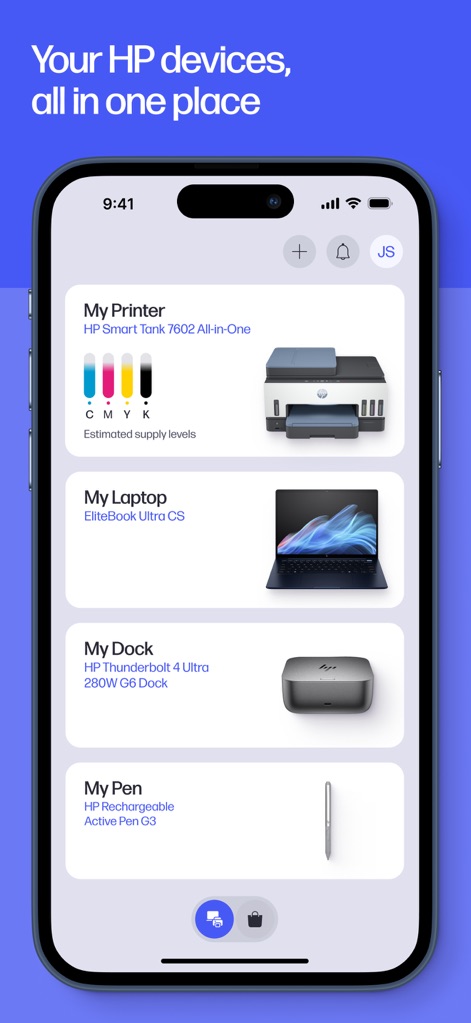
모든 기기 통합 관리
이 앱은 사용자가 등록된 여러 HP 기기 목록을 한눈에 확인하고, 프린터의 잉크 잔량 표시와 같은 핵심 정보를 직관적으로 파악할 수 있도록 돕습니다.
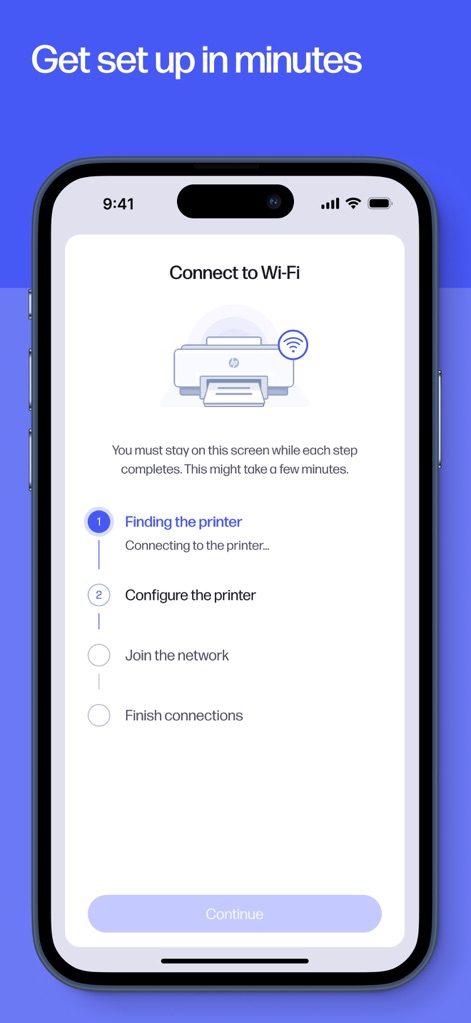
간편한 기기 설정
사용자는 Wi-Fi 연결 안내와 함께 단계별 프린터 설정 가이드를 따라가며 새로운 HP 기기를 쉽고 빠르게 시작할 수 있습니다.
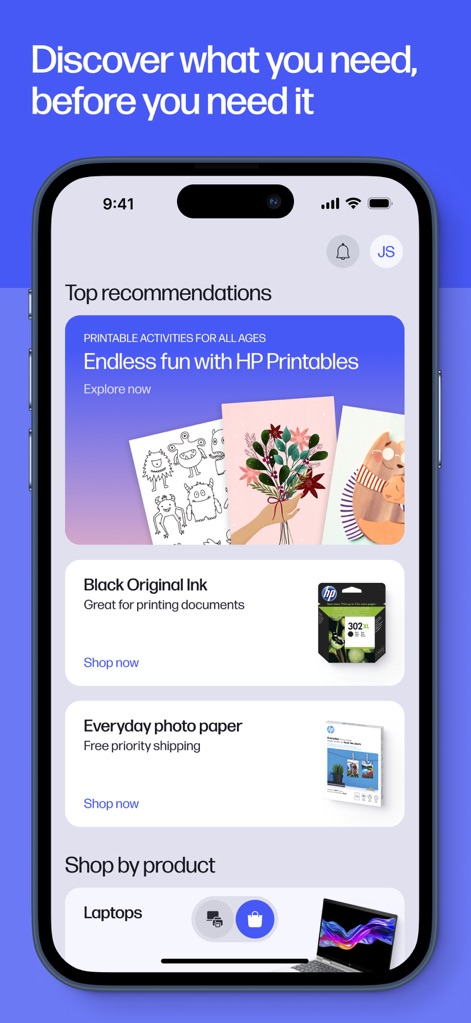
맞춤형 추천과 구매
이 앱은 HP 프린터블(Printables) 추천 콘텐츠를 제공하여 창의력을 발휘하게 하며, 잉크 및 용지 등 소모품 구매 제안으로 필요한 것을 미리 준비할 수 있도록 돕습니다.
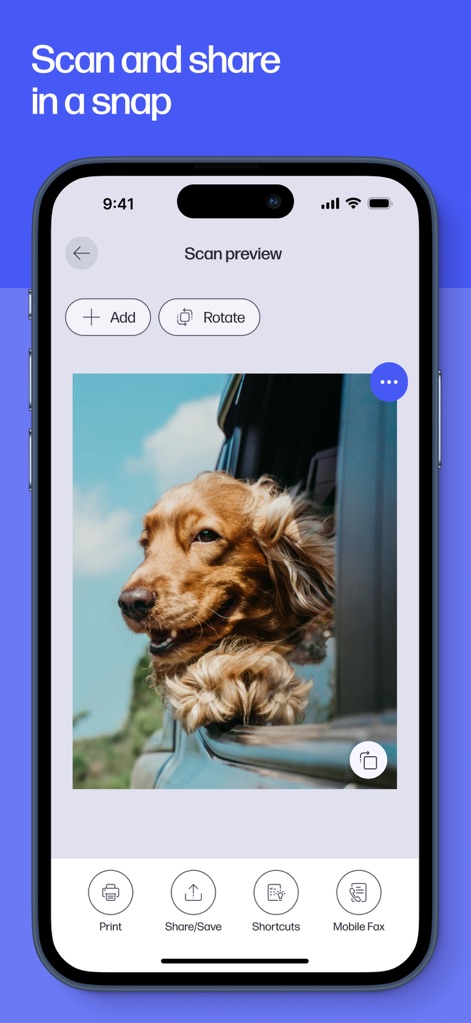
빠르고 쉬운 스캔
사용자는 스캔 미리보기 화면을 통해 이미지나 문서를 확인하고, 인쇄, 공유 및 인쇄 옵션을 활용하여 작업을 손쉽게 처리할 수 있습니다.
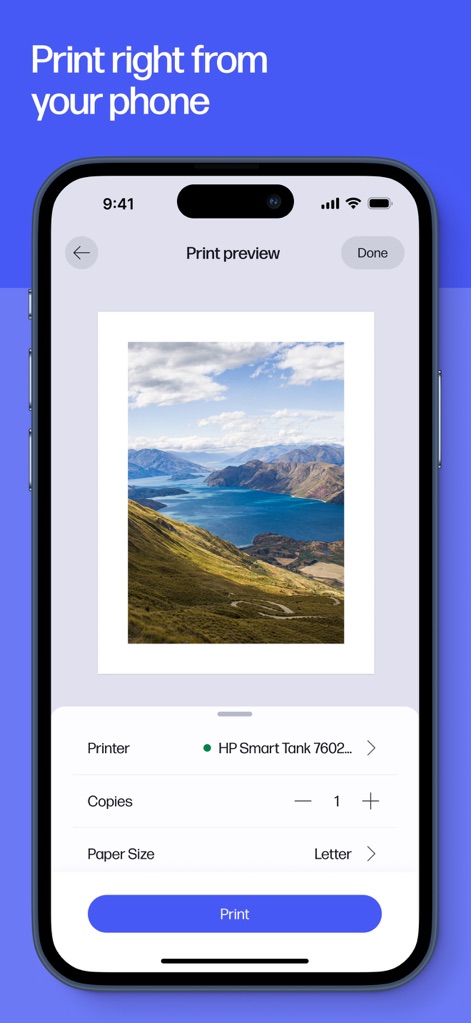
휴대폰에서 즉시 인쇄
이 앱은 인쇄 미리보기 화면을 통해 최종 결과물을 확인하고, 프린터 선택 및 복사 매수 조절과 같은 세부 인쇄 설정을 간편하게 조절할 수 있습니다.
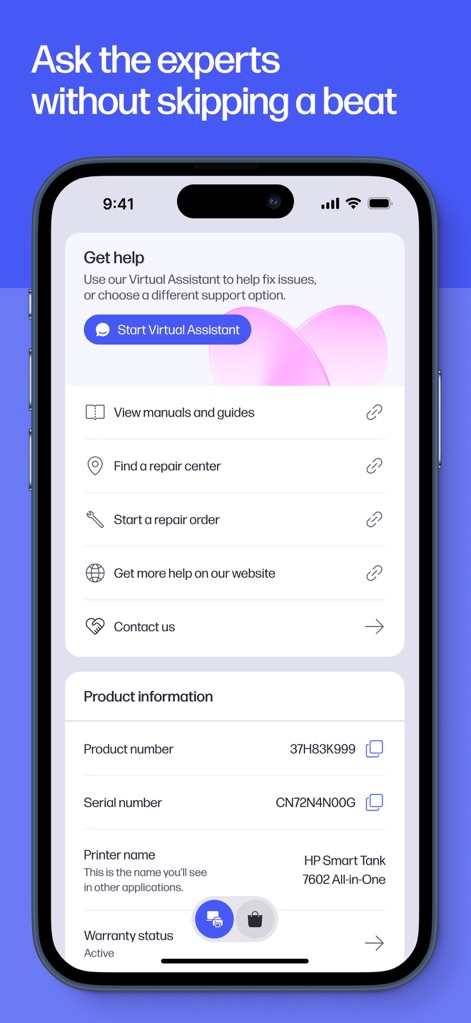
전문가 지원 접근
사용자는 가상 지원 시작 버튼을 통해 전문가의 도움을 받거나, 제품 정보 및 보증 상태 확인을 통해 기기 상태를 정확히 파악할 수 있습니다.
설명
Download
비슷한 앱
유사한 기능과 사용자 경험을 가진 앱

Docuslice - Poster Printing
Jeremiah Lachica

Printer Pro: Smart Printer App
Ivan Spyrydonov

Canon PRINT
Canon Inc.

Epson Smart Panel
Seiko Epson Corporation

Brother Mobile Connect
Brother Industries, LTD.

Epson iPrint
Seiko Epson Corporation

Printer App: Smart Print
Netpeak EOOD

Smart Printer App: iPrint
AppFusion OU

小白学习打印-手机打印,教辅试卷错题整理
Nanjing White Box Information Technology Co., Ltd
이 페이지는 앱이나 개발자의 공식 페이지가 아니며, 정보 제공 및 논평을 목적으로 작성된 독립 편집 간행물입니다. 명시적으로 달리 언급되지 않는 한, 해당 앱이나 개발자는 MWM, Apple, Google Play, 앱 퍼블리셔 또는 앱 개발자와 제휴, 보증, 후원, 승인 또는 공식적으로 연결되어 있지 않으며, 이 페이지의 어떤 내용도 해당 앱이 MWM의 서비스를 사용하여 개발되었음을 의미하지 않습니다. 모든 상표, 로고, 스크린샷 및 기타 콘텐츠는 해당 소유자의 자산입니다.