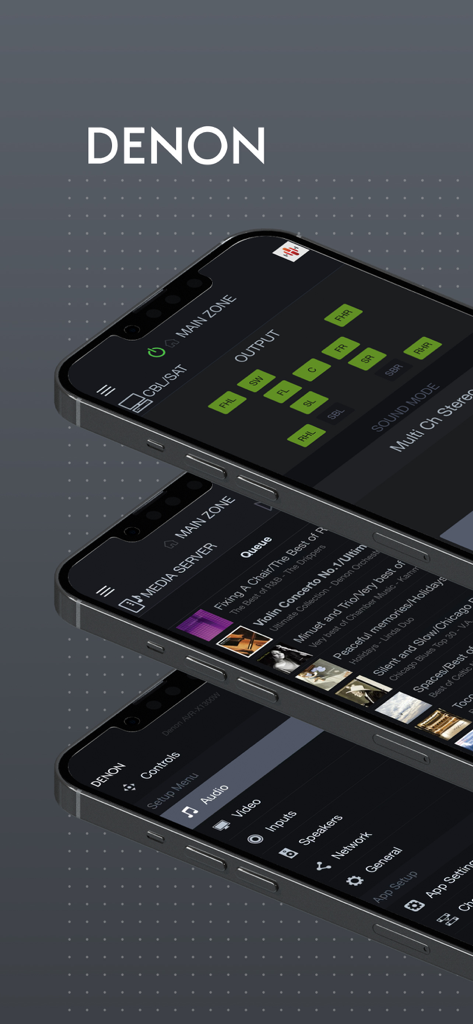
Denon AVR 리모컨 앱 인터페이스를 표시하는 세 대의 iPhone (스피커 채널 출력, 음악 큐, 시스템 설정 메뉴 포함)
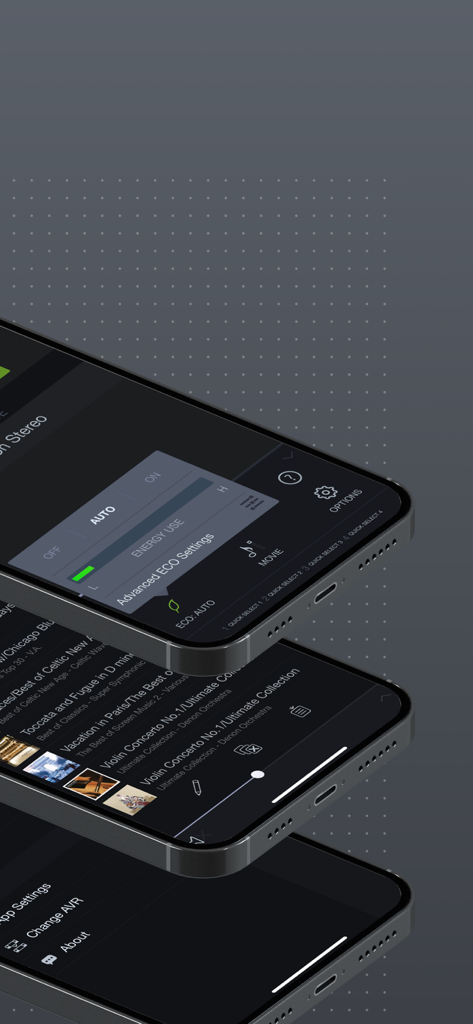
Denon AVR 리모컨 앱의 다른 화면 (ECO 설정 및 음악 라이브러리 포함)을 표시하는 세 대의 iPhone 스택
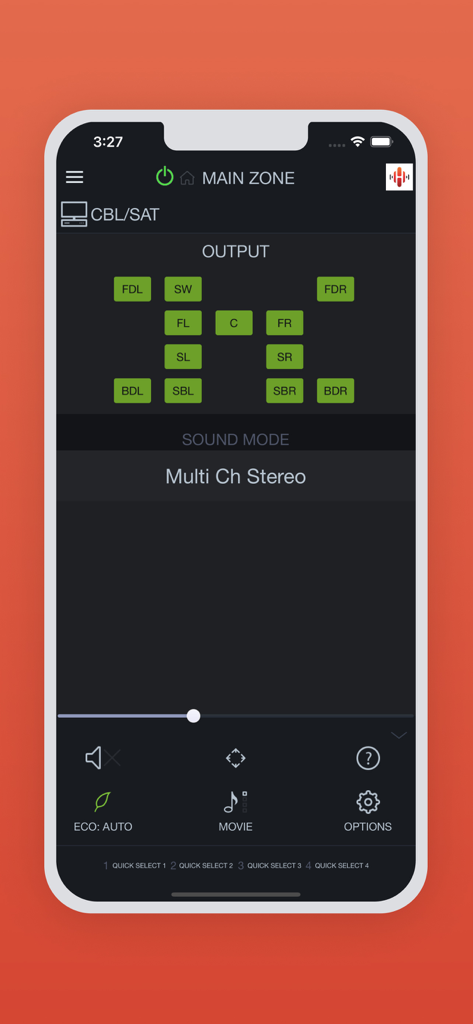
Denon AVR 리모컨 앱 스피커 설정 및 사운드 모드를 표시하는 스마트폰 화면
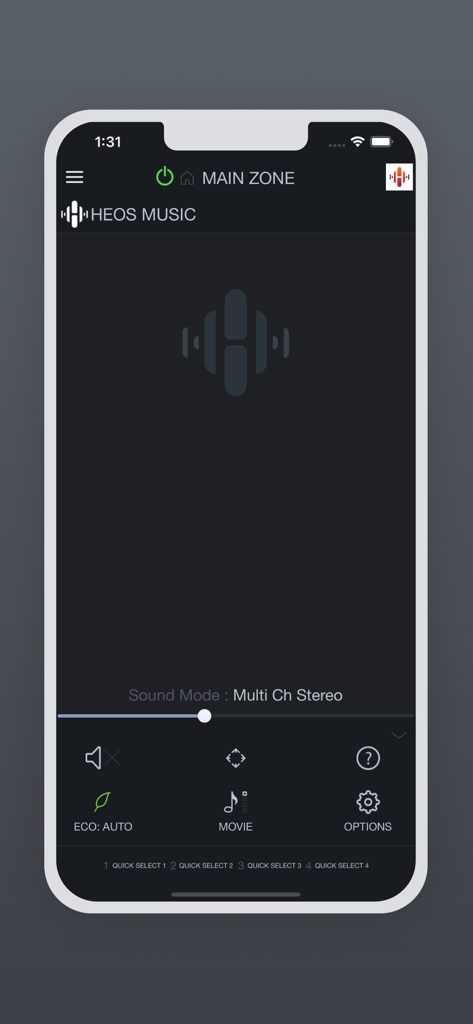
HEOS 음악 및 오디오 제어를 표시하는 Denon AVR 리모컨 앱 화면
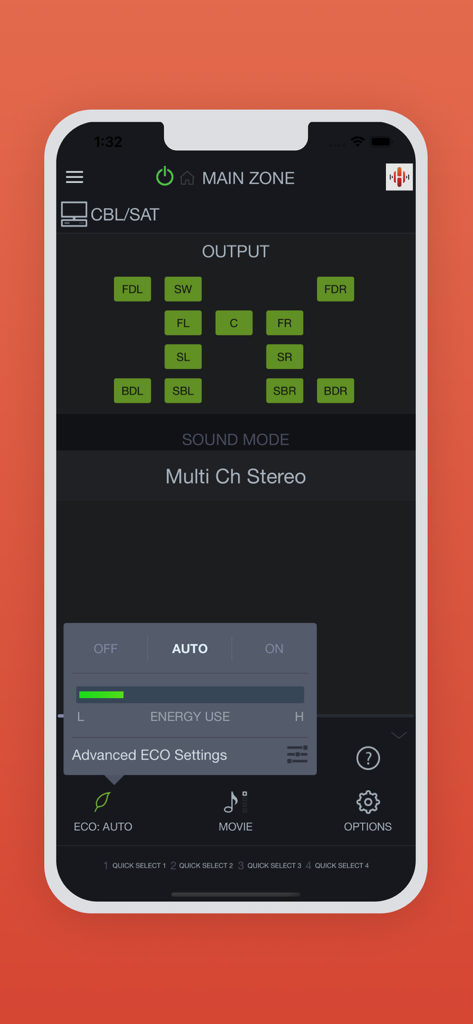
스피커 출력 레이아웃과 ECO 모드 설정을 보여주는 Denon AVR 리모컨 앱 인터페이스
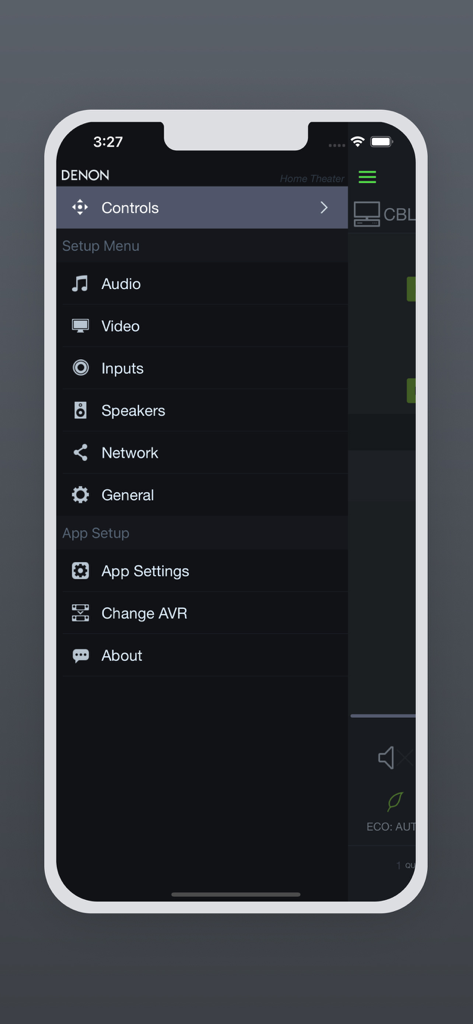
다양한 시스템 및 오디오 설정을 보여주는 Denon AVR 리모컨 앱의 측면 탐색 메뉴
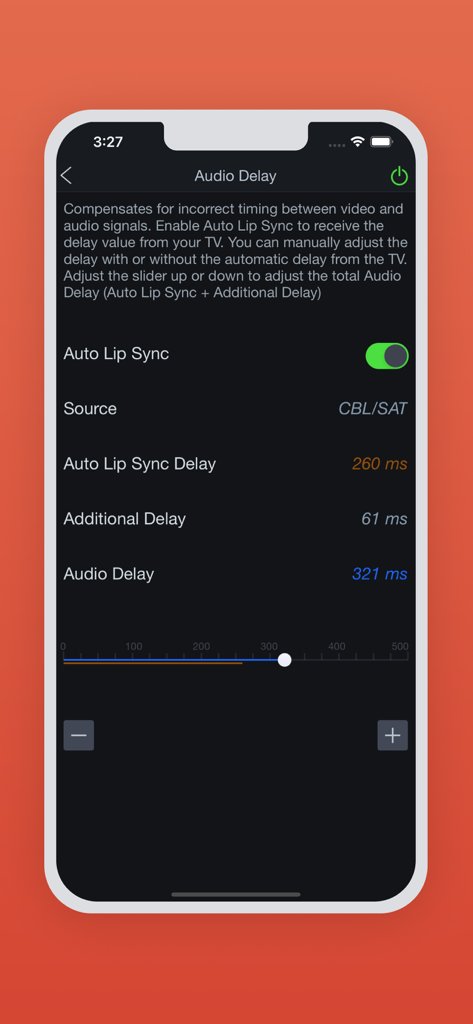
Denon AVR 리모컨 앱 오디오 지연 및 립싱크 조정 설정 화면
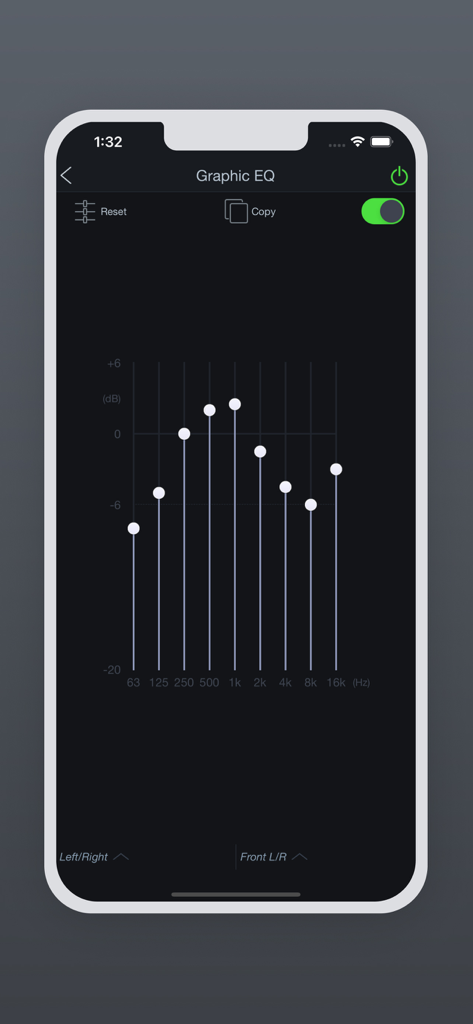
Denon AVR 리모컨 앱의 그래픽 이퀄라이저 인터페이스
홈 시네마 완벽 제어
이 앱을 돋보이게 하는 도구, 1M+ 명의 사용자가 선택.
🎚️
정밀한 사운드 튜닝
자리에 앉아서 화면을 방해하지 않고 채널 레벨과 서브우퍼 설정을 즉시 미세 조정하세요.
🏠
멀티존 마스터
하나의 인터페이스에서 각기 다른 방의 HEOS 존과 입력을 관리하여 집 전체의 오디오를 제어하세요.
📱
스마트 무선 제어
집안 어디에서든 Wi-Fi를 통해 전원, 볼륨, 입력 선택을 원활하게 제어하여 리모컨을 교체하세요.
리뷰 분석
사용자 리뷰 인사이트.
감정 점수
26%
부정적
요약
General feedback for the app is overwhelmingly negative, with users citing frequent crashes, particularly after updating to iOS 26 or recent app versions like 3.12.1. Many struggle with unreliable device detection and connectivity to their Denon AVRs, often requiring network troubleshooting or device resets. Users also express frustration with the app's sluggish performance, outdated interface, and the removal or malfunction of key features like internet radio and web-based speaker settings. While some users appreciate its use for firmware updates or find recent updates (like version 3.12.3) have improved stability, the overall consensus is that the app significantly underperforms for a premium brand.
주요 테마
App Stability(3)
Update Issues & Compatibility(3)
Device Connectivity(2)
Core Functionality & Features(2)
Usability & Performance(1)
앱 소개
에 대해 알아야 할 모든 것 Denon AVR Remote.
설명
This app for iPhone and iPad will give you an unprecedented level of command and control over your 2014 or later model year network ready Denon AV Receivers (due to hardware differences, older models are not supported with this app. Please check the model compatibility list below; if your model is not listed, please download our previous “Denon Remote App”). Along with many new features, the graphics and user interface have been completely overhauled.
Control the basic functions of your Denon product with power, volume, input and settings.
Network browsing is either done within the Denon AVR Remote app or depending on model by selecting HEOS network as input which opens the HEOS app automatically.
With the Denon AVR Remote, your iOS device just became an integral part of your home entertainment experience.
Compatible Denon Models (*1, *2)
2024 New Models
Network AV Receiver: AVR-A10H, AVR-X6800H
2023 Models
Network AV Receiver: AVR-X1800H, AVR-S770H, AVR-S670H, DRA-900H
2022 Models
Network AV Receiver: AVR-A1H, AVR-X4800H, AVR-X3800H, AVR-X2800H, AVR-S970H
2021 Models
Network AV Receiver: AVR-X8500HA, AVR-X1700H, AVR-S760H, AVR-S660H
2020 Models
Network AV Receiver: AVR-A110, AVR-X6700H, AVR-X4700H, AVR-X3700H, AVR-X2700H, AVR-S960H
2019 Models
Network AV Receiver: AVR-X3600H, AVR-X2600H, AVR-X1600H, AVR-S950H, AVR-S750H, AVR-S650H, DRA-800H
2018 Models
Network AV Receiver: AVR-X6500H, AVR-X4500H, AVR-X3500H, AVR-X2500H, AVR-X1500H, AVR-S940H, AVR-S740H, AVR-S640H
2017 Models
Network AV Receiver: AVR-X8500H, AVR-X6400H, AVR-X4400H, AVR-X3400H, AVR-X2400H, AVR-X1400H, AVR-S930H, AVR-S730H
2016 Models
Network AV Receiver: AVR-X6300H, AVR-X4300H, AVR-X3300W, AVR-X2300W, AVR-X1300W, AVR-S920W, AVR-S720W
2015 Models:
Network AV Receiver: AVR-X6200W, AVR-X4200W, AVR-X3200W, AVR-X2200W, AVR-X1200W, AVR-S910W, AVR-S710W
2014 Models:
Network AV Receiver: AVR-X7200W, AVR-X7200WA
*Not compatible with Denon models other than the above models.
Main feature:
•On the fly HEOS app switching for network browsing and control for HEOS built-in AVRs
•ECO Mode setting
•Option settings (Sleep Tone, Channel Level etc.) and Selected Setup Features
•Viewing User manuals
•Multi-Language Support (English, French, German, Spanish, Dutch, Italian, Swedish, Japanese, Simplified Chinese, Russian and Polish.) (*3)
Notes:
*1: A firmware update for your Denon product is may be needed, please update the firmware via the system setup menu. (General > Firmware) If the App doesn't work well, please try to reboot your mobile device, unplug the power cord of the main unit and reinsert into the power outlet or check your home network.
*2: Please set "Network Control" to "ON" in your product via the system setup menu to use this app. (Network > Network Control)
*3: The OS language setting is automatically detected; when not available, English is selected.
최신 버전
3.12.5
크기
69.0 MB
출시일
2016년 1월 28일
홈 시어터 완벽 제어
100만 명 이상의 오디오 애호가와 함께 Denon 경험을 미세 조정하세요. iPhone 또는 iPad에서 직접 전원, 볼륨, 멀티룸 HEOS 존을 정밀하게 제어할 수 있습니다.
FAQ
자주 묻는 질문
에 대해 알아야 할 모든 것 Denon AVR Remote
Denon AVR Remote 앱은 무엇인가요?
Denon AVR Remote 앱은 2014년 또는 그 이후 모델의 네트워크 지원 Denon AV 리시버를 iPhone 또는 iPad를 사용하여 명령하고 제어할 수 있게 해줍니다. 향상된 그래픽과 사용자 인터페이스를 제공합니다.
어떤 Denon AV 리시버 모델이 Denon AVR Remote 앱과 호환되나요?
Denon AVR Remote 앱은 2014년 또는 그 이후 모델의 네트워크 지원 Denon AV 리시버와 호환되며, 앱 설명에 나열된 특정 AVR-A, AVR-X, AVR-S 및 DRA 시리즈 모델을 포함합니다.
Denon AVR Remote 앱으로 AV 리시버의 기본 기능을 제어할 수 있나요?
네, Denon AVR Remote 앱은 전원, 볼륨, 입력 선택 및 다양한 설정을 포함하여 Denon 제품의 기본 기능을 제어합니다.
Denon AVR Remote 앱이 HEOS 네트워크 브라우징을 지원하나요?
네, Denon AVR Remote 앱은 네트워크 브라우징을 지원합니다. 사용자는 앱 내에서 브라우즈하거나 HEOS 네트워크를 입력으로 선택하여 HEOS 앱을 자동으로 열 수 있습니다.
Denon AVR Remote 앱을 위해 네트워크 제어를 어떻게 활성화하나요?
Denon AVR Remote 앱을 사용하려면 Denon 제품의 시스템 설정 메뉴에서 "네트워크 제어"를 "켬"으로 설정하십시오. 네트워크 > 네트워크 제어로 이동하십시오.
Denon AVR Remote 앱에 ECO 모드 설정이 있나요?
네, Denon AVR Remote 앱에는 ECO 모드 설정이 포함되어 있습니다. 사용자는 "끔", "자동" 또는 "켬" 토글을 통해 에너지 사용량을 조정하고 고급 ECO 설정을 액세스할 수 있습니다.
Denon AVR Remote 앱으로 오디오 지연 설정을 조정할 수 있나요?
네, Denon AVR Remote 앱을 사용하면 오디오 지연 설정을 조정할 수 있습니다. 여기에는 자동 립싱크, 자동 립싱크 지연 및 추가 지연이 포함되며 슬라이더를 통해 액세스할 수 있습니다.
Denon AVR Remote 앱이 다국어 지원을 제공하나요?
네, Denon AVR Remote 앱은 영어, 프랑스어, 독일어, 스페인어, 네덜란드어, 이탈리아어, 스웨덴어, 일본어, 중국어 간체, 러시아어, 폴란드어를 포함한 여러 언어를 지원합니다.
Denon AVR Remote 앱이 제대로 작동하지 않을 경우 어떻게 문제를 해결할 수 있나요?
앱이 오작동하는 경우, 모바일 장치를 다시 시작하거나, 메인 장치의 전원 코드를 뽑았다가 다시 꽂거나, 홈 네트워크 연결을 확인하십시오.
Denon AVR Remote 앱을 통해 사용자 설명서를 볼 수 있나요?
네, Denon AVR Remote 앱은 애플리케이션 내에서 직접 사용자 설명서를 볼 수 있는 기능을 제공합니다.
Denon AVR Remote 앱에 그래픽 이퀄라이저가 제공되나요?
네, Denon AVR Remote 앱에는 그래픽 EQ가 있습니다. 이를 통해 사용자는 주파수 대역을 조정하고, 설정을 재설정하고, 구성을 복사할 수 있습니다.
App information, icons, screenshots, and descriptions displayed on this page are sourced from the Apple App Store and are the property of their respective developers. Download estimates and rankings are based on MWM's proprietary models and may not reflect actual figures. This page is provided for informational and analytical purposes only.
Believe this page infringes your intellectual property? File a dispute