‎iArtbook

‎iArtbook

다운로드: App Store
로고: ‎iArtbook

iArtbook: 재미있는 전문 디지털 아트 및 애니메이션

무제한 레이어, 캘리그라피 안정화, 실시간 튜토리얼로 창의력을 발휘하세요. 바이럴 타임랩스부터 에픽 애니메이션까지, iPad에서 실력을 향상시키는 데 필요한 프로급 도구를 얻으세요.

개발사

Alexander Kondrashov

카테고리

Graphics & Design

다운로드

16M+

사용자 평점

4.0/5

총 평가 수

33K+

지원 언어

40

여러분의 스튜디오, 시각화되다

이 인터페이스를 사용하는 16M+ 명의 사용자.

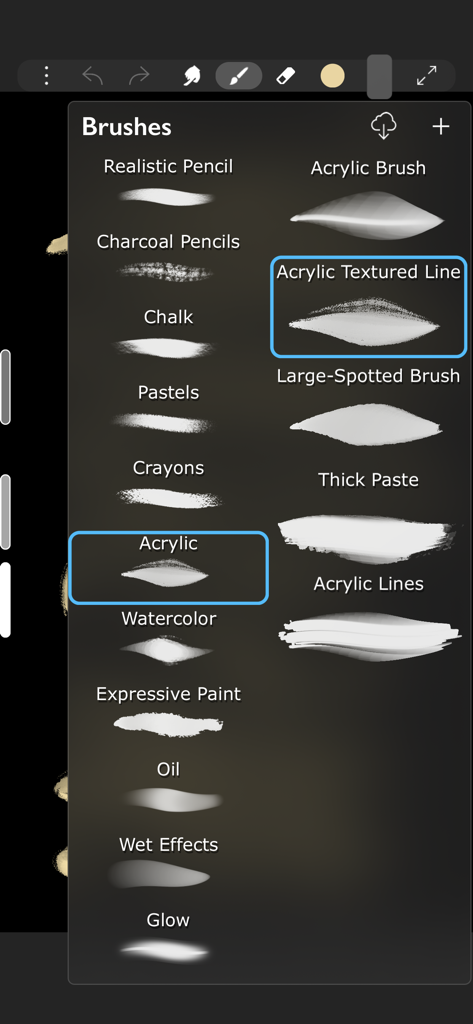
iArtbook 앱의 메뉴로, 아크릴, 수채화, 목탄 등 다양한 디지털 드로잉 브러시를 보여줍니다.

iArtbook 앱의 메뉴로, 아크릴, 수채화, 목탄 등 다양한 디지털 드로잉 브러시를 보여줍니다.

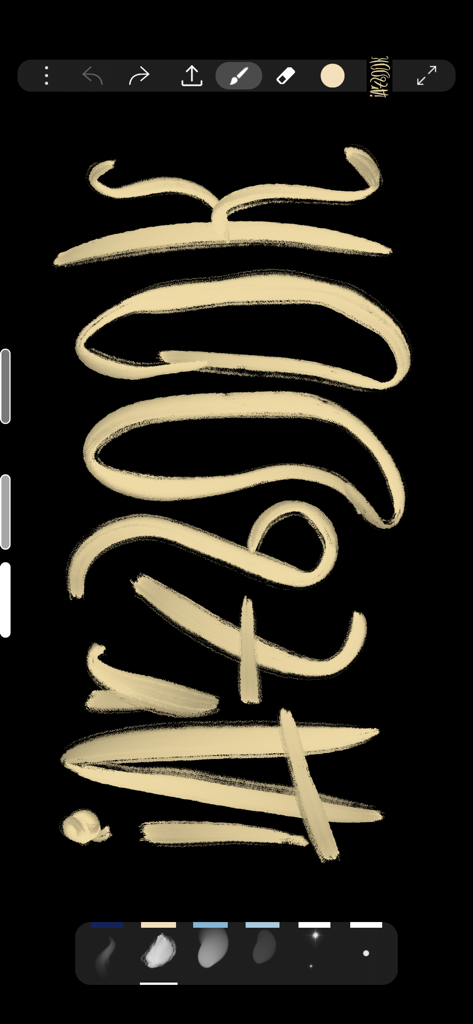
검은색 캔버스에 디지털 캘리그라피 획을 보여주는 iArtbook 인터페이스

검은색 캔버스에 디지털 캘리그라피 획을 보여주는 iArtbook 인터페이스

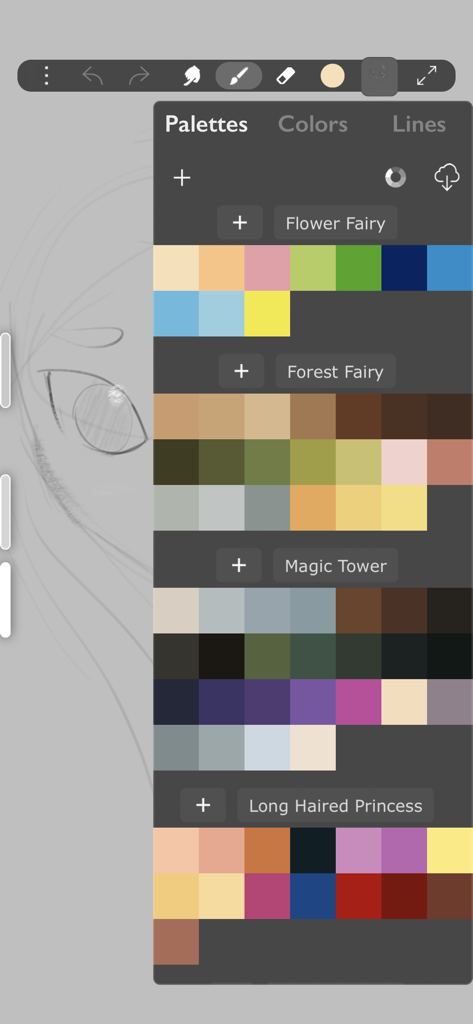
디지털 일러스트레이션을 위한 다양한 색상 팔레트를 보여주는 iArtbook 앱 인터페이스

디지털 일러스트레이션을 위한 다양한 색상 팔레트를 보여주는 iArtbook 앱 인터페이스

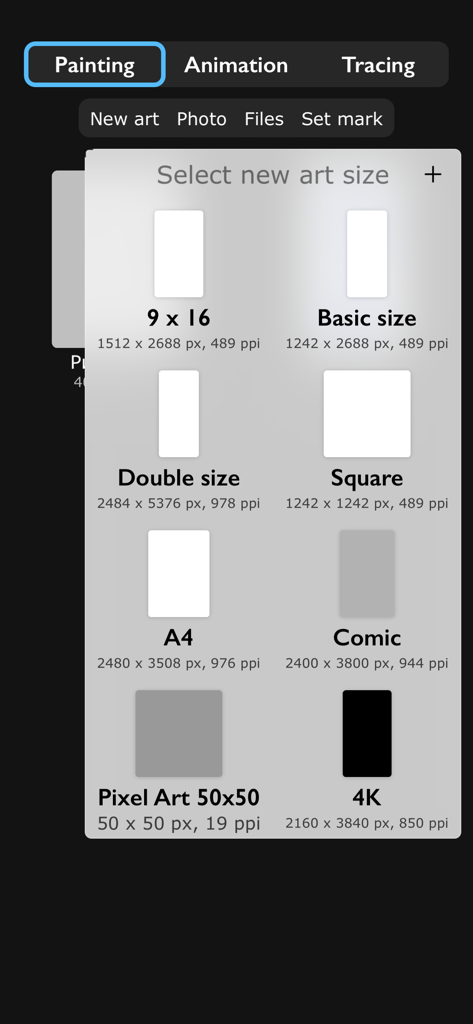
새로운 디지털 페인팅 시작을 위해 정사각형 A4 및 4K와 같은 다양한 캔버스 크기 옵션을 보여주는 iArtbook 앱 화면

새로운 디지털 페인팅 시작을 위해 정사각형 A4 및 4K와 같은 다양한 캔버스 크기 옵션을 보여주는 iArtbook 앱 화면

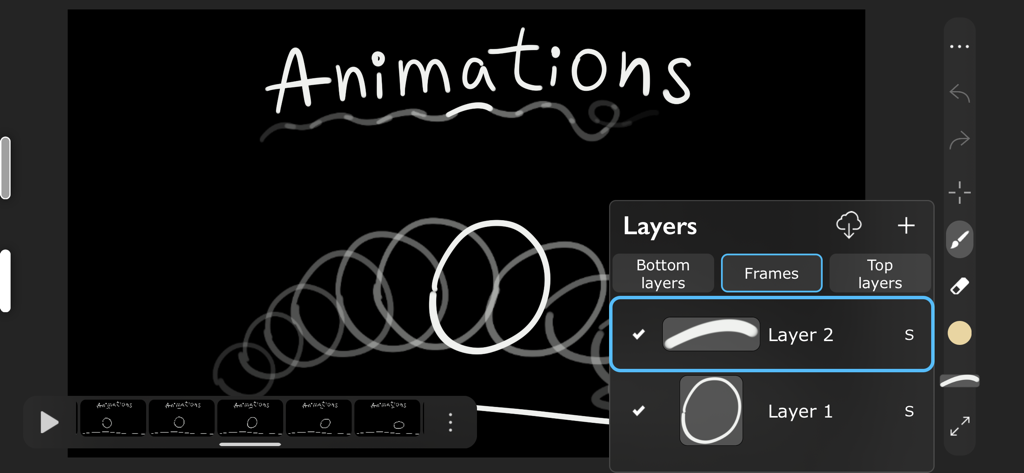
프레임과 모션 레이어를 보여주는 iArtbook 디지털 애니메이션 인터페이스

프레임과 모션 레이어를 보여주는 iArtbook 디지털 애니메이션 인터페이스

영감의 모든 불꽃을 걸작으로 바꾸세요

이 앱을 돋보이게 하는 도구, 16M+ 명의 사용자가 선택.

✍️

프로급 브러시 정밀도

Apple Pencil에 최적화된 고급 캘리그라피 안정화 및 1,000개 이상의 텍스처로 지연 없는 드로잉을 경험하세요.

🎓

인터랙티브 아트 튜토리얼

빈 캔버스 앞에서 더 이상 고심하지 마세요. 마스터 일러스트레이션과 비교하고 실시간으로 작업하며 전문적인 기법을 배우세요.

🎬

콘텐츠 제작을 위한 설계

무제한 레이어 및 블렌드 모드를 사용하여 고품질 타임랩스 또는 프레임별 애니메이션을 TikTok 및 Instagram으로 직접 내보내세요.

리뷰 분석

사용자 리뷰 인사이트.

감정 점수

28%
부정적

요약

User feedback for this app is largely negative, driven by recent updates that have moved many core functionalities behind a paywall, including saving artwork, lasso tools, transformation, fill, and liquify features. Users are highly frustrated by the introduction of excessive and lengthy advertisements, which often interrupt workflows or appear when attempting simple actions like screenshots. While some users still praise the app's free brushes and acknowledge its past utility for art improvement and ease of use, the current monetization strategy has severely impacted the overall user experience. There's also a mention of a 'force close bug' specifically on iPad Air, suggesting some stability concerns.

주요 테마

Past User Experience(21)
Free Brushes(4)
Ease of Use(4)
Old UI Design(2)
Developer Responsiveness(1)
Stability(1)
Art Improvement Contribution(1)

앱 소개

에 대해 알아야 할 모든 것 ‎iArtbook.

설명

Fun painting app, based on Unlimited Layers with Blend Modes and Masks Any brush can be used with 3 professional-level realtime technologies of calligraphy: Line Delay, Rope Stabilization and Correction, combine it for best results. With 100% calligraphy the line will be very smooth even if you are drawing with your finger Brushes can be Dry, Glossy and Wet. There are 3 types of Wet brushes: Without Pull, With Pull and Super-Precise. Any brush can instantly became Smudge-brush with Finger instrument. Textured brushes are also supported If you like to draw with simple round brush, there are quick settings for Hardness, Ovality & Rotation of your brush shape. Or, if you prefer realistic brushes, large Pro-Library of shapes (>1000 textures) can be used to create new brushes of any type Apple Pencil is fully supported, including Touch Force, Tilt, Azimuth and Predicted Points. There are settings for each Pencil ability. You also can disable finger-painting, if you never use it Gestures: 2-fingers tap for Undo and 3-fingers tap for Redo any action For color choosing there are 2 different Color Pickers and Palettes with Gradient Mixer. Use long-pressure gesture for quick color choosing Time-Lapse video recording is enabled by default FEATURES LIST: Create Animation: * Unlimited frames of animation * Multiple animation layers * Export to mp4, hevc, gif, apng Learn How to Draw by copying Professional Art: * Use any Painting or Sketch as a Lesson * Tap left side of screen to switch between your painting and the lesson * 4 lesson types: "Equal size", "First Layer", "Horizontal split", "Vertical split" Brushes: * Preinstalled professional brushes * Glossy brushes * 50+ brush settings * Shapes library * Calligraphy * Apple Pencil support * Smudge brushes with 3 different smudge technologies * Export-import of brushes * Dynamic shape * Realistic brushes * Any brush can became a smudge brush with Smudge tool Colors: * 2 Color Pickers * Color mixer * Palettes * Import/Export of palettes Interface: * Right and left handed interface * Light or dark interface * Custom interface color Layers: * Unlimited layers * Dynamic ssd/operative memory using for layers * Masks * Clear / Fill / Select / Sort / Duplicate * Blend modes * Opacity and visibility * Import any image as a layer * Transform without loosing image quality Gestures: * 2-Fingers tap for Undo * 3-Fingers tap for Redo * Long pressure for quick color choosing * Bucket Tool: Drag the Color circle onto the canvas * Only-gestures control with Swipes Advanced: * Flip canvas horizontally * Time-Lapse video recording * Transform instrument * Selection tool * PNG with transparency creation

최신 버전

10.9.8

크기

387.7 MB

출시일

2019년 2월 8일

디지털 아트를 한 단계 끌어올릴 준비가 되셨나요?

1600만 크리에이터와 함께 iPad를 전문 스튜디오로 바꿔보세요. 지금 iArtbook을 다운로드하고 스케치를 바이럴 걸작으로 만드세요.

다운로드: App Store
FAQ

자주 묻는 질문

에 대해 알아야 할 모든 것 ‎iArtbook

iArtbook에서 애니메이션 제작을 지원하나요?

네, iArtbook은 무제한 프레임과 여러 레이어로 애니메이션 제작을 지원합니다. 사용자는 애니메이션을 mp4, hevc, gif, apng 형식으로 내보낼 수 있습니다.

iArtbook에서 Apple Pencil을 지원하나요?

네, iArtbook은 터치 강도, 기울기, 방위, 예측 지점을 포함한 Apple Pencil을 완벽하게 지원합니다. 선호에 따라 핑거 페인팅을 비활성화할 수도 있습니다.

사용자는 iArtbook에서 브러시를 사용자 정의할 수 있나요?

iArtbook은 50개 이상의 브러시 설정, 모양 라이브러리, 1000개 이상의 텍스처로 구성된 Pro-Library를 통해 광범위한 브러시 사용자 정의를 제공하여 새로운 브러시 유형을 만들 수 있습니다. 경도, 타원성, 회전에 대한 빠른 설정이 가능합니다.

iArtbook에서 어떤 종류의 브러시를 사용할 수 있나요?

iArtbook에는 마른 브러시, 윤기 나는 브러시, 젖은 브러시와 같은 다양한 브러시 유형이 포함되어 있으며, 당김 없음, 당김 있음, 초정밀과 같은 옵션이 있습니다. 텍스처 브러시를 지원하며, 모든 브러시는 번짐 브러시가 될 수 있습니다.

iArtbook 앱에 레이어 기능이 포함되어 있나요?

네, iArtbook은 블렌드 모드와 마스크를 사용하여 무제한 레이어를 제공합니다. 사용자는 레이어를 지우고, 채우고, 선택하고, 정렬하고, 복제하고, 불투명도와 가시성을 조정하고, 이미지를 레이어로 가져올 수 있습니다.

iArtbook에서 제스처는 어떻게 작동하나요?

iArtbook은 실행 취소를 위해 2개의 손가락 탭, 다시 실행을 위해 3개의 손가락 탭, 빠른 색상 선택을 위한 길게 누르기 제스처를 사용합니다. 버킷 도구는 색상 원을 캔버스에 드래그하여 활성화됩니다.

iArtbook에서 그림의 타임랩스 동영상을 녹화할 수 있나요?

네, iArtbook은 작품의 타임랩스 동영상을 자동으로 녹화합니다. 이 기능은 창작 과정을 캡처하기 위해 기본적으로 활성화되어 있습니다.

iArtbook 앱을 사용하여 그림을 그리는 방법을 배울 수 있나요?

iArtbook은 사용자가 전문 아트를 복사하여 그리는 법을 배울 수 있도록 도와줍니다. 사용자는 수업으로 그림이나 스케치를 선택하고 네 가지 수업 유형을 사용하여 자신의 작업과 수업 간에 전환할 수 있습니다.

iArtbook은 아티스트를 위한 색상 팔레트를 제공하나요?

네, iArtbook은 두 가지 색상 선택기, 그라디언트 혼합기가 있는 팔레트를 제공하며, 색상 관리를 위해 팔레트를 가져오거나 내보낼 수 있습니다.

iArtbook에서 다른 캔버스 크기를 사용할 수 있나요?

네, iArtbook은 9x16, 기본 크기, 두 배 크기, 정사각형, A4, 만화, 픽셀 아트 50x50, 4K를 포함한 다양한 사전 설정 캔버스 크기를 제공하여 사용자가 작품에 적합한 치수를 선택할 수 있도록 합니다.

App information, icons, screenshots, and descriptions displayed on this page are sourced from the Apple App Store and are the property of their respective developers. Download estimates and rankings are based on MWM's proprietary models and may not reflect actual figures. This page is provided for informational and analytical purposes only.

Believe this page infringes your intellectual property? File a dispute